

編輯:關於 Android 開發
本文以「禁止輸入表情的自定義 EditText」為例,說明自定義屬性的定義與使用方式。
第一步:建立自定義類
讓 EditTextNoEmoji 繼承 EditText,並重寫三個構造方法。這裡有個關鍵細節:三個構造方法都必須各自呼叫父類對應的 super(),而不能用 this() 去呼叫本類的其他構造方法,否則控制項在實際使用時將無法取得焦點。
這三個構造方法的用途各異:一參的 EditTextNoEmoji(Context context) 用於 Java 動態建立時;兩參的 EditTextNoEmoji(Context context, AttributeSet attrs) 用於 XML 靜態佈局時;三參的構造基本用不到。而兩參構造中的 attrs 正是自定義屬性的來源,因此會在其中呼叫 setAttrs(context, attrs) 來解析 XML 中設定的屬性。
1 public EditTextNoEmoji(Context context) { 2 super(context); 3 } 4 5 public EditTextNoEmoji(Context context, AttributeSet attrs) { 6 super(context, attrs); 7 setAttrs(context, attrs); 8 } 9 10 public EditTextNoEmoji(Context context, AttributeSet attrs, int defStyle) { 11 super(context, attrs, defStyle); 12 setAttrs(context, attrs); 13 }第二步:聲明自定義屬性
為了方便在 XML 佈局中配置,需先在 res/values 的 attrs 資源中宣告屬性。特別注意:styleable 的名稱必須與自定義控制項的類名一致,這樣才能在其下添加任意屬性。這裡定義了一個名為 canInputEmoji 的 boolean 屬性;此外還可使用的屬性型別包括 color、boolean、dimension、enum、flag、float、fraction、integer、reference、string 等共十種。
1 <declare-styleable name="EditTextNoEmoji"> 2 <attr name="canInputEmoji" format="boolean"/> 3 </declare-styleable>
回到 EditTextNoEmoji 類,完成 setAttrs 的內容,用 TypedArray 讀出自定義屬性:
1 //自定義屬性,控制是否輸入表情 2 private boolean canInputEmoji; 3 4 private void setAttrs(Context context, AttributeSet attrs){ 5 TypedArray typedArray = context.obtainStyledAttributes(attrs, R.styleable.EditTextNoEmoji); 6 canInputEmoji=typedArray.getBoolean(R.attr.canInputEmoji, false); 7 }若使用者在 Java 中動態建立控制項(走一參構造),上述方式便不適用,因此需要提供屬性的封裝方法:
1 public boolean canInputEmoji() { 2 return canInputEmoji; 3 } 4 5 public void setCanInputEmoji(boolean canInputEmoji) { 6 this.canInputEmoji = canInputEmoji; 7 }第三步:攔截表情輸入
最後覆寫 EditText 的 onTextChanged(),在其中判斷並刪除表情字元:
1 @Override 2 protected void onTextChanged(CharSequence text, int start, int lengthBefore, int lengthAfter) { 3 super.onTextChanged(text, start, lengthBefore, lengthAfter); 4 if(canInputEmoji()){ 5 int index = getSelectionStart() - 1; 6 if (index > 0) { 7 if (isEmojiChar(text.charAt(index))) { 8 Editable edit = getText(); 9 edit.delete(text.length() - 2, text.length()); 10 } 11 } 12 } 13 }判斷字元是否為表情符號的方法如下:
1 /** 2 * 判斷字符是否是表情符號 3 * @param inputChar 4 * @return 5 */ 6 private boolean isEmojiChar(char inputChar) { 7 return !((inputChar == 0x0) || (inputChar == 0x9) || (inputChar == 0xA) || (inputChar == 0xD) || ((inputChar >= 0x20) && inputChar <= 0xD7FF)) || ((inputChar >= 0xE000) && (inputChar <= 0xFFFD)) || ((inputChar >= 0x10000) && (inputChar <= 0x10FFFF)); 8 }透過以上三步,就完成了一個可透過 XML 屬性(或程式碼)控制是否允許輸入表情的自定義 EditText。
 標題欄透明度隨 ScrollView 滑動漸變實作
效果說明 這個範例展示如何讓標題欄背景在 ScrollView 滑動時逐漸變得不透明。當畫面向下滾動,標題背景會從全透明慢慢過渡到指定顏色,常用於個人頁面或內容頁的視覺效
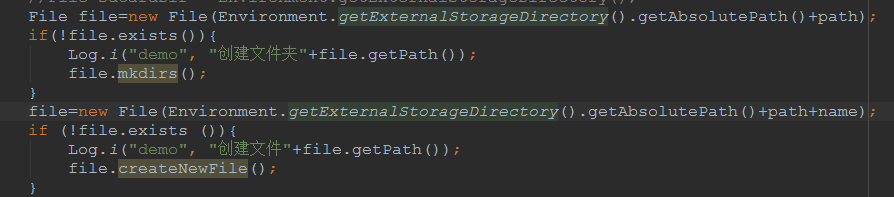 別再被騙了:getExternalStorageDirectory並非你想像中的SD卡
 前情提要:我的測試機是華為榮耀6,裝過一張16G的內存卡。 由於面試需要,我的演示
 Swift 開發 iOS 應用(一):UITableView 列表的實作
軟硬體環境 OS X EI Capitan、Xcode 7.0.1。 簡介 列表可以說是最重要的控制元件之一,在 iOS 中對應的是 UITableView。本文將一步步
 插入排序演算法詳解
 插入排序是一種簡單且穩定的排序演算法。它的核心概念是將未排序區域中的元素逐一取出,插入到已排序區域中正確的位置,讓已排序區域始終保持有序。 以陣列