

編輯:關於 Android 開發
還記得第一次打開 QQ 時,那隻漸漸浮現的企鵝嗎?那種由淡到濃的漸變效果,其實只要透過一個簡單的 Alpha 動畫就能實現。本文記錄了如何用 AlphaAnimation 做出啟動頁的漸顯效果,並在動畫結束後自動跳轉到下一個頁面。
package com.moonweather.app.activity; import com.moonweather.app.R; import android.app.Activity; import android.content.Intent; import android.os.Bundle; import android.view.View; import android.view.animation.AlphaAnimation; import android.view.animation.Animation; import android.widget.ImageView; public class ShouyeActivity extends Activity { private ImageView ima;; protected void onCreate(Bundle savedInstanceState) { super.onCreate(savedInstanceState); setContentView(R.layout.shouye); ima=(ImageView) findViewById(R.id.ima); AlphaAnimation alphaAnimation = new AlphaAnimation(0.3f, 1.0f); alphaAnimation.setDuration(3*1000); alphaAnimation.setRepeatCount(0); ima.startAnimation(alphaAnimation); alphaAnimation.setAnimationListener(new Animation.AnimationListener() { @Override public void onAnimationStart(Animation animation) { } @Override public void onAnimationRepeat(Animation animation) { } @Override public void onAnimationEnd(Animation animation) { //這裡可以寫動畫結束後的事件,比如說跳轉 Intent intent=new Intent(ShouyeActivity.this,ChooseAreaActivity.class); startActivity(intent); ShouyeActivity.this.finish(); } }); } }
核心思路很簡單:建立一個從 0.3f 到 1.0f 的 AlphaAnimation,透明度由淡到濃,設定持續時間為 3 秒,然後透過 setAnimationListener 監聽動畫結束事件,在 onAnimationEnd 中完成頁面跳轉並關閉當前啟動頁。這樣一來,使用者便能看到一個流暢自然的漸顯過場。
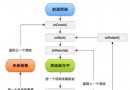 Android Activity 生命週期完整解析
 在 Android 開發中,理解 Activity 的生命週期是掌握頁面切換、資料保存與效能優化的基礎。一個 Acti
 Android 多選本地相冊:MediaStore 與縮圖優化
 許多社群或動態發布功能都需要圖片上傳。若系統相簿不支援多選,或無法滿足自訂互動需求,就可以自行實作一個本地
 Android 圖片控件與時間日期選擇器入門
本文從基礎控件說起,帶大家認識圖片相關的容器,以及 TimePicker、DatePicker 這兩個常用的時間日期選擇器。 一、基礎知識 1. ImageView 是
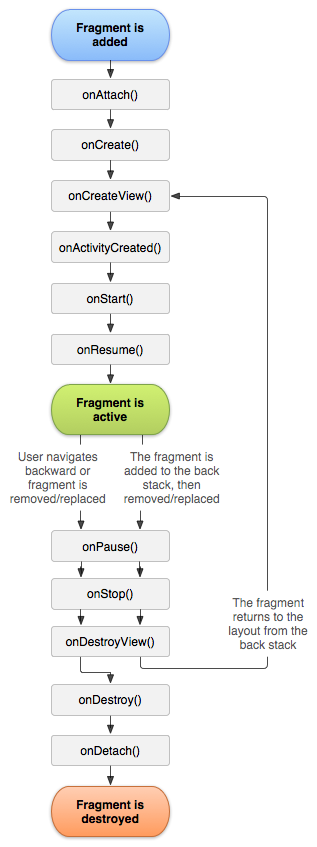 Activity 與 Fragment 生命週期的差異與解析
 理解 Activity 與 Fragment 的生命週期,是掌握 Android 頁面狀態管理的核心。以下透