

編輯:關於 Android 開發
在 Android 平台上,應用程式預設並不能直接對 /data 目錄進行操作。系統只允許每個 App 讀寫自己的私有目錄,也就是 /data/data/套件名稱/ 底下的內容,因此若想把資料直接寫進 /data 這樣的系統目錄,一般情況下是行不通的。
不過,只要取得 Root 權限並調整目標檔案或目錄的存取權限,就能突破這個限制。以下以「在 /data/sibon/var 目錄下建立 dir.ip 檔案,並把資料寫入其中」為例,說明完整的操作流程。
透過 chmod 指令把資料夾權限放開,才能後續寫入:
initChmod("chmod 777 /data/sibon/var");

/** 修改檔案或資料夾的權限 **/
private void initChmod(String command) {
    Process process = null;
    DataOutputStream os = null;
    try {
        process = Runtime.getRuntime().exec("su");
        os = new DataOutputStream(process.getOutputStream());
        os.writeBytes(command + "\n");
        os.writeBytes("exit\n");
        os.flush();
    } catch (Exception e) {
    } finally {
        try {
            if (os != null) {
                os.close();
            }
            process.destroy();
        } catch (Exception e) {
        }
    }
}
接著把資料寫入 dir.ip。第二個參數用來控制是否以附加(append)方式寫入,此處傳入 false 代表每次覆寫:
saveText("start saveText now......");

/** 向 dir.ip 中寫入資料 **/
private void saveText(String string) {
    File file = new File("/data/sibon/var/dir.ip");
    BufferedWriter bw = null;
    try {
        // 第二個參數代表是否以 append 方式附加資料
        bw = new BufferedWriter(new FileWriter(file, false));
        bw.write(string);
        bw.flush();
        System.out.println("寫入資料成功");
    } catch (Exception e) {
        e.printStackTrace();
    }
}
initChmod("chmod 666 /data/sibon/var/dir.ip");
最後透過逐行讀取的方式,確認資料是否成功寫入:
readTxtFile(String filePath);

/** 讀取 txt 文字檔(一行一行讀取)**/
private static String readTxtFile(String strFilePath) {
    String path = strFilePath;
    String content = ""; // 文字內容字串

    // 開啟檔案
    File file = new File(path);

    // 若 path 是外部傳入的參數,可先做非目錄的判斷
    if (file.isDirectory()) {
        System.out.println("-----------------");
    } else {
        try {
            InputStream is = new FileInputStream(file);
            if (is != null) {
                InputStreamReader inputreader = new InputStreamReader(is);
                BufferedReader buffreader = new BufferedReader(inputreader);
                String line;
                // 分行讀取
                while ((line = buffreader.readLine()) != null) {
                    content += line + "\n";
                }
                is.close();
            }
        } catch (java.io.FileNotFoundException e) {
            System.out.println("The File doesn't exist.");
        } catch (IOException e) {
            System.out.println("" + e.getMessage());
        }
    }
    return content;
}
整體思路就是:先用 Root 權限把目錄與檔案的權限都打開,再進行一般的檔案寫入與讀取。需要特別提醒的是,這種做法依賴裝置已取得 Root,且直接操作系統目錄存在風險,正式環境中應謹慎評估,優先考慮使用 App 專屬的私有儲存空間。
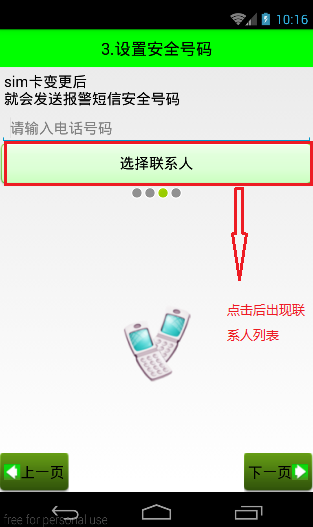 Android 手機衛士:讀取聯絡人並回顯號碼
讀取聯絡人 手機防盜需要選擇安全號碼時,可透過系統聯絡人內容提供者取得資料。核心表包含 raw_contacts 與 data,並以 mimetype 區分電話與名稱。
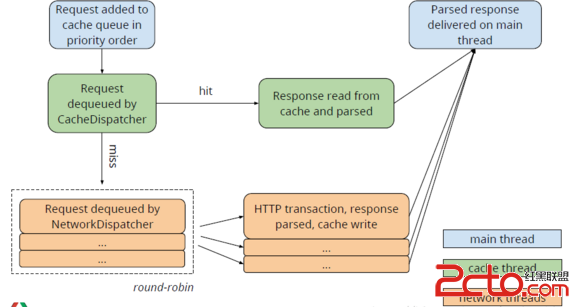 Volley 源碼深度解析:從使用到擴充的完整剖析
Volley 源碼深度解析 很早之前就想寫一篇關於 Volley 的源碼解析。最初學 Android 網路訪問時用的都是 HttpClient,剛接觸 Volley 便愛
 Android Studio 快速上手:下載、安裝、建立專案與新增 module
Android Studio 是什麼 Google 在 I/O 大會上推出了 Android Studio,這是一款以 IntelliJ IDEA 為基礎的開發工具,並以
 用 Easy Touch 搭配 PlayMaker 拖動 NGUI 物件實戰
用 Easy Touch 搭配 PlayMaker 拖動 NGUI 物件 最近埋頭研究了 Unity3D 的三個常用外掛:Easy Touch、PlayMaker 與 N