

編輯:關於 Android 開發
一、運行時的狀態
曾遇過這樣的需求:「在不進行掃描的情況下,如何連線到指定的免密碼 WiFi(且先前從未連線過)?」於是動手做了一個 Demo。下圖為尚未連線成功時的狀態,第一個輸入框讓使用者輸入 SSID,第二個輸入框輸入密碼;密碼可依實際情況填寫,也可以留空,因為部分 WiFi 本身免密碼。這裡所說的「免密碼」並不是指破解他人密碼。請特別注意手機頂部的 WiFi 圖示——此時並未開啟,代表尚未啟用無線網路。在手機上的運行狀態如下:
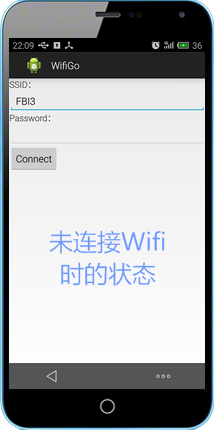
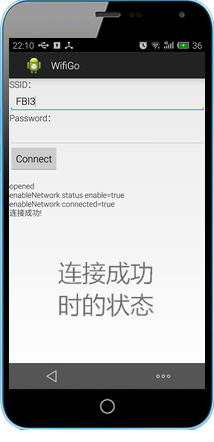
輸入 SSID 並點擊連線後,若手機 WiFi 尚未開啟,程式會自動開啟 WiFi,開啟後再連線到指定的網路:
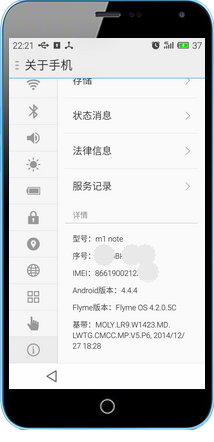
測試手機資訊如下:
二、功能實作
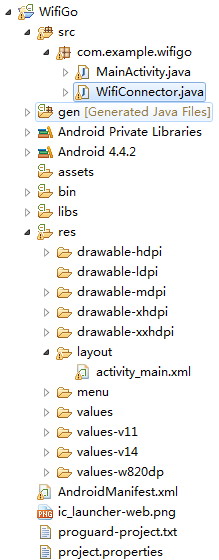
2.1、專案結構如下:
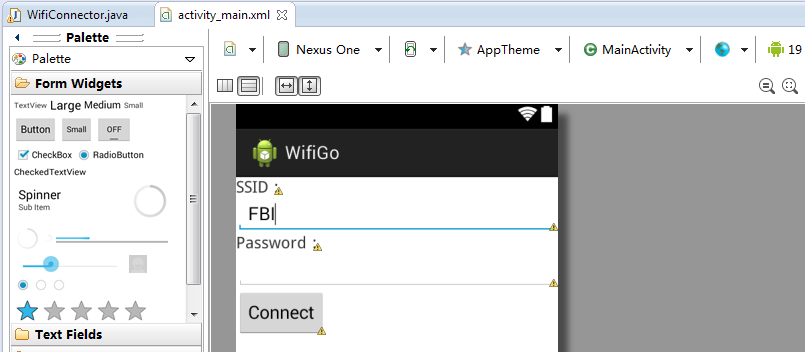
2.2、頁面配置檔 activity_main.xml 如下:
<LinearLayout xmlns:android="https://schemas.android.com/apk/res/android"
    android:layout_width="fill_parent"
    android:layout_height="fill_parent"
    android:orientation="vertical" >
    <TextView
        android:id="@+id/txtSSID"
        android:layout_width="wrap_content"
        android:layout_height="wrap_content"
        android:text="SSID:"
        android:textSize="@dimen/activity_horizontal_margin" />
    <EditText
        android:id="@+id/editSSID"
        android:layout_width="match_parent"
        android:layout_height="wrap_content"
        android:ems="10"
        android:text="FBI" >
        <requestFocus />
    </EditText>
    <TextView
        android:id="@+id/TextView01"
        android:layout_width="wrap_content"
        android:layout_height="wrap_content"
        android:text="Password:"
        android:textSize="@dimen/activity_horizontal_margin" />
    <EditText
        android:id="@+id/editPwd"
        android:layout_width="match_parent"
        android:layout_height="wrap_content"
        android:ems="10"
        android:text="" />
    <Button
        android:id="@+id/btnConnect"
        android:layout_width="wrap_content"
        android:layout_height="wrap_content"
        android:text="Connect" />
    <TextView
        android:id="@+id/txtMessage"
        android:layout_width="wrap_content"
        android:layout_height="wrap_content"
        android:text="" />
</LinearLayout>
2.3、清單檔 AndroidManifest.xml 內容如下,其中對 WiFi 存取權限的宣告非常重要,缺一不可:
<?xml version="1.0" encoding="utf-8"?>
<manifest xmlns:android="https://schemas.android.com/apk/res/android"
    package="com.example.wifigo"
    android:versionCode="1"
    android:versionName="1.0" >
    <uses-sdk
        android:minSdkVersion="14"
        android:targetSdkVersion="19" />
    <uses-permission android:name="android.permission.CHANGE_NETWORK_STATE" />
    <uses-permission android:name="android.permission.CHANGE_WIFI_STATE" />
    <uses-permission android:name="android.permission.ACCESS_NETWORK_STATE" />
    <uses-permission android:name="android.permission.ACCESS_WIFI_STATE" />
    <application
        android:allowBackup="true"
        android:icon="@drawable/ic_launcher"
        android:label="@string/app_name"
        android:theme="@style/AppTheme" >
        <activity
            android:name=".MainActivity"
            android:label="@string/app_name" >
            <intent-filter>
                <action android:name="android.intent.action.MAIN" />
                <category android:name="android.intent.category.LAUNCHER" />
            </intent-filter>
        </activity>
    </application>
</manifest>
2.4、WiFi 連線管理類別 WifiConnector.java(部分內容參考自熱心網友的分享,特此致謝):
package com.example.wifigo;

import java.util.List;
import android.net.wifi.*;
import android.net.wifi.WifiConfiguration.AuthAlgorithm;
import android.net.wifi.WifiConfiguration.KeyMgmt;
import android.os.Handler;
import android.os.Message;
import android.text.TextUtils;
import android.util.Log;

public class WifiConnector {
    Handler mHandler;
    WifiManager wifiManager;

    public void sendMsg(String info) {
        if (mHandler != null) {
            Message msg = new Message();
            msg.obj = info;
            mHandler.sendMessage(msg);
        } else {
            Log.e("wifi", info);
        }
    }

    // WIFICIPHER_WEP是WEP,WIFICIPHER_WPA是WPA,WIFICIPHER_NOPASS沒有密碼
    public enum WifiCipherType {
        WIFICIPHER_WEP, WIFICIPHER_WPA, WIFICIPHER_NOPASS, WIFICIPHER_INVALID
    }

    public WifiConnector(WifiManager wifiManager) {
        this.wifiManager = wifiManager;
    }

    // 提供外部接口,傳入要連接的無線網路
    public void connect(String ssid, String password, WifiCipherType type) {
        Thread thread = new Thread(new ConnectRunnable(ssid, password, type));
        thread.start();
    }

    // 查看以前是否配置過這個網路
    private WifiConfiguration isExsits(String SSID) {
        List<WifiConfiguration> existingConfigs = wifiManager.getConfiguredNetworks();
        for (WifiConfiguration existingConfig : existingConfigs) {
            if (existingConfig.SSID.equals("\"" + SSID + "\"")) {
                return existingConfig;
            }
        }
        return null;
    }

    private WifiConfiguration createWifiInfo(String SSID, String Password, WifiCipherType Type) {
        WifiConfiguration config = new WifiConfiguration();
        config.allowedAuthAlgorithms.clear();
        config.allowedGroupCiphers.clear();
        config.allowedKeyManagement.clear();
        config.allowedPairwiseCiphers.clear();
        config.allowedProtocols.clear();
        config.SSID = "\"" + SSID + "\"";
        // nopass
        if (Type == WifiCipherType.WIFICIPHER_NOPASS) {
            config.allowedKeyManagement.set(WifiConfiguration.KeyMgmt.NONE);
        }
        // wep
        if (Type == WifiCipherType.WIFICIPHER_WEP) {
            if (!TextUtils.isEmpty(Password)) {
                if (isHexWepKey(Password)) {
                    config.wepKeys[0] = Password;
                } else {
                    config.wepKeys[0] = "\"" + Password + "\"";
                }
            }
            config.allowedAuthAlgorithms.set(AuthAlgorithm.OPEN);
            config.allowedAuthAlgorithms.set(AuthAlgorithm.SHARED);
            config.allowedKeyManagement.set(KeyMgmt.NONE);
            config.wepTxKeyIndex = 0;
        }
        // wpa
        if (Type == WifiCipherType.WIFICIPHER_WPA) {
            config.preSharedKey = "\"" + Password + "\"";
            config.hiddenSSID = true;
            config.allowedAuthAlgorithms.set(WifiConfiguration.AuthAlgorithm.OPEN);
            config.allowedGroupCiphers.set(WifiConfiguration.GroupCipher.TKIP);
            config.allowedKeyManagement.set(WifiConfiguration.KeyMgmt.WPA_PSK);
            config.allowedPairwiseCiphers.set(WifiConfiguration.PairwiseCipher.TKIP);
            config.allowedGroupCiphers.set(WifiConfiguration.GroupCipher.CCMP);
            config.allowedPairwiseCiphers.set(WifiConfiguration.PairwiseCipher.CCMP);
            config.status = WifiConfiguration.Status.ENABLED;
        }
        return config;
    }

    // 打開wifi功能
    private boolean openWifi() {
        boolean bRet = true;
        if (!wifiManager.isWifiEnabled()) {
            bRet = wifiManager.setWifiEnabled(true);
        }
        return bRet;
    }

    class ConnectRunnable implements Runnable {
        private String ssid;
        private String password;
        private WifiCipherType type;

        public ConnectRunnable(String ssid, String password, WifiCipherType type) {
            this.ssid = ssid;
            this.password = password;
            this.type = type;
        }

        @Override
        public void run() {
            try {
                openWifi();
                sendMsg("opened");
                Thread.sleep(200);
                // 開啟wifi需要一段時間(實測約1-3秒),需等到WIFI_STATE_ENABLED才能繼續
                while (wifiManager.getWifiState() == WifiManager.WIFI_STATE_ENABLING) {
                    try {
                        Thread.sleep(100);
                    } catch (InterruptedException ie) { }
                }
                WifiConfiguration wifiConfig = createWifiInfo(ssid, password, type);
                WifiConfiguration tempConfig = isExsits(ssid);
                if (tempConfig != null) {
                    wifiManager.removeNetwork(tempConfig.networkId);
                }
                int netID = wifiManager.addNetwork(wifiConfig);
                boolean enabled = wifiManager.enableNetwork(netID, true);
                sendMsg("enableNetwork status enable=" + enabled);
                boolean connected = wifiManager.reconnect();
                sendMsg("enableNetwork connected=" + connected);
                sendMsg("連接成功!");
            } catch (Exception e) {
                sendMsg(e.getMessage());
                e.printStackTrace();
            }
        }
    }

    private static boolean isHexWepKey(String wepKey) {
        final int len = wepKey.length();
        if (len != 10 && len != 26 && len != 58) {
            return false;
        }
        return isHex(wepKey);
    }

    private static boolean isHex(String key) {
        for (int i = key.length() - 1; i >= 0; i--) {
            final char c = key.charAt(i);
            if (!(c >= '0' && c <= '9' || c >= 'A' && c <= 'F' || c >= 'a' && c <= 'f')) {
                return false;
            }
        }
        return true;
    }
}
2.5、MainActivity.java 負責接收使用者輸入並呼叫 WiFi 連線功能:
package com.example.wifigo;

import com.example.wifigo.WifiConnector.WifiCipherType;
import android.app.Activity;
import android.content.Context;
import android.net.wifi.WifiManager;
import android.os.Bundle;
import android.os.Handler;
import android.os.Message;
import android.view.Menu;
import android.view.MenuItem;
import android.view.View;
import android.widget.Button;
import android.widget.EditText;
import android.widget.TextView;

public class MainActivity extends Activity {
    Button btnConnect;
    WifiManager wifiManager;
    WifiConnector wac;
    TextView textView1;
    EditText editPwd;
    EditText editSSID;

    @Override
    protected void onCreate(Bundle savedInstanceState) {
        super.onCreate(savedInstanceState);
        setContentView(R.layout.activity_main);
        btnConnect = (Button) findViewById(R.id.btnConnect);
        textView1 = (TextView) findViewById(R.id.txtMessage);
        wifiManager = (WifiManager) getSystemService(Context.WIFI_SERVICE);
        wac = new WifiConnector(wifiManager);
        editPwd = (EditText) findViewById(R.id.editPwd);
        editSSID = (EditText) findViewById(R.id.editSSID);
        wac.mHandler = new Handler() {
            @Override
            public void handleMessage(Message msg) {
                textView1.setText(textView1.getText() + "\n" + msg.obj + "");
                super.handleMessage(msg);
            }
        };
        btnConnect.setOnClickListener(new Button.OnClickListener() {
            @Override
            public void onClick(View v) {
                try {
                    wac.connect(editSSID.getText().toString(),
                        editPwd.getText().toString(),
                        editPwd.getText().toString().equals("") ?
                            WifiCipherType.WIFICIPHER_NOPASS : WifiCipherType.WIFICIPHER_WPA);
                } catch (Exception e) {
                    textView1.setText(e.getMessage());
                }
            }
        });
    }
}
2.6、小結
由於時間有限,程式碼相對粗糙,這畢竟只是一個 Demo,若要應用於商業專案,僅能發揮拋磚引玉的作用。另外實測發現,若手機 WiFi 未開啟,依賴程式開啟時有時會崩潰,推測是因為開啟 WiFi 需要一段時間,因此程式碼中加入了人為延時,後續可用更優雅的方式取代。筆者使用一台 Android 4.x.x 的魅族 note 1 搭配 DLink DIR-600N 老路由器測試無誤,以自己的筆記型電腦開熱點、帶密碼連線也正常,但這不代表在其他環境下都能運作,實際部署仍建議多方測試。
2.7、參考示例:可下載示例原始碼。
 Android EditText 密碼框明文與密文切換的兩種實現方式
Android EditText 密碼框明文與密文切換的兩種實現 在做登錄界面時,密碼框需要支持「明文/密文」的即時切換,這是很實用的交互細節。下面我整理了布局文件以及
 Nagios 分組出圖的程式碼實現(下):讓同組主機的服務圖一次畫完
承接上篇:從「選得中」到「畫得出」上一節我們完成了分組全選:沿用 Nagios 自帶的主機/服務分組,在列表裡補上複選框,讓同一組的機器可以一次勾選,並加上服務分類的下拉
 Android 提高 21 篇之九:SQLite 分頁表格控制項實作
前一階段談到 SQLite 分頁讀取,本文進一步把資料以表格形式呈現,並封裝成可重複使用的分頁表格控制項。這個控制項不只支援分頁,也能依查詢結果的欄位數量呈現表格結構。控
 Activity 切換動畫特效大全:overridePendingTransition 與 13 種 anim 實作
 預設的 Activity 切換顯得有點生硬。Andr