

編輯:關於 Android 開發
1、前言:
前陣子使用了 GitHub 上 se.emilsjolander.stickylistheaders 這個元件,卻發現它的 listview 無法加入 footerView——一旦加上 footer,滑到底部時 head 就會消失,這與我專案的需求不符。
於是便自己動手寫了一個 StickHeaderListView,實作起來並不複雜,做法與 stickylistheaders 大致相同,只是沒有封裝那麼多功能。它支援加入 footer,但不支援 header,有需要的朋友可以拿去改良後使用。
另外,由於這是臨時寫的元件,程式碼未做過多優化,若有改進建議,歡迎提出,謝謝!
2、示例效果:
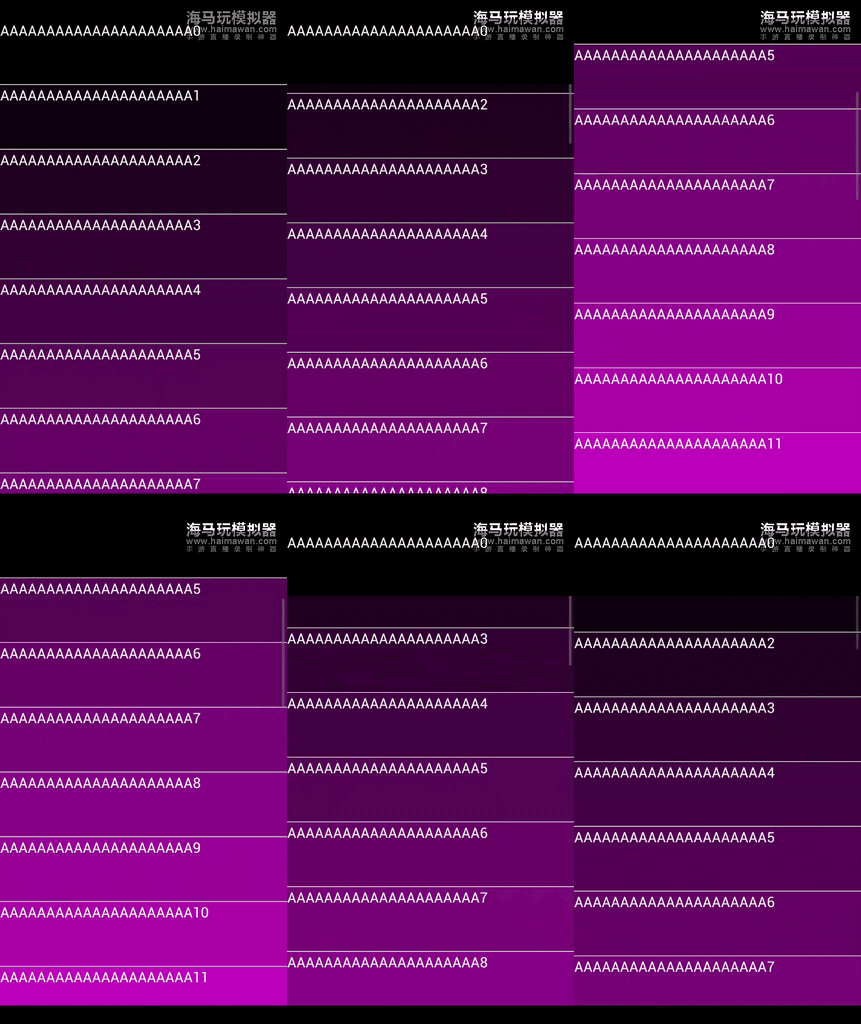
3、元件原始碼:
1 /** 2 * 帶頭部固定的列表 3 * Created by shengdong.huang on 2016/6/24. 4 */ 5 public class StickHeaderListView extends FrameLayout { 6 7 /** 頁面引用 */ 8 protected Context context; 9 /** 列表視圖 */ 10 protected ListView listView; 11 /** 適配器 */ 12 protected StickHeaderAdapter adapter; 13 /** 頭部布局 */ 14 protected FrameLayout headLayout; 15 /** 滾動監聽器 */ 16 protected OnScrollListener listener; 17 /** 提供Adapter響應的觀察者 */ 18 protected DataSetObserver mDataSetObserver = new DataSetObserver() { 19 @Override 20 public void onChanged() { 21 if (listView != null && headLayout != null && adapter != null) { 22 refreshHead(listView.getFirstVisiblePosition(), true); 23 } 24 } 25 26 @Override 27 public void onInvalidated() { 28 } 29 }; 30 31 /** 32 * 滾動監聽器 33 */ 34 protected AbsListView.OnScrollListener scrollListener = new AbsListView.OnScrollListener() { 35 36 @Override 37 public void onScrollStateChanged(AbsListView view, int scrollState) { 38 if (listener != null) { 39 listener.onScrollStateChanged(view, scrollState); 40 } 41 } 42 43 @Override 44 public void onScroll(AbsListView view, int firstVisibleItem, int visibleItemCount, int totalItemCount) { 45 if (listener != null) { 46 listener.onScroll(view, firstVisibleItem, visibleItemCount, totalItemCount); 47 } 48 // 刷新 49 refreshHead(firstVisibleItem, false); 50 } 51 }; 52 53 protected void refreshHead(int firstVisibleItem, boolean forceRefresh) { 54 // 防空 55 if (headLayout == null || adapter == null || adapter.getHeadPos() == null 56 || listView.getChildAt(0) == null) { 57 return; 58 } 59 60 // 獲取頭部位置記錄 61 ArrayList<Integer> headPos = adapter.getHeadPos(); 62 // 是否有找到head 63 boolean find = false; 64 65 // 獲取head中的位置 66 int prevHeadPos = -1; 67 if (headLayout.getChildCount() > 0 && headLayout.getChildAt(0) != null && 68 headLayout.getChildAt(0).getTag() != null) { 69 prevHeadPos = (int) headLayout.getChildAt(0).getTag(); 70 } 71 72 // 反向遍歷頭部位置記錄 73 for (int i = (headPos.size() - 1); i>=0; i--) { 74 // 如果當前位置大於等於某個頭部記錄,表示應該使用該頭部 75 if (firstVisibleItem >= headPos.get(i)) { 76 // 獲取headLayout中視圖的pos標簽 77 78 // 構造或者從headLayout中獲取視圖 79 View v; 80 if (prevHeadPos == -1 || prevHeadPos != headPos.get(i) || forceRefresh) { 81 // 無Pos標簽或POS標簽不配對 82 headLayout.removeAllViews(); 83 v = listView.getAdapter().getView(headPos.get(i), null, null); 84 v.setTag(headPos.get(i)); 85 LayoutParams params = new FrameLayout.LayoutParams(-1, -2); 86 v.setLayoutParams(params); 87 headLayout.addView(v); 88 } else if (i+1 < headPos.size() && firstVisibleItem == headPos.get(i+1) - 1) { 89 // 當前第一個item的top值 90 int top = listView.getChildAt(0).getTop(); 91 // Pos標簽配對但,有下一個head,且下一個head的pos為下一個item時 92 v = headLayout.getChildAt(0); 93 // 設置head的Top 94 LayoutParams params = (LayoutParams) v.getLayoutParams(); 95 params.setMargins(0, top, 0, -top); 96 v.setLayoutParams(params); 97 } else { 98 // 修正head top沒有回到0的問題 99 v = headLayout.getChildAt(0); 100 LayoutParams params = (LayoutParams) v.getLayoutParams(); 101 if (params.topMargin != 0) { 102 params.setMargins(0, 0, 0, 0); 103 v.setLayoutParams(params); 104 } 105 } 106 find = true; 107 break; 108 } 109 } 110 // 未找到head的情況,清空Head 111 if (!find && headLayout != null) { 112 headLayout.removeAllViews(); 113 } 114 } 115 116 public StickHeaderListView(Context context) { 117 super(context); 118 this.context = context; 119 } 120 public StickHeaderListView(Context context, AttributeSet attrs) { 121 super(context, attrs); 122 this.context = context; 123 } 124 125 public void setBackgroundColor(int color) { 126 if (listView != null) { 127 listView.setBackgroundColor(color); 128 } 129 } 130 131 public void addFooterView(View v) { 132 if (listView != null) { 133 listView.addFooterView(v); 134 } 135 } 136 137 public boolean removeFooterView(View v) { 138 if (listView != null) { 139 return listView.removeFooterView(v); 140 } 141 return false; 142 } 143 144 public int getFooterViewsCount() { 145 if (listView != null) { 146 return listView.getFooterViewsCount(); 147 } 148 return 0; 149 } 150 151 public void setDividerHeight(int height) { 152 if (listView != null) { 153 listView.setDividerHeight(height); 154 } 155 } 156 157 public void setCacheColorHint(int color) { 158 if (listView != null) { 159 listView.setCacheColorHint(color); 160 } 161 } 162 public void setSelector(int resID) { 163 if (listView != null) { 164 listView.setSelector(resID); 165 } 166 } 167 public void setAdapter(StickHeaderAdapter adapter) { 168 if (adapter instanceof BaseAdapter && listView != null) { 169 this.adapter = adapter; 170 if (adapter != null && mDataSetObserver != null) { 171 try { 172 ((BaseAdapter) adapter).unregisterDataSetObserver(mDataSetObserver); 173 } catch (Exception e) {} 174 } 175 listView.setAdapter((ListAdapter) this.adapter); 176 ((BaseAdapter) adapter).registerDataSetObserver(mDataSetObserver); 177 } 178 } 179 180 public void setOnScrollListener(OnScrollListener listener) { 181 this.listener = listener; 182 } 183 184 @Override 185 protected void onFinishInflate() { 186 super.onFinishInflate(); 187 // 添加列表,屬性直接使用父視圖 188 listView = new ListView(context); 189 listView.setLayoutParams(new FrameLayout.LayoutParams(ViewGroup.LayoutParams.MATCH_PARENT, 190 ViewGroup.LayoutParams.MATCH_PARENT)); 191 addView(listView); 192 // 添加head 193 headLayout = new FrameLayout(context); 194 headLayout.setLayoutParams(new FrameLayout.LayoutParams(ViewGroup.LayoutParams.MATCH_PARENT, 195 ViewGroup.LayoutParams.WRAP_CONTENT)); 196 addView(headLayout); 197 // 添加滾動監聽 198 listView.setOnScrollListener(scrollListener); 199 } 200 public interface OnScrollListener extends AbsListView.OnScrollListener {} 201 public interface StickHeaderAdapter { 202 public ArrayList<Integer> getHeadPos(); 203 } 204 }4、示例程式碼:
1 /** 2 * 主頁面 3 * Created by shengdong.huang on 2016/6/20. 4 */ 5 public class MainActivity extends FragmentActivity { 6 7 private StickHeaderListView listView; 8 private TestAdapter adapter; 9 10 @Override 11 protected void onCreate(@Nullable Bundle savedInstanceState) { 12 super.onCreate(savedInstanceState); 13 setContentView(R.layout.activity_main); 14 listView = (StickHeaderListView) findViewById(R.id.list); 15 16 View footer = LayoutInflater.from(this).inflate(R.layout.item_head_foot, null); 17 footer.setBackgroundColor(Color.GREEN); 18 listView.addFooterView(footer); 19 20 View footer2 = LayoutInflater.from(this).inflate(R.layout.item_head_foot, null); 21 footer2.setBackgroundColor(Color.BLUE); 22 listView.addFooterView(footer2); 23 24 View footer3 = LayoutInflater.from(this).inflate(R.layout.item_head_foot, null); 25 footer3.setBackgroundColor(Color.RED); 26 listView.addFooterView(footer3); 27 28 listView = (StickHeaderListView) findViewById(R.id.list); 29 30 adapter = new TestAdapter(); 31 listView.setAdapter(adapter); 32 } 33 34 public class TestAdapter extends BaseAdapter implements StickHeaderListView.StickHeaderAdapter { 35 36 private ArrayList<Integer> headpos = new ArrayList<>(); 37 38 public TestAdapter() { 39 headpos.add(0); 40 headpos.add(5); 41 headpos.add(15); 42 } 43 @Override 44 public int getCount() { 45 return 30; 46 } 47 @Override 48 public Object getItem(int position) { 49 return position; 50 } 51 @Override 52 public long getItemId(int position) { 53 return position; 54 } 55 @Override 56 public View getView(final int position, View convertView, ViewGroup parent) { 57 ViewHolder holder; 58 if (convertView == null) { 59 convertView = LayoutInflater.from(MainActivity.this).inflate(R.layout.item_list, null); 60 holder = new ViewHolder(); 61 holder.text = (TextView) convertView.findViewById(R.id.text); 62 convertView.setTag(holder); 63 } else { 64 holder = (ViewHolder) convertView.getTag(); 65 } 66 holder.text.setText("AAAAAAAAAAAAAAAAAAAAA"+position); 67 holder.text.setOnClickListener(new View.OnClickListener() { 68 @Override 69 public void onClick(View v) { 70 Toast.makeText(MainActivity.this, "pos:"+position, Toast.LENGTH_SHORT).show(); 71 } 72 }); 73 convertView.setBackgroundColor(0x110011 * position % 0xffffff + 0xff000000); 74 return convertView; 75 } 76 77 @Override 78 public ArrayList<Integer> getHeadPos() { 79 return headpos; 80 } 81 } 82 83 private class ViewHolder { 84 TextView text; 85 } 86 }5、使用方法:
1、在布局中加入 StickHeaderListView
2、Adapter 實作 StickHeaderAdapter 介面
3、在 getHeadPos() 中返回 head item 的位置,標示 listview item 中各個 head 的起點(這一點與 stickylistheaders 不同)
4、若需要用到一些 listview 的方法,請自行在 StickHeaderListView 中補上,但要注意不能 addHeaderView,否則會導致滑動異常
-END-
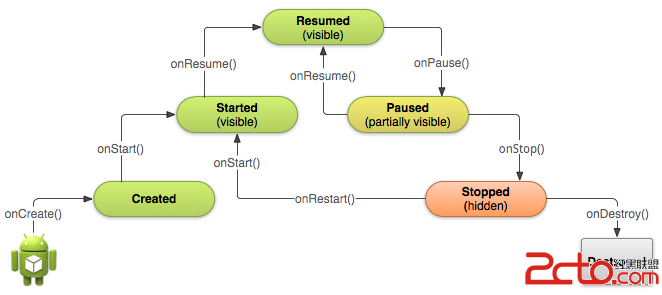 Android Activity 生命週期詳解:各回調時機與職責
 本文參考官方文檔,目的不是去總結 Activity 如何啟動、創建、暫停與銷毀,而是從實際開發出發,分
 Android 動畫實作入門(上):補間動畫與逐幀動畫完全上手
從按鈕的回饋、頁面的轉場,到啟動畫面的淡入淡出,動畫幾乎存在於每一個你會天天打開的 App 裡。好的動畫不只是「炫」,它其實在替使用者回答三個問題:我剛剛點了什麼、東西跑
 安卓入門第一課:環境架構、ADB指令與基礎控件全解析
 這是一篇為Android初學者整理的入門筆記,從行動通訊的演進講起,涵蓋Android系統架構、Dalvik虛擬機、
 FloatingActionButton 增強版:一個按鈕彈出菜單的開源方案
標準的 FloatingActionButton 只能放一個按鈕,但有時候我們需要點擊它之後彈出一整組操作。這裡推薦一個好用的第三方開源庫—— futuresimple