

編輯:關於 Android 開發
本文分享一個 Android 多執行緒下載器範例,重點在於使用多個執行緒下載同一個檔案,並透過 Handler 更新進度條。

public class MultiThreadDown extends Activity {
    private EditText url;
    private Button downButton;
    private ProgressBar bar;
    private DownUtil downUtil;
    private int mDownStatus;
    private int threadNum = 6;

    private Handler handler = new Handler() {
        @Override
        public void handleMessage(Message msg) {
            if (msg.what == 0x123) {
                bar.setProgress(mDownStatus);
                if (mDownStatus >= 100) {
                    Toast.makeText(MultiThreadDown.this, "下載完成", Toast.LENGTH_SHORT).show();
                }
            }
        }
    };
}
<LinearLayout xmlns:android="https://schemas.android.com/apk/res/android"
    android:layout_width="match_parent"
    android:layout_height="match_parent"
    android:orientation="vertical">

    <EditText
        android:id="@+id/url"
        android:layout_width="match_parent"
        android:layout_height="wrap_content" />

    <Button
        android:id="@+id/down"
        android:layout_width="match_parent"
        android:layout_height="wrap_content"
        android:text="下載" />

    <ProgressBar
        android:id="@+id/bar"
        android:layout_width="match_parent"
        android:layout_height="wrap_content"
        android:max="100" />
</LinearLayout>
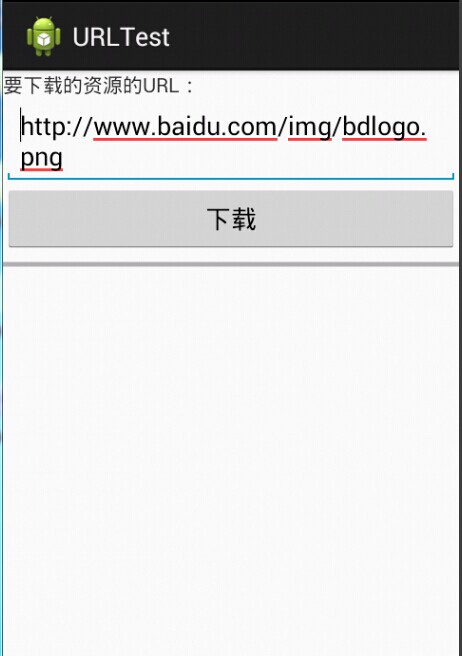
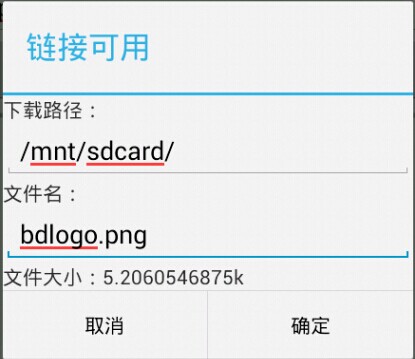
按下下載後,可先跳出對話框讓使用者確認儲存路徑與檔案名稱。
<LinearLayout xmlns:android="https://schemas.android.com/apk/res/android"
    android:layout_width="match_parent"
    android:layout_height="wrap_content"
    android:orientation="vertical">

    <EditText
        android:id="@+id/editText_target_path"
        android:layout_width="match_parent"
        android:layout_height="wrap_content" />

    <EditText
        android:id="@+id/editText_file_name"
        android:layout_width="match_parent"
        android:layout_height="wrap_content" />
</LinearLayout>輸入 URL 後按下下載,系統會先連線取得檔案資訊,再開始下載並顯示進度。
 Android 插件化开发(二):如何让插件的 Activity 获得系统认可
 本文是上一篇的延续,阅读前建议先看第一部分。上一篇中,我们通过替换 Component 成
 Android 離線緩存快速實現:Volley 與圖片快取
離線緩存的目標離線緩存的目標是讓 App 在無網路時仍能顯示上次取得的資料。Volley 內建快取,可與 Universal-ImageLoader 搭配,實現圖文快取。
 Selenium 中 WebDriver 的局部 HTML 提取技巧
 別再跟我說 Selenium 中的 WebDriver 用 driver.page_source 就
 Android Selector 選擇器詳解:按鈕狀態切換與圖片替換
 Selector,也就是「選擇器」,在 App 開發中可說是隨處可見。最典型的例子就是按鈕:平時顯示