

編輯:關於 Android 開發
SharedPreferences 是 Android 提供的輕量級鍵值存儲方案,特別適合保存「設定項」「上次填的表單」這類零碎的小數據。本文示範如何在 Fragment 中用它把三個輸入框的內容存起來,並在下次進入頁面時自動回填。
在 onCreateView() 裡綁定控件,然後通過 getActivity().getSharedPreferences() 取得存儲對象,把之前保存的值讀出來填回輸入框:
public View onCreateView(LayoutInflater inflater, ViewGroup container, Bundle savedInstanceState) {
    View view = inflater.inflate(R.layout.wifi, container, false);

    view.findViewById(R.id.openwifi).setOnClickListener(this);
    view.findViewById(R.id.closewifi).setOnClickListener(this);

    wifiurl = (EditText) view.findViewById(R.id.editText1);
    wificom = (EditText) view.findViewById(R.id.editText2);
    wificamera = (EditText) view.findViewById(R.id.editText3);

    sharedPreferences = getActivity().getSharedPreferences("WifiSettings", Activity.MODE_PRIVATE);

    String str_wifiurl = sharedPreferences.getString("wifiurl", "192.168.8.1");
    String str_wificom = sharedPreferences.getString("wificom", "2016");
    String str_wificamera = sharedPreferences.getString("wificamera", "8083");

    wifiurl.setText(str_wifiurl);
    wificom.setText(str_wificom);
    wificamera.setText(str_wificamera);

    return view;
}
這裡有個關鍵細節:getString() 的第二個參數是預設值。第一次運行時文件還不存在,如果沒有預設值就會拿到 null,後面 setText() 又要出問題。順手把合理的初始值寫進去,是個省麻煩的好習慣。
寫入要走 Editor:
public void savewifisettings() {
    sharedPreferences = getActivity().getSharedPreferences("WifiSettings", Activity.MODE_PRIVATE);

    Editor editor = sharedPreferences.edit();   // 獲取編輯器
    editor.putString("wifiurl", wifiurl.getText().toString());
    editor.putString("wificom", wificom.getText().toString());
    editor.putString("wificamera", wificamera.getText().toString());
    editor.commit();                            // 提交修改
}
commit() 是同步寫入,會阻塞主線程;apply() 是異步寫入,性能更好,在 4.0 以上的項目裡更推薦使用 apply()。
在點擊事件裡調用即可:
@Override
public void onClick(View v) {
    switch (v.getId()) {
        case R.id.openwifi:
            savewifisettings();  // 開啟 wifi 的時候保存一下設置
            break;
    }
}
SharedPreferences 最終會生成一個 XML 文件,路徑是:
data/data/包名/shared_prefs/WifiSettings.xml
通過 adb 或者 DDMS 的 File Explorer 可以把它拉出來看:
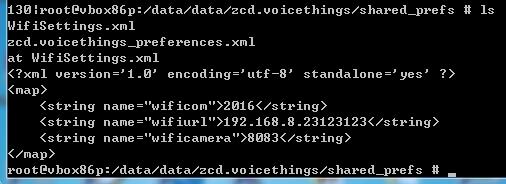
文件結構非常直白,就是一堆 <string name="...">value</string>。
不要存敏感信息。SharedPreferences 是明文 XML,密碼、密鑰這類內容不能直接往裡放,需要配合加密使用。
模式要選對。本文用的是 MODE_PRIVATE(僅本應用可讀),這也是絕大多數場景的正確選擇;早期的 MODE_WORLD_READABLE 已被廢棄。
數據量大時換方案。SharedPreferences 是全量加載到內存的,如果數據超過幾百條,應該改用 SQLite 或 Room。
來源:https://www.cnblogs.com/xiaobo-Linux/
 Android Tab 頁籤實作:ViewPager 搭配 PagerTabStrip
 要做「滑動切頁 + 點標籤切頁」的頂部頁籤,最省事的做法是 ViewPager 搭
 Android Studio 如何匯入 jar 套件:告別 Eclipse 思維的簡便做法
在 Android Studio 中加入外部 jar 的輕鬆流程 Android Studio 在開發 Android APK 時確實十分便利,但它的許多設定都與老搭檔
 高仿人人網客戶端 Android 版開源源碼分享
 本文分享一份高仿人人網客戶端的 Android 專案源碼,裡面涵蓋了不少 UI 設計與人機交互的實作手法,很適合想研究社
 Activity 切換動畫特效大全:overridePendingTransition 與 13 種 anim 實作
 預設的 Activity 切換顯得有點生硬。Andr