

編輯:關於 Android 開發
把日常開發中反覆遇到的報錯和小技巧整理在一起,方便隨時翻查。
1. 無法使用網絡:Permission denied (maybe missing internet permission)
忘記申請網絡權限。在 AndroidManifest.xml 的 </application> 之後加上:
<uses-permission android:name="android.permission.INTERNET" />
2. 找不到 Activity:android.content.ActivityNotFoundException: Unable to find explicit activity class
Activity 沒有在清單文件裡聲明:
<activity android:name=".xxxActivity">
</activity>
3. 找不到 startSubActivity 方法
這個方法早已廢棄,請改用 startActivityForResult()。
4. 加載 XML 中的 view 報 java.lang.NullPointerException
最常見的原因是忘記調用 setContentView():
setContentView(R.layout.main);
5. Unparsed aapt error(s)! Check the console for output
控制台裡往往看不到有意義的錯誤信息。試試 Project → Clean,多數情況會直接解決。這類問題通常是資源文件被 IDE 增量編譯搞亂了狀態。
6. requestCode 和 resultCode 到底誰是誰
使用 startActivityForResult() 和 onActivityResult() 時極容易把這兩個參數搞混。理清楚:
onActivityResult() 裡區分「是哪個子頁面回傳的數據」。如果有 C、D、E 多個頁面都會回傳,就給每個分配不同的 requestCode。RESULT_OK,一般情況直接用它就好。如果不做區分,任何 Activity 只要 setResult 回到 A,onActivityResult() 都會無差別處理,邏輯很快就亂了。
7. 無法下載文件到 SD 卡
缺少寫外部存儲的權限:
<uses-permission android:name="android.permission.WRITE_EXTERNAL_STORAGE" />
注意:Android 6.0 之後這個權限屬於危險權限,除了聲明還必須在運行時動態申請。
8. ListView 無法觸發 OnItemClickListener
檢查行佈局裡是不是有 EditText 或 CheckBox 這類會搶焦點的控件。有則把它們的 focusable 屬性設為 false:
android:focusable="false"
9. 讓控件在父容器中居中
android:layout_gravity="center_vertical"
10. 控件兩端對齊
用 RelativeLayout 讓同一行的兩個控件分別靠左和靠右:
<RelativeLayout
    xmlns:android="https://schemas.android.com/apk/res/android"
    android:background="@drawable/top"
    android:layout_width="fill_parent"
    android:layout_height="wrap_content" >

    <ImageView
        android:id="@+file_browser/imgRefresh"
        android:layout_width="wrap_content"
        android:layout_height="wrap_content"
        android:layout_marginLeft="10px"
        android:src="@drawable/refresh"
        android:layout_centerVertical="true" >
    </ImageView>

    <ImageView
        android:id="@+file_browser/imgCheck"
        android:layout_alignParentRight="true"
        android:layout_width="wrap_content"
        android:layout_height="wrap_content"
        android:layout_marginRight="10px"
        android:src="@drawable/close"
        android:layout_centerVertical="true" >
    </ImageView>

</RelativeLayout>
順帶一提,這裡的 10px 應該寫成 10dp,px 在不同屏幕上物理大小不一致,是適配的常見坑。
11. 軟鍵盤把控件往上擠
鍵盤彈出時,只有鍵盤區域之外的才是屏幕的可視範圍,所以如果佈局用了 android:gravity="bottom",內容就會被頂到上面變形。兩種解法:
AndroidManifest.xml 對應 Activity 上加 android:windowSoftInputMode="adjustPan"12. 在佈局中使用 ScrollView
把原來的佈局用 ScrollView 包起來即可:
<ScrollView xmlns:android="https://schemas.android.com/apk/res/android"
    android:layout_width="fill_parent"
    android:layout_height="wrap_content"
    android:scrollbars="none">
</ScrollView>
注意 ScrollView 只能包含一個直接子元素,多個要用 LinearLayout 包起來。
13. 全局變量:自定義 Application Context
創建一個 android.app.Application 的子類,在 manifest 中聲明,系統就會為此建立一個全局可用的實例,任何地方都能通過 Context.getApplicationContext() 拿到它,進而讀寫其中的狀態。
class MyApp extends Application {
    private String myState;

    public String getState() {
        return myState;
    }

    public void setState(String s) {
        myState = s;
    }
}

class Blah extends Activity {
    @Override
    public void onCreate(Bundle b) {
        ...
        MyApp appState = ((MyApp) getApplicationContext());
        String state = appState.getState();
        ...
    }
}
效果和使用靜態變量類似,但更符合 Android 的架構體系。需要在清單裡配置:
<application android:name=".MyApp"
    android:icon="@drawable/icon"
    android:label="@string/app_name">
不過要提醒:把狀態長期掛在 Application 上時,注意內存洩漏風險——不要在其中持有 Activity 引用。
14. 給模擬器打電話、發短信
Android 模擬器有個特殊號碼 15555218135,類似實機的 SIM 卡號。三步搞定:
telnet localhost 5554(5554 是模擬器啟動後窗口標題上顯示的數字)gsm call 15555218135模擬器上就會顯示來電,接聽和掛斷操作與實機一致。
發短信前三步相同,最後一條命令換成:
sms send 15555218135 Hello,this is a Message.
這個技巧在測試來電攔截、短信解析類功能時特別好用,不用真拿兩台手機互相打。
推薦延伸閱讀:https://www.cnblogs.com/roucheng/p/sdka.html
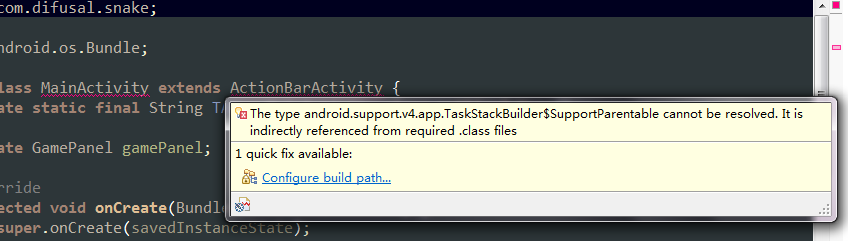 Android Support 庫的作用與常見錯誤排解
搞懂 Android Support 庫,並解決常見錯誤 這些 Support 包究竟是幹什麼的? 為了保證高版本 SDK 開發的應用能向下相容,Google 提供了 A
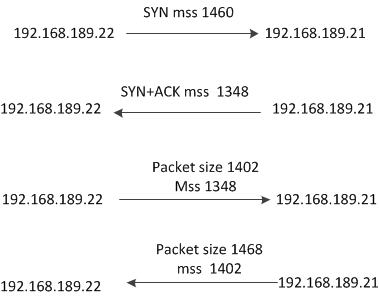 關於 TCP MSS 的內核設置解析
 下面通過一個 MSS 交互的例子來說明內核中的設置過程。在三次握手中,兩個主機各自捎帶了不同的 MSS 值:192.168.189.
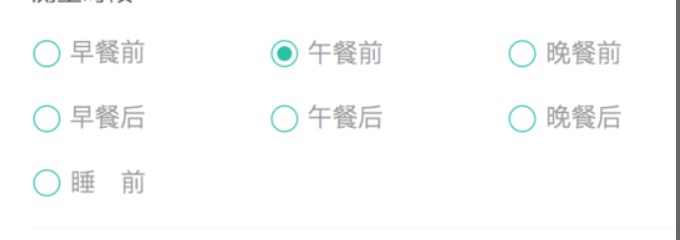 Android 組件式開發(2):打造網格布局的 RadioButton 矩陣
前言 在 Android 中,我們通常透過 RadioGroup 管理一組 RadioButton,以達到單選互斥的效果。但有些需求需要 N 行 N 列的 RadioBu
 Android 訪問 SD 卡路徑的幾種方式:兼顧兼容與健壯性
Android 中訪問 sdcard 路徑的幾種方式 在早期 Android(4.1 之前)中,SD 卡路徑通常以「/sdcard」或「/mnt/sdcard」表示;而從