

編輯:關於 Android 開發
下拉刷新加上拉載入,幾乎是每個列表頁的標配。本文以自訂的 DropDownListView 為例,說明怎麼在原生 ListView 基礎上加上 header 與 footer,並透過自訂屬性控制行為。
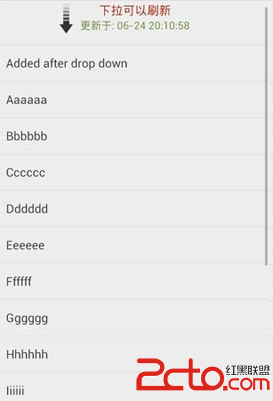
2.1 在布局檔中宣告
<RelativeLayout xmlns:android="https://schemas.android.com/apk/res/android"
xmlns:listviewattr="https://schemas.android.com/apk/res-auto"
android:layout_width="match_parent"
android:layout_height="match_parent">
<com.nsu.app.dropdownlistviewdemo.dropdownlistview
android:id="@+id/list_view"
android:layout_width="match_parent"
android:layout_height="match_parent"
android:drawSelectorOnTop="false"
listviewattr:isDropDown="true"
listviewattr:isOnBottom="true"
listviewattr:isAutoLoadOnBottom="true" />
</RelativeLayout>
DropDownListView 自訂了三個 boolean 屬性:
isDropDownStyle:是否啟用下拉樣式。Java 端可自訂下拉 listener,決定要執行什麼任務。
isOnBottomStyle:是否啟用底部樣式。Java 端可自訂滾動到底部的 listener。
isAutoLoadOnBottom:滾動到底部時是否自動觸發 listener,僅在 isOnBottomStyle 為 true 時有效。
值得注意的效能細節:如果 isDropDownStyle 或 isOnBottomStyle 為 false,對應的 header/footer 布局根本不會被載入,因此效能表現與原生 ListView 相當。
屬性宣告部分:
<declare-styleable name="drop_down_list_attr">
<attr name="isDropDownStyle" format="boolean" />
<attr name="isOnBottomStyle" format="boolean" />
<attr name="isAutoLoadOnBottom" format="boolean" />
</declare-styleable>
2.2 在 Java 中操作
以下是一個可直接運行的示例:
public class DropDownListViewDemo extends Activity {

    private LinkedList listItems = null;
    private DropDownListView listView = null;
    private ArrayAdapter adapter;
    private String[] mStrings = {"11111", "2222", "3333", "4444", "5555", "6666",
            "77777", "8888", "99999", "aaaaa", "bbbb", "cccc", "dddd", "eeee",};
    public static final int MORE_DATA_MAX_COUNT = 3;
    public int moreDataCount = 0;

    @Override
    protected void onCreate(Bundle savedInstanceState) {
        super.onCreate(savedInstanceState);
        setContentView(R.layout.activity_drop_down_list_view_demo);
        listView = (DropDownListView) findViewById(R.id.list_view);

        // 設定下拉 listener
        listView.setOnDropDownListener(new DropDownListView.OnDropDownListener() {
            @Override
            public void onDropDown() {
                new GetDataTask(true).execute();
            }
        });

        // 設定底部 listener
        listView.setOnBottomListener(new View.OnClickListener() {
            @Override
            public void onClick(View v) {
                new GetDataTask(false).execute();
            }
        });

        listView.setOnItemClickListener(new AdapterView.OnItemClickListener() {
            @Override
            public void onItemClick(AdapterView parent, View view, int position, long id) {
                Toast.makeText(DropDownListViewDemo.this, R.string.drop_down_tip,
                        Toast.LENGTH_LONG).show();
            }
        });

        listItems = new LinkedList();
        listItems.addAll(Arrays.asList(mStrings));
        adapter = new ArrayAdapter(this, android.R.layout.simple_list_item_1, listItems);
        listView.setAdapter(adapter);
    }

    private class GetDataTask extends AsyncTask {
        private boolean isDropDown;

        public GetDataTask(boolean isDropDown) {
            this.isDropDown = isDropDown;
        }

        @Override
        protected String[] doInBackground(Void... params) {
            try {
                Thread.sleep(1000);
            } catch (InterruptedException e) {
            }
            return mStrings;
        }

        @Override
        protected void onPostExecute(String[] result) {
            if (isDropDown) {
                listItems.addFirst("Added after drop down");
                adapter.notifyDataSetChanged();
                // 下拉完成後記得呼叫 onDropDownComplete 復原狀態
                SimpleDateFormat dateFormat = new SimpleDateFormat("MM-dd HH:mm:ss");
                listView.onDropDownComplete(getString(R.string.update_at)
                        + dateFormat.format(new Date()));
            } else {
                moreDataCount++;
                listItems.add("Added after on bottom");
                adapter.notifyDataSetChanged();
                if (moreDataCount >= MORE_DATA_MAX_COUNT) {
                    listView.setHasMore(false);
                }
                listView.onBottomComplete();
            }
            super.onPostExecute(result);
        }
    }
}
使用上有兩個重點:setOnDropDownListener 設定下拉事件,但任務結束時必須手動呼叫 onDropDownComplete() 復原狀態,而且要在 adapter.notifyDataSetChanged() 之後呼叫;setOnBottomListener 設定底部事件,結束時同樣要呼叫 onBottomComplete()。
整體結構是在 ListView 上方加 header、下方加 footer,相關資源分成四塊。
3.1 下拉箭頭圖:在 drawable 下放一個名為 drop_down_list_arrow.png 的圖片即可。
3.2 文字資源(strings.xml):
Click to refresh。。。
Drop Down to refresh。。。
Release to refresh。。。
Loading。。。
More
Loading。。。
No More
Pull down to refresh or scroll to bottom to load more
updated at:
3.3 顏色(colors.xml):
#000000
#000000
#000000
3.4 樣式(styles.xml,會覆蓋前面 string 與 color 的設定):
3.5 尺寸(dimens.xml):
12dp
15dp
36dp
36dp
自訂控件的骨架如下,重點在於繼承 ListView 並實作 OnScrollListener:
public class DropDownListView extends ListView implements OnScrollListener {

    private boolean isDropDownStyle = true;
    private boolean isOnBottomStyle = true;
    private boolean isAutoLoadOnBottom = false;

    private String headerDefaultText, headerPullText, headerReleaseText, headerLoadingText;
    private String footerDefaultText, footerLoadingText, footerNoMoreText;

    /** header 布局 */
    private RelativeLayout headerLayout;
    private ImageView headerImage;
    private ProgressBar headerProgressBar;
    private TextView headerText;
    private TextView headerSecondText;

    /** footer 布局 */
    private RelativeLayout footerLayout;
    private ProgressBar footerProgressBar;
    private Button footerButton;

    private OnDropDownListener onDropDownListener;
    private OnScrollListener onScrollListener;

    /** 下拉距離與 header padding top 的比例 */
    private float headerPaddingTopRate = 1.5f;
    /** header 可釋放觸發載入的最小距離 */
    private int headerReleaseMinDistance;
    /** 是否還有更多資料 */
    private boolean hasMore = true;
    private boolean isShowFooterProgressBar = true;
    private boolean isShowFooterWhenNoMore = false;

    private int currentScrollState;
    private int currentHeaderStatus;
    private boolean hasReachedTop = false;
    private RotateAnimation flipAnimation;
    private RotateAnimation reverseFlipAnimation;
    private int headerOriginalHeight;
    private int headerOriginalTopPadding;
    private float actionDownPointY;
    private boolean isOnBottomLoading = false;

    private void init(Context context) {
        this.context = context;
        initDropDownStyle();
        initOnBottomStyle();
        // 必須設定,才能觸發 onScroll 等回呼
        super.setOnScrollListener(this);
    }

    /** 初始化下拉樣式,只執行一次 */
    private void initDropDownStyle() {
        if (headerLayout != null) {
            if (isDropDownStyle) addHeaderView(headerLayout);
            else removeHeaderView(headerLayout);
            return;
        }
        if (!isDropDownStyle) return;

        headerReleaseMinDistance = context.getResources()
                .getDimensionPixelSize(R.dimen.drop_down_list_header_release_min_distance);
        flipAnimation = new RotateAnimation(0, 180, RotateAnimation.RELATIVE_TO_SELF, 0.5f,
                RotateAnimation.RELATIVE_TO_SELF, 0.5f);
        flipAnimation.setInterpolator(new LinearInterpolator());
        flipAnimation.setDuration(250);
        flipAnimation.setFillAfter(true);
        reverseFlipAnimation = new RotateAnimation(-180, 0, RotateAnimation.RELATIVE_TO_SELF, 0.5f,
                RotateAnimation.RELATIVE_TO_SELF, 0.5f);
        reverseFlipAnimation.setInterpolator(new LinearInterpolator());
        reverseFlipAnimation.setDuration(250);
        reverseFlipAnimation.setFillAfter(true);

        headerDefaultText = context.getString(R.string.drop_down_list_header_default_text);
        headerPullText = context.getString(R.string.drop_down_list_header_pull_text);
        headerReleaseText = context.getString(R.string.drop_down_list_header_release_text);
        headerLoadingText = context.getString(R.string.drop_down_list_header_loading_text);

        LayoutInflater inflater = (LayoutInflater)
                context.getSystemService(Context.LAYOUT_INFLATER_SERVICE);
        headerLayout = (RelativeLayout) inflater.inflate(R.layout.drop_down_list_header, this, false);
        headerText = (TextView) headerLayout.findViewById(R.id.drop_down_list_header_default_text);
        headerImage = (ImageView) headerLayout.findViewById(R.id.drop_down_list_header_image);
        headerProgressBar = (ProgressBar) headerLayout.findViewById(R.id.drop_down_list_header_progress_bar);
        headerSecondText = (TextView) headerLayout.findViewById(R.id.drop_down_list_header_second_text);
        headerLayout.setClickable(true);
        headerLayout.setOnClickListener(new OnClickListener() {
            @Override
            public void onClick(View v) {
                onDropDown();
            }
        });
        headerText.setText(headerDefaultText);
        addHeaderView(headerLayout);
        measureHeaderLayout(headerLayout);
        headerOriginalHeight = headerLayout.getMeasuredHeight();
        headerOriginalTopPadding = headerLayout.getPaddingTop();
        currentHeaderStatus = HEADER_STATUS_CLICK_TO_LOAD;
    }

    /** 初始化底部樣式,只執行一次 */
    private void initOnBottomStyle() {
        if (footerLayout != null) {
            if (isOnBottomStyle) addFooterView(footerLayout);
            else removeFooterView(footerLayout);
            return;
        }
        if (!isOnBottomStyle) return;

        footerDefaultText = context.getString(R.string.drop_down_list_footer_default_text);
        footerLoadingText = context.getString(R.string.drop_down_list_footer_loading_text);
        footerNoMoreText = context.getString(R.string.drop_down_list_footer_no_more_text);

        LayoutInflater inflater = (LayoutInflater)
                context.getSystemService(Context.LAYOUT_INFLATER_SERVICE);
        footerLayout = (RelativeLayout) inflater.inflate(R.layout.drop_down_list_footer, this, false);
        footerButton = (Button) footerLayout.findViewById(R.id.drop_down_list_footer_button);
        footerButton.setDrawingCacheBackgroundColor(0);
        footerButton.setEnabled(true);
        footerProgressBar = (ProgressBar)
                footerLayout.findViewById(R.id.drop_down_list_footer_progress_bar);
        addFooterView(footerLayout);
    }

    @Override
    public void setAdapter(ListAdapter adapter) {
        super.setAdapter(adapter);
        if (isDropDownStyle) setSecondPositionVisible();
    }

    @Override
    public void setOnScrollListener(OnScrollListener listener) {
        onScrollListener = listener;
    }

    public void setOnDropDownListener(OnDropDownListener onDropDownListener) {
        this.onDropDownListener = onDropDownListener;
    }

    public void setOnBottomListener(OnClickListener onBottomListener) {
        if (!isDropDownStyle) {
            throw new RuntimeException("isDropDownStyle is false, cannot call "
                    + "setOnBottomListener, you can call setDropDownStyle(true) at first.");
        }
        footerButton.setOnClickListener(onBottomListener);
    }

    @Override
    public boolean onTouchEvent(MotionEvent event) {
        if (!isDropDownStyle) return super.onTouchEvent(event);
        hasReachedTop = false;
        switch (event.getAction()) {
            case MotionEvent.ACTION_DOWN:
                actionDownPointY = event.getY();
                break;
            case MotionEvent.ACTION_MOVE:
                adjustHeaderPadding(event);
                break;
            case MotionEvent.ACTION_UP:
                if (!isVerticalScrollBarEnabled()) setVerticalScrollBarEnabled(true);
                // 手指離開螢幕時,若第一項可見且 header 不在載入中
                // HEADER_STATUS_RELEASE_TO_LOAD 時呼叫 onDropDown
                // HEADER_STATUS_DROP_DOWN_TO_LOAD 時復原成 CLICK_TO_LOAD 並隱藏 header
                if (getFirstVisiblePosition() == 0
                        && currentHeaderStatus != HEADER_STATUS_LOADING) {
                    switch (currentHeaderStatus) {
                        case HEADER_STATUS_RELEASE_TO_LOAD:
                            onDropDown();
                            break;
                        case HEADER_STATUS_DROP_DOWN_TO_LOAD:
                            setHeaderStatusClickToLoad();
                            setSecondPositionVisible();
                            break;
                        default:
                            break;
                    }
                }
                break;
        }
        return super.onTouchEvent(event);
    }

    @Override
    public void onScroll(AbsListView view, int firstVisibleItem, int visibleItemCount,
                         int totalItemCount) {
        if (isDropDownStyle) {
            if (currentScrollState == SCROLL_STATE_TOUCH_SCROLL
                    && currentHeaderStatus != HEADER_STATUS_LOADING) {
                // 手指在螢幕上且 header 不在載入中:
                // 依 header 高度決定是 DROP_DOWN 還是 RELEASE 狀態
                if (firstVisibleItem == 0) {
                    headerImage.setVisibility(View.VISIBLE);
                    int pointBottom = headerOriginalHeight + headerReleaseMinDistance;
                    if (headerLayout.getBottom() >= pointBottom) {
                        setHeaderStatusReleaseToLoad();
                    } else {
                        setHeaderStatusDropDownToLoad();
                    }
                } else {
                    setHeaderStatusClickToLoad();
                }
            } else if (currentScrollState == SCROLL_STATE_FLING
                    && firstVisibleItem == 0
                    && currentHeaderStatus != HEADER_STATUS_LOADING) {
                // 手指離開後仍在滑動,且 header 可見,則隱藏 header
                setSecondPositionVisible();
                hasReachedTop = true;
            } else if (currentScrollState == SCROLL_STATE_FLING && hasReachedTop) {
                setSecondPositionVisible();
            }
        }

        // 若啟用自動載入,滾動到底部時自動觸發 onBottom
        if (isOnBottomStyle && isAutoLoadOnBottom && hasMore) {
            if (firstVisibleItem > 0 && totalItemCount > 0
                    && (firstVisibleItem + visibleItemCount == totalItemCount)) {
                onBottom();
            }
        }
        if (onScrollListener != null) {
            onScrollListener.onScroll(view, firstVisibleItem, visibleItemCount, totalItemCount);
        }
    }

    @Override
    public void onScrollStateChanged(AbsListView view, int scrollState) {
        if (isDropDownStyle) {
            currentScrollState = scrollState;
            if (currentScrollState == SCROLL_STATE_IDLE) hasReachedTop = false;
        }
        if (onScrollListener != null) {
            onScrollListener.onScrollStateChanged(view, scrollState);
        }
    }

    private void onDropDownBegin() {
        if (isDropDownStyle) setHeaderStatusLoading();
    }

    /** 手動觸發下拉載入 */
    public void onDropDown() {
        if (currentHeaderStatus != HEADER_STATUS_LOADING && isDropDownStyle
                && onDropDownListener != null) {
            onDropDownBegin();
            onDropDownListener.onDropDown();
        }
    }

    /** 下拉完成,復原狀態 */
    public void onDropDownComplete(CharSequence secondText) {
        if (isDropDownStyle) {
            setHeaderSecondText(secondText);
            onDropDownComplete();
        }
    }

    public void onDropDownComplete() {
        if (isDropDownStyle) {
            setHeaderStatusClickToLoad();
            if (headerLayout.getBottom() > 0) {
                invalidateViews();
                setSecondPositionVisible();
            }
        }
    }

    private void onBottomBegin() {
        if (isOnBottomStyle) {
            if (isShowFooterProgressBar) footerProgressBar.setVisibility(View.VISIBLE);
            footerButton.setText(footerLoadingText);
            footerButton.setEnabled(false);
        }
    }

    /** 手動觸發底部載入 */
    public void onBottom() {
        if (isOnBottomStyle && !isOnBottomLoading) {
            isOnBottomLoading = true;
            onBottomBegin();
            footerButton.performClick();
        }
    }

    /** 底部載入完成,復原狀態 */
    public void onBottomComplete() {
        if (isOnBottomStyle) {
            if (isShowFooterProgressBar) footerProgressBar.setVisibility(View.GONE);
            if (!hasMore) {
                footerButton.setText(footerNoMoreText);
                footerButton.setEnabled(false);
                if (!isShowFooterWhenNoMore) removeFooterView(footerLayout);
            } else {
                footerButton.setText(footerDefaultText);
                footerButton.setEnabled(true);
            }
            isOnBottomLoading = false;
        }
    }

    /** header 狀態常數 */
    public static final int HEADER_STATUS_CLICK_TO_LOAD = 1;      // 點擊可載入(初始狀態)
    public static final int HEADER_STATUS_DROP_DOWN_TO_LOAD = 2;  // 繼續下拉可載入
    public static final int HEADER_STATUS_RELEASE_TO_LOAD = 3;    // 釋放即可載入
    public static final int HEADER_STATUS_LOADING = 4;            // 載入中

    private void setHeaderStatusClickToLoad() {
        if (currentHeaderStatus != HEADER_STATUS_CLICK_TO_LOAD) {
            resetHeaderPadding();
            headerImage.clearAnimation();
            headerImage.setVisibility(View.GONE);
            headerProgressBar.setVisibility(View.GONE);
            headerText.setText(headerDefaultText);
            currentHeaderStatus = HEADER_STATUS_CLICK_TO_LOAD;
        }
    }

    private void setHeaderStatusDropDownToLoad() {
        if (currentHeaderStatus != HEADER_STATUS_DROP_DOWN_TO_LOAD) {
            headerImage.setVisibility(View.VISIBLE);
            if (currentHeaderStatus != HEADER_STATUS_CLICK_TO_LOAD) {
                headerImage.clearAnimation();
                headerImage.startAnimation(reverseFlipAnimation);
            }
            headerProgressBar.setVisibility(View.GONE);
            headerText.setText(headerPullText);
            if (isVerticalFadingEdgeEnabled()) setVerticalScrollBarEnabled(false);
            currentHeaderStatus = HEADER_STATUS_DROP_DOWN_TO_LOAD;
        }
    }

    private void setHeaderStatusReleaseToLoad() {
        if (currentHeaderStatus != HEADER_STATUS_RELEASE_TO_LOAD) {
            headerImage.setVisibility(View.VISIBLE);
            headerImage.clearAnimation();
            headerImage.startAnimation(flipAnimation);
            headerProgressBar.setVisibility(View.GONE);
            headerText.setText(headerReleaseText);
            currentHeaderStatus = HEADER_STATUS_RELEASE_TO_LOAD;
        }
    }

    private void setHeaderStatusLoading() {
        if (currentHeaderStatus != HEADER_STATUS_LOADING) {
            resetHeaderPadding();
            headerImage.setVisibility(View.GONE);
            headerImage.clearAnimation();
            headerProgressBar.setVisibility(View.VISIBLE);
            headerText.setText(headerLoadingText);
            currentHeaderStatus = HEADER_STATUS_LOADING;
            setSelection(0);
        }
    }

    /** 依觸控事件調整 header 的 padding,做出跟手位移的效果 */
    private void adjustHeaderPadding(MotionEvent ev) {
        int pointerCount = ev.getHistorySize();
        if (isVerticalFadingEdgeEnabled()) setVerticalScrollBarEnabled(false);
        for (int i = 0; i < pointerCount; i++) {
            if (currentHeaderStatus == HEADER_STATUS_DROP_DOWN_TO_LOAD
                    || currentHeaderStatus == HEADER_STATUS_RELEASE_TO_LOAD) {
                headerLayout.setPadding(headerLayout.getPaddingLeft(),
                        (int) (((ev.getHistoricalY(i) - actionDownPointY) - headerOriginalHeight)
                                / headerPaddingTopRate),
                        headerLayout.getPaddingRight(), headerLayout.getPaddingBottom());
            }
        }
    }

    private void resetHeaderPadding() {
        headerLayout.setPadding(headerLayout.getPaddingLeft(), headerOriginalTopPadding,
                headerLayout.getPaddingRight(), headerLayout.getPaddingBottom());
    }

    /** 手動測量 header 高度,因為 addHeaderView 時還拿不到正確尺寸 */
    private void measureHeaderLayout(View child) {
        ViewGroup.LayoutParams p = child.getLayoutParams();
        if (p == null) {
            p = new ViewGroup.LayoutParams(ViewGroup.LayoutParams.MATCH_PARENT,
                    ViewGroup.LayoutParams.WRAP_CONTENT);
        }
        int childWidthSpec = ViewGroup.getChildMeasureSpec(0, 0, p.width);
        int childHeightSpec;
        if (p.height > 0) {
            childHeightSpec = MeasureSpec.makeMeasureSpec(p.height, MeasureSpec.EXACTLY);
        } else {
            childHeightSpec = MeasureSpec.makeMeasureSpec(0, MeasureSpec.UNSPECIFIED);
        }
        child.measure(childWidthSpec, childHeightSpec);
    }

    /** 讀出自訂屬性 */
    private void getAttrs(Context context, AttributeSet attrs) {
        TypedArray ta = context.obtainStyledAttributes(attrs, R.styleable.drop_down_list_attr);
        isDropDownStyle = ta.getBoolean(R.styleable.drop_down_list_attr_isDropDownStyle, false);
        isOnBottomStyle = ta.getBoolean(R.styleable.drop_down_list_attr_isOnBottomStyle, false);
        isAutoLoadOnBottom = ta.getBoolean(R.styleable.drop_down_list_attr_isAutoLoadOnBottom, false);
        ta.recycle();
    }

    /** 因為 header 佔了 position 0,可能需要把第二項設為可見 */
    public void setSecondPositionVisible() {
        if (getAdapter() != null && getAdapter().getCount() > 0
                && getFirstVisiblePosition() == 0) {
            setSelection(1);
        }
    }

    public void setHasMore(boolean hasMore) { this.hasMore = hasMore; }
    public boolean isHasMore() { return hasMore; }
    public RelativeLayout getHeaderLayout() { return headerLayout; }
    public RelativeLayout getFooterLayout() { return footerLayout; }
    public float getHeaderPaddingTopRate() { return headerPaddingTopRate; }
    public void setHeaderPaddingTopRate(float rate) { this.headerPaddingTopRate = rate; }
    public int getHeaderReleaseMinDistance() { return headerReleaseMinDistance; }
    public void setHeaderReleaseMinDistance(int d) { this.headerReleaseMinDistance = d; }
    public void setShowFooterProgressBar(boolean show) { this.isShowFooterProgressBar = show; }
    public void setDropDownStyle(boolean style) {
        if (this.isDropDownStyle != style) {
            this.isDropDownStyle = style;
            initDropDownStyle();
        }
    }
    public void setOnBottomStyle(boolean style) {
        if (this.isOnBottomStyle != style) {
            this.isOnBottomStyle = style;
            initOnBottomStyle();
        }
    }
    public void setAutoLoadOnBottom(boolean auto) { this.isAutoLoadOnBottom = auto; }
    public void setHeaderSecondText(CharSequence secondText) {
        if (isDropDownStyle) {
            if (secondText == null) headerSecondText.setVisibility(View.GONE);
            else {
                headerSecondText.setVisibility(View.VISIBLE);
                headerSecondText.setText(secondText);
            }
        }
    }
    public interface OnDropDownListener {
        void onDropDown();
    }
}
事件設定與復原
setOnDropDownListener() 設定下拉事件;onDropDownComplete() 與 onDropDownComplete(CharSequence) 復原下拉狀態,注意必須在 adapter.notifyDataSetChanged() 之後呼叫。
setOnBottomListener() 設定滾動到底部事件;onBottomComplete() 復原底部狀態。
可見性控制
setSecondPositionVisible():在 isDropDownStyle 為 true 時,header 佔據 position 0,所以常需要呼叫此方法把 position 1 的項目設為可見。setSelection(0) 則會捲回 header。onDropDownComplete() 預設已呼叫 setSecondPositionVisible()。
樣式切換
setDropDownStyle()、setOnBottomStyle()、setAutoLoadOnBottom() 分別對應 XML 中的三個屬性,可在執行期動態切換。
距離與比例
setHeaderPaddingTopRate() 設定 header padding 變化與實際下拉距離的比例;setHeaderReleaseMinDistance() 設定觸發載入的最小釋放距離;setShowFooterProgressBar() 控制底部是否顯示進度條;setHasMore() 決定是否還有更多資料。
文字自訂
setHeaderDefaultText()、setHeaderPullText()、setHeaderReleaseText()、setHeaderLoadingText()、setHeaderSecondText() 對應 header 的四種狀態與副標;setFooterDefaultText()、setFooterLoadingText()、setFooterNoMoreText() 對應 footer 的三種狀態。
這個自訂控件有几個做法頗值得參考。第一,用四個明確的狀態常數(CLICK / DROP_DOWN / RELEASE / LOADING)取代散落的 boolean 旗標,讓手勢判斷一目了然。第二,header 的跟手效果不是靠改 TranslationY,而是調整 padding top 並除以一個比例係數,滑動手感會更柔和。第三,所有可選功能都做成開關,關掉時連布局都不載入,效能與原生 ListView 無異。第四,把 onScrollListener 起來並在最後轉發給外部,不破壞使用者既有的監聽設定。
 模擬微信聊天菜單:OptionsMenu 與 ContextMenu 的配合使用
在微信裡長按一條聊天記錄,會從底部彈出「標記為未讀 / 置頂聊天 / 刪除該聊天」的浮層。這個交互在原生 Android 中,可以用 OptionsMenu 與 Cont
 FloatingActionButton 增強版:一個按鈕彈出菜單的開源方案
標準的 FloatingActionButton 只能放一個按鈕,但有時候我們需要點擊它之後彈出一整組操作。這裡推薦一個好用的第三方開源庫—— futuresimple
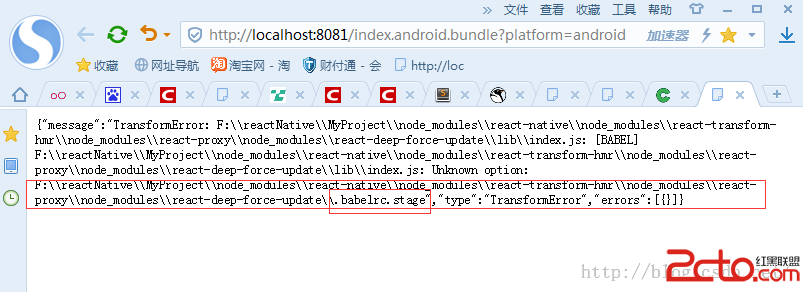 在 Windows 下快速搭建 React Native Android 開發環境
 搭建 Java 開發環境 根據操作系統選擇 x86 或 x64 位,下載 JDK 1.
 Android 學習指南(七):TableLayout 表格版面配置完全解析
TableLayout 的基本觀念 TableLayout 以列與行的方式排列子元件。每一個 TableRow 通常代表一列,而 TableRow 中的元件會依序形成欄位