

編輯:關於 Android 開發
運維工作中有一類需求特別瑣碎:把同一份檔案發到十幾台機器上。逐台 scp 顯然不現實,而 Ansible、SaltStack 這類重量級方案對小規模場景又顯得殺雞用牛刀。這裡介紹一個輕量做法——自己寫一支以 libssh2 為基礎的批次上傳小工具。
./mooon_upload -h=192.168.10.11,192.168.10.12 -p=6000 -u=root -P='root123' -s=./abc -d=/tmp/這行指令的意思很直白:把本地的 ./abc 上傳到 192.168.10.11 與 192.168.10.12 兩台機器的 /tmp/ 目錄,SSH 連接埠是 6000。
參數定義用了自家庭中繼的巨集,好處是把型別、預設值、取值範圍與說明集中在一處宣告:
#include "mooon/net/libssh2.h"
#include "mooon/sys/stop_watch.h"
#include "mooon/utils/args_parser.h"
#include "mooon/utils/print_color.h"
#include "mooon/utils/string_utils.h"
#include "mooon/utils/tokener.h"
#include <fstream>
#include <iostream>

// 逗號分隔的遠端主機列表
STRING_ARG_DEFINE(h, "", "remote hosts");
// 遠端主機的 sshd 埠號
INTEGER_ARG_DEFINE(uint16_t, p, 22, 10, 65535, "remote hosts port");
// 使用者名稱
STRING_ARG_DEFINE(u, "root", "remote host user");
// 密碼
STRING_ARG_DEFINE(P, "", "remote host password");

// 被上傳的檔案路徑
STRING_ARG_DEFINE(s, "", "the source file uploaded");
// 檔案上傳後存放的目錄路徑
STRING_ARG_DEFINE(d, "", "the directory to store");

// 連線逾時,單位為秒
INTEGER_ARG_DEFINE(uint16_t, t, 10, 1, 65535, "timeout seconds to remote host");因為要統計每台機器的成敗,所以需要一個簡單的結果結構,並為它多載入 operator<< 方便輸出:
// 結果資訊
struct ResultInfo
{
    bool success;    // true 表示執行成功
    std::string ip;  // 遠端 host 的 IP 位址
    uint32_t seconds; // 花費時長,精確到秒

    ResultInfo() : success(false), seconds(0) {}

    std::string str() const
    {
        std::string tag = success ? "SUCCESS" : "FAILURE";
        return mooon::utils::CStringUtils::format_string(
            "[%s %s]: %u seconds", ip.c_str(), tag.c_str(), seconds);
    }
};

inline std::ostream& operator<<(std::ostream& out, const struct ResultInfo& result)
{
    std::string tag = result.success ? "SUCCESS" : "FAILURE";
    out << "[" PRINT_COLOR_YELLOW << result.ip << PRINT_COLOR_NONE " "
        << tag << "] " << result.seconds << " seconds";
    return out;
}整體結構可以拆成四段:參數解析與校驗、主機清單切分、逐台上傳、結果彙整。
int main(int argc, char* argv[])
{
    // 1. 解析命令列參數
    std::string errmsg;
    if (!mooon::utils::parse_arguments(argc, argv, &errmsg)) {
        fprintf(stderr, "parameter error: %s\n", errmsg.c_str());
        exit(1);
    }

    uint16_t port = mooon::argument::p->value();
    std::string source = mooon::argument::s->value();
    std::string directory = mooon::argument::d->value();
    std::string hosts = mooon::argument::h->value();
    std::string user = mooon::argument::u->value();
    std::string password = mooon::argument::P->value();

    mooon::utils::CStringUtils::trim(source);
    mooon::utils::CStringUtils::trim(directory);
    mooon::utils::CStringUtils::trim(hosts);
    mooon::utils::CStringUtils::trim(user);
    mooon::utils::CStringUtils::trim(password);

    // 2. 必填參數檢查
    if (source.empty())    { fprintf(stderr, "parameter[-s]'s value not set\n"); exit(1); }
    if (directory.empty()) { fprintf(stderr, "parameter[-d]'s value not set\n"); exit(1); }
    if (user.empty())      { fprintf(stderr, "parameter[-u]'s value not set\n"); exit(1); }
    if (password.empty())  { fprintf(stderr, "parameter[-P]'s value not set\n"); exit(1); }

    // -h 未提供時,退而求其次讀環境變數 HOSTS
    if (hosts.empty()) {
        const char* hosts_ = getenv("HOSTS");
        if (NULL == hosts_) {
            fprintf(stderr, "parameter[-h]'s value not set\n");
            exit(1);
        }
        hosts = hosts_;
        mooon::utils::CStringUtils::trim(hosts);
        if (hosts.empty()) {
            fprintf(stderr, "parameter[-h]'s value not set\n");
            exit(1);
        }
    }

    // 3. 切分主機清單
    std::vector<std::string> hosts_ip;
    int num_remote_hosts_ip =
        mooon::utils::CTokener::split(&hosts_ip, hosts, ",", true);
    if (0 == num_remote_hosts_ip) {
        fprintf(stderr, "parameter[-h] error\n");
        exit(1);
    }

    std::string remote_filepath =
        directory + std::string("/")
        + mooon::utils::CStringUtils::extract_filename(source);

    std::vector<struct ResultInfo> results(num_remote_hosts_ip);

    // 4. 逐台上傳
    for (int i = 0; i < num_remote_hosts_ip; ++i) {
        const std::string& remote_host_ip = hosts_ip[i];
        results[i].ip = remote_host_ip;
        results[i].success = false;

        fprintf(stdout, "[" PRINT_COLOR_YELLOW "%s" PRINT_COLOR_NONE "]\n",
                remote_host_ip.c_str());
        fprintf(stdout, PRINT_COLOR_GREEN);

        mooon::sys::CStopWatch stop_watch;
        try {
            int file_size = 0;
            mooon::net::CLibssh2 libssh2(remote_host_ip, port, user, password,
                                         mooon::argument::t->value());
            libssh2.upload(source, remote_filepath, &file_size);

            fprintf(stdout,
                    "[" PRINT_COLOR_YELLOW "%s" PRINT_COLOR_NONE
                    "] SUCCESS: %d bytes\n",
                    remote_host_ip.c_str(), file_size);
            results[i].success = true;
        }
        catch (mooon::sys::CSyscallException& ex) {
            fprintf(stderr, "[" PRINT_COLOR_RED "%s" PRINT_COLOR_NONE
                            "] failed: %s\n",
                    remote_host_ip.c_str(), ex.str().c_str());
        }
        catch (mooon::utils::CException& ex) {
            fprintf(stderr, "[" PRINT_COLOR_RED "%s" PRINT_COLOR_NONE
                            "] failed: %s\n",
                    remote_host_ip.c_str(), ex.str().c_str());
        }

        results[i].seconds = stop_watch.get_elapsed_microseconds() / 1000000;
        std::cout << std::endl;
    }

    // 5. 輸出總結
    std::cout << std::endl;
    std::cout << "================================" << std::endl;
    int num_success = 0;
    int num_failure = 0;
    for (std::vector<struct ResultInfo>::size_type i = 0; i < results.size(); ++i) {
        const struct ResultInfo& result_info = results[i];
        std::cout << result_info << std::endl;
        if (result_info.success) ++num_success;
        else                     ++num_failure;
    }
    std::cout << "SUCCESS: " << num_success
              << ", FAILURE: " << num_failure << std::endl;

    return 0;
}這支工具的骨架其實很值得借鏡:
CStopWatch 記錄每台的上傳秒數,方便比較哪台機器網路較慢。-h 沒給就讀 HOSTS,方便寫進 cron 或 CI 腳本。若要進一步打磨,可以考慮改成多執行緒或 epoll 事件驅動的並行上傳,把大檔案在多台機器間的傳輸時間壓下來;另外密碼以明文字串傳入並非長久之計,改成支援 SSH 金鑰會安全得多。
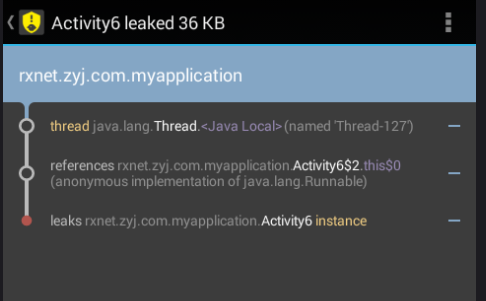 Android 內存洩漏排查實戰:五類高頻陷阱與 LeakCanary 定位思路
前言:近期在複習 Handler 相關知識時,碰上一個反覆被提及的難題——如何避免 Handler 帶來的內存溢出。網路上的資料雖然多,但彼此抄來抄去,真正能落地的內容並
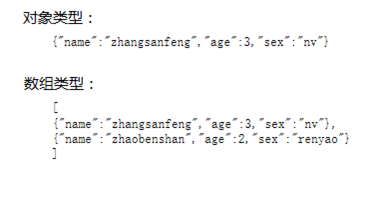 Android JSON 與 XML 解析比較
JSON 與 XML 解析 JSON 與 XML 都是常見的資料交換格式。JSON 以鍵值對為核心,可分為物件、陣列與混合結構;XML 則以標籤描述資料,適合結構化文件。
 Android PopupWindow 懸浮窗口的入門實戰
快速上手 PopupWindow 懸浮容器 PopupWindow 是一個可以浮動顯示在當前 Activity 之上的容器,常用於製作菜單、快捷操作面板等效果。本文以一個
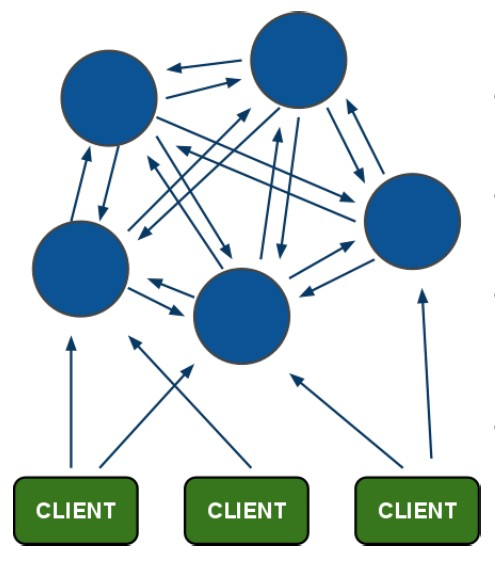 Redis Cluster 主從切換演練:從自動容錯選舉到集群 fail 的完整實測
Redis Cluster 的高可用能力,最終要靠一次真實的宕機演練來驗證。本文以一套三主三從的集群為例,逐步關停節點,觀察 slot 覆蓋率、slave 自動升主以及集