

編輯:關於 Android 開發
在註冊頁面,「獲取驗證碼」按鈕通常需要一個倒計時效果,避免使用者頻繁點擊。本文封裝了一個可重複使用的倒計時工具類,基於 Android 原生的 CountDownTimer 實現,讓按鈕在倒數期間變灰不可點,倒數結束後再恢復可點擊狀態。
在這個構造方法裡需要傳入幾個參數:一個是 Activity,一個是總時間 millisInFuture,一個是每次遞減的時間,最後一個是要顯示倒計時的按鈕。
用法:
TimeLastUtil timeLastUtil = new TimeLastUtil(this, 60000, 1000, btn);
timeLastUtil.start();
工具類:
public class TimeLastUtil extends CountDownTimer {

 private Activity mActivity;
 private TextView btn;// 按鈕

 //在這個構造方法裡需要傳入幾個參數,一個是Activity,一個是總的時間millisInFuture,
 // 一個是countDownInterval,然後就是你在哪個按鈕上做這個,就把這個按鈕傳過來
 public TimeLastUtil(Activity mActivity, long millisInFuture,
 long countDownInterval, TextView btn) {
 super(millisInFuture, countDownInterval);
 this.mActivity = mActivity;
 this.btn = btn;
 }

 @SuppressLint("NewApi")
 @Override
 public void onFinish() {
 btn.setText(R.string.register_regetchecknum);
 btn.setClickable(true);// 重新獲得點擊
 btn.setBackgroundColor(Color.parseColor("#00CCCC"));// 還原背景色
 }

 @Override
 public void onTick(long millisUntilFinished) {
 btn.setClickable(false);// 設置不能點擊
 btn.setText(millisUntilFinished / 1000 + "s後可重新發送");// 設置倒計時時間

 // 設置按鈕為灰色,這時是不能點擊的
 btn.setBackgroundColor(Color.GRAY);
 Spannable span = new SpannableString(btn.getText().toString());// 獲取按鈕的文字
 span.setSpan(new ForegroundColorSpan(Color.RED), 0, 2,
 Spannable.SPAN_INCLUSIVE_EXCLUSIVE);// 把倒計時時間顯示為紅色
 btn.setText(span);
 }
}
 Android 中 byte 字節數組與十六進制字符串的相互轉換(物聯網開發總結)
在做物聯網外包開發時,經常需要處理透過 WiFi 接收的數據:有時要把收到的字節轉成十六進制字符串,有時又要還原成十進制數據;而發送時,也需要依據雙方協議把數據轉換成 b
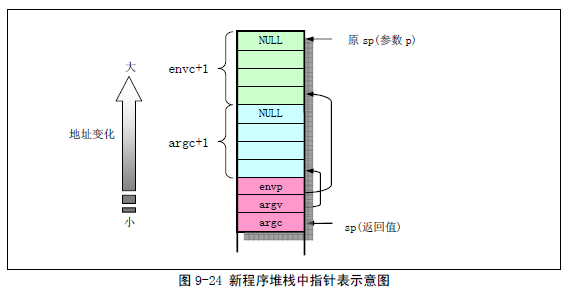 Linux 0.11 內核剖析:加載可執行二進制文件之 do_execve 全流程
最後剩下最核心的 do_execve。為簡化起見,這裡不展開 shell 腳本解釋相關的分支。 /* * do_execve() 函數執行一個新程序。 */ // e
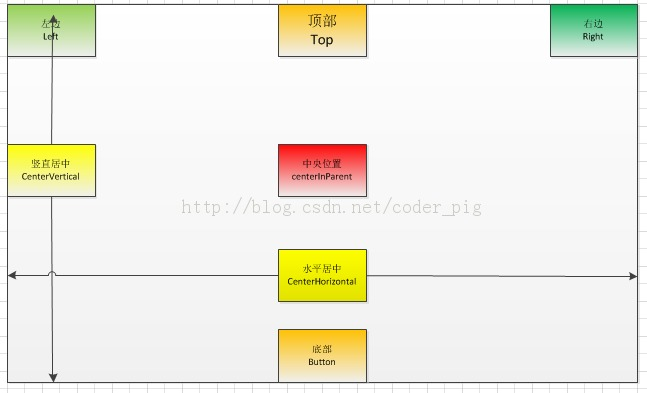 Android 開發重點難點(1):RelativeLayout 相對布局詳解
前言 之前的「Android 開發」系列以完成實驗為主線,一次會混進不少知識點,讀起來難免有點雜。因此另開了這個「重點難點」系列,把實驗過程中真正容易卡住、容易出錯的地方
 Android Studio 教學:將專案分享至 GitHub
Android Studio 分享專案到 GitHub 本文說明如何將 Android Studio 專案分享至 GitHub。流程包含安裝 Git、設定版本控制、登入