

編輯:關於 Android 開發
Android Support Library 更新到 23.2 版時,除了既有的 API 調整,還新增了幾個實用控制項,Bottom Sheet 就是其中之一。
這個控制項通常用於「從底部劃出表單」,Material Design 設計規範官網上就有這種設計模式。
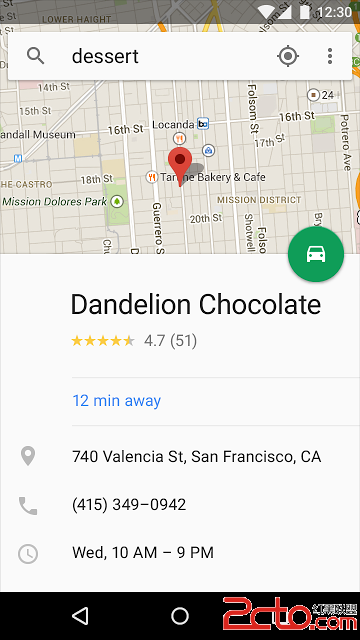
用法很直覺:只要為 CoordinatorLayout 的某個子 View 加上 BottomSheetBehavior 來描述行為即可。
<?xml version="1.0" encoding="utf-8"?>
<RelativeLayout
    android:id="@+id/bottom_sheet"
    android:layout_alignParentBottom="true"
    android:layout_height="wrap_content"
    android:layout_width="match_parent"
    app:behavior_hideable="true"
    app:behavior_peekHeight="@dimen/peek_height"
    app:layout_behavior="android.support.design.widget.BottomSheetBehavior">

    <include layout="@layout/layout_bottom_sheet" />
</RelativeLayout>
layout_bottom_sheet.xml 裡定義的是 sheet 本身的版面,內容完全依你的需求撰寫。
唯一必須注意的是:sheet 的版面必須是 CoordinatorLayout 的子 View。
這一點可以從原始碼看出來:
public static <V extends View> BottomSheetBehavior<V> from(V view) {
    ViewGroup.LayoutParams params = view.getLayoutParams();
    if (!(params instanceof CoordinatorLayout.LayoutParams)) {
        throw new IllegalArgumentException("The view is not a child of CoordinatorLayout");
    }
    CoordinatorLayout.Behavior behavior =
            ((CoordinatorLayout.LayoutParams) params).getBehavior();
    if (!(behavior instanceof BottomSheetBehavior)) {
        throw new IllegalArgumentException(
                "The view is not associated with BottomSheetBehavior");
    }
    return (BottomSheetBehavior<V>) behavior;
}
也就是說,若父容器不是 CoordinatorLayout,就會丟出 IllegalArgumentException。
STATE_COLLAPSED
折疊狀態。可透過 app:behavior_peekHeight 設定預設露出的高度。
STATE_SETTLING
拖拽鬆開後、抵達終點位置(collapsed 或 expanded)之前的過渡狀態。
STATE_EXPANDED
完全展開的狀態。
STATE_HIDDEN
隱藏狀態。預設為 false,可透過 app:behavior_hideable 屬性開啟。
STATE_DRAGGING
正在被拖拽的狀態。
監聽方式如下:
View bottomSheet = findViewById(R.id.bottom_sheet);
BottomSheetBehavior behavior = BottomSheetBehavior.from(bottomSheet);

behavior.setBottomSheetCallback(new BottomSheetBehavior.BottomSheetCallback() {
    @Override
    public void onStateChanged(View bottomSheet, int newState) {
        String state = "null";
        switch (newState) {
            case 1: state = "STATE_DRAGGING"; break;
            case 2: state = "STATE_SETTLING"; break;
            case 3: state = "STATE_EXPANDED"; break;
            case 4: state = "STATE_COLLAPSED"; break;
            case 5: state = "STATE_HIDDEN"; break;
        }
        Log.d("MainActivity", "newState:" + state);
    }

    @Override
    public void onSlide(View bottomSheet, float slideOffset) {
        // slideOffset 介於 -1(隱藏)到 1(完全展開)之間
    }
});
如果 Bottom Sheet 內部含有需要滑動的視圖,那個視圖必須支援嵌套滑動,否則手勢會互相打架。可用的選項包括 NestedScrollView、RecyclerView,或在 API 21 以上使用 ListView、ScrollView。
Support Library 23.2 另外提供了這兩個現成類別,用法與一般的 Dialog 幾乎相同,省下自己組 CoordinatorLayout 的功夫。
Button dialogBtn = (Button) findViewById(R.id.bottom_sheet_dialog_btn);
dialogBtn.setOnClickListener(new View.OnClickListener() {
    @Override
    public void onClick(View v) {
        BottomSheetDialog dialog = new BottomSheetDialog(BottomSheetDemo.this);
        dialog.setContentView(R.layout.bottom_sheet_dialog_layout);
        dialog.show();
    }
});
版面檔 bottom_sheet_dialog_layout.xml:
<?xml version="1.0" encoding="utf-8"?>
<LinearLayout
    android:layout_height="wrap_content"
    android:layout_width="match_parent"
    android:orientation="vertical"
    android:paddingLeft="15dp"
    android:paddingRight="15dp">

    <TextView
        android:gravity="center"
        android:layout_height="wrap_content"
        android:layout_width="wrap_content"
        android:minHeight="30dp"
        android:text="選取方式"
        android:textColor="?attr/colorAccent" />

    <Button
        android:gravity="center"
        android:id="@+id/photo"
        android:layout_height="wrap_content"
        android:layout_width="match_parent"
        android:minHeight="48dp"
        android:text="照片"
        android:textColor="@color/gray" />

    <View
        android:background="@color/color_gray"
        android:layout_height="1dp"
        android:layout_width="match_parent" />

    <Button
        android:gravity="center"
        android:id="@+id/camera"
        android:layout_height="wrap_content"
        android:layout_width="match_parent"
        android:minHeight="48dp"
        android:text="相機"
        android:textColor="@color/gray" />

    <View
        android:background="@color/color_gray"
        android:layout_height="1dp"
        android:layout_width="match_parent" />

    <Button
        android:gravity="center"
        android:id="@+id/tv_dialog_cancel"
        android:layout_height="wrap_content"
        android:layout_width="match_parent"
        android:text="取消"
        android:textColor="?attr/colorAccent" />
</LinearLayout>
效果圖:
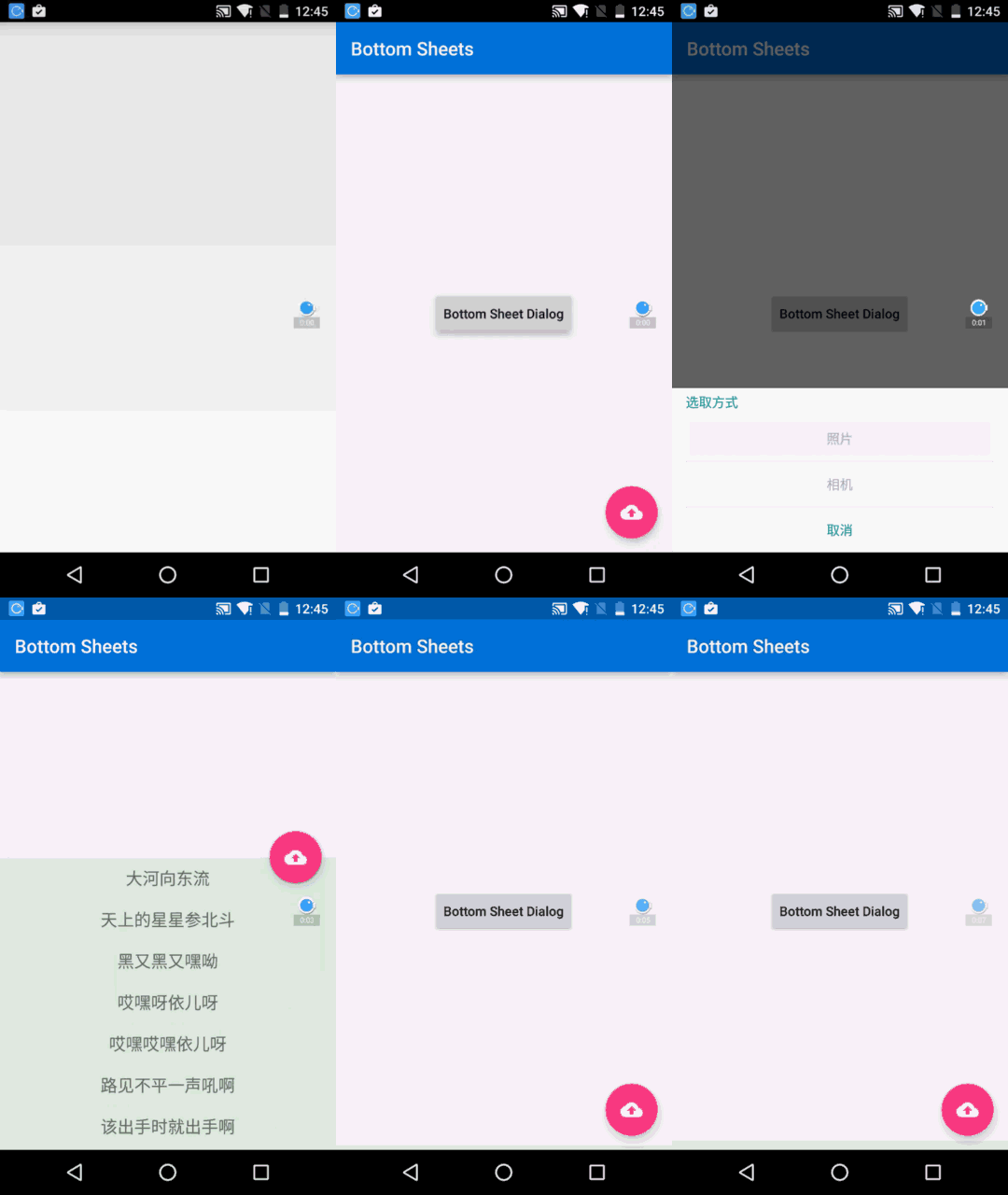
Bottom Sheet 介紹完畢。實務上它很適合承載「分享面板」、「篩選條件」、「更多操作」這類不需要佔滿整個螢幕、又希望使用者能一眼掌握選項的情境。
 Android 數據儲存方式解析:Preference、檔案、SQLite 與網路的取捨
Android 數據儲存的三個層次 對 Android 應用來說,資料儲存不只是「寫入」與「讀取」而已,而是會直接影響效能、相容性與使用者體驗。最常見的儲存目標可以分成檔
 谷歌電子市場(九):詳情界面實現
 1. 詳情頁(HomeDetailActivity) @Override protected void onCreate(Bundle
 Android APK 的安裝:用 Intent 拉起系統安裝器
要讓使用者點一下就裝 apk,最省事的方式是發一個 VIEW Intent,把檔案與 MIME 型別交給系統的 PackageInstaller 處理。先看它的清單檔:
 下拉刷新開源庫 PullToRefresh 使用教學
 PullToRefresh 是 Chrisbanes 開發的知名開源下拉刷新元件,支援下拉、上拉與雙向刷新,使用簡單