

編輯:關於 Android 開發
在開發類新聞或資訊聚合類應用時,頂部標籤頁與下方內容聯動滑動是常見的交互形式。本文以 TabLayout 與 ViewPager 的組合為例,示範如何快速實現頁卡滑動切換。
由於 TabLayout 屬於 android.support.design.widget 下的元件,需先在當前 module 的 build.gradle 中新增以下依賴:
compile 'com.android.support:design:23.0.1'
主佈局由 TabLayout 與 ViewPager 兩部分組成,前者負責展示標籤,後者承載可滑動的內容頁:
<?xml version="1.0" encoding="utf-8"?>
<LinearLayout xmlns:android="https://schemas.android.com/apk/res/android"
 xmlns:app="https://schemas.android.com/apk/res-auto"
 android:layout_width="match_parent"
 android:layout_height="match_parent"
 android:orientation="vertical">
 <android.support.design.widget.TabLayout
 android:id="@+id/tabs"
 android:layout_height="wrap_content"
 android:layout_width="match_parent"
 app:tabIndicatorColor="@android:color/holo_red_dark"
 app:tabSelectedTextColor="@android:color/holo_red_light"
 app:tabTextColor="@android:color/black"/>

 <android.support.v4.view.ViewPager
 android:layout_height="wrap_content"
 android:layout_width="match_parent"
 android:id="@+id/vp_view"
 />
</LinearLayout>
其中 tabIndicatorColor 設定游標顏色,tabSelectedTextColor 為選中標籤的文字色,tabTextColor 則是一般狀態下的文字色。
透過 TabLayout 與 ViewPager 的聯動,即可實現滑動頁卡,整體流程相當直觀:
package com.hcc.customviewpager;

import android.support.design.widget.TabLayout;
import android.support.v4.view.ViewPager;
import android.support.v7.app.AppCompatActivity;
import android.os.Bundle;
import android.view.LayoutInflater;
import android.view.View;

import java.util.ArrayList;

public class NewsHomePage extends AppCompatActivity {
 ArrayList<View> mViewList;
 ArrayList<String> mTabList;
 ViewPager mViewPager;
 TabLayout mTabLayout;
 LayoutInflater mLayoutInflater;
 View view_home;
 View view_intro;
 View view_info;

 @Override
 protected void onCreate(Bundle savedInstanceState) {
 super.onCreate(savedInstanceState);
 setContentView(R.layout.activity_main);
 findViews();
 initList();

 view_home = mLayoutInflater.inflate(R.layout.pager_home, null);
 view_info = mLayoutInflater.inflate(R.layout.page_information, null);
 view_intro = mLayoutInflater.inflate(R.layout.page_introduce, null);
 mViewList.add(view_home);
 mViewList.add(view_info);
 mViewList.add(view_intro);

 mTabList.add("個人信息");
 mTabList.add("網易新聞");
 mTabList.add("娛樂資訊");

 mTabLayout.setTabMode(TabLayout.MODE_FIXED);

 mTabLayout.setOnTabSelectedListener(new TabLayout.OnTabSelectedListener() {
 @Override
 public void onTabSelected(TabLayout.Tab tab) {
 mViewPager.setCurrentItem(tab.getPosition());
 }
 @Override
 public void onTabUnselected(TabLayout.Tab tab) {
 }
 @Override
 public void onTabReselected(TabLayout.Tab tab) {
 }
 });

 mTabLayout.addTab(mTabLayout.newTab().setText(mTabList.get(0)));
 mTabLayout.addTab(mTabLayout.newTab().setText(mTabList.get(1)));
 mTabLayout.addTab(mTabLayout.newTab().setText(mTabList.get(2)));

 CustomPagerAdapter myAdapter = new CustomPagerAdapter(mViewList, mTabList);
 mViewPager.setAdapter(myAdapter);
 mTabLayout.setupWithViewPager(mViewPager);
 mTabLayout.setTabsFromPagerAdapter(myAdapter);
 }

 private void initList() {
 mTabList = new ArrayList<String>();
 mViewList = new ArrayList<View>();
 }

 private void findViews() {
 mLayoutInflater = LayoutInflater.from(this);
 mTabLayout = (TabLayout) findViewById(R.id.tabs);
 mViewPager = (ViewPager) findViewById(R.id.vp_view);
 }
}
執行結果如下:
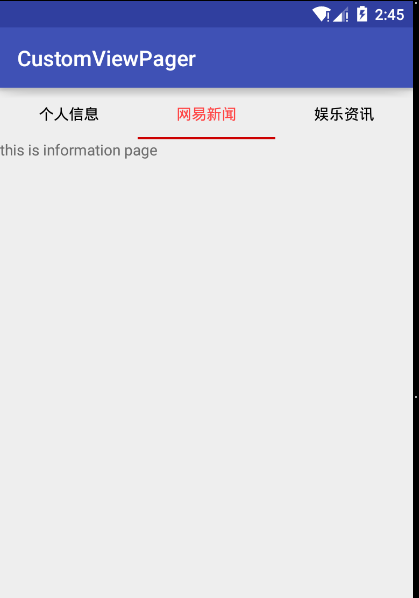
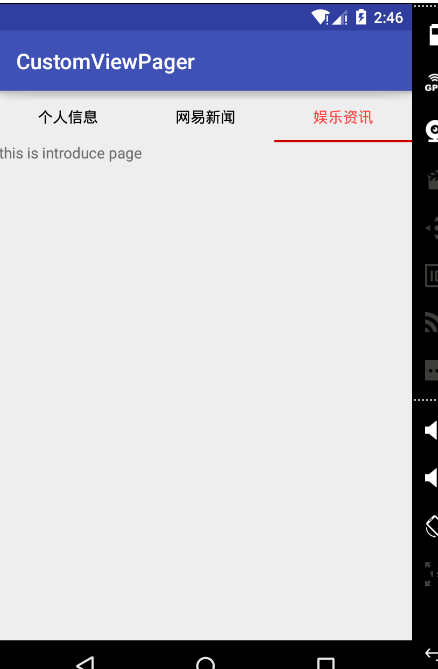
TabLayout.OnTabSelectedListener:用於監聽標籤被選中的事件。
TabLayout.TabLayoutOnPageChangeListener:可搭配 ViewPager 使用的頁面變更監聽器,用來同步切換 Tab;不過由於 TabLayout 已內建 setupWithViewPager 幫我們完成綁定,因此通常無需再自行實作。
以上就是 TabLayout 與 ViewPager 聯合實現滑動頁卡的完整思路,適合大量使用於多頁資訊切換的場景。
 Hive 1.2.1、Spark 與 Sqoop 整合安裝完整指南
本文以 Hive 1.2.1 為核心,說明如何在 Hadoop 2.7.1 上完成安裝與配置,並進一步整合 Spark 與 Sqoop。Hive 將以 Server 模
 10 個值得收藏的 Android 開發學習網站
 學習 Android 開發,除了官方文件,網路上其實還有不少優質資源。以下依序整理十個我認為值得放進書籤的網站,從入門教
 Adapter 是什麼?從 ArrayAdapter、SimpleAdapter 到自訂 BaseAdapter
 Adapter 是連接後端資料與前端顯示的適配器介面,是
 從零搭建流媒體直播服務器
需求:現在要搭建一台流媒體服務器,把主講人的電腦桌面與聲音即時直播給遠端觀看,要求延遲在 5 秒左右。理論上 RTSP、RTMP、HTTP 都能做直播與點播,但一般直播多