

編輯:關於 Android 開發
在 Android 應用中,若需要保存較大量或較持久的資料,除了資料庫與偏好設定,也可以選擇外部儲存空間。本文整理向 SD 卡或外部儲存空間寫入與讀取資料的基本做法。
在操作外部儲存之前,必須先確認儲存空間是否可用。可以使用 Environment.getExternalStorageState() 判斷目前狀態是否為 MEDIA_MOUNTED。只有當狀態正確時,才適合進行檔案讀寫。
寫入流程通常包含以下步驟:
1. 取得外部儲存根目錄。
2. 建立目標檔案的 File 物件。
3. 使用 FileOutputStream 將字串內容寫入檔案。
4. 關閉串流並釋放資源。
簡化示意如下:
if (Environment.getExternalStorageState().equals(Environment.MEDIA_MOUNTED)) {
    File directory = Environment.getExternalStorageDirectory();
    File file = new File(directory, "test.txt");
    FileOutputStream output = new FileOutputStream(file);
    output.write(content.getBytes());
    output.close();
}
讀取時,一樣需要先確認檔案是否存在。若檔案存在,可以使用 FileInputStream 搭配 BufferedReader 逐行讀取內容,再將結果拼接成完整字串。
簡化示意如下:
File file = new File(Environment.getExternalStorageDirectory(), "test.txt");
if (file.exists()) {
    FileInputStream input = new FileInputStream(file);
    BufferedReader reader = new BufferedReader(new InputStreamReader(input));
    String line;
    while ((line = reader.readLine()) != null) {
        buffer.append(line);
    }
    input.close();
}
在較新的 Android 版本中,外部儲存權限與目錄範圍有更嚴格的限制。實作時應確認 targetSdkVersion、執行期權限請求,以及是否適用儲存空間存取框架。此外,寫入檔案後最好加入例外處理,避免設備狀態異常造成應用崩潰。
 自定義帶圓角、黑色描邊、白色背景的背景樣式
首先在 drawable 文件夾下新建一個 xml 文件 solid_c9c9c9.xml:<?xml version=1
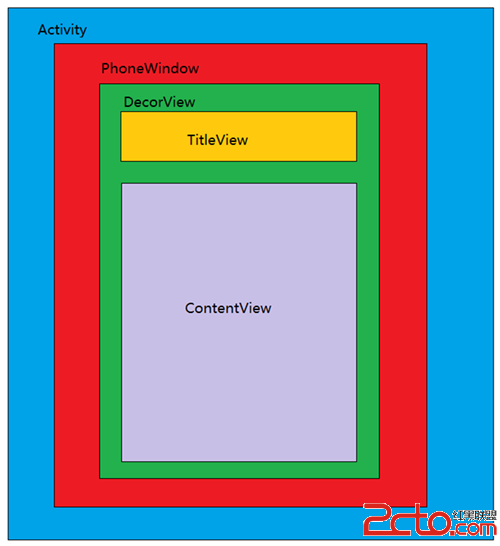 Android View 體系:從源碼理解 Activity 的構成
Activity 的視窗構成Activity 的 setContentView 並非直接把版面塞入 Activity,而是透過 Window 管理。呼叫流程setCont
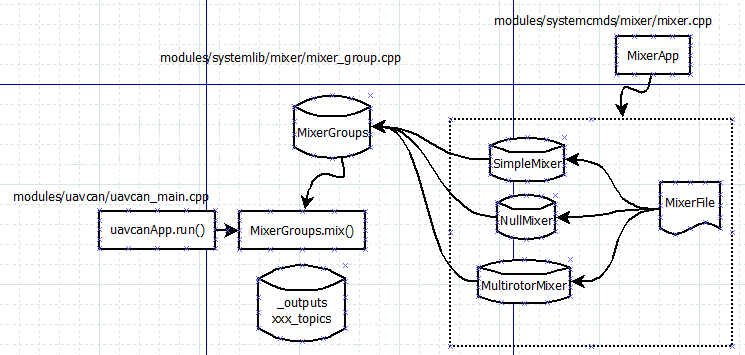 PX4 mixer 結構剖析:以 UAVCAN 為例
 mixer 是 PX4 系統層級的 app 指令,原始碼位於 Firmware/src/systemcmds/mix
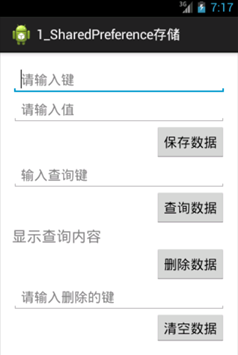 SharedPreferences 存儲詳解:使用方式、Editor 陷阱與安全建議
SharedPreferences 存儲詳解 SharedPreferences 是 Android 上用來存放輕量級配置數據的標準方案。它上手極簡單,但正因為簡單,很多