

編輯:關於 Android 開發
Toast 是 Android 中最常用的輕量級提示方式。默認的 Toast 只能顯示純文字,樣式單調。本篇文章將延續自定義 Toast 的思路,在提示框中加入圖標,讓提示信息更加直觀生動。
第一步:在 toast_customer.xml 中添加一個 ImageView 組件,用於顯示提示圖片。
<?xml version="1.0" encoding="utf-8"?>
<LinearLayout ......>
    <ImageView
        android:id="@+id/toastIcon"
        android:layout_width="24dp"
        android:layout_height="24dp"
        android:layout_gravity="center_vertical"/>
    ......
</LinearLayout>
第二步:在 LoginActivity.java 的自定義 Toast 調用方法中,添加對圖片組件的設置。
public class LoginActivity extends AppCompatActivity {
    ......
    private void showCustomerToast(final int icon, final String message){
        LayoutInflater inflater=getLayoutInflater();
        View layout=inflater.inflate(R.layout.toast_customer, (ViewGroup) findViewById(R.id.toast_layout_root));
        ......
        // 圖片組件的設置
        ImageView toastIcon=(ImageView)layout.findViewById(R.id.toastIcon);
        toastIcon.setBackgroundResource(icon);
        ......
        Toast toast=new Toast(getApplicationContext());
        toast.setDuration(Toast.LENGTH_LONG);
        toast.setView(layout);
        toast.show();
    }
    ......
}
第三步:在需要的地方調用該方法,根據登錄結果傳入不同的圖標。
public class LoginActivity extends AppCompatActivity {
    ......
    private class ViewOcl implements View.OnClickListener{
        public void onClick (View v){
            ......
            if (login_flag) {
                showCustomerToast(android.R.drawable.ic_menu_call,"歡迎登錄," + account);
                ......
            }
            else {
                showCustomerToast(android.R.drawable.ic_delete,"賬號或密碼錯誤");
            }
            break;
            ......
        }
    }
    ......
}
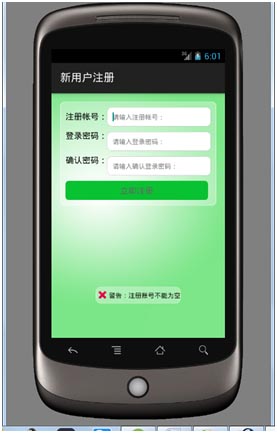
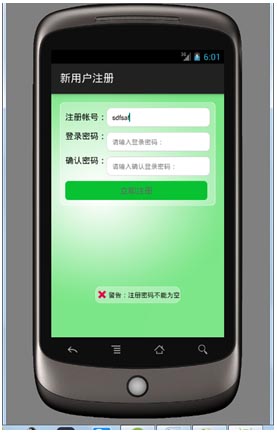
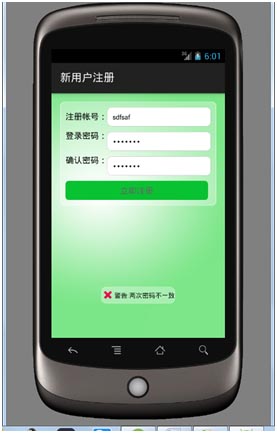
在註冊頁面的表單校驗中,同樣可以用自定義 Toast 替換原本單調的系統提示,讓錯誤提示更加醒目:
public class Register_Activity extends AppCompatActivity {
    ......
    private boolean checkform() {
        if (this.txtRegAccount.getText().toString() == null || this.txtRegAccount.getText().toString().length() == 0) {
            showCustomerToast(android.R.drawable.ic_delete, "警告:注冊賬號不能為空");
            return false;
        }
        if (this.txtRegPassword.getText().toString() == null || this.txtRegPassword.getText().toString().length() == 0) {
            showCustomerToast(android.R.drawable.ic_delete,"警告:注冊密碼不能為空");
            return false;
        }
        if (!(this.txtRegPassword.getText().toString()).equals((this.txtReRegPassword.getText().toString()))) {
            showCustomerToast(android.R.drawable.ic_delete,"警告:兩次密碼不一致");
            return false;
        }
        return true;
    }
    ......
}
運行後可以看到,帶圖標的 Toast 提示效果明顯優於系統默認樣式,能夠給用戶更清晰的視覺反饋。
 為下拉刷新列表加入 SwipeDismissListViewTouchListener 實作滑動刪除
 Android 的 SwipeToDismiss 是 GitHub
 解決 Bintray 上傳時 Repo 'maven' was not found 問題
使用 bintray-release 或 gradle-bintray-plugin 將 Android Library 上傳到 JCenter 時,常會遇到 HTTP/
 Android 開發實戰(十):應用程式間的四種溝通方式——Handler、通知欄、廣播與 Intent
Android 在程式之間通訊這件事上,介面設計得相當豐富。這一節把最常打交道的四種溝通方式一次講清楚:各自解決什麼問題、怎麼實作、又有哪些容易忽略的細節。 一、用 Ha
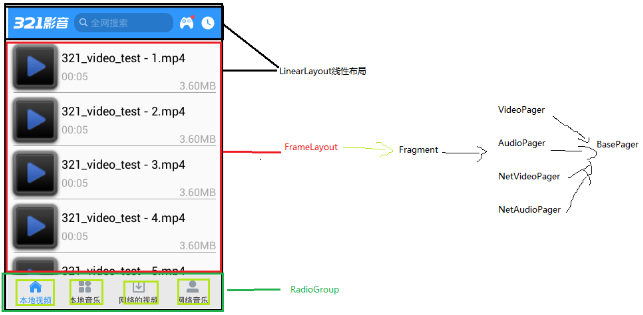 手機影音實戰(二):自定義標題欄與 ViewPager 懶加載優化
手機影音實戰(二):自定義標題欄與頁面懶加載 主頁面的第一步是搭骨架。這一節我們實現自定義標題欄,並解決 ViewPager 各子頁面重複初始化數據的性能問題。 一、