

編輯:關於 Android 開發
Service 的意義在於:當軟體畫面停止之後,它仍能在背景中持續運行。舉例來說,音樂播放器在我們離開後,往往仍希望在背景繼續播放音樂,這時 Service 就派上了用場。
Service 的生命週期與 Activity 頗為相似,同樣有啟動與停止。onCreate() 負責初始化配置,onDestroy() 負責釋放所有剩餘資源,整個生命週期發生在兩者之間。
startService() 用於啟動 Service;stopService() 用於停止 Service。當元件透過 startService() 啟動 Service 後,系統會呼叫 onStartCommand(),並接收 startService() 傳入的 Intent 值。
onStartCommand() 必須回傳一個整數值,用以說明 Service 在系統中的執行方式,常見的三種取值為:
START_NOT_STICKY:若系統在回傳後終止 Service,則不會重新建立,除非有等待中的 Intent。
START_STICKY:若系統終止 Service,會重啟 Service 並重新呼叫 onStartCommand(),但不會重新傳遞最新的 Intent。
START_REDELIVER_INTENT:若系統終止 Service,會重新建立 Service,並以最近傳入的 Intent 再次呼叫 onStartCommand()。
實作 Service 時,通常會在 onCreate() 中開啟一個執行緒持續輸出狀態,以便觀察 Service 是否運行中;onCreate() 只會被呼叫一次,而 onStartCommand() 每次啟動時都會被呼叫。
綁定 Service 的做法較為複雜,從 bindService(Intent service, ServiceConnection conn, int flags) 的參數即可看出:需要傳入 Intent、ServiceConnection 實例,以及一個標示位。整個綁定流程可分為三個步驟:
第一步:在 Service 中建立並實作 Binder 介面。此 Binder 可包含一個供用戶端呼叫的 public 方法,或回傳目前 Service 的實例(同樣含用戶端可呼叫的 public 方法),例如 MyBinder 透過 getService() 回傳 MyService.this。
第二步:在 onBind() 中回傳這個 Binder 實例。
第三步:在用戶端,於 onServiceConnected() 回呼中接收這個 Binder,並使用 Binder 所封裝、由 Service 提供的方法;同時别忘了在 onServiceDisconnected() 中將其清空。用戶端需先宣告 ServiceConnection 實例,並在合適的時機呼叫 unbindService() 進行解綁。
值得注意的是:使用 startService() 啟動的 Service 一旦開啟便與呼叫者無關,即使呼叫者的 Activity 退出也不影響 Service 運行;而使用 bindService() 綁定的 Service 則與呼叫者「同生共死」,呼叫者退出時 Service 也會隨之結束,但好處是 Activity 可以直接呼叫 Service 內的方法。
最後別忘了在 AndroidManifest.xml 中註冊這個 Service:
<service android:name="com.example.servicetest.MyService"></service>
 Android實用技術(5)——Service進階技巧:前台服務與IntentService
前面我們已經把Service的基礎用法摸清楚了,這一篇來看兩個實務上很常踩到的問題,以及對應的標準解法。 一、前台服務(Foreground Service) 問題:Se
 Android 與 3G 行動通訊時代的前言
 本章節作為 Android 學習的開場,先從 3G 行動通訊、智能手機軟體平台與 Android 系統的基本背景開始,幫助讀
 自定義SwipeRefreshLayout實現上拉加載:Android列表互動實作
從下拉刷新到上拉加載 在Android列表開發中,下拉重新整理與上拉載入更多資料是常見互動。SwipeRefreshLayout已提供下拉刷新能力,但沒有直接提供上拉加載
 Linux 效能監控利器 sar:CPU、記憶體、I/O 與負載全面解析
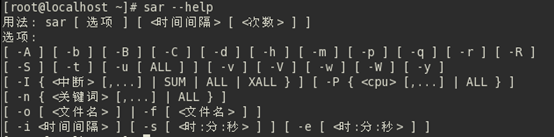
sar 的定位 sar(System Activity Reporter)是 Linux 上最全面的系統性能分析工具之一,能從多個面向回報系統活動:檔案讀寫、系統呼叫、磁