

編輯:關於 Android 開發
當 App 內嵌網頁時,若能即時顯示載入進度,使用體驗會更好。本文示範如何為 WebView 加上一條橫向的線性進度條,讓使用者清楚知道頁面目前的載入狀況。
效果圖:

先定義進度條的 drawable 資源,背景透明,進度部分則以綠色顯示。
<layer-list xmlns:android="https://schemas.android.com/apk/res/android" >
 <!-- 背景 -->
 <item android:id="@android:id/background">
 <shape>
 <solid android:color="@android:color/transparent" />
 </shape>
 </item>
 <!-- 進度條 -->
 <item android:id="@android:id/progress">
 <clip>
 <shape>
 <solid android:color="@android:color/holo_green_light" />
 </shape>
 </clip>
 </item>
</layer-list>
自定義一個 WebView,在內部加入 ProgressBar,並透過 WebChromeClient 的 onProgressChanged 回呼即時更新進度。
@SuppressWarnings("deprecation")
public class ProgressWebView extends WebView {
 private final static String TAG = ProgressWebView.class.getSimpleName();

 private ProgressBar progressBar;
 private Context context;

 public ProgressWebView(Context context, AttributeSet attrs) {
 super(context, attrs);
 this.context = context;
 progressBar = new ProgressBar(context, null, android.R.attr.progressBarStyleHorizontal);
 progressBar.setLayoutParams(new AbsoluteLayout.LayoutParams(AbsoluteLayout.LayoutParams.MATCH_PARENT, 3, 0, 0));
 progressBar.setProgressDrawable(getResources().getDrawable(R.drawable.wevbview_progressbar));
 addView(progressBar);
 setWebChromeClient(new WebChromeClient());
 }

 public class WebChromeClient extends android.webkit.WebChromeClient {
 @Override
 public void onProgressChanged(WebView view, int newProgress) {
 Log.d(TAG, "newProgress" + newProgress);
 if (newProgress == 100) {
 progressBar.setVisibility(GONE);
 } else {
 if (progressBar.getVisibility() == GONE)
 progressBar.setVisibility(VISIBLE);
 progressBar.setProgress(newProgress);
 }
 super.onProgressChanged(view, newProgress);
 }

 // 處理javascript中的console.log
 @Override
 public boolean onConsoleMessage(ConsoleMessage cm){
 android.util.Log.d(TAG, "webview console " + cm.lineNumber() + " of " + cm.sourceId() + " : " + cm.message());
 return true;
 }

 // 處理javascript中的alert()
 @Override
 public boolean onJsAlert(WebView view, String url, String message, JsResult result) {
 result.cancel();
 return true;
 }

 }

 @Override
 protected void onScrollChanged(int l, int t, int oldl, int oldt) {
 LayoutParams lp = (LayoutParams) progressBar.getLayoutParams();
 lp.x = l;
 lp.y = t;
 progressBar.setLayoutParams(lp);
 super.onScrollChanged(l, t, oldl, oldt);
 }
}在 Activity 中取得自定義的 ProgressWebView,並開啟 JavaScript 支援。
ProgressWebView webView = (ProgressWebView)findViewById(R.id.them_webview);
webView.getSettings().setJavaScriptEnabled(true);
接著設定下載監聽器,並載入目標網址。
webView.setDownloadListener(new DownloadListener() {
 @Override
 public void onDownloadStart(String url, String userAgent, String contentDisposition, String mimetype, long contentLength) {
 if (url != null && url.startsWith("https://"))
 startActivity(new Intent(Intent.ACTION_VIEW, Uri.parse(url)));
 }
});
webView.loadUrl("https://www.cnblogs.com/hubli/p/4835549.html");在布局檔中直接使用自定義的 ProgressWebView 控制項即可。
<com.etoury.webviewprogress.ProgressWebView
 android:id="@+id/them_webview"
 android:layout_width="match_parent"
 android:layout_height="match_parent" />
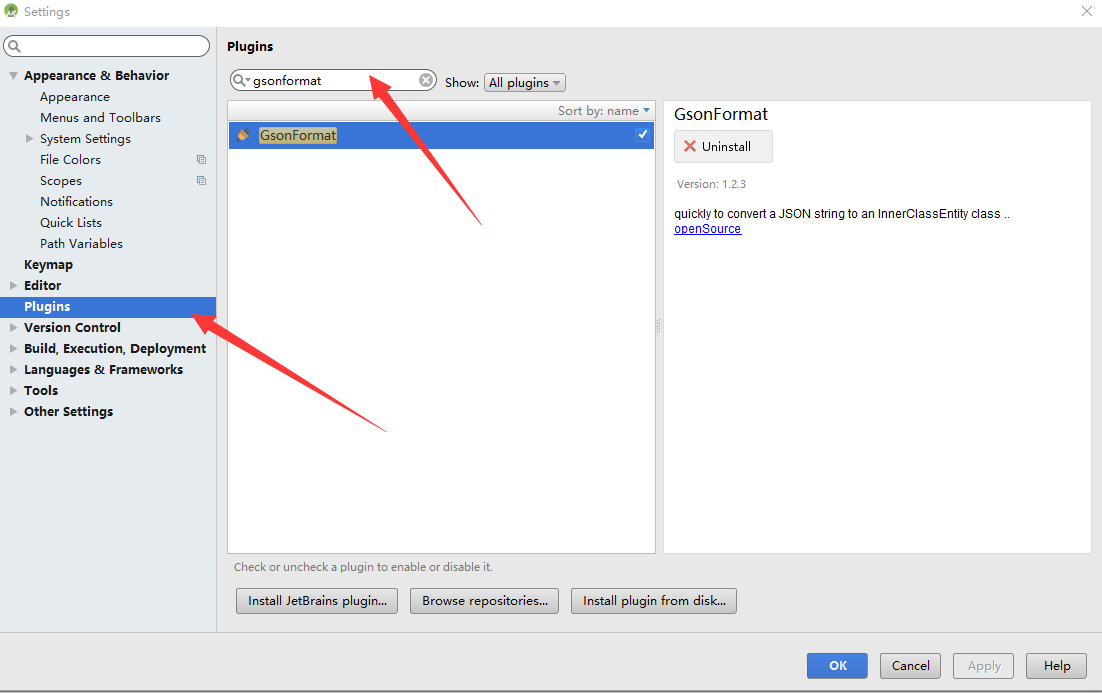 使用 Android Studio GsonFormat 外掛快速解析複雜 JSON
GsonFormat 外掛可以把 JSON 字串快速轉成 Java Bean,大幅減少手寫欄位與內部類別的時間,特別適合處理巢狀結構複雜的回應。安裝與使用先到 Setti
 SpannableString 實作:讓 TextView 裡的某幾個字可以點擊
核心概念 Android 中各種文字樣式(Span)都是透過 SpannableString 來封裝的。流程固定為三步:建立 Span → 把 Span 放進 Spann
 自定義SwipeRefreshLayout實現上拉加載:Android列表互動實作
從下拉刷新到上拉加載 在Android列表開發中,下拉重新整理與上拉載入更多資料是常見互動。SwipeRefreshLayout已提供下拉刷新能力,但沒有直接提供上拉加載
 Xamarin.Android 日誌實作:封裝可寫入檔案的日誌元件
 無論哪個平台、開發哪種應用,日誌都是少不了的。在 Xamarin 進行行動開發時,為了更好地除錯與記錄