

編輯:關於 Android 開發
它會先按照各控件聲明的尺寸進行分配,再將剩餘空間依據 layout_weight 的比例進行分配。
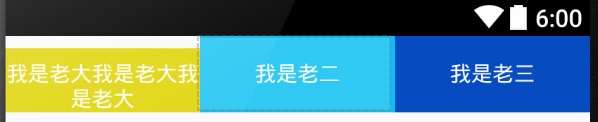
程式碼:
<LinearLayout android:gravity="center" android:layout_height="wrap_content" android:layout_width="match_parent" android:orientation="horizontal" xmlns:android="https://schemas.android.com/apk/res/android"> <TextView android:background="#e1d611" android:gravity="center" android:layout_height="50dp" android:layout_weight="1" android:layout_width="0dp" android:text="我是老大我是老大我是老大" android:textColor="#ffffff" android:visibility="gone"> <TextView android:background="#09c0f2" android:gravity="center" android:layout_height="50dp" android:layout_weight="1" android:layout_width="0dp" android:text="我是老二" android:textColor="#ffffff"> <TextView android:background="#074bc1" android:gravity="center" android:layout_height="50dp" android:layout_weight="1" android:layout_width="0dp" android:text="我是老三" android:textColor="#ffffff" android:visibility="gone"> </TextView></TextView></TextView></LinearLayout>
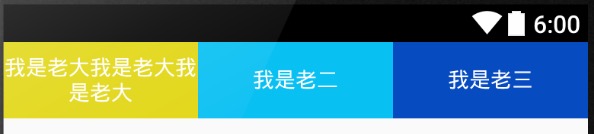
在父控件中加上:
android:baselineAligned="false"
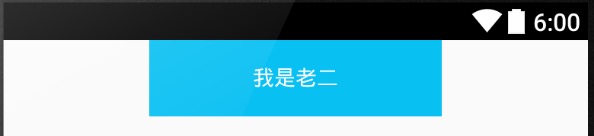
在父控件中加入:
android:weightSum="2"
程式碼:
<LinearLayout android:baselineAligned="false" android:gravity="center" android:layout_height="wrap_content" android:layout_width="match_parent" android:orientation="horizontal" android:weightSum="2" xmlns:android="https://schemas.android.com/apk/res/android"> <TextView android:background="#09c0f2" android:gravity="center" android:layout_height="50dp" android:layout_weight="1" android:layout_width="0dp" android:text="我是老二" android:textColor="#ffffff"> </TextView></LinearLayout>
 Android 通知欄基本用法:建立普通通知並加入點擊跳轉
 Notification 是應用程式在常規介面之外向使用者顯示訊息的機制。訊息會先出現在通知欄,使用者可下拉
 Android 之意圖(Intent)的使用詳解
 Intent 常見的動作有:MAIN_ACTION(主視圖)、VIEW_ACTION(查看)、EDIT_ACTION(修
 UI 設計師必備:搞懂 Android 螢幕解析度、密度與 dp 換算
 不少設計師與工程師都被安卓五花八門的螢幕搞得頭昏,本文把這塊知識重新梳理,一次講清楚。 1、幾個基
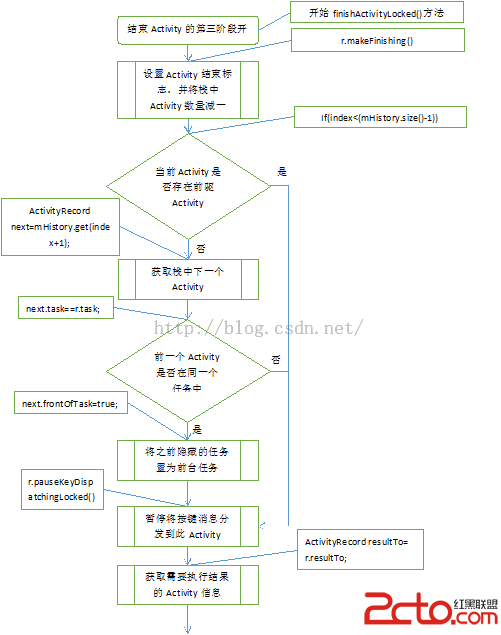 深入解析Android四大組件(八)——Activity消亡的四個階段全透視
 當我們呼叫關閉一個Activity時,背後的ActivityManagerService究竟