

編輯:中階開發
網路上關於 ViewGroup 的完整範例並不多。早期的 Android Home 就用到了這個類別,相比 GridView,ViewGroup 給你的自由度大得多——因為版面配置與子元件排布的邏輯完全由你自己決定。以下是一段經典的實作,讓子 View 在保持寬高比的前提下盡量填滿並置中。
public class FitCenterFrameLayout extends ViewGroup {

    public FitCenterFrameLayout(Context context) {
        super(context);
    }

    public FitCenterFrameLayout(Context context, AttributeSet attrs) {
        super(context, attrs);
    }
    @Override
    protected void onMeasure(int widthMeasureSpec, int heightMeasureSpec) {
        final int width = resolveSize(getSuggestedMinimumWidth(), widthMeasureSpec);
        final int height = resolveSize(getSuggestedMinimumHeight(), heightMeasureSpec);
        setMeasuredDimension(width, height);

        int childWidthSpec = MeasureSpec.makeMeasureSpec(width, MeasureSpec.UNSPECIFIED);
        int childHeightSpec = MeasureSpec.makeMeasureSpec(height, MeasureSpec.UNSPECIFIED);

        int childCount = getChildCount();
        for (int i = 0; i < childCount; i++) {
            getChildAt(i).measure(childWidthSpec, childHeightSpec);
        }
    }
這裡刻意用 UNSPECIFIED 去量子 View,因為最終尺寸要由父容器換算後決定,不能讓子 View 自己挑大小。
    @Override
    protected void onLayout(boolean changed, int l, int t, int r, int b) {
        final int childCount = getChildCount();

        final int parentLeft = getPaddingLeft();
        final int parentTop = getPaddingTop();
        final int parentRight = r - l - getPaddingRight();
        final int parentBottom = b - t - getPaddingBottom();

        final int parentWidth = parentRight - parentLeft;
        final int parentHeight = parentBottom - parentTop;

        int unpaddedWidth, unpaddedHeight, parentUnpaddedWidth, parentUnpaddedHeight;
        int childPaddingLeft, childPaddingTop, childPaddingRight, childPaddingBottom;

        for (int i = 0; i < childCount; i++) {
            final View child = getChildAt(i);
            if (child.getVisibility() == GONE) {
                continue;
            }

            childPaddingLeft = child.getPaddingLeft();
            childPaddingTop = child.getPaddingTop();
            childPaddingRight = child.getPaddingRight();
            childPaddingBottom = child.getPaddingBottom();

            unpaddedWidth = child.getMeasuredWidth() - childPaddingLeft - childPaddingRight;
            unpaddedHeight = child.getMeasuredHeight() - childPaddingTop - childPaddingBottom;

            parentUnpaddedWidth = parentWidth - childPaddingLeft - childPaddingRight;
            parentUnpaddedHeight = parentHeight - childPaddingTop - childPaddingBottom;

            if (parentUnpaddedWidth * unpaddedHeight > parentUnpaddedHeight * unpaddedWidth) {
                final int scaledChildWidth = unpaddedWidth * parentUnpaddedHeight
                        / unpaddedHeight + childPaddingLeft + childPaddingRight;
                child.layout(
                        parentLeft + (parentWidth - scaledChildWidth) / 2,
                        parentTop,
                        parentRight - (parentWidth - scaledChildWidth) / 2,
                        parentBottom);
            } else {
                final int scaledChildHeight = unpaddedHeight * parentUnpaddedWidth
                        / unpaddedWidth + childPaddingTop + childPaddingBottom;
                child.layout(
                        parentLeft,
                        parentTop + (parentHeight - scaledChildHeight) / 2,
                        parentRight,
                        parentTop + (parentHeight + scaledChildHeight) / 2);
            }
        }
    }
}
那段看似複雜的 if 判斷,其實是透過交叉相乘比較兩個比例:parentUnpaddedWidth * unpaddedHeight 與 parentUnpaddedHeight * unpaddedWidth。哪邊比較大,就代表寬度是受限的那一維,於是反推出縮放後的寬度,再用剩下的空間除以二做左右居中;反之則以高度為基準,做上下居中。用乘法而非除法比較,是為了避開整數除法造成的精度損失,這個細節值得學起來。
另外注意 GONE 的子 View 直接跳過,以及所有計算都扣掉 padding 後再進行——這兩點是自訂 ViewGroup 時最常被忽略的地方。
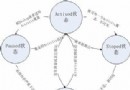 Android Activity 指南:生命週期、Intent 通訊與 Intent Filter
Activity 的基本狀態 Android 中的 Activity 由系統管理,常見狀態包含執行中、暫停、停止與刪除。當新 Activity 進入前景,舊 Activi
 混合式應用程式模型打造 WebSphere Commerce 行動 App(上)
摘要:本文說明「混合式應用程式」(hybrid application)這個編程模型與其他行動方案差異在哪,並透過兩個實作案例,示範如何用它為 WebSphere Com
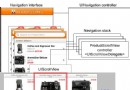 混合式應用程式模型打造 WebSphere Commerce 行動 App(下)
接續上篇,本文說明 iPhone 版本的四個進階能力,並完整介紹 Android 版本的實作方式。 可翻頁的產品詳情畫面 為了讓使用者能左右滑動瀏覽產品,我們自訂了一個
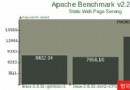 Linux BFS 調度器解析:設計理念、效能爭議與實作原理
摘要:BFS 是一款專為 Linux 桌面環境設計的核心調度器,基於 Staircase Deadline 與 EEVDF 演算法,支援 Linux 2.6.31 之後的