

編輯:中階開發
這一篇是承接上表的續編,把剩下的 android.permission 權限常數,以及 Intent 相關的 Action、Category 與啟動旗標整理成可快速查閱的形式。宣告方式不變:在 AndroidManifest.xml 中寫入 <uses-permission>,程式才有機會觸及對應的敏感資源。
android.permission.CALL_PHONEandroid.permission.DUMPandroid.permission.FOTA_UPDATEandroid.permission.GET_TASKSandroid.permission.INSTALL_PACKAGESandroid.permission.INTERNAL_SYSTEM_WINDOWandroid.permission.RAISED_THREAD_PRIORITYandroid.permission.READ_CONTACTSandroid.permission.RECEIVE_SMSandroid.permission.RECEIVE_WAP_PUSHandroid.permission.RUN_INSTRUMENTATIONandroid.permission.SET_ACTIVITY_WATCHERandroid.permission.SIGNAL_PERSISTENT_PROCESSESandroid.permission.SYSTEM_ALERT_WINDOWandroid.permission.WRITE_CONTACTSandroid.permission.WRITE_SETTINGS建構子僅為 public Manifest.permission(),實務上不會直接 new,一律透過字串常數引用。
以下字串可直接寫進意圖的 action 欄位,或於 AndroidManifest 的 <intent-filter> 中宣告。
android.intent.action.ADD_SHORTCUT 在系統中新增一個捷徑。android.intent.action.ALL_APPS 列舉所有可用的應用程式(無輸入)。android.intent.action.ANSWER 接聽來電。android.intent.action.BATTERY_CHANGED 廣播:充電狀態或電量改變。android.intent.action.BOOT_COMPLETED 廣播:開機完成,僅發送一次。android.intent.action.BUG_REPORT 顯示錯誤回報畫面。android.intent.action.CALL 撥打資料中指定的號碼。android.intent.action.CFF 廣播:語音來話轉接狀態改變。android.intent.action.CLEAR_CREDENTIALS 清除登入憑證。android.intent.action.CONFIGURATION_CHANGED 廣播:裝置組態(例如語系)改變。android.intent.action.DATA_ACTIVITY 廣播:資料收發狀態改變。android.intent.action.DATA_STATE 廣播:資料連線狀態改變。android.intent.action.DATE_CHANGED 廣播:日期被改動。android.intent.action.VIEW 在資料上執行的標準動作,等同 VIEW。android.intent.action.DELETE 從容器中刪除指定資料。android.intent.action.DIAL 把資料中的號碼帶到撥號介面。android.intent.action.EDIT 為指定資料顯示可編輯的介面。android.intent.action.EMERGENCY_DIAL 撥打緊急號碼。android.intent.action.GET_CONTENT 讓使用者挑選一筆資料並回傳。android.intent.action.INSERT 在容器中插入一筆空資料。android.intent.action.LOGIN 取得登入憑證。android.intent.action.MAIN 作為主入口啟動,不需附帶資料。android.intent.action.MEDIABUTTON 廣播:使用者按下媒體鍵。android.intent.action.MEDIA_MOUNTED 廣播:外部儲存已插入並掛載完成。android.intent.action.MEDIA_REMOVED 廣播:外部儲存被移除。android.intent.action.MEDIA_EJECT 廣播:使用者要求退出記憶卡。android.intent.action.MEDIA_BAD_REMOVAL 廣播:記憶卡已拔出但掛載點尚未解除。android.intent.action.MEDIA_UNMOUNTED 廣播:記憶卡存在但尚未掛載。android.intent.action.MEDIA_SHARED 廣播:記憶卡被共享為 USB 大量儲存裝置,掛載已解除。android.intent.action.MEDIA_SCANNER_STARTED、..._FINISHED 廣播:媒體掃描開始與結束。android.intent.action.MWI 廣播:語音留言等待狀態改變。android.intent.action.NETWORK_TICKLE_RECEIVED 廣播:收到新的網路喚醒通知。android.intent.action.PACKAGE_ADDED、..._REMOVED 廣播:套件被安裝或移除。android.intent.action.PHONE_STATE 廣播:通話狀態改變。android.intent.action.PICK 從資料中挑一項並回傳。android.intent.action.PICK_ACTIVITY 挑選一個 Activity,回傳其類別名稱。android.intent.action.PROVIDER_CHANGED 廣播:Content Provider 有變動。android.intent.action.RUN 直接執行指定資料對應的應用。android.intent.action.SCREEN_OFF、..._ON 廣播:螢幕關閉與開啟。android.intent.action.SENDTO 向資料指定的收件者送出訊息。android.intent.action.SERVICE_STATE 廣播:電信服務狀態改變。android.intent.action.SETTINGS 開啟系統設定(無輸入)。android.intent.action.SIG_STR 廣播:訊號強度改變。android.intent.action.STATISTICS_REPORT、..._STATE_CHANGED 統計資訊回報與服務狀態變更。android.intent.action.SYNC 執行資料同步。android.intent.action.TIMEZONE_CHANGED 廣播:時區改變。android.intent.action.TIME_SET、..._TIME_TICK 廣播:時間被重設,以及時間正常流動。android.intent.action.UMS_CONNECTED、..._DISCONNECTED 廣播:進入與退出 USB 大量儲存模式。android.intent.action.VIEW 向使用者顯示指定資料。android.intent.action.WALLPAPER_CHANGED、..._SETTINGS 廣播:桌布變更;以及開啟桌布挑選設定。android.intent.action.WEB_SEARCH 執行網頁搜尋。android.intent.action.XMPP_CONNECTED、..._DISCONNECTED 廣播:XMPP 連線建立與斷開。android.intent.category.ALTERNATIVE 此 Activity 是使用者目前瀏覽資料的一項替代操作。android.intent.category.SELECTED_ALTERNATIVE 針對使用者「已選中」的資料的一項替代操作。android.intent.category.BROWSABLE 能安全地被瀏覽器喚起。android.intent.category.DEFAULT 當此 Activity 是按下資料時的預設動作選項,必須標上。android.intent.category.HOME 主畫面,裝置啟動後顯示的第一個 Activity。android.intent.category.LAUNCHER 應顯示在頂層啟動器中。android.intent.category.EMBED 可在母 Activity 內運行。android.intent.category.GADGET 可嵌入到託管它的 Activity 中。android.intent.category.TAB 作為 TabActivity 中的一個分頁。android.intent.category.WALLPAPER 能為裝置設定桌布。android.intent.category.PREFERENCE、..._DEVELOPMENT_PREFERENCE 分別代表一般設定面板與開發設定面板。另有兩個附加資料鍵常搭配使用:android.intent.extra.INTENT(與 PICK_ACTIVITY、ADD_SHORTCUT 搭配,描述要顯示或要新增的意圖)與 android.intent.extra.LABEL(捷徑的名稱標籤),以及 android.intent.extra.TEMPLATE(新記錄的初始化範本)。
這些整數常數透過 Intent.setFlags() 設定,會改變 Activity 在任務堆疊中的行為:
最後提醒:這份清單反映的是 Android 早期版本的 API。後續版本對通訊錄、簡訊、位置、相機等敏感權限改採執行期動態請求模型,其中 READ_LOGS、WRITE_SETTINGS、SYSTEM_ALERT_WINDOW 等更被歸入特殊權限,需另走 Settings 頁面引導使用者授權。查閱時請以目前 SDK 的 Manifest.permission 文件為準。
 Android 3.0 Honeycomb 底層細節:硬體加速、Renderscript 與平板 UI
Honeycomb:Android 平板時代的起點 Android 3.0,代號 Honeycomb,是 Android 第一個主要針對平板設計的版本,也是首個導入硬體加
 Android 自定義按鈕:背景、9-patch 與異形按鈕實作
在 Android 應用開發中,系統預設的 Button 樣式往往較為制式。若想提升產品的視覺質感與操作體驗,通常需要自定義按鈕背景、形狀與狀態變化。本文整理三種常見做法
 Android 3.x 平板相容性設計:讓 1.5~2.3 的 App 跑在 Honeycomb 上
Android 3.x(Honeycomb)是為平板而生的一代,螢幕尺寸與解析度都遠高於早期手機,因此舊有應用要在平板上正確顯示,需要做一些資源與版面配置上的調整。以下說
 Android 佈局入門(一):LinearLayout 線性佈局
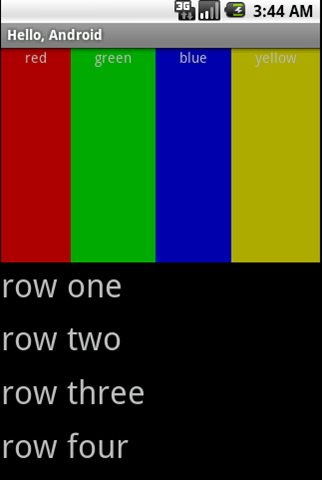
在 Android 介面開發中,單一畫面往往包含許多控制項。如何安排這些控制項的位置與排列方式,是佈局系統最重要的任務之一。Android 提供了多種 Layout,其中