編輯:Android技術基礎
本節我們介紹的是Vibrator(振動器),是手機自帶的振動器,別去百度直接搜針振動器,因為 你的搜索結果可能是如圖所示的神秘的道具,或者其他神秘道具:
嗯,說回本節介紹的Vibrator,其實就是Android給我們提供的用於機身震動的一個服務! 比如前面我們的Notification中可以設置震動,當收到推送消息的時候我們可以設置震動 提醒,游戲必備,比如"打飛機"的游戲,當你的飛機給人打爆的時候,會長震動!
下面我們就來寫個簡單的例子,來熟悉下這個Vibrator的用法!
官方API文檔:Vibrator
Vibrator vb = (Vibrator)getSystemService(Service.VIBRATOR_SERVICE);
- abstract void cancel():關閉或者停止振動器
- abstract boolean hasVibrator():判斷硬件是否有振動器
- void vibrate(long milliseconds):控制手機振動為milliseconds毫秒
- void vibrate(long[] pattern,int repeat):指定手機以pattern指定的模式振動! 比如:pattern為new int[200,400,600,800],就是讓他在200,400,600,800這個時間交替啟動與關閉振動器! 而第二個則是重復次數,如果是-1的只振動一次,如果是0的話則一直振動 還有其他兩個方法用得不多~ 對了,使用振動器還需要在AndroidManifest.xml中添加下述權限: <uses-permission android:name="android.permission.VIBRATE"/>
對於Vibrator用的最廣泛的莫過於所謂的手機按摩器類的app,在app市場一搜,一堆,筆者隨便下了 幾個下來瞅瞅,都是大同小異的,這點小玩意竟然有8W多的下載量...好吧,好像也不算多, 不過普遍功能都是切換振動頻率來完成,而所謂的按摩效果,是否真的有效就不得而知了, 那麼接下來我們就來實現一個簡單的按摩器吧! 核心其實就是:vibrate()中的數組的參數,根據自己需求寫一個數組就可以了! 下述代碼需要在真機上進行測試!
運行效果圖:
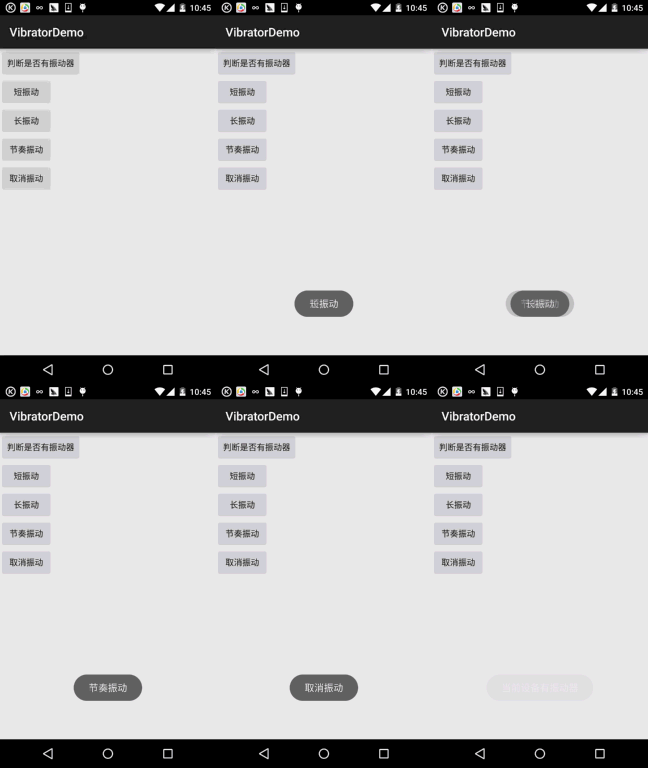
實現代碼:
簡單的布局文件,五個按鈕:activity_main.xml:
<LinearLayout xmlns:android="http://schemas.android.com/apk/res/android"
    android:layout_width="match_parent"
    android:layout_height="match_parent"
    android:orientation="vertical">

    <Button
        android:id="@+id/btn_hasVibrator"
        android:layout_width="wrap_content"
        android:layout_height="wrap_content"
        android:text="判斷是否有振動器" />


    <Button
        android:id="@+id/btn_short"
        android:layout_width="wrap_content"
        android:layout_height="wrap_content"
        android:text="短振動" />

    <Button
        android:id="@+id/btn_long"
        android:layout_width="wrap_content"
        android:layout_height="wrap_content"
        android:text="長振動" />

    <Button
        android:id="@+id/btn_rhythm"
        android:layout_width="wrap_content"
        android:layout_height="wrap_content"
        android:text="節奏振動" />

    <Button
        android:id="@+id/btn_cancle"
        android:layout_width="wrap_content"
        android:layout_height="wrap_content"
        android:text="取消振動" />
</LinearLayout>
接著是MainActivity.java部分:
public class MainActivity extends AppCompatActivity implements View.OnClickListener {

    private Button btn_hasVibrator;
    private Button btn_short;
    private Button btn_long;
    private Button btn_rhythm;
    private Button btn_cancle;
    private Vibrator myVibrator;
    private Context mContext;

    @Override
    protected void onCreate(Bundle savedInstanceState) {
        super.onCreate(savedInstanceState);
        setContentView(R.layout.activity_main);
        //獲得系統的Vibrator實例:
        myVibrator = (Vibrator) getSystemService(Service.VIBRATOR_SERVICE);
        mContext = MainActivity.this;
        bindViews();
    }

    private void bindViews() {
        btn_hasVibrator = (Button) findViewById(R.id.btn_hasVibrator);
        btn_short = (Button) findViewById(R.id.btn_short);
        btn_long = (Button) findViewById(R.id.btn_long);
        btn_rhythm = (Button) findViewById(R.id.btn_rhythm);
        btn_cancle = (Button) findViewById(R.id.btn_cancle);

        btn_hasVibrator.setOnClickListener(this);
        btn_short.setOnClickListener(this);
        btn_long.setOnClickListener(this);
        btn_rhythm.setOnClickListener(this);
        btn_cancle.setOnClickListener(this);
    }


    @Override
    public void onClick(View v) {
        switch (v.getId()) {
            case R.id.btn_hasVibrator:
                Toast.makeText(mContext, myVibrator.hasVibrator() ? "當前設備有振動器" : "當前設備無振動器",
                        Toast.LENGTH_SHORT).show();
                break;
            case R.id.btn_short:
                myVibrator.cancel();
                myVibrator.vibrate(new long[]{100, 200, 100, 200}, 0);
                Toast.makeText(mContext, "短振動", Toast.LENGTH_SHORT).show();
                break;
            case R.id.btn_long:
                myVibrator.cancel();
                myVibrator.vibrate(new long[]{100, 100, 100, 1000}, 0);
                Toast.makeText(mContext, "長振動", Toast.LENGTH_SHORT).show();
                break;
            case R.id.btn_rhythm:
                myVibrator.cancel();
                myVibrator.vibrate(new long[]{500, 100, 500, 100, 500, 100}, 0);
                Toast.makeText(mContext, "節奏振動", Toast.LENGTH_SHORT).show();
                break;
            case R.id.btn_cancle:
                myVibrator.cancel();
                Toast.makeText(mContext, "取消振動", Toast.LENGTH_SHORT).show();
        }
    }
}
對了,別漏了振動器權限哦!
<uses-permission android:name="android.permission.VIBRATE"/>
VibratorDemo.zip
好的,本節我們學習了Vibrator(振動器)的基本使用,代碼非常簡單,還不趕緊加入到 你的APP中,讓你的應用HI起來~,嗯,就說這麼多,謝謝,天色不早,小豬還是趕緊回家吧! 畢竟我還是個黃花閨仔!萬一濕身了就不好了~
 8.3.2 繪圖類實戰示例
本節引言:前兩節我們學了Bitmap和一些基本的繪圖API的屬性以及常用的方法,但心裡總覺得有點不踏實,總得寫點什麼加深下映像是吧,嗯,本節我們就來
 1.0.1 2015年最新Android基礎入門教程目錄
前言:關於《2015年最新Android基礎入門教程目錄》終於在今天落下了帷幕,全套教程共148節已編寫完畢,附上目錄,關於教程的由來,筆者的情況和
 第64章、XML文件-XML Pull解析(從零開始學Android)
在android系統中,很多資源文件中,很多都是xml格式,在android系統中解析這些xml的方式,是使用pul解析器進行解析的,它和sax解析一樣(個人感覺要比sa
 第61章、資源文件之存取操作(從零開始學Android)
Android資源主要包括文本字符串(strings)、顏色(colors)、數組(arrays)、動畫(anim)、布局(layout)、圖像和圖標(drawable)