編輯:關於android開發
開發步驟:
 1 <?xml version="1.0" encoding="utf-8"?>
 2 <LinearLayout ......>
 3
 4     <ImageView android:id="@+id/toastIcon"
 5         android:layout_width="24dp"
 6         android:layout_height="24dp"
 7         android:layout_gravity="center_vertical"/>
 8
 9 ......
10
11 </LinearLayout>
 1 public class LoginActivity extends AppCompatActivity {
 2
 3     ........
 4
 5     private void showCustomerToast(final int icon, final String message){
 6         LayoutInflater inflater=getLayoutInflater();
 7         View layout=inflater.inflate(R.layout.toast_customer, (ViewGroup) findViewById(R.id.toast_layout_root));
 8         ......
 9
10         //圖片組件的設置
11         ImageView toastIcon=(ImageView)layout.findViewById(R.id.toastIcon);
12         toastIcon.setBackgroundResource(icon);
13
14         ......
15
16         Toast toast=new Toast(getApplicationContext());
17         toast.setDuration(Toast.LENGTH_LONG);
18         toast.setView(layout);
19         toast.show();
20     }
21    ......
22 }
 1 public class LoginActivity extends AppCompatActivity {
 2     ......
 3     private  class ViewOcl implements View.OnClickListener{
 4        public void onClick (View v){
 5          ......
 6          if (login_flag) {
 7               showCustomerToast(android.R.drawable.ic_menu_call,"歡迎登錄," + account);
 8               ......
 9          }
10          else {
11               showCustomerToast(android.R.drawable.ic_delete,"賬號或密碼錯誤");
12          }
13          break;
14          ......
15        }
16     }
17     ......
18 }
運行:
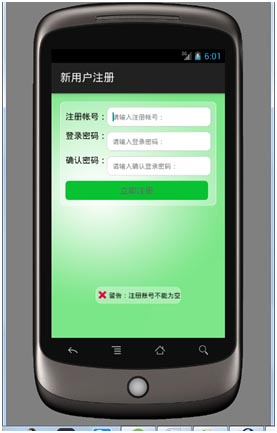
1 public class Register_Activity extends AppCompatActivity {
2 ......
3 private boolean checkform() {
4 if (this.txtRegAccount.getText().toString() == null || this.txtRegAccount.getText().toString().length() == 0) {
5
6 //Toast.makeText(getApplicationContext(), "警告:注冊賬號不能為空", Toast.LENGTH_LONG).show();
7 showCustomerToast(android.R.drawable.ic_delete, "警告:注冊賬號不能為空");
8 return false;
9 }
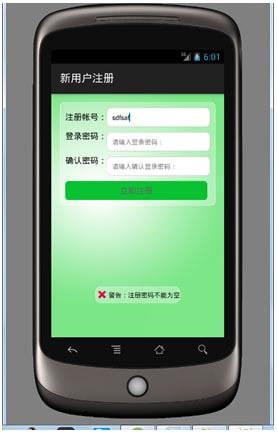
10 if (this.txtRegPassword.getText().toString() == null || this.txtRegPassword.getText().toString().length() == 0) {
11 //Toast.makeText(getApplicationContext(), "警告:注冊密碼不能為空", Toast.LENGTH_LONG).show();
12 showCustomerToast(android.R.drawable.ic_delete,"警告:注冊密碼不能為空");
13 return false;
14 }
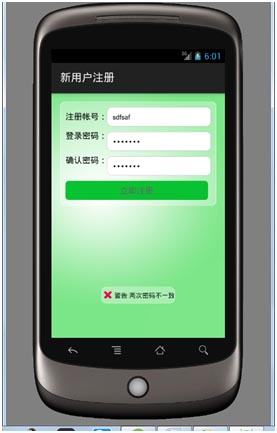
15 if (!(this.txtRegPassword.getText().toString()).equals((this.txtReRegPassword.getText().toString()))) {
16 //Toast.makeText(getApplicationContext(), "警告:兩次密碼不一致", Toast.LENGTH_LONG).show();
17 showCustomerToast(android.R.drawable.ic_delete,"警告:兩次密碼不一致");
18 return false;
19 }
20 return true;
21 }
22 ......
23 }
運行:
 在Android中用Kotlin的Anko運行後台任務(KAD 09),kotlinanko
在Android中用Kotlin的Anko運行後台任務(KAD 09),kotlinanko作者:Antonio Leiva 時間:Jan 19, 2017 原文鏈接:h
 Android開發Tips(3)
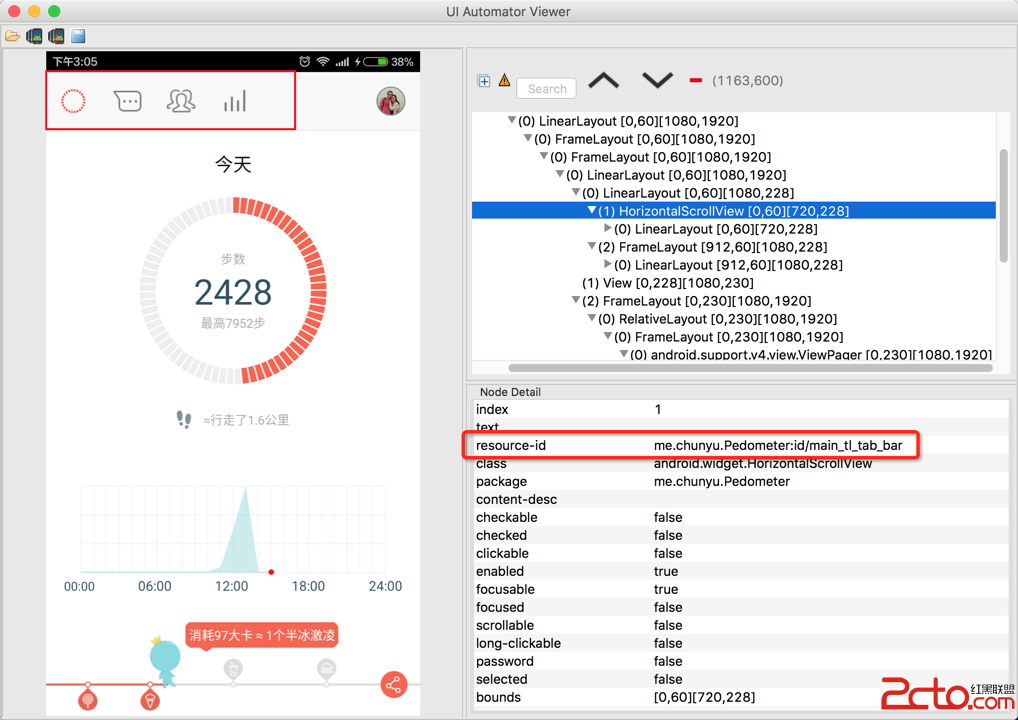
Android開發Tips(3) 1. UIAutomatorViewer 自動化測試是Android測試的趨勢, 穩定\復用, 最常用的工具就是Espresso. 使用
 Android AsyncTask 深度理解、簡單封裝、任務隊列分析、自定義線程池,androidasynctask
Android AsyncTask 深度理解、簡單封裝、任務隊列分析、自定義線程池,androidasynctask前言:由於最近在做SDK的功能,需要設計線程池。看了很
 深度剖析:Android_PullToRefresh
深度剖析:Android_PullToRefresh 上拉加載更多,下拉刷新,網上比較強大比較全的一個開源庫PullToRefresh,支持Listview、GridVi