編輯:關於android開發
我們繼續的沿用上一篇所建立的應用。
Android應用程序可以分為:應用程序源代碼(.java),應用程序描述文件(.xml),各種資源。
可以這麼理解: 安卓應用程序,通過java代碼來實現其業務邏輯,由XML文件來描述其界面及其他一切資源。
我們來看看下面的幾類文件:
一、資源極其描述文件。
1. strings.xml 文件
strings.xml 文件是定義程序中使用的字符串資源。
打開HelloWorld項目,展開res/values/目錄,找到strings.xml 文件。
建立項目的時候自動創建的代碼:
<?xml version="1.0" encoding="utf-8"?>
<resources>

    <string name="app_name">搜投網</string>
    <string name="action_settings">Settings</string>
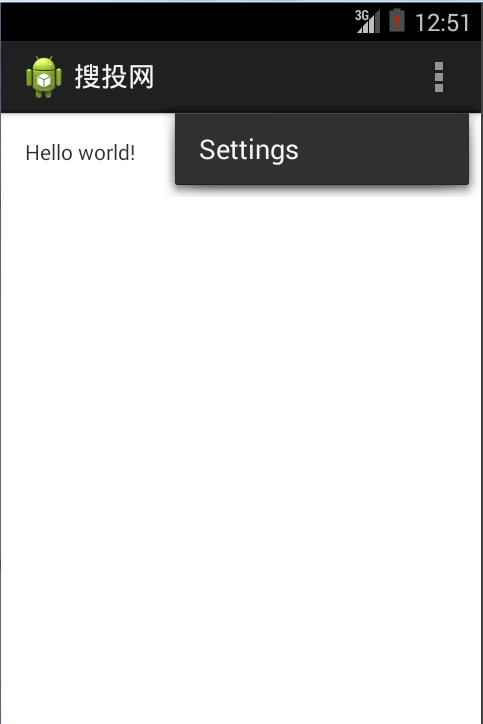
    <string name="hello_world">Hello world!</string>

</resources>
代碼注釋版:
<?xml version="1.0" encoding="utf-8"?>
<!-- 定義了xml的版本,以及編碼方式 -->

<!--resources 定義資源的標簽  -->
<resources>
    <!-- String 定義了三個字符串常量  ,該變量可以在java和xml文件中使用  -->

    <!-- 字符串的為  appname ,內容為 “搜投網”  -->
    <string name="app_name">搜投網</string>

    <!-- 字符串的為  appname ,內容為 “Settings”  -->
    <string name="action_settings">Settings</string>

    <!-- 字符串的為  appname ,內容為 “Hello world!”  -->
    <string name="hello_world">Hello world!</string>

</resources>
在AndroidManifest.xml文件中可以找到相應的引用。
對應的效果:
2. styles.xml 文件。
styles.xml 文件是預先定義布局中需要顯示的樣式,如文本的顯示顏色和字體等。
創建項目的時候生成的代碼:
<resources>

    <!--
        Base application theme, dependent on API level. This theme is replaced
        by AppBaseTheme from res/values-vXX/styles.xml on newer devices.
    -->
    <style name="AppBaseTheme" parent="android:Theme.Light">
        <!--
            Theme customizations available in newer API levels can go in
            res/values-vXX/styles.xml, while customizations related to
            backward-compatibility can go here.
        -->
    </style>

    <!-- Application theme. -->
    <style name="AppTheme" parent="AppBaseTheme">
        <!-- All customizations that are NOT specific to a particular API-level can go here. -->
    </style>

</resources>
在name="AppBaseTheme"上加以下代碼:
<item name="android:textSize">30sp</item>
<item name="android:textColor">#111</item>
在 name="AppTheme" 上加以下代碼:
<item name="android:textSize">8sp</item>
代碼解析:
<?xml version="1.0" encoding="utf-8"?>
<resources>
    <!--
        Base application theme, dependent on API level. This theme is replaced
        by AppBaseTheme from res/values-vXX/styles.xml on newer devices.
    -->
    <style name="AppBaseTheme" parent="android:Theme.Light">
        <!--
            Theme customizations available in newer API levels can go in
            res/values-vXX/styles.xml, while customizations related to
            backward-compatibility can go here.
        -->

        <!-- 定義類   "AppBaseTheme" 樣式文本的大小為  30sp  ,顏色為 #111 -->
        <item name="android:textSize">30sp</item>
        <item name="android:textColor">#111</item>

    </style>

    <!-- Application theme. -->
    <style name="AppTheme" parent="AppBaseTheme">
        <!-- All customizations that are NOT specific to a particular API-level can go here. -->

       <!-- 定義類   "AppTheme" ,在保持父樣式的其他屬性不變的情況下,該樣式文本的大小為  8sp  -->
       <item name="android:textSize">8sp</item>

    </style>
</resources>
3. dimens.xml文件
dimens.xml文件通常用於創建布局常量,在樣式和布局資源中定義邊界、高度和尺寸大小時經常用到維度,使用“<dimen>”標簽指定一個維度資源 。
用標識符表示維度單位:
px(像素):屏幕上的像素。
in (英寸):長度單位。
mm(毫米):長度單位。
pt (磅):1/72英寸。
dip(與密度無關的像素):一種基於屏幕密度的抽象單位。
sp (與刻度無關的像素):與pd類似。
建議:使用sp作為文字的單位,使用dip作為其他元素的單位。
<resources>

    <!-- Default screen margins, per the Android Design guidelines. -->
    <dimen name="activity_horizontal_margin">16dp</dimen>
    <dimen name="activity_vertical_margin">16dp</dimen>

</resources>
4. colors.xml 文件
有些應用可能會沒有這個文件。
使用“<color>”標簽定義一個顏色資源。
顏色值由RGB(三位16進制數)或RRGGBB (六位16進制數)表示,以“# ”符號開頭。例如:#00f(藍色), #00ff00(綠色)。
定義透明色,表示透明度的alpha通道值緊隨“#”之後。例如: #600f(透明藍色), #7700ff00(透明綠色)
<?xml version="1.0" encoding="utf-8"?>
<resources>
    <color name="listDivider">#ffcc99</color>
    <color name="character">#f37301</color>
</resources>
5. activity_main.xml 文件
位於res文件夾的layout子文件夾中。
定義第一個顯示界面布局(默認)。
<RelativeLayout xmlns:android="http://schemas.android.com/apk/res/android"
    xmlns:tools="http://schemas.android.com/tools"
    android:layout_width="match_parent"
    android:layout_height="match_parent"
    android:paddingBottom="@dimen/activity_vertical_margin"
    android:paddingLeft="@dimen/activity_horizontal_margin"
    android:paddingRight="@dimen/activity_horizontal_margin"
    android:paddingTop="@dimen/activity_vertical_margin"
    tools:context=".MainActivity" >

    <TextView
        android:layout_width="wrap_content"
        android:layout_height="wrap_content"
        android:text="@string/hello_world" />

</RelativeLayout>
解析後的代碼:
<?xml version="1.0" encoding="utf-8"?>
<!-- 定義xml版本,以及編碼方式  -->

<!-- 定義了一個   相對布局   -->
<!-- 屬性" http://schemas.android.com/apk/res/android" 是xml的命名空間,告訴安卓工具,將要涉及公共的屬性已被定義在xml命名空間。-->
<RelativeLayout xmlns:android="http://schemas.android.com/apk/res/android"
    xmlns:tools="http://schemas.android.com/tools"
    android:layout_width="match_parent"
    android:layout_height="match_parent"
    android:paddingBottom="@dimen/activity_vertical_margin"
    android:paddingLeft="@dimen/activity_horizontal_margin"
    android:paddingRight="@dimen/activity_horizontal_margin"
    android:paddingTop="@dimen/activity_vertical_margin"
    tools:context=".MainActivity" >

    <!-- 添加了一個textView 控件,其顯示的內容是 string.xml 文件定義的內容   -->
    <TextView
        android:layout_width="wrap_content"
        android:layout_height="wrap_content"
        android:text="@string/hello_world" />

</RelativeLayout>
6. AndroidManifest.xml文件
根目錄下的AndroidManifest.xml文件是一個清單文件,用於應用程序的全局描述。
<?xml version="1.0" encoding="utf-8"?>
<manifest xmlns:android="http://schemas.android.com/apk/res/android"
    package="com.souvc.helloworld"
    android:versionCode="1"
    android:versionName="1.0" >

    <uses-sdk
        android:minSdkVersion="19"
        android:targetSdkVersion="19" />

    <application
        android:allowBackup="true"
        android:icon="@drawable/ic_launcher"
        android:label="@string/app_name"
        android:theme="@style/AppTheme" >
        <activity
            android:name="com.souvc.helloworld.MainActivity"
            android:label="@string/app_name" >
            <intent-filter>
                <action android:name="android.intent.action.MAIN" />

                <category android:name="android.intent.category.LAUNCHER" />
            </intent-filter>
        </activity>
    </application>

</manifest>
解析後的代碼:
<?xml version="1.0" encoding="utf-8"?>
<!-- 定義xml版本,以及編碼方式  -->

<manifest xmlns:android="http://schemas.android.com/apk/res/android"
    package="com.souvc.helloworld"
    android:versionCode="1"
    android:versionName="1.0" >

    <!-- 定義了包名 -->
    <!-- 定義了版本 -->
    <!-- 定義了版本名-->


     <!-- 可兼容的最低版本,以及當前版本  -->
    <uses-sdk
        android:minSdkVersion="19"
        android:targetSdkVersion="19" />

    <application
        android:allowBackup="true"
        android:icon="@drawable/ic_launcher"
        android:label="@string/app_name"
        android:theme="@style/AppTheme" >

        <!-- 定義應用程序的圖標 -->
        <!-- 定義應用程序的名字 -->
        <!-- 定義應用程序的主題 -->

        <!-- 應用程序第一個執行的是   com.souvc.helloworld 下的  MainActivity 類 -->
        <activity
            android:name="com.souvc.helloworld.MainActivity"
            android:label="@string/app_name" >

            <intent-filter>
                <action android:name="android.intent.action.MAIN" />
                <category android:name="android.intent.category.LAUNCHER" />
            </intent-filter>

        </activity>


    </application>

</manifest>
二、 邏輯代碼文件。
1. MainActivity.java 文件。
位於src文件夾中。
應用程序的操作控制部分在java源程序中定義
package com.souvc.helloworld;

import android.os.Bundle;
import android.app.Activity;
import android.view.Menu;

public class MainActivity extends Activity {

    @Override
    protected void onCreate(Bundle savedInstanceState) {
        super.onCreate(savedInstanceState);
        setContentView(R.layout.activity_main);
    }


    @Override
    public boolean onCreateOptionsMenu(Menu menu) {
        // Inflate the menu; this adds items to the action bar if it is present.
        getMenuInflater().inflate(R.menu.main, menu);
        return true;
    }

}
解析後的代碼:
package com.souvc.helloworld;

//引入相關的類
import android.os.Bundle;
import android.app.Activity;
import android.view.Menu;

/**
* @Title: MainActivity.java
* @Package com.souvc.helloworld
* @Description:操作安卓界面的代碼
* @author souvc
* @date 2016-1-1
* @version V1.0
 */
public class MainActivity extends Activity {

    //第一次創建該Activity時的回調方法
    @Override
    protected void onCreate(Bundle savedInstanceState) {
        super.onCreate(savedInstanceState);//調用父類的onCreate()構造函數,savedInstanceState保存當前的Activity的狀態信息
        setContentView(R.layout.activity_main);//設置當前顯示的布局
    }


    @Override
    public boolean onCreateOptionsMenu(Menu menu) {
        // Inflate the menu; this adds items to the action bar if it is present.
        getMenuInflater().inflate(R.menu.main, menu);
        return true;
    }

}
2. R.java 文件
由Android-Eclipse自動生成,不能直接修改。
用資源id的形式標注drawable、layout、values文件夾中的資源信息。
/* AUTO-GENERATED FILE.  DO NOT MODIFY.
 *
 * This class was automatically generated by the
 * aapt tool from the resource data it found.  It
 * should not be modified by hand.
 */

package com.souvc.helloworld;

public final class R {
    public static final class attr {
    }
    public static final class color {
        public static final int character=0x7f040001;
        public static final int listDivider=0x7f040000;
    }
    public static final class dimen {
        /**  Default screen margins, per the Android Design guidelines.

         Customize dimensions originally defined in res/values/dimens.xml (such as
         screen margins) for sw720dp devices (e.g. 10" tablets) in landscape here.

         */
        public static final int activity_horizontal_margin=0x7f050000;
        public static final int activity_vertical_margin=0x7f050001;
    }
    public static final class drawable {
        public static final int ic_launcher=0x7f020000;
    }
    public static final class id {
        public static final int action_settings=0x7f090000;
    }
    public static final class layout {
        public static final int activity_main=0x7f030000;
    }
    public static final class menu {
        public static final int main=0x7f080000;
    }
    public static final class string {
        /**  字符串的為  appname ,內容為 “Settings”
         */
        public static final int action_settings=0x7f060001;
        /**  String 定義了三個字符串常量  ,該變量可以在java和xml文件中使用
 字符串的為  appname ,內容為 “搜投網”
         */
        public static final int app_name=0x7f060000;
        /**  字符串的為  appname ,內容為 “Hello world!”
         */
        public static final int hello_world=0x7f060002;
    }
    public static final class style {
        /**
        Base application theme, dependent on API level. This theme is replaced
        by AppBaseTheme from res/values-vXX/styles.xml on newer devices.


        Base application theme for API 11+. This theme completely replaces
        AppBaseTheme from res/values/styles.xml on API 11+ devices.

 API 11 theme customizations can go here.

        Base application theme for API 14+. This theme completely replaces
        AppBaseTheme from BOTH res/values/styles.xml and
        res/values-v11/styles.xml on API 14+ devices.

 API 14 theme customizations can go here.
         */
        public static final int AppBaseTheme=0x7f070000;
        /**  Application theme.
         */
        public static final int AppTheme=0x7f070001;
    }
}
以上的注釋,當在xml注釋後,自動生成該注釋。
 Android RecyclerView 使用解析
Android RecyclerView 使用解析 RecyclerView出現已經有一段時間了,相信大家肯定不陌生了,大家可以通過導入support-
 AndroidAnnnotations注入框架使用之第三方框架集成RoboGuice(十三)
AndroidAnnnotations注入框架使用之第三方框架集成RoboGuice(十三) (一).前言: 前面我們已經對於AndroidA
 數組到結構體轉換和聯合體與位段結合中的大小端問題
數組到結構體轉換和聯合體與位段結合中的大小端問題移植驅動代碼時發現工程中使用了如下形式的代碼 typedef struct BlkTestTag{ uint16_tm_
 Android Studio 打包apk,自動追加版本號和版本名稱
Android Studio 打包apk,自動追加版本號和版本名稱 默認AS大包好的apk是app-deubg.apk的,這樣的話版本多了找出一個bug在哪個版本中存在的