編輯:關於android開發
本文是在《使用.NET框架、Web service實現Android的文件上傳(一)》的基礎上繼續編寫的,如有疑問請先查看第一篇。本文的代碼(包括客戶端與服務端)已經上傳至GitHub,地址:https://github.com/weifengzz/UploadFile_1
要想實現大文件上傳,如果使用第一篇講到的方法是很不合適的,因為手機內存是有限的,而我們上傳的文件的大小是不確定的。如果文件比較大的話,我在夜神模擬器上的測試結果是,文件在10M以內就會出現內存溢出的情況。那麼要想實現大文件的上傳,我們就需要將文件以規定的某一大小進行分割(文中是以100K的大小進行分割的),然後進行上傳,最後在服務端將文件進行合並,這樣就實現了文件的上傳。下面開始介紹一下實現大文件上傳的主要代碼:
一、文件讀取工具類
 1 import java.io.IOException;
 2 import java.io.RandomAccessFile;
 3 import java.io.Serializable;
 4
 5 /**
 6  * Created by WFZ on 2015/12/8.
 7  */
 8 public class BigRandomAccessFile implements Serializable {
 9
10     RandomAccessFile randomAccessFile = null;
11     long nPos;//從文件的;哪一個地方開始讀
12
13     public BigRandomAccessFile(String fName, long nPos) throws IOException {
14         randomAccessFile = new RandomAccessFile(fName, "rw");//創建一個隨機訪問文件類,可讀寫模式
15         this.nPos = nPos;
16         randomAccessFile.seek(nPos);
17     }
18
19     /**
20      * 寫文件,
21      * 寫b數組長的文件,
22      * 從哪個地方開始寫,
23      * 寫的長度
24      * 返回寫的長度
25      */
26     public synchronized int write(byte[] b, int nStart, int nLen) {
27         int n = -1;
28         try {
29             randomAccessFile.write(b, nStart, nLen);
30             n = nLen;
31         } catch (IOException e) {
32             e.printStackTrace();
33         }
34         return n;
35     }
36
37     /**
38      * 讀取文件
39      * @param length 每次讀取字節數
40      */
41     public synchronized Detail getContent(long nStart,int length) {
42         Detail detail = new Detail();
43         detail.b = new byte[length];
44         try {
45             randomAccessFile.seek(nStart);
46             detail.length = randomAccessFile.read(detail.b);//讀了多長的數據
47         } catch (IOException e) {
48             e.printStackTrace();
49         }
50         return detail;
51     }
52
53     /**
54      * 讀取文件的信息
55      */
56     public class Detail {
57         public byte[] b;//讀取文件的存放數據的byte數組
58         public int length;//讀取的文件的長度
59     }
60
61     /**
62      * 獲取文件長度
63      */
64     public long getFileLength() {
65         Long length = 0L;
66         try {
67             length = randomAccessFile.length();
68         } catch (IOException e) {
69             // TODO Auto-generated catch block
70             e.printStackTrace();
71         }
72         return length;
73     }
74 }
二、得到經過處理的Base64字符串
 1 import android.util.Base64;
 2 import com.lhgj.wfz.uploadfiles.utils.Fileutil;
 3 import java.io.File;
 4
 5 /**
 6  *得到經過處理的Base64字符串
 7  */
 8 public class BigBase64Util {
 9     public static String getBase64String( byte[] byteArray) {
10         String strBase64 = new String(Base64.encode(byteArray,0));
11         return strBase64;
12     }
13 }
三、Activity類
  1 import android.app.ProgressDialog;
  2 import android.graphics.Bitmap;
  3 import android.graphics.BitmapFactory;
  4 import android.os.Handler;
  5 import android.os.Message;
  6 import android.support.v7.app.AppCompatActivity;
  7 import android.os.Bundle;
  8 import android.view.View;
  9 import android.widget.Button;
 10 import android.widget.ImageView;
 11 import android.widget.TextView;
 12
 13 import com.lhgj.wfz.uploadfiles.BigUtils.BigBase64Util;
 14 import com.lhgj.wfz.uploadfiles.BigUtils.BigRandomAccessFile;
 15 import com.lhgj.wfz.uploadfiles.utils.Base64Util;
 16 import com.lhgj.wfz.uploadfiles.utils.Fileutil;
 17 import com.lhgj.wfz.uploadfiles.utils.QueryUploadUtil;
 18
 19 import java.io.File;
 20 import java.io.IOException;
 21
 22 public class MainActivity extends AppCompatActivity {
 23     private TextView tv1 = null;//上傳的文件地址
 24     private TextView tv2 = null;//上傳的文件名稱
 25     private TextView tv3 = null;//上傳是否成功提示
 26     private Button btn = null;//上傳小圖片按鈕
 27     private ImageView img = null;//圖片
 28     private Button bigBtn = null;//上傳大圖片的按鈕
 29     private int i = 0;//記錄上傳的次數
 30     private ProgressDialog progressDialog = null;//進度條
 31
 32     private String filePath = "/data/data/com.lhgj.wfz.uploadfiles/";//手機中文件存儲的位置
 33     private String fileName = "temp.jpg";//上傳的圖片
 34     private String bigFileName = "lyf.mp4";//上傳的圖片
 35     private String wsdl = "http://192.168.15.4:1122/service/vedios/GetVedios.asmx?WSDL";//WSDL
 36     private String url = "http://192.168.15.4:1122/service/vedios/GetVedios.asmx/FileUploadByBase64String";//上傳小文件與webservice交互的地址
 37     private String bigUrl = "http://192.168.15.4:1122/service/vedios/GetVedios.asmx/BigFileUploadByBase64String";//上傳大文件與webservice交互的地址
 38
 39     /**
 40      * 由於上傳文件是一個耗時操作,需要開一個異步,這裡我們使用handle
 41      */
 42     private Handler handler = new Handler() {
 43         public void handleMessage(android.os.Message msg) {
 44             String string = (String) msg.obj;
 45             tv3.setText(string +"本文件上傳次數:"+ i++);
 46         }
 47     };
 48
 49     @Override
 50     protected void onCreate(Bundle savedInstanceState) {
 51         super.onCreate(savedInstanceState);
 52         setContentView(R.layout.activity_main);
 53         initView();
 54     }
 55
 56         /**
 57          * 初始化view
 58          */
 59     private void initView() {
 60         tv1 = (TextView) findViewById(R.id.tv1);
 61         tv2 = (TextView) findViewById(R.id.tv2);
 62         tv3 = (TextView) findViewById(R.id.tv3);
 63         btn = (Button) findViewById(R.id.btn);
 64         img = (ImageView) findViewById(R.id.iv);
 65         bigBtn = (Button) findViewById(R.id.big_btn);
 66
 67         //設置顯示的圖片
 68         byte[] byteArray = null;
 69         byteArray = Fileutil.readFileToByteArray(new File(filePath + fileName));
 70         Bitmap bitmap = BitmapFactory.decodeByteArray(byteArray, 0,
 71                 byteArray.length);
 72         img.setImageBitmap(bitmap);
 73
 74         //設置顯示的文本
 75         tv1.setText("文件位置:" + filePath);
 76         tv2.setText("文件名稱" + fileName);
 77
 78         //進度條
 79         progressDialog = new ProgressDialog(MainActivity.this);
 80         btn.setOnClickListener(new BtnOnclickListener());
 81         bigBtn.setOnClickListener(new BtnOnclickListener());
 82         //設置標題
 83         progressDialog.setTitle("文件上傳");
 84         //設置最大進度
 85         progressDialog.setMax(100);
 86         //設置顯示的信息
 87         progressDialog.setMessage("文件正上傳...");
 88         //設置是否可以點擊
 89         progressDialog.setCancelable(false);
 90         //設置ProgressBar的樣式
 91         progressDialog.setProgressStyle(ProgressDialog.STYLE_HORIZONTAL);
 92     }
 93
 94     /**
 95      * ImageView的事件響應
 96      */
 97     private class BtnOnclickListener implements View.OnClickListener {
 98
 99         @Override
100         public void onClick(View v) {
101             switch (v.getId()) {
102                 case R.id.btn://當是上傳小文件的時候
103                     upSmallFile();
104                     break;
105                 case R.id.big_btn://當上傳大文件的時候
106                     upBigFile();
107                     break;
108             }
109
110         }
111     }
112
113     /**
114      * 上傳小文件
115      */
116     public void upSmallFile() {
117         new Thread(new Runnable() {
118
119             @Override
120             public void run() {
121                 // TODO Auto-generated method stub
122                 Message message = Message.obtain();
123                 String result = "";
124                 try {
125                     QueryUploadUtil quu = new QueryUploadUtil(Base64Util.getBase64String(filePath + fileName), "temp.jpg");
126                     result = quu.call(wsdl, url,"FileUploadByBase64String");
127                 } catch (Exception e) {
128                     // TODO Auto-generated catch block
129                     e.printStackTrace();
130                 }
131                 message.obj = result;
132                 handler.sendMessage(message);
133             }
134         }).start();
135     }
136
137     /**
138      * 上傳大文件
139      */
140     public void upBigFile() {
141         progressDialog.show();//顯示進度條
142         new Thread(new Runnable() {
143             @Override
144             public void run() {
145                 try {
146
147                     BigRandomAccessFile bigRandomAccessFile = new BigRandomAccessFile(filePath + bigFileName, 0);
148                     long startPos = 0L;
149                     Long length = bigRandomAccessFile.getFileLength();//得到文件的長度
150                     int mBufferSize = 1024 * 100; //每次處理1024 * 100字節
151                     byte[] buffer = new byte[mBufferSize];//創建一個mBufferSize大小的緩存數組
152                     BigRandomAccessFile.Detail detail;//文件的詳情類
153                     long nRead = 0l;//讀取文件的當前長度
154                     String vedioFileName = fileName; //分配一個文件名
155                     long nStart = startPos;//開始讀的位置
156                     while (nStart < length) {//當開始都的位置比長度小的時候
157                         progressDialog.setProgress((int) ((nStart/(float)length)*100));//設置progressDialog的進度
158
159                         detail = bigRandomAccessFile.getContent(startPos,mBufferSize);//開始讀取文件
160                         nRead = detail.length;//讀取的文件的長度
161                         buffer = detail.b;//讀取文件的緩存
162                         Message message = Message.obtain();
163                         String result = "";//上傳的結果
164                         try {
165                             QueryUploadUtil quu = new QueryUploadUtil(BigBase64Util.getBase64String(buffer), bigFileName);//將數據進行上傳
166                             result = quu.call(wsdl, bigUrl,"BigFileUploadByBase64String");
167                         } catch (Exception e) {
168                             // TODO Auto-generated catch block
169                             e.printStackTrace();
170                         }
171                         nStart += nRead;//下一次從哪裡開始讀取
172                         startPos = nStart;
173
174                         message.obj = result;//返回的結果
175                         handler.sendMessage(message);
176                     }
177                     progressDialog.cancel();
178                 } catch (IOException e) {
179                     e.printStackTrace();
180                 }
181             }
182         }).start();
183     }
184 }
四、服務端
 1  [WebMethod(EnableSession = true, Description = "上傳文件")]
 2         public int BigFileUploadByBase64String(string base64string, string fileName1)
 3         {
 4             try
 5             {
 6                 string fileName = "D:\\VedioPlayerWeb\\videos\\" + fileName1;
 7                 // 取得文件夾
 8                 string dir = fileName.Substring(0, fileName.LastIndexOf("\\"));
 9                 //如果不存在文件夾,就創建文件夾
10                 if (!Directory.Exists(dir))
11                     Directory.CreateDirectory(dir);
12                 byte[] bytes = Convert.FromBase64String(base64string);
13                 MemoryStream memoryStream = new MemoryStream(bytes, 0, bytes.Length);
14                 memoryStream.Write(bytes, 0, bytes.Length);
15                 if (!File.Exists(fileName))
16                 {
17                     // 寫入文件
18                     File.WriteAllBytes(fileName, memoryStream.ToArray());
19                 }
20                 else
21                 {
22                     FileStream fsSource = new FileStream(fileName, FileMode.Append, FileAccess.Write);
23                     fsSource.Write(memoryStream.ToArray(),0, memoryStream.ToArray().Length);
24                     fsSource.Close();
25                 }
26                 //返回數據如果是1,上傳成功!
27                 return 1;
28             }
29             catch (Exception ex)
30             {
31                 //返回如果是-1,上傳失敗
32                 return -1;
33             }
34         }
本文是在《使用.NET框架、Web service實現Android的文件上傳(一)》的基礎上繼續編寫的,如有疑問請先查看第一篇。本文的代碼(包括客戶端與服務端)已經上傳至GitHub,地址:https://github.com/weifengzz/UploadFile_1
 Getting Started with Testing ——開始單元測試,startedtesting
Getting Started with Testing ——開始單元測試,startedtestingAndroid tests are based on J
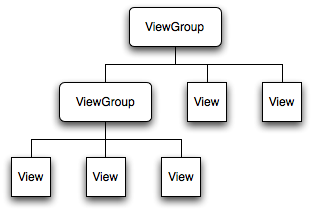 Android界面架構(Activity,PhoneWiondow,DecorView)簡介,activitydecorview
Android界面架構(Activity,PhoneWiondow,DecorView)簡介,activitydecorview 在一個Android
 Android 在C代碼中調用logcat,androidlogcat
Android 在C代碼中調用logcat,androidlogcat本文給《Android java傳遞int類型數組給C》中添加C代碼中調用logcat的功能 And
 Linux內核系列—10.操作系統開發之內核HelloWorld,linuxhelloworld
Linux內核系列—10.操作系統開發之內核HelloWorld,linuxhelloworlda.我們先來體驗一下在Linux下用匯編編程的感覺,見代碼 [secti