編輯:關於android開發
Android第三方開源對話消息提示框:SweetAlertDialog(sweet-alert-dialog)
Android第三方開源對話消息提示框:SweetAlertDialog(sweet-alert-dialog)是一個套制作精美、動畫效果出色生動的Android對話、消息提示框.
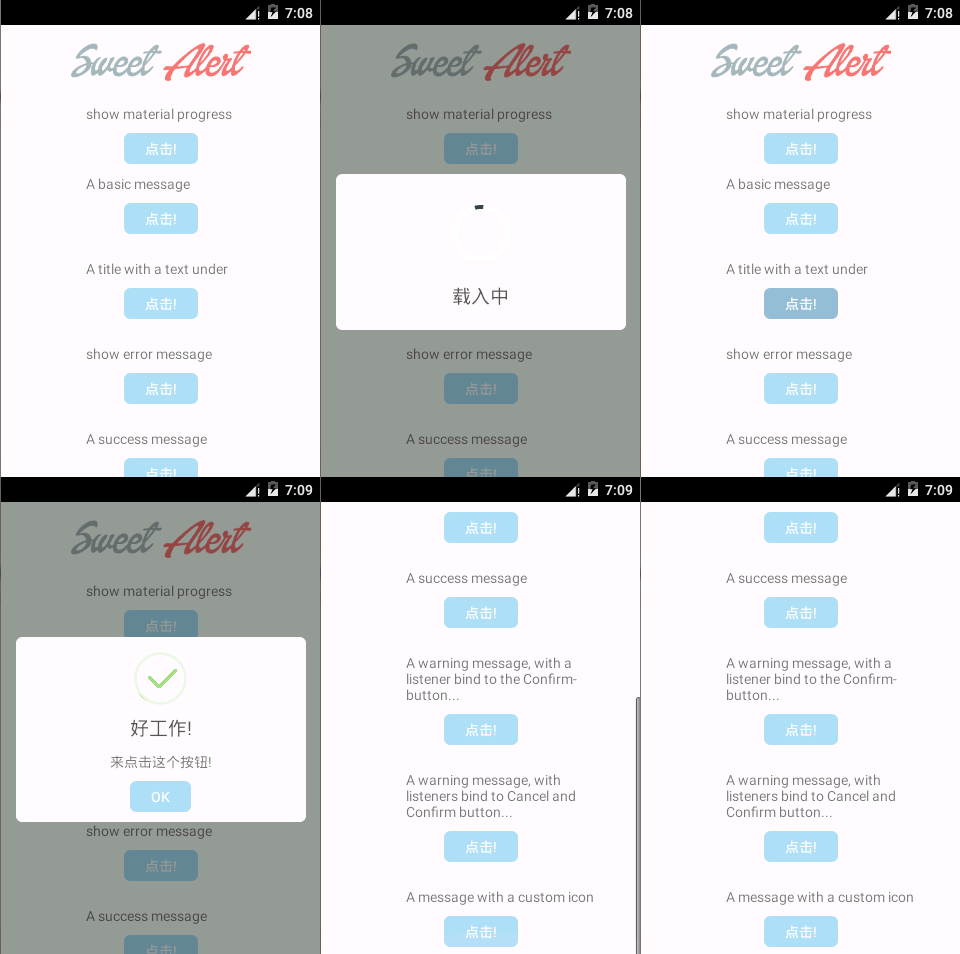
需要兩個lib包,其中一個依賴另一個,下載地址是:點此下載
  1 package cn.pedant.SweetAlert.sample;
  2
  3 import android.app.Activity;
  4 import android.os.Bundle;
  5 import android.os.CountDownTimer;
  6 import android.view.View;
  7
  8 import cn.pedant.SweetAlert.SweetAlertDialog;
  9
 10 public class SampleActivity extends Activity implements View.OnClickListener {
 11
 12     private int i = -1;
 13
 14     @Override
 15     public void onCreate(Bundle savedInstanceState) {
 16         super.onCreate(savedInstanceState);
 17         setContentView(R.layout.sample_activity);
 18         findViewById(R.id.basic_test).setOnClickListener(this);
 19         findViewById(R.id.under_text_test).setOnClickListener(this);
 20         findViewById(R.id.error_text_test).setOnClickListener(this);
 21         findViewById(R.id.success_text_test).setOnClickListener(this);
 22         findViewById(R.id.warning_confirm_test).setOnClickListener(this);
 23         findViewById(R.id.warning_cancel_test).setOnClickListener(this);
 24         findViewById(R.id.custom_img_test).setOnClickListener(this);
 25         findViewById(R.id.progress_dialog).setOnClickListener(this);
 26     }
 27
 28     @Override
 29     public void onClick(View v) {
 30         switch (v.getId()) {
 31         case R.id.basic_test:
 32             // default title "Here's a message!"
 33             SweetAlertDialog sd = new SweetAlertDialog(this);
 34             sd.setCancelable(true);
 35             sd.setCanceledOnTouchOutside(true);
 36             sd.show();
 37             break;
 38         case R.id.under_text_test:
 39             new SweetAlertDialog(this).setContentText("我很漂亮,是不是啊!").show();
 40             break;
 41         case R.id.error_text_test:
 42             new SweetAlertDialog(this, SweetAlertDialog.ERROR_TYPE).setTitleText("Oops...").setContentText("某些地方出錯了!")
 43                     .show();
 44             break;
 45         case R.id.success_text_test:
 46             new SweetAlertDialog(this, SweetAlertDialog.SUCCESS_TYPE).setTitleText("好工作!").setContentText("來點擊這個按鈕!")
 47                     .show();
 48             break;
 49         case R.id.warning_confirm_test:
 50             new SweetAlertDialog(this, SweetAlertDialog.WARNING_TYPE).setTitleText("你確定嗎?").setContentText("你確定要刪除它嗎!")
 51                     .setConfirmText("是的,刪除!").setConfirmClickListener(new SweetAlertDialog.OnSweetClickListener() {
 52                         @Override
 53                         public void onClick(SweetAlertDialog sDialog) {
 54                             // reuse previous dialog instance
 55                             sDialog.setTitleText("刪除!").setContentText("你的文件已經刪除了!").setConfirmText("好的")
 56                                     .setConfirmClickListener(null).changeAlertType(SweetAlertDialog.SUCCESS_TYPE);
 57                         }
 58                     }).show();
 59             break;
 60         case R.id.warning_cancel_test:
 61             new SweetAlertDialog(this, SweetAlertDialog.WARNING_TYPE).setTitleText("你確定嗎?").setContentText("是否刪除文件!")
 62                     .setCancelText("不,退出!").setConfirmText("是的,刪除!").showCancelButton(true)
 63                     .setCancelClickListener(new SweetAlertDialog.OnSweetClickListener() {
 64                         @Override
 65                         public void onClick(SweetAlertDialog sDialog) {
 66                             // reuse previous dialog instance, keep widget user
 67                             // state, reset them if you need
 68                             sDialog.setTitleText("Cancelled!").setContentText("你的文件安全:)").setConfirmText("好的")
 69                                     .showCancelButton(false).setCancelClickListener(null).setConfirmClickListener(null)
 70                                     .changeAlertType(SweetAlertDialog.ERROR_TYPE);
 71
 72                             // or you can new a SweetAlertDialog to show
 73                             /*
 74                              * sDialog.dismiss(); new
 75                              * SweetAlertDialog(SampleActivity.this,
 76                              * SweetAlertDialog.ERROR_TYPE)
 77                              * .setTitleText("Cancelled!") .setContentText(
 78                              * "Your imaginary file is safe :)")
 79                              * .setConfirmText("OK") .show();
 80                              */
 81                         }
 82                     }).setConfirmClickListener(new SweetAlertDialog.OnSweetClickListener() {
 83                         @Override
 84                         public void onClick(SweetAlertDialog sDialog) {
 85                             sDialog.setTitleText("刪除了!").setContentText("你的文件被刪除了!").setConfirmText("好的")
 86                                     .showCancelButton(false).setCancelClickListener(null).setConfirmClickListener(null)
 87                                     .changeAlertType(SweetAlertDialog.SUCCESS_TYPE);
 88                         }
 89                     }).show();
 90             break;
 91         case R.id.custom_img_test:
 92             new SweetAlertDialog(this, SweetAlertDialog.CUSTOM_IMAGE_TYPE).setTitleText("很漂亮!")
 93                     .setContentText("這是一張圖片.").setCustomImage(R.drawable.custom_img).show();
 94             break;
 95         case R.id.progress_dialog:
 96             final SweetAlertDialog pDialog = new SweetAlertDialog(this, SweetAlertDialog.PROGRESS_TYPE)
 97                     .setTitleText("載入中");
 98             pDialog.show();
 99             pDialog.setCancelable(false);
100             new CountDownTimer(800 * 7, 800) {
101                 public void onTick(long millisUntilFinished) {
102                     // you can change the progress bar color by ProgressHelper
103                     // every 800 millis
104                     i++;
105                     switch (i) {
106                     case 0:
107                         pDialog.getProgressHelper().setBarColor(getResources().getColor(R.color.blue_btn_bg_color));
108                         break;
109                     case 1:
110                         pDialog.getProgressHelper().setBarColor(getResources().getColor(R.color.material_deep_teal_50));
111                         break;
112                     case 2:
113                         pDialog.getProgressHelper().setBarColor(getResources().getColor(R.color.success_stroke_color));
114                         break;
115                     case 3:
116                         pDialog.getProgressHelper().setBarColor(getResources().getColor(R.color.material_deep_teal_20));
117                         break;
118                     case 4:
119                         pDialog.getProgressHelper().setBarColor(getResources().getColor(R.color.material_blue_grey_80));
120                         break;
121                     case 5:
122                         pDialog.getProgressHelper().setBarColor(getResources().getColor(R.color.warning_stroke_color));
123                         break;
124                     case 6:
125                         pDialog.getProgressHelper().setBarColor(getResources().getColor(R.color.success_stroke_color));
126                         break;
127                     }
128                 }
129
130                 public void onFinish() {
131                     i = -1;
132                     pDialog.setTitleText("成功了!").setConfirmText("好的").changeAlertType(SweetAlertDialog.SUCCESS_TYPE);
133                 }
134             }.start();
135             break;
136         }
137     }
138 }
xml文件:
  1 <?xml version="1.0" encoding="utf-8"?>
  2 <ScrollView xmlns:android="http://schemas.android.com/apk/res/android"
  3     android:layout_width="match_parent"
  4     android:layout_height="match_parent"
  5     android:background="#FFF" >
  6
  7     <RelativeLayout
  8         android:layout_width="match_parent"
  9         android:layout_height="wrap_content"
 10         android:paddingBottom="10dp" >
 11
 12         <ImageView
 13             android:id="@+id/logo_img"
 14             android:layout_width="180dp"
 15             android:layout_height="wrap_content"
 16             android:layout_centerHorizontal="true"
 17             android:layout_marginBottom="15dp"
 18             android:layout_marginTop="10dp"
 19             android:contentDescription="@string/app_name"
 20             android:src="@drawable/logo_big" />
 21
 22         <TextView
 23             android:id="@+id/txt_0"
 24             android:layout_width="wrap_content"
 25             android:layout_height="wrap_content"
 26             android:layout_alignLeft="@id/logo_img"
 27             android:layout_below="@id/logo_img"
 28             android:layout_marginLeft="15dp"
 29             android:text="show material progress"
 30             android:textColor="#797979"
 31             android:textSize="14sp" />
 32
 33         <Button
 34             android:id="@+id/progress_dialog"
 35
 36             android:layout_below="@id/txt_0"
 37             android:layout_centerHorizontal="true"
 38             android:layout_margin="10dp"
 39             android:text="點擊!" />
 40
 41         <TextView
 42             android:id="@+id/txt_1"
 43             android:layout_width="wrap_content"
 44             android:layout_height="wrap_content"
 45             android:layout_alignLeft="@id/logo_img"
 46             android:layout_below="@id/progress_dialog"
 47             android:layout_marginLeft="15dp"
 48             android:text="A basic message"
 49             android:textColor="#797979"
 50             android:textSize="14sp" />
 51
 52         <Button
 53             android:id="@+id/basic_test"
 54
 55             android:layout_below="@id/txt_1"
 56             android:layout_centerHorizontal="true"
 57             android:layout_margin="10dp"
 58             android:text="點擊!" />
 59
 60         <TextView
 61             android:id="@+id/txt_2"
 62             android:layout_width="wrap_content"
 63             android:layout_height="wrap_content"
 64             android:layout_alignLeft="@id/logo_img"
 65             android:layout_below="@id/basic_test"
 66             android:layout_marginLeft="15dp"
 67             android:layout_marginTop="15dp"
 68             android:text="A title with a text under"
 69             android:textColor="#797979"
 70             android:textSize="14sp" />
 71
 72         <Button
 73             android:id="@+id/under_text_test"
 74
 75             android:layout_below="@id/txt_2"
 76             android:layout_centerHorizontal="true"
 77             android:layout_margin="10dp"
 78             android:text="點擊!" />
 79
 80         <TextView
 81             android:id="@+id/txt_3"
 82             android:layout_width="wrap_content"
 83             android:layout_height="wrap_content"
 84             android:layout_alignLeft="@id/logo_img"
 85             android:layout_below="@id/under_text_test"
 86             android:layout_marginLeft="15dp"
 87             android:layout_marginTop="15dp"
 88             android:text="show error message"
 89             android:textColor="#797979"
 90             android:textSize="14sp" />
 91
 92         <Button
 93             android:id="@+id/error_text_test"
 94
 95             android:layout_below="@id/txt_3"
 96             android:layout_centerHorizontal="true"
 97             android:layout_margin="10dp"
 98             android:text="點擊!" />
 99
100         <TextView
101             android:id="@+id/txt_4"
102             android:layout_width="wrap_content"
103             android:layout_height="wrap_content"
104             android:layout_alignLeft="@id/logo_img"
105             android:layout_below="@id/error_text_test"
106             android:layout_marginLeft="15dp"
107             android:layout_marginTop="15dp"
108             android:text="A success message"
109             android:textColor="#797979"
110             android:textSize="14sp" />
111
112         <Button
113             android:id="@+id/success_text_test"
114
115             android:layout_below="@id/txt_4"
116             android:layout_centerHorizontal="true"
117             android:layout_margin="10dp"
118             android:text="點擊!" />
119
120         <TextView
121             android:id="@+id/txt_5"
122             android:layout_width="200dp"
123             android:layout_height="wrap_content"
124             android:layout_alignLeft="@id/logo_img"
125             android:layout_below="@id/success_text_test"
126             android:layout_marginLeft="15dp"
127             android:layout_marginTop="15dp"
128             android:text="A warning message, with a listener bind to the Confirm-button..."
129             android:textColor="#797979"
130             android:textSize="14sp" />
131
132         <Button
133             android:id="@+id/warning_confirm_test"
134
135             android:layout_below="@id/txt_5"
136             android:layout_centerHorizontal="true"
137             android:layout_margin="10dp"
138             android:text="點擊!" />
139
140         <TextView
141             android:id="@+id/txt_6"
142             android:layout_width="200dp"
143             android:layout_height="wrap_content"
144             android:layout_alignLeft="@id/logo_img"
145             android:layout_below="@id/warning_confirm_test"
146             android:layout_marginLeft="15dp"
147             android:layout_marginTop="15dp"
148             android:text="A warning message, with listeners bind to Cancel and Confirm button..."
149             android:textColor="#797979"
150             android:textSize="14sp" />
151
152         <Button
153             android:id="@+id/warning_cancel_test"
154
155             android:layout_below="@id/txt_6"
156             android:layout_centerHorizontal="true"
157             android:layout_margin="10dp"
158             android:text="點擊!" />
159
160         <TextView
161             android:id="@+id/txt_7"
162             android:layout_width="200dp"
163             android:layout_height="wrap_content"
164             android:layout_alignLeft="@id/logo_img"
165             android:layout_below="@id/warning_cancel_test"
166             android:layout_marginLeft="15dp"
167             android:layout_marginTop="15dp"
168             android:text="A message with a custom icon"
169             android:textColor="#797979"
170             android:textSize="14sp" />
171
172         <Button
173             android:id="@+id/custom_img_test"
174
175             android:layout_below="@id/txt_7"
176             android:layout_centerHorizontal="true"
177             android:layout_margin="10dp"
178             android:text="點擊!" />
179     </RelativeLayout>
180
181 </ScrollView>
 Android開發: fragment解析及案例
Android開發: fragment解析及案例 Fragment 設計理念 在設計應用時特別是Android 應用 ,有眾多的分辨率要去適應,而fragme
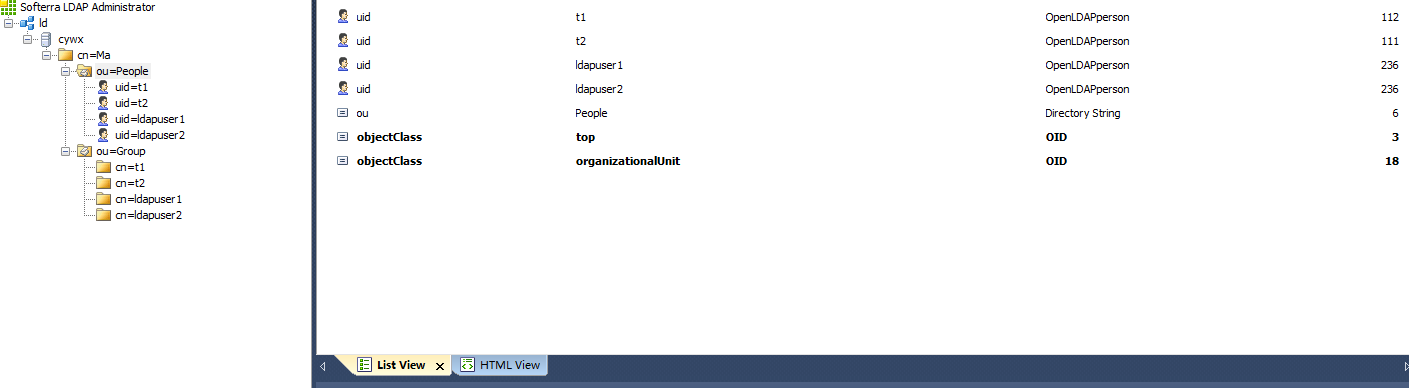 redmine 整合ldap 用戶
redmine 整合ldap 用戶首先要配置好LDAP 不然會把你累死LDAP的安裝過程在博客目錄中找一下()要對應slapd.conf配置文件來寫 我們需要三份數據文件
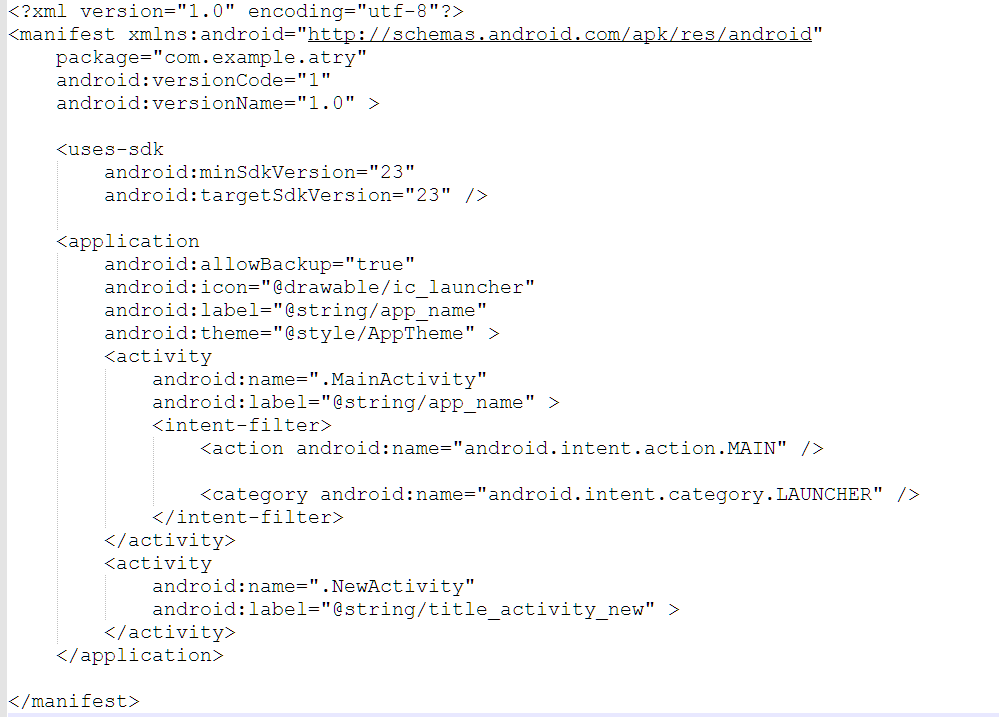 Android清單文件AndroidMenifest.xml,android清單文件
Android清單文件AndroidMenifest.xml,android清單文件1.AndroidMenifes.xml清單文主要結構件結構 所謂主要結構就是每一個清
 Android自定義控件之仿汽車之家下拉刷新
Android自定義控件之仿汽車之家下拉刷新 關於下拉刷新的實現原理我在上篇文章Android自定義控件之仿美團下拉刷新中已經詳細介紹過了,這篇文章主要介紹表盤的動畫實