編輯:關於android開發
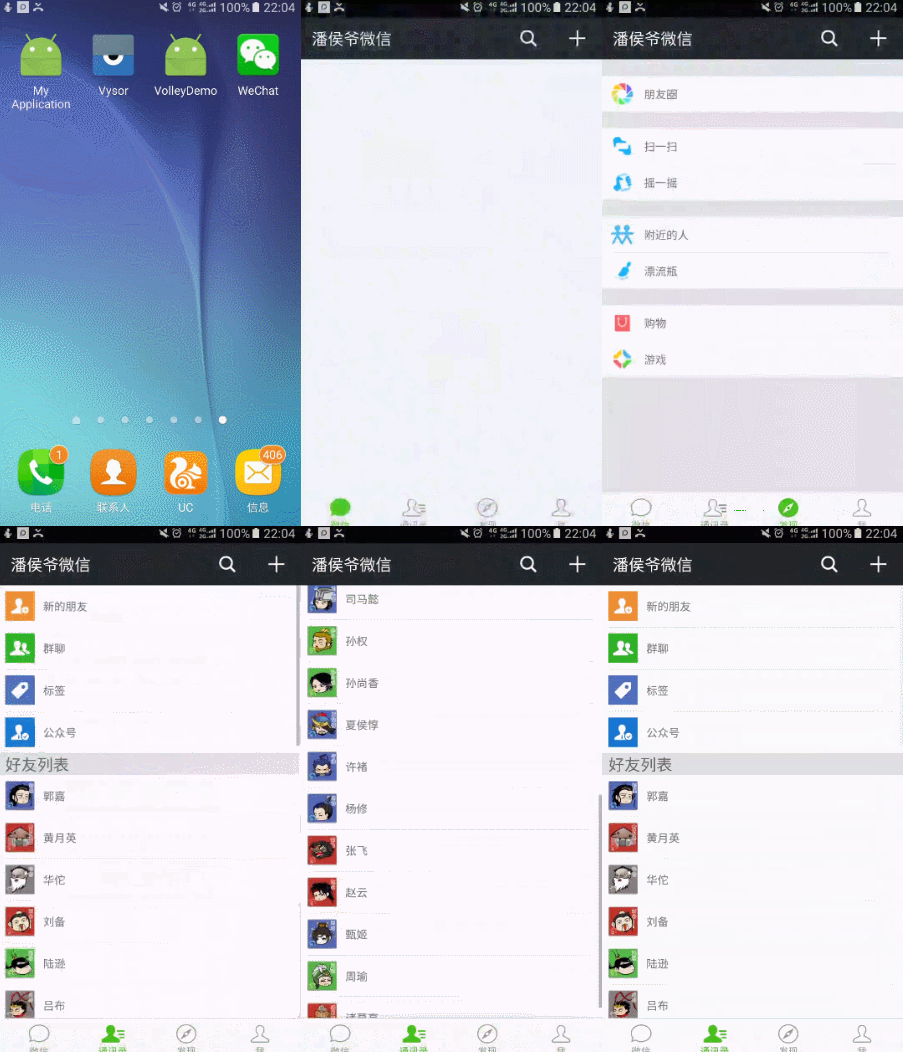
之前的博文《Android中使用ExpandableListView實現好友分組》我簡單介紹了使用ExpandableListView實現簡單的好友分組功能,今天我們針對之前的所做的仿微信APP來對ExpandableListView做一個擴展介紹,實現效果如下(通訊裡使用ExpandableListView實現):
相關知識點博文鏈接:
Android中使用ExpandableListView實現好友分組
Android中Fragment和ViewPager那點事兒
Android中ListView實現圖文並列並且自定義分割線(完善仿微信APP)
(1)要給ExpandableListView 設置適配器,那麼必須先設置數據源。
(2)數據源,就是此處的適配器類ExpandableAdapter,此方法繼承了BaseExpandableListAdapter ,它是ExpandableListView的一個子類。需要重寫裡面的多個方法。方法的意思,代碼中都有詳細的注釋。數據源中,用到了自定義的View布局,此時根據自己的需求,來設置組和子項的布局樣式。getChildView()和getGroupView()方法設置自定義布局。
(3)數據源設置好,直接給 ExpandableListView.setAdapter()即可實現此收縮功能。
1 //Group.size()為組名個數,如果為數組存儲則為group、length
2 for (int i = 0; i < Group.size(); i++) {
3     expandableListView.expandGroup(i);
4 }
提醒:加載前別忘了判斷adapter是否為空和有沒有Group數據哦
(2)保持ExpandableListView始終展開無法收縮
1 expandableListView.setOnGroupClickListener(new OnGroupClickListener() {
2     @Override
3     public boolean onGroupClick(ExpandableListView parent, View v,
4         int groupPosition, long id) {
5         return true;//返回true則表示無法收縮
6     }
7 });
(3)取消通訊錄上方的groupName空間
微信通訊錄中“新的朋友”,“群聊”,“標簽”,“公眾號”,作為一個整體自定義布局添加到ExpandableListView中,詳情見以下代碼實現
(4)修改ExpandableListView的分割線
大概思路就是這樣,現在開始整體實現代碼的演示:
其實就是一個ExpandableListView,添加android:divider ="#FFFFFF"取消自帶分割線
 1 <?xml version="1.0" encoding="utf-8"?>
 2 <LinearLayout xmlns:android="http://schemas.android.com/apk/res/android"
 3     android:orientation="vertical" android:layout_width="match_parent"
 4     android:layout_height="match_parent"
 5     android:background="@color/fragmentback">
 6     <ExpandableListView
 7         android:id="@+id/contact_list"
 8         android:layout_width="match_parent"
 9         android:layout_height="match_parent"
10         android:layout_alignParentTop="true"
11         android:layout_alignParentStart="true"
12         android:divider ="#FFFFFF"/>
13 </LinearLayout>
注意設置間距,保證美觀且盡量與微信一致
 1 <?xml version="1.0" encoding="utf-8"?>
 2 <LinearLayout xmlns:android="http://schemas.android.com/apk/res/android"
 3     android:orientation="vertical" android:layout_width="match_parent"
 4     android:layout_height="match_parent"
 5     android:background="@color/fragmentback">
 6     <TextView
 7         android:text="TextView"
 8         android:textSize="20sp"
 9         android:layout_width="match_parent"
10         android:layout_height="wrap_content"
11         android:layout_marginLeft="10dp"
12         android:gravity="center_vertical"
13         android:id="@+id/group_tv" />
14 </LinearLayout>
 1 <?xml version="1.0" encoding="utf-8"?>
 2 <LinearLayout xmlns:android="http://schemas.android.com/apk/res/android"
 3     android:orientation="vertical" android:layout_width="match_parent"
 4     android:layout_height="match_parent">
 5     <LinearLayout
 6         android:background="@color/colorwhite"
 7         android:layout_width="match_parent"
 8         android:layout_height="match_parent"
 9         android:orientation="vertical">
10         <LinearLayout
11             android:paddingLeft="10dp"
12             android:paddingTop="5dp"
13             android:paddingBottom="5dp"
14             android:gravity="center_vertical"
15             android:layout_width="match_parent"
16             android:layout_height="wrap_content"
17             android:orientation="horizontal">
18             <ImageView
19                 android:id="@+id/contact_item_iv"
20                 android:layout_width="wrap_content"
21                 android:layout_height="wrap_content"
22                 android:src="@mipmap/default_fmessage"
23                 android:adjustViewBounds="true"
24                 android:maxWidth="35dp"/>
25             <TextView
26                 android:id="@+id/contact_item_tv"
27                 android:layout_margin="10dp"
28                 android:layout_width="0dp"
29                 android:layout_height="wrap_content"
30                 android:layout_weight="1"
31                 android:text="新的朋友"/>
32         </LinearLayout>
33         <View
34             android:layout_width="match_parent"
35             android:layout_height="1dp"
36             android:layout_marginLeft="10dp"
37             android:layout_marginRight="10dp"
38             android:background="@color/fragmentback"/>
39     </LinearLayout>
40 </LinearLayout>
  1 <?xml version="1.0" encoding="utf-8"?>
  2 <LinearLayout xmlns:android="http://schemas.android.com/apk/res/android"
  3     android:orientation="vertical" android:layout_width="match_parent"
  4     android:layout_height="match_parent">
  5         <LinearLayout
  6             android:background="@color/colorwhite"
  7             android:layout_width="match_parent"
  8             android:layout_height="match_parent"
  9             android:orientation="vertical">
 10             <LinearLayout
 11                 android:paddingLeft="10dp"
 12                 android:paddingTop="5dp"
 13                 android:paddingBottom="5dp"
 14                 android:gravity="center_vertical"
 15                 android:layout_width="match_parent"
 16                 android:layout_height="wrap_content"
 17                 android:orientation="horizontal">
 18                 <ImageView
 19                     android:layout_width="wrap_content"
 20                     android:layout_height="wrap_content"
 21                     android:src="@mipmap/default_fmessage"
 22                     android:adjustViewBounds="true"
 23                     android:maxWidth="35dp"/>
 24                 <TextView
 25                     android:layout_margin="10dp"
 26                     android:layout_width="0dp"
 27                     android:layout_height="wrap_content"
 28                     android:layout_weight="1"
 29                     android:text="新的朋友"/>
 30             </LinearLayout>
 31             <View
 32                 android:layout_width="match_parent"
 33                 android:layout_height="1dp"
 34                 android:layout_marginLeft="10dp"
 35                 android:layout_marginRight="10dp"
 36                 android:background="@color/fragmentback"/>
 37             <LinearLayout
 38                 android:paddingLeft="10dp"
 39                 android:paddingTop="5dp"
 40                 android:paddingBottom="5dp"
 41                 android:gravity="center_vertical"
 42                 android:layout_width="match_parent"
 43                 android:layout_height="wrap_content"
 44                 android:orientation="horizontal">
 45                 <ImageView
 46                     android:layout_width="wrap_content"
 47                     android:layout_height="wrap_content"
 48                     android:src="@mipmap/default_chatroom"
 49                     android:adjustViewBounds="true"
 50                     android:maxWidth="35dp"/>
 51                 <TextView
 52                     android:layout_margin="10dp"
 53                     android:layout_width="0dp"
 54                     android:layout_height="wrap_content"
 55                     android:layout_weight="1"
 56                     android:text="群聊"/>
 57             </LinearLayout>
 58             <View
 59                 android:layout_width="match_parent"
 60                 android:layout_height="1dp"
 61                 android:layout_marginLeft="10dp"
 62                 android:layout_marginRight="10dp"
 63                 android:background="@color/fragmentback"/>
 64             <LinearLayout
 65                 android:paddingLeft="10dp"
 66                 android:paddingTop="5dp"
 67                 android:paddingBottom="5dp"
 68                 android:gravity="center_vertical"
 69                 android:layout_width="match_parent"
 70                 android:layout_height="wrap_content"
 71                 android:orientation="horizontal">
 72                 <ImageView
 73                     android:layout_width="wrap_content"
 74                     android:layout_height="wrap_content"
 75                     android:src="@mipmap/default_contactlabel"
 76                     android:adjustViewBounds="true"
 77                     android:maxWidth="35dp"/>
 78                 <TextView
 79                     android:layout_margin="10dp"
 80                     android:layout_width="0dp"
 81                     android:layout_height="wrap_content"
 82                     android:layout_weight="1"
 83                     android:text="標簽"/>
 84             </LinearLayout>
 85             <View
 86                 android:layout_width="match_parent"
 87                 android:layout_height="1dp"
 88                 android:layout_marginLeft="10dp"
 89                 android:layout_marginRight="10dp"
 90                 android:background="@color/fragmentback"/>
 91             <LinearLayout
 92                 android:paddingLeft="10dp"
 93                 android:paddingTop="5dp"
 94                 android:paddingBottom="5dp"
 95                 android:gravity="center_vertical"
 96                 android:layout_width="match_parent"
 97                 android:layout_height="wrap_content"
 98                 android:orientation="horizontal">
 99                 <ImageView
100                     android:layout_width="wrap_content"
101                     android:layout_height="wrap_content"
102                     android:src="@mipmap/default_servicebrand_contact"
103                     android:adjustViewBounds="true"
104                     android:maxWidth="35dp"/>
105                 <TextView
106                     android:layout_margin="10dp"
107                     android:layout_width="0dp"
108                     android:layout_height="wrap_content"
109                     android:layout_weight="1"
110                     android:text="公眾號"/>
111             </LinearLayout>
112         </LinearLayout>
113 </LinearLayout>
  1 import android.content.Context;
  2 import android.view.LayoutInflater;
  3 import android.view.View;
  4 import android.view.ViewGroup;
  5 import android.widget.BaseExpandableListAdapter;
  6 import android.widget.ImageView;
  7 import android.widget.TextView;
  8 import com.mly.panhouye.wechat.R;
  9 /**
 10  * Created by panchengjia on 2016/12/28 0028.
 11  */
 12 public class MyExpandableListAdapter extends BaseExpandableListAdapter {
 13     Context context;
 14     String[] group;
 15     String[][] itemName;
 16     int[][] itemIcon;
 17     public MyExpandableListAdapter(Context context, String[] group, String[][] itemName, int[][] itemIcon) {
 18         this.context = context;
 19         this.group = group;
 20         this.itemName = itemName;
 21         this.itemIcon = itemIcon;
 22     }
 23
 24     @Override
 25     public int getGroupCount() {
 26         return group.length;
 27     }
 28
 29     @Override
 30     public int getChildrenCount(int groupPosition) {
 31         return itemName[groupPosition].length;
 32     }
 33
 34     @Override
 35     public Object getGroup(int groupPosition) {
 36         return group[groupPosition];
 37     }
 38
 39     @Override
 40     public Object getChild(int groupPosition, int childPosition) {
 41         return itemName[groupPosition][childPosition];
 42     }
 43
 44     @Override
 45     public long getGroupId(int groupPosition) {
 46         return groupPosition;
 47     }
 48
 49     @Override
 50     public long getChildId(int groupPosition, int childPosition) {
 51         return childPosition;
 52     }
 53
 54     @Override
 55     public boolean hasStableIds() {
 56         return false;
 57     }
 58
 59     @Override
 60     public View getGroupView(int groupPosition, boolean isExpanded, View convertView, ViewGroup parent) {
 61         ViewHolder vh;
 62         //ExpandableList的第一個分組沒有組名,這裡需要自定義布局
 63         if(groupPosition==0){
 64             convertView =LayoutInflater.from(context).inflate(R.layout.contact_list_title,null);
 65         }else{
 66             if(convertView==null){
 67                 convertView= LayoutInflater.from(context).inflate(R.layout.contact_list_group_item,null);
 68                 vh = new ViewHolder();
 69                 vh.tv = (TextView) convertView.findViewById(R.id.group_tv);
 70                 convertView.setTag(vh);
 71             }
 72             vh = (ViewHolder) convertView.getTag();
 73
 74             vh.tv.setText(group[groupPosition]);
 75         }
 76
 77         return convertView;
 78     }
 79
 80     @Override
 81     public View getChildView(int groupPosition, int childPosition, boolean isLastChild, View convertView, ViewGroup parent) {
 82         ViewHolder vh;
 83         //ExpandableList的第一個分組沒有組名,這裡需要自定義布局
 84         if (groupPosition==0){
 85             convertView =LayoutInflater.from(context).inflate(R.layout.contact_list_title,null);
 86         }else{
 87             if(convertView==null){
 88                 convertView= LayoutInflater.from(context).inflate(R.layout.contact_list_item,null);
 89                 vh = new ViewHolder();
 90                 vh.tv = (TextView) convertView.findViewById(R.id.contact_item_tv);
 91                 vh.iv= (ImageView) convertView.findViewById(R.id.contact_item_iv);
 92                 convertView.setTag(vh);
 93             }
 94             vh = (ViewHolder) convertView.getTag();
 95             vh.tv.setText(itemName[groupPosition][childPosition]);
 96             vh.iv.setImageResource(itemIcon[groupPosition][childPosition]);
 97         }
 98         return convertView;
 99     }
100     @Override
101     public boolean isChildSelectable(int groupPosition, int childPosition) {
102         return true;
103     }
104     class ViewHolder{
105         TextView tv;
106         ImageView iv;
107     }
108 }
 1 import android.os.Bundle;
 2 import android.support.annotation.Nullable;
 3 import android.support.v4.app.Fragment;
 4 import android.view.LayoutInflater;
 5 import android.view.View;
 6 import android.view.ViewGroup;
 7 import android.widget.ExpandableListView;
 8 import com.mly.panhouye.wechat.R;
 9 import com.mly.panhouye.wechat.adapter.MyExpandableListAdapter;
10
11 /**
12  * Created by panchengjia on 2016/12/28 0028.
13  */
14
15 public class ContactFragment extends Fragment {
16     private ExpandableListView contact_list;
17     //定義分組以及組內成員(設置頭文件位置為空)
18     String[] group ={"","好友列表"};
19     String[][] itemName={{},{"郭嘉", "黃月英", "華佗",
20             "劉備", "陸遜", "呂布", "呂蒙", "馬超", "司馬懿", "孫權", "孫尚香", "夏侯惇",
21             "許褚", "楊修", "張飛", "趙雲", "甄姬", "周瑜", "諸葛亮"}};
22     int[][] itemIcon={{},{R.mipmap.guojia,
23             R.mipmap.huangyueying, R.mipmap.huatuo,
24             R.mipmap.liubei, R.mipmap.luxun, R.mipmap.lvbu, R.mipmap.lvmeng,
25             R.mipmap.machao, R.mipmap.simayi, R.mipmap.sunquan, R.mipmap.sunshangxiang,
26             R.mipmap.xiahoudun, R.mipmap.xuchu, R.mipmap.yangxiu, R.mipmap.zhangfei,
27             R.mipmap.zhaoyun, R.mipmap.zhenji, R.mipmap.zhouyu, R.mipmap.zhugeliang}};
28     @Override
29     public View onCreateView(LayoutInflater inflater, @Nullable ViewGroup container, @Nullable Bundle savedInstanceState) {
30         View view = inflater.inflate(R.layout.contact_fragment,container,false);
31         contact_list = (ExpandableListView) view.findViewById(R.id.contact_list);
32         //實例化適配器
33         MyExpandableListAdapter myExpandableListAdapter=new MyExpandableListAdapter(getContext(),group,itemName,itemIcon);
34         //配置適配器
35         contact_list.setAdapter(myExpandableListAdapter);
36         //去掉ExpandableListView 默認的箭頭
37         contact_list.setGroupIndicator(null);
38         //設置ExpandableListView默認展開
39         for (int i = 0; i <group.length; i++) {
40             contact_list.expandGroup(i);
41         }
42         //設置ExpandableListView不可點擊收回
43         contact_list.setOnGroupClickListener(new ExpandableListView.OnGroupClickListener() {
44             @Override
45             public boolean onGroupClick(ExpandableListView parent, View v, int groupPosition, long id) {
46                 return true;
47             }
48         });
49         return view;
50     }
51 }
實現方法很多大家開動吧(建議使用recyclerView),我先睡了。
 安卓自定義組合控件--toolbar,安卓控件--toolbar
安卓自定義組合控件--toolbar,安卓控件--toolbar最近在學習安卓APP的開發,用到了toolbar這個控件, 最開始使用時include layout這種方
 Android開發5:應用程序窗口小部件App Widgets的實現,androidwidgets
Android開發5:應用程序窗口小部件App Widgets的實現,androidwidgets 前言 本次主要是實現一個Android應用,實現靜態廣
 ViewPager應用引導界面,viewpager引導界面
ViewPager應用引導界面,viewpager引導界面如圖設置的一種引導頁的開啟這個引用時先將圖片進行一個動畫當動畫結束時進入到了引導頁面 &
 Android提高21篇之三:SurfaceView與多線程配合使用
上節中簡單介紹了SurfaceView的基本使用方法,本節主要講解SurfaceView與多線程的