編輯:關於android開發
在一些應用中,比如騰訊的應用市場APP應用寶,關於某款應用的介紹文字,如果介紹文字過長,那麼不是全部展現出來,而是顯示三四行的開始部分(摘要),預知全部的內容,用戶點擊展開按鈕即可查閱全部內容。
這樣的設計有一定的優越性,畢竟用戶的時間有限,注意力和關注力也有限,在使用APP時候,用戶需要在最短時間內盡可能快速浏覽和查閱到更主要內容,而不是一大堆泛泛而談的文字內容。
在Android原生的TextView的基礎上,可收縮/擴展的TextView:PhilExpandableTextView。
實現原理:核心是控制TextView的max lines。在TextView的初始化階段但尚未繪制出View的時候,使用ViewTreeObserver,監聽onPreDraw事件,獲取TextView正常顯示需要顯示的總行數,但只給TextView設置最大運行的行數(小於總行數),從而造成TextView的收縮摘要效果,當用戶通過按鈕或其他方式擴展時候,把TextView的最大行數設置為正常顯示完全的行數+1(+1是保持余量,避免不足)。
 1 package com.lixu.ExpandableTextView;
 2
 3 import android.app.Activity;
 4 import android.os.Bundle;
 5 import android.view.View;
 6 import android.view.View.OnClickListener;
 7 import android.widget.Button;
 8
 9 public class MainActivity extends Activity {
10     private String str = "";
11
12     @Override
13     protected void onCreate(Bundle savedInstanceState) {
14         super.onCreate(savedInstanceState);
15         setContentView(R.layout.activity_main);
16
17         for (int i = 0; i < 200; i++) {
18             str = str + i + "  ";
19         }
20         final ExpandableTextView etv = (ExpandableTextView) findViewById(R.id.etv);
21         etv.setText(str);
22
23         Button btn = (Button) findViewById(R.id.btn);
24
25         btn.setOnClickListener(new OnClickListener() {
26
27             @Override
28             public void onClick(View v) {
29                 boolean b = etv.getExpandablestatus();
30
31                 b = !b;
32                 etv.setExpandable(b);
33
34             }
35         });
36
37     }
38
39 }
PhilExpandableTextView.java:
 1 package com.lixu.ExpandableTextView;
 2
 3 import android.content.Context;
 4 import android.util.AttributeSet;
 5 import android.view.ViewTreeObserver;
 6 import android.view.ViewTreeObserver.OnPreDrawListener;
 7 import android.widget.TextView;
 8 import android.widget.Toast;
 9
10 public class ExpandableTextView extends TextView {
11
12     // 最大行,默認顯示3行
13     private final int MAX = 3;
14     // 完全展開需要的行數
15     private int lines;
16
17     private ExpandableTextView mExpandableTextView;
18
19     private boolean expandablestatus = false;
20
21     // 構造方法用兩個參數的
22     public ExpandableTextView(Context context, AttributeSet attrs) {
23         super(context, attrs);
24         mExpandableTextView = this;
25         init();
26
27     }
28
29     private void init() {
30         // 在view繪制之前的時候執行,在onDraw之前
31         ViewTreeObserver mViewTreeObserver = this.getViewTreeObserver();
32         mViewTreeObserver.addOnPreDrawListener(new OnPreDrawListener() {
33
34             @Override
35             public boolean onPreDraw() {
36                 // 避免重復監聽
37                 mExpandableTextView.getViewTreeObserver().removeOnPreDrawListener(this);
38                 // 獲得內容行數
39                 lines = getLineCount();
40
41                 return true;
42             }
43         });
44         setExpandable(false);
45
46     }
47     // 是否展開或者收縮,
48     // true,展開;
49     // false,不展開
50
51     public void setExpandable(boolean isExpand) {
52         if (isExpand) {
53             setMaxLines(lines + 1);
54         } else
55             setMaxLines(MAX);
56
57         expandablestatus = isExpand;
58     }
59
60     public boolean getExpandablestatus() {
61         return expandablestatus;
62     }
63
64 }
xml文件:
 1 <RelativeLayout xmlns:android="http://schemas.android.com/apk/res/android"
 2     xmlns:tools="http://schemas.android.com/tools"
 3     android:layout_width="match_parent"
 4     android:layout_height="match_parent" >
 5
 6     <com.lixu.ExpandableTextView.ExpandableTextView
 7         android:id="@+id/etv"
 8         android:layout_width="match_parent"
 9         android:layout_height="wrap_content"
10         android:layout_alignParentTop="true" />
11
12     <Button
13         android:id="@+id/btn"
14         android:layout_width="wrap_content"
15         android:layout_height="wrap_content"
16         android:layout_alignParentBottom="true"
17         android:layout_centerHorizontal="true"
18         android:text="點擊" />
19
20 </RelativeLayout>
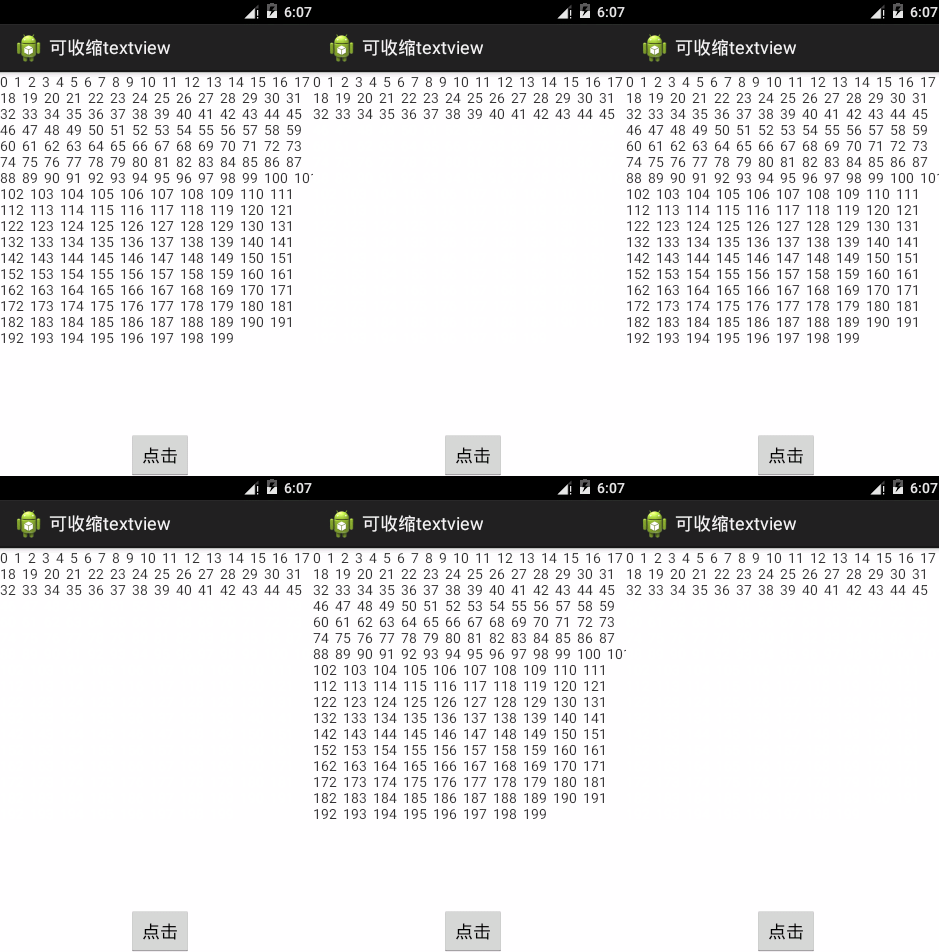
運行效果圖:
 Android應用安全開發之淺談網頁打開APP
Android應用安全開發之淺談網頁打開APP 一、網頁打開APP簡介 Android有一個特性,可以通過點擊網頁內的某個鏈接打開APP,或者在其他APP
 詳解Android Handler的使用
我們進行Android開發時,Handler可以說是使用非常頻繁的一個概念,它
 android中保持屏幕常亮,android屏幕常亮
android中保持屏幕常亮,android屏幕常亮關於android開發中保持屏幕常亮這個問題網上的很多文章都表示需要配合使用 PowerManager&nb
 使用ViewPager切換Fragment時,防止頻繁調用OnCreatView,fragmentoncreat
使用ViewPager切換Fragment時,防止頻繁調用OnCreatView,fragmentoncreat使用ViewPager切換Fragment,我原先使用系統