編輯:關於android開發
1.集成Zxing.bar
2.復制代碼到項目中
3.修改 MipacActivityCapture.java 的掃描結果方法 handleDecode()
/**
     * 處理掃描結果,實現活動頁面跳轉
     * @param result
     * @param barcode
     */
    public void handleDecode(Result result, Bitmap barcode) {
        inactivityTimer.onActivity();
        playBeepSoundAndVibrate();
        String resultString = result.getText();
        if (resultString.equals("")) {
            Toast.makeText(MipcaActivityCapture.this, "Scan failed!", Toast.LENGTH_SHORT).show();
        }else {
            Intent resultIntent = new Intent(MipcaActivityCapture.this,NewsMainActivity.class);
            Bundle bundle = new Bundle();

            bundle.putString("result", resultString);
            bundle.putParcelable("bitmap", barcode);

            resultIntent.putExtras(bundle);
            //this.setResult(RESULT_OK, resultIntent);
            startActivity(resultIntent);
        }
        MipcaActivityCapture.this.finish();
    }
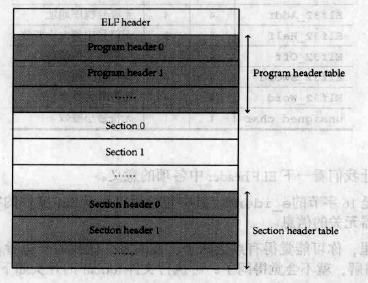 Linux內核系列—11.操作系統開發之ELF格式,linuxelf
Linux內核系列—11.操作系統開發之ELF格式,linuxelfELF文件的結構如下圖所示: ELF文件由4部分組成,分別是ELF頭(ELF header)、程序頭
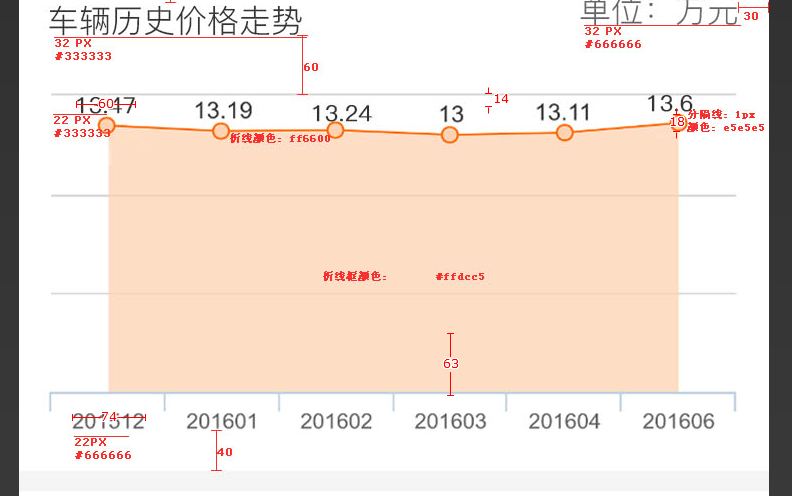 andoid 自定義view 畫折線圖,andoid折線
andoid 自定義view 畫折線圖,andoid折線1 這個主要包含了簡單的繪圖操作 還是比較簡單的 package com.che300.price
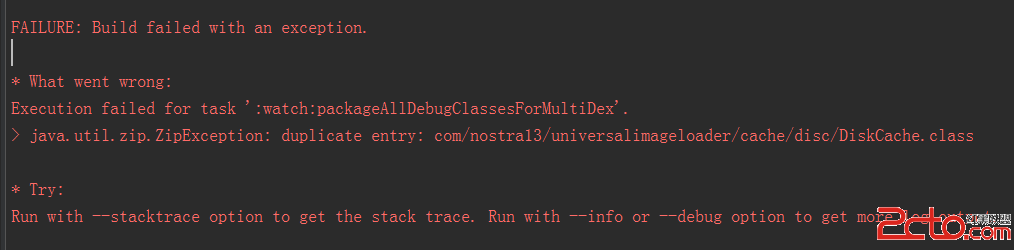 我的Android進階之旅------)Android編譯錯誤java.util.zip.ZipException: duplicate entry的解決方法
我的Android進階之旅------)Android編譯錯誤java.util.zip.ZipException: duplicate entry的解決方法 今天在An
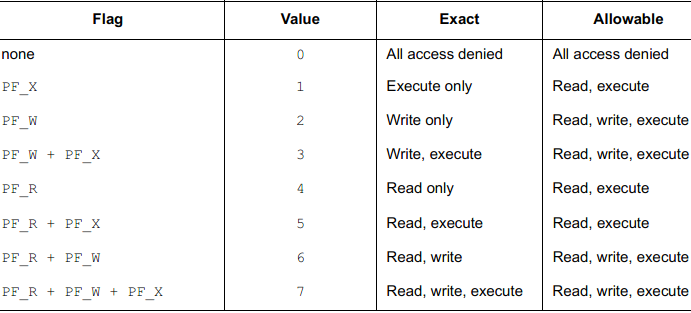 ELF Format 筆記(十三)—— 段權限,elfformat
ELF Format 筆記(十三)—— 段權限,elfformatilocker:關注 Android 安全(新手) QQ: 2597294287 一個可被系統加載的程序