編輯:關於android開發
接上篇博文:Android7.0 Phone應用源碼分析(二) phone來電流程分析
今天我們再來分析下Android7.0 的phone的拒接流程
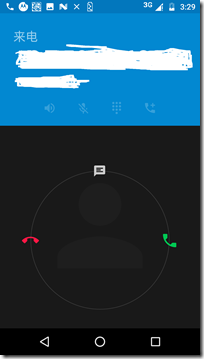
下面先來看一下拒接電話流程時序圖
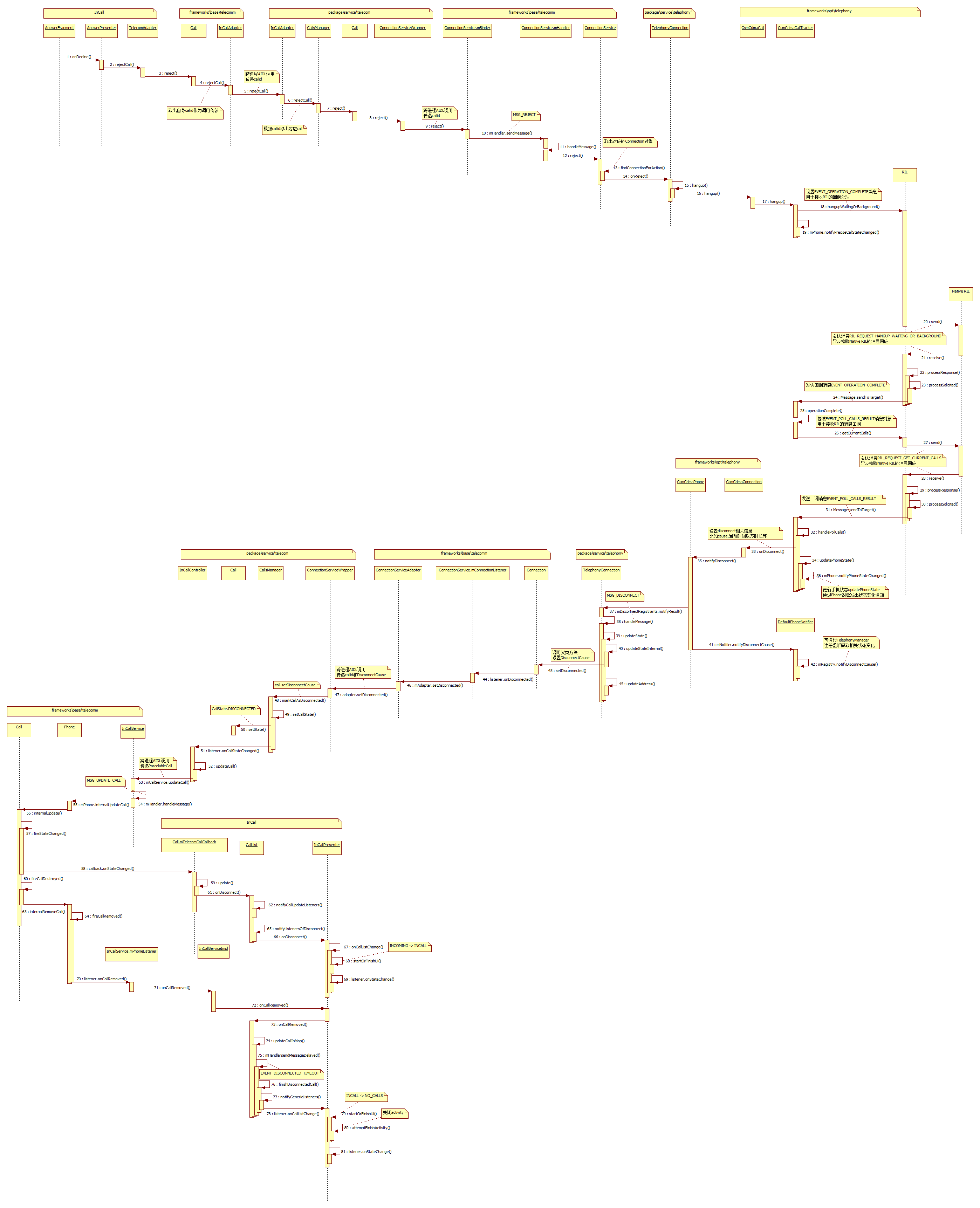
步驟1:滑動按鈕到拒接圖標,會調用到AnswerFragment的onDecline方法
com.android.incallui.AnswerFragment
public void onDecline(Context context) {
        getPresenter().onDecline(context);
 }
最後是調用到AnswerPresenteronDecline方法
com.android.incallui.AnswerPresenter
 public void onDecline(Context context) {
        Log.d(this, "onDecline " + mCallId);
        if (mCall.getSessionModificationState()
                == Call.SessionModificationState.RECEIVED_UPGRADE_TO_VIDEO_REQUEST) {
            InCallPresenter.getInstance().declineUpgradeRequest(context);
        } else {
            TelecomAdapter.getInstance().rejectCall(mCall.getId(), false, null);
        }
 }
步驟2:進入TelecomAdapter的rejectCall方法
com.android.incallui.TelecomAdapter
void rejectCall(String callId, boolean rejectWithMessage, String message) {
        android.telecom.Call call = getTelecomCallById(callId);
        if (call != null) {
            call.reject(rejectWithMessage, message);
        } else {
            Log.e(this, "error rejectCall, call not in call list: " + callId);
        }
}
TelecomAdapter是incallui與telecom通信的代理類,這裡通過callid取出對應的Call對象(android.telecom.Call)
步驟3:調用到framework裡Call的reject方法
android.telecom.Call
public void reject(boolean rejectWithMessage, String textMessage) {
        mInCallAdapter.rejectCall(mTelecomCallId, rejectWithMessage, textMessage);
 }
這裡mInCallAdapter是android.telecom.InCallAdapter類,是在Call對象創建的時候由外部傳入的參數
在telecom綁定InCallService服務的時候,會傳遞一個AIDL接口對象,InCallService會生成InCallAdapter對象來保存這個接口對象
步驟4:InCallAdapter的rejectCall方法
android.telecom.InCallAdapter
public void rejectCall(String callId, boolean rejectWithMessage, String textMessage) {
        try {
            mAdapter.rejectCall(callId, rejectWithMessage, textMessage);
        } catch (RemoteException e) {
        }
 }
mAdapter就是incallui與telecom通信的AIDL接口
步驟5:跨進程調用進入telecom進程,該AIDL接口具體實現類是InCallAdapter,雖然類名一樣但是不同的包名,這裡需要注意一下
com.android.server.telecom.InCallAdapter
 public void rejectCall(String callId, boolean rejectWithMessage, String textMessage) {
        try {
            Log.startSession("ICA.rC", mOwnerComponentName);
            long token = Binder.clearCallingIdentity();
            try {
                synchronized (mLock) {
                    Log.d(this, "rejectCall(%s,%b,%s)", callId, rejectWithMessage, textMessage);
                    Call call = mCallIdMapper.getCall(callId);
                    if (call != null) {
                        mCallsManager.rejectCall(call, rejectWithMessage, textMessage);
                    } else {
                        Log.w(this, "setRingback, unknown call id: %s", callId);
                    }
                }
            } finally {
                Binder.restoreCallingIdentity(token);
            }
        } finally {
            Log.endSession();
        }
 }
這裡同樣是根據callid取出對應Call(com.android.server.telecom.Call),最後調用CallsManager的rejectCall方法傳入call
步驟6:CallsManager的rejectCall方法
com.android.server.telecom.CallsManager
public void rejectCall(Call call, boolean rejectWithMessage, String textMessage) {
        if (!mCalls.contains(call)) {
            Log.i(this, "Request to reject a non-existent call %s", call);
        } else {
            for (CallsManagerListener listener : mListeners) {
                listener.onIncomingCallRejected(call, rejectWithMessage, textMessage);
            }
            call.reject(rejectWithMessage, textMessage);
        }
 }
這裡先通知觀察者來電拒接事件,比如CallAudioManager對該事件感興趣,它的處理是停止播放來電鈴聲和來電等待聲
com.android.server.telecom.CallAudioManager
 public void onIncomingCallRejected(Call call, boolean rejectWithMessage, String message) {
        maybeStopRingingAndCallWaitingForAnsweredOrRejectedCall(call);
}
private void maybeStopRingingAndCallWaitingForAnsweredOrRejectedCall(Call call) {
        // Check to see if the call being answered/rejected is the only ringing call, since this
        // will be called before the connection service acknowledges the state change.
        if (mRingingCalls.size() == 0 ||
                (mRingingCalls.size() == 1 && call == mRingingCalls.iterator().next())) {
            mRinger.stopRinging();
            mRinger.stopCallWaiting();
        }
 }
最後再調用前面傳進來的call對象的reject方法
步驟7:Call的reject方法
com.android.server.telecom.Call
public void reject(boolean rejectWithMessage, String textMessage) {
        Preconditions.checkNotNull(mConnectionService);

        // Check to verify that the call is still in the ringing state. A call can change states
        // between the time the user hits 'reject' and Telecomm receives the command.
        if (isRinging("reject")) {
            // Ensure video state history tracks video state at time of rejection.
            mVideoStateHistory |= mVideoState;

            mConnectionService.reject(this, rejectWithMessage, textMessage);
            Log.event(this, Log.Events.REQUEST_REJECT);
        }
}
這裡的mConnectionService是ConnectionServiceWrapper類,是telecom與telephony通信的代理類
步驟8:ConnectionServiceWrapper的reject方法
com.android.server.telecom.ConnectionServiceWrapper
void reject(Call call, boolean rejectWithMessage, String message) {
        final String callId = mCallIdMapper.getCallId(call);
        if (callId != null && isServiceValid("reject")) {
            try {
                logOutgoing("reject %s", callId);

                if (rejectWithMessage && call.can(
                        Connection.CAPABILITY_CAN_SEND_RESPONSE_VIA_CONNECTION)) {
                    mServiceInterface.rejectWithMessage(callId, message);
                } else {
                    mServiceInterface.reject(callId);
                }
            } catch (RemoteException e) {
            }
        }
 }
這裡mServiceInterface就是telephony提供給telecom調用的AIDL接口
步驟9:跨進程調用進入telephony進程,telephony進程實際服務類是TelephonyConnectionService繼承於ConnectionService類在manifest聲明如下:
<service
         android:singleUser="true"
         android:name="com.android.services.telephony.TelephonyConnectionService"
         android:label="@string/pstn_connection_service_label"
         android:permission="android.permission.BIND_TELECOM_CONNECTION_SERVICE" >
          <intent-filter>
              <action android:name="android.telecom.ConnectionService" />
          </intent-filter>
</service>
而AIDL接口具體實現是其父類ConnectionService的mBinder成員變量
android.telecom.ConnectionService
 private final IBinder mBinder = new IConnectionService.Stub() {

        @Override
        public void reject(String callId) {
            mHandler.obtainMessage(MSG_REJECT, callId).sendToTarget();
        }
}
步驟10~13:發送MSG_REJECT消息到隊列裡處理
private void reject(String callId) {
        Log.d(this, "reject %s", callId);
        findConnectionForAction(callId, "reject").onReject();
 }

 private Connection findConnectionForAction(String callId, String action) {
        if (mConnectionById.containsKey(callId)) {
            return mConnectionById.get(callId);
        }
        Log.w(this, "%s - Cannot find Connection %s", action, callId);
        return getNullConnection();
}
根據callid找到對應的connection對象(android.telecom.Connection),調用onReject方法
步驟14:TelephonyConnection繼承於connection
com.android.services.telephony.TelephonyConnection
public void onReject() {
        Log.v(this, "onReject");
        if (isValidRingingCall()) {
            hangup(android.telephony.DisconnectCause.INCOMING_REJECTED);
        }
        super.onReject();
}
protected void hangup(int telephonyDisconnectCode) {
        if (mOriginalConnection != null) {
            try {
                // Hanging up a ringing call requires that we invoke call.hangup() as opposed to
                // connection.hangup(). Without this change, the party originating the call will not
                // get sent to voicemail if the user opts to reject the call.
                if (isValidRingingCall()) {
                    Call call = getCall();
                    if (call != null) {
                        call.hangup();
                    } else {
                        Log.w(this, "Attempting to hangup a connection without backing call.");
                    }
                } else {
                    // We still prefer to call connection.hangup() for non-ringing calls in order
                    // to support hanging-up specific calls within a conference call. If we invoked
                    // call.hangup() while in a conference, we would end up hanging up the entire
                    // conference call instead of the specific connection.
                    mOriginalConnection.hangup();
                }
            } catch (CallStateException e) {
                Log.e(this, e, "Call to Connection.hangup failed with exception");
            }
        }
 }
步驟15,16:這獲取mOriginalConnection的call(com.android.internal.telephony.Call)對象,並調用hangup方法
protected Call getCall() {
        if (mOriginalConnection != null) {
            return mOriginalConnection.getCall();
        }
        return null;
 }
Call是抽象類,具體子類是GsmCdmaCall
com.android.internal.telephony.GsmCdmaCall
public void hangup() throws CallStateException {
        mOwner.hangup(this);
 }
mOwner是GsmCdmaCallTracker對象
步驟17:GsmCdmaCallTracker的hangup方法
com.android.internal.telephony.GsmCdmaCallTracker
public void hangup(GsmCdmaCall call) throws CallStateException {
        if (call.getConnections().size() == 0) {
            throw new CallStateException("no connections in call");
        }

        if (call == mRingingCall) {
            if (Phone.DEBUG_PHONE) log("(ringing) hangup waiting or background");
            mCi.hangupWaitingOrBackground(obtainCompleteMessage());
        } else if (call == mForegroundCall) {
            if (call.isDialingOrAlerting()) {
                if (Phone.DEBUG_PHONE) {
                    log("(foregnd) hangup dialing or alerting...");
                }
                hangup((GsmCdmaConnection)(call.getConnections().get(0)));
            } else if (isPhoneTypeGsm()
                    && mRingingCall.isRinging()) {
                // Do not auto-answer ringing on CHUP, instead just end active calls
                log("hangup all conns in active/background call, without affecting ringing call");
                hangupAllConnections(call);
            } else {
                hangupForegroundResumeBackground();
            }
        } else if (call == mBackgroundCall) {
            if (mRingingCall.isRinging()) {
                if (Phone.DEBUG_PHONE) {
                    log("hangup all conns in background call");
                }
                hangupAllConnections(call);
            } else {
                hangupWaitingOrBackground();
            }
        } else {
            throw new RuntimeException ("GsmCdmaCall " + call +
                    "does not belong to GsmCdmaCallTracker " + this);
        }

        call.onHangupLocal();
        mPhone.notifyPreciseCallStateChanged();
 }
由於是ringcall,這裡調用mCi.hangupWaitingOrBackground(obtainCompleteMessage());
mCi是CommandsInterface即RILJ接口,包裝了一個EVENT_OPERATION_COMPLETE回調消息,發送給RIL
步驟18:RIL的hangupWaitingOrBackground方法
com.android.internal.telephony.RIL
hangupWaitingOrBackground (Message result) {
        RILRequest rr = RILRequest.obtain(RIL_REQUEST_HANGUP_WAITING_OR_BACKGROUND,
                                        result);

        if (RILJ_LOGD) riljLog(rr.serialString() + "> " + requestToString(rr.mRequest));

        mEventLog.writeRilHangup(rr.mSerial, RIL_REQUEST_HANGUP_WAITING_OR_BACKGROUND, -1);

        send(rr);
 }
給RIL層發送RIL_REQUEST_HANGUP_WAITING_OR_BACKGROUND消息
步驟19:mPhone.notifyPreciseCallStateChanged通知Phone狀態監聽事件
步驟20~24:收到RIL層的回應消息並處理,最後發送回調消息EVENT_OPERATION_COMPLETE給GsmCdmaCallTracker
步驟25:GsmCdmaCallTracker處理回調消息EVENT_OPERATION_COMPLETE
com.android.internal.telephony.GsmCdmaCallTracker
 private void operationComplete() {
        mPendingOperations--;

        if (DBG_POLL) log("operationComplete: pendingOperations=" +
                mPendingOperations + ", needsPoll=" + mNeedsPoll);

        if (mPendingOperations == 0 && mNeedsPoll) {
            mLastRelevantPoll = obtainMessage(EVENT_POLL_CALLS_RESULT);
            mCi.getCurrentCalls(mLastRelevantPoll);
        } else if (mPendingOperations < 0) {
            // this should never happen
            Rlog.e(LOG_TAG,"GsmCdmaCallTracker.pendingOperations < 0");
            mPendingOperations = 0;
        }
 }
這裡再次向RIL發送消息主動獲取當前Call狀態,包裝的回調消息為EVENT_POLL_CALLS_RESULT
步驟26~32:RIL返回消息,GsmCdmaCallTracker接收EVENT_POLL_CALLS_RESULT消息並處理
protected synchronized void handlePollCalls(AsyncResult ar) {
     ...................

     for (int i = mDroppedDuringPoll.size() - 1; i >= 0 ; i--) {
            GsmCdmaConnection conn = mDroppedDuringPoll.get(i);
            //CDMA
            boolean wasDisconnected = false;

            if (conn.isIncoming() && conn.getConnectTime() == 0) {
                // Missed or rejected call
                int cause;
                if (conn.mCause == DisconnectCause.LOCAL) {
                    cause = DisconnectCause.INCOMING_REJECTED;
                } else {
                    cause = DisconnectCause.INCOMING_MISSED;
                }

                if (Phone.DEBUG_PHONE) {
                    log("missed/rejected call, conn.cause=" + conn.mCause);
                    log("setting cause to " + cause);
                }
                mDroppedDuringPoll.remove(i);
                hasAnyCallDisconnected |= conn.onDisconnect(cause);
                wasDisconnected = true;
            } else if (conn.mCause == DisconnectCause.LOCAL
                    || conn.mCause == DisconnectCause.INVALID_NUMBER) {
                mDroppedDuringPoll.remove(i);
                hasAnyCallDisconnected |= conn.onDisconnect(conn.mCause);
                wasDisconnected = true;
            }

            if (!isPhoneTypeGsm() && wasDisconnected && unknownConnectionAppeared
                    && conn == newUnknownConnectionCdma) {
                unknownConnectionAppeared = false;
                newUnknownConnectionCdma = null;
            }

     ...................
     ...................

       updatePhoneState();

        if (unknownConnectionAppeared) {
            if (isPhoneTypeGsm()) {
                for (Connection c : newUnknownConnectionsGsm) {
                    log("Notify unknown for " + c);
                    mPhone.notifyUnknownConnection(c);
                }
            } else {
                mPhone.notifyUnknownConnection(newUnknownConnectionCdma);
            }
        }

        if (hasNonHangupStateChanged || newRinging != null || hasAnyCallDisconnected) {
            mPhone.notifyPreciseCallStateChanged();
        }


}
這裡設置DisconnectCause.INCOMING_REJECTED為連接斷開的cause並調用GsmCdmaConnection的onDisconnect方法
步驟33:GsmCdmaConnection的onDisconnect方法
com.android.internal.telephony.GsmCdmaConnection
 public boolean onDisconnect(int cause) {
        boolean changed = false;

        mCause = cause;

        if (!mDisconnected) {
            doDisconnect();

            if (DBG) Rlog.d(LOG_TAG, "onDisconnect: cause=" + cause);

            mOwner.getPhone().notifyDisconnect(this);

            if (mParent != null) {
                changed = mParent.connectionDisconnected(this);
            }

            mOrigConnection = null;
        }
        clearPostDialListeners();
        releaseWakeLock();
        return changed;
  }
doDisconnect方法設置斷開時間以及通話時長
private void  doDisconnect() {
        mIndex = -1;
        mDisconnectTime = System.currentTimeMillis();
        mDuration = SystemClock.elapsedRealtime() - mConnectTimeReal;
        mDisconnected = true;
        clearPostDialListeners();
}
最後通知注冊者斷開事件mOwner.getPhone().notifyDisconnect(this);
步驟34,36:通知phone狀態變化事件給相關監聽者
步驟35:GsmCdmaPhone通知通話斷開事件
com.android.internal.telephony.GsmCdmaPhone
 public void notifyDisconnect(Connection cn) {
        mDisconnectRegistrants.notifyResult(cn);

        mNotifier.notifyDisconnectCause(cn.getDisconnectCause(), cn.getPreciseDisconnectCause());
}
步驟37~40:TelephonyConnection注冊了斷開事件監聽,接收並處理斷開消息
com.android.services.telephony.TelephonyConnection
void setOriginalConnection(com.android.internal.telephony.Connection originalConnection) {
        Log.v(this, "new TelephonyConnection, originalConnection: " + originalConnection);
 ......
 getPhone().registerForDisconnect(mHandler, MSG_DISCONNECT, null);
 ......
}
void updateState() {
        if (mOriginalConnection == null) {
            return;
        }

        updateStateInternal();
        updateStatusHints();
        updateConnectionCapabilities();
        updateConnectionProperties();
        updateAddress();
        updateMultiparty();
 }
void updateStateInternal() {
        if (mOriginalConnection == null) {
            return;
        }
        Call.State newState;
        // If the state is overridden and the state of the original connection hasn't changed since,
        // then we continue in the overridden state, else we go to the original connection's state.
        if (mIsStateOverridden && mOriginalConnectionState == mOriginalConnection.getState()) {
            newState = mConnectionOverriddenState;
        } else {
            newState = mOriginalConnection.getState();
        }
        Log.v(this, "Update state from %s to %s for %s", mConnectionState, newState, this);

        if (mConnectionState != newState) {
            mConnectionState = newState;
            switch (newState) {
                case IDLE:
                    break;
                case ACTIVE:
                    setActiveInternal();
                    break;
                case HOLDING:
                    setOnHold();
                    break;
                case DIALING:
                case ALERTING:
                    setDialing();
                    break;
                case INCOMING:
                case WAITING:
                    setRinging();
                    break;
                case DISCONNECTED:
                    setDisconnected(DisconnectCauseUtil.toTelecomDisconnectCause(
                            mOriginalConnection.getDisconnectCause(),
                            mOriginalConnection.getVendorDisconnectCause()));
                    close();
                    break;
                case DISCONNECTING:
                    break;
            }
        }
}
通過DisconnectCauseUtil的toTelecomDisconnectCause方法生成DisconnectCause(android.telecom.DisconnectCause)對象
包含code, label, description, reason,toneToPlay信息
步驟41,42:通知外部監聽者斷開事件mNotifier.notifyDisconnectCause
步驟43:調用父類Connection的setDisconnected方法
public final void setDisconnected(DisconnectCause disconnectCause) {
        checkImmutable();
        mDisconnectCause = disconnectCause;
        setState(STATE_DISCONNECTED);
        Log.d(this, "Disconnected with cause %s", disconnectCause);
        for (Listener l : mListeners) {
            l.onDisconnected(this, disconnectCause);
        }
    }
回調通知觀察者ConnectionService注冊了該事件,mConnectionListener接收處理
步驟44:mConnectionListener處理onDisconnected事件
android.telecom.ConnectionService
private final Connection.Listener mConnectionListener = new Connection.Listener() {
 ......
 @Override
        public void onDisconnected(Connection c, DisconnectCause disconnectCause) {
            String id = mIdByConnection.get(c);
            Log.d(this, "Adapter set disconnected %s", disconnectCause);
            mAdapter.setDisconnected(id, disconnectCause);
        }

}
根據connection對象取出對應的callid
步驟45:TelephonyConnection的updateAddress方法更新connection信息
步驟46:ConnectionServiceAdapter的setDisconnected方法
android.telecom.ConnectionServiceAdapter
 void setDisconnected(String callId, DisconnectCause disconnectCause) {
        for (IConnectionServiceAdapter adapter : mAdapters) {
            try {
                adapter.setDisconnected(callId, disconnectCause);
            } catch (RemoteException e) {
            }
        }
}
telecom在綁定TelephonyConnectionService的時候,會設置AIDL回調接口對象給telephony即ConnectionServiceWrapper的Adapter成員變量
步驟47:跨進程調用到telecom進程,ConnectionServiceWrapper的Adapter處理setDisconnected
com.android.server.telecom.ConnectionServiceWrapper
 private final class Adapter extends IConnectionServiceAdapter.Stub {
......
  @Override
        public void setDisconnected(String callId, DisconnectCause disconnectCause) {
            Log.startSession("CSW.sD");
            long token = Binder.clearCallingIdentity();
            try {
                synchronized (mLock) {
                    logIncoming("setDisconnected %s %s", callId, disconnectCause);
                    Call call = mCallIdMapper.getCall(callId);
                    Log.d(this, "disconnect call %s %s", disconnectCause, call);
                    if (call != null) {
                        mCallsManager.markCallAsDisconnected(call, disconnectCause);
                    } else {
                        // Log.w(this, "setDisconnected, unknown call id: %s", args.arg1);
                    }
                }
            } finally {
                Binder.restoreCallingIdentity(token);
                Log.endSession();
            }
        }
......
}
根據callid取出Call(com.android.server.telecom.Call)對象,給CallsManager傳遞Call和disconnectCause
步驟48,49,50:CallsManager的markCallAsDisconnected方法
com.android.server.telecom.CallsManager
void markCallAsDisconnected(Call call, DisconnectCause disconnectCause) {
        call.setDisconnectCause(disconnectCause);
        setCallState(call, CallState.DISCONNECTED, "disconnected set explicitly");
}
給Call設置disconnectCause,同時設置callstate
private void setCallState(Call call, int newState, String tag) {
        if (call == null) {
            return;
        }
        int oldState = call.getState();
        Log.i(this, "setCallState %s -> %s, call: %s", CallState.toString(oldState),
                CallState.toString(newState), call);
        if (newState != oldState) {
            // Unfortunately, in the telephony world the radio is king. So if the call notifies
            // us that the call is in a particular state, we allow it even if it doesn't make
            // sense (e.g., STATE_ACTIVE -> STATE_RINGING).
            // TODO: Consider putting a stop to the above and turning CallState
            // into a well-defined state machine.
            // TODO: Define expected state transitions here, and log when an
            // unexpected transition occurs.
            call.setState(newState, tag);
            maybeShowErrorDialogOnDisconnect(call);

            Trace.beginSection("onCallStateChanged");
            // Only broadcast state change for calls that are being tracked.
            if (mCalls.contains(call)) {
                updateCallsManagerState();
                for (CallsManagerListener listener : mListeners) {
                    if (Log.SYSTRACE_DEBUG) {
                        Trace.beginSection(listener.getClass().toString() + " onCallStateChanged");
                    }
                    listener.onCallStateChanged(call, oldState, newState);
                    if (Log.SYSTRACE_DEBUG) {
                        Trace.endSection();
                    }
                }
            }
            Trace.endSection();
        }
}
最後回調onCallStateChanged方法通知監聽者,這裡監聽call狀態變化的對象有很多,我們看下InCallController的處理
步驟51,52:InCallController的onCallStateChanged方法
com.android.server.telecom.InCallController
 @Override
    public void onCallStateChanged(Call call, int oldState, int newState) {
        updateCall(call);
    }
private void updateCall(Call call, boolean videoProviderChanged) {
        if (!mInCallServices.isEmpty()) {
            ParcelableCall parcelableCall = ParcelableCallUtils.toParcelableCall(
                    call,
                    videoProviderChanged /* includeVideoProvider */,
                    mCallsManager.getPhoneAccountRegistrar());
            Log.i(this, "Sending updateCall %s ==> %s", call, parcelableCall);
            List<ComponentName> componentsUpdated = new ArrayList<>();
            for (Map.Entry<ComponentName, IInCallService> entry : mInCallServices.entrySet()) {
                ComponentName componentName = entry.getKey();
                IInCallService inCallService = entry.getValue();
                componentsUpdated.add(componentName);
                try {
                    inCallService.updateCall(parcelableCall);
                } catch (RemoteException ignored) {
                }
            }
            Log.i(this, "Components updated: %s", componentsUpdated);
        }
    }
}
根據call信息生成ParcelableCall對象,給incallservice傳遞ParcelableCall
步驟53,54:InCallService的updateCall方法
android.telecom.InCallService
 @Override
        public void updateCall(ParcelableCall call) {
            mHandler.obtainMessage(MSG_UPDATE_CALL, call).sendToTarget();
 }
private final Handler mHandler = new Handler(Looper.getMainLooper()) {
        @Override
        public void handleMessage(Message msg) {
 ......
                case MSG_UPDATE_CALL:
                    mPhone.internalUpdateCall((ParcelableCall) msg.obj);
                    break;

}
步驟55:Phone的internalUpdateCall方法
android.telecom.Phone
 final void internalUpdateCall(ParcelableCall parcelableCall) {
         Call call = mCallByTelecomCallId.get(parcelableCall.getId());
         if (call != null) {
             checkCallTree(parcelableCall);
             call.internalUpdate(parcelableCall, mCallByTelecomCallId);
         }
}
這裡的Phone對象只是一個管理類,保存call列表信息和與telecom通信的AIDL接口對象,通過callid取出Call(android.telecom.Call)對象
步驟56:Call的internalUpdate方法
android.telecom.Call
final void internalUpdate(ParcelableCall parcelableCall, Map<String, Call> callIdMap) {

        Details details = Details.createFromParcelableCall(parcelableCall);

        ......
        ......

        // Now we fire updates, ensuring that any client who listens to any of these notifications
        // gets the most up-to-date state.

        if (stateChanged) {
            fireStateChanged(mState);
        }
        if (detailsChanged) {
            fireDetailsChanged(mDetails);
        }
        if (cannedTextResponsesChanged) {
            fireCannedTextResponsesLoaded(mCannedTextResponses);
        }
        if (videoCallChanged) {
            fireVideoCallChanged(mVideoCallImpl);
        }
        if (parentChanged) {
            fireParentChanged(getParent());
        }
        if (childrenChanged) {
            fireChildrenChanged(getChildren());
        }

        // If we have transitioned to DISCONNECTED, that means we need to notify clients and
        // remove ourselves from the Phone. Note that we do this after completing all state updates
        // so a client can cleanly transition all their UI to the state appropriate for a
        // DISCONNECTED Call while still relying on the existence of that Call in the Phone's list.
        if (mState == STATE_DISCONNECTED) {
            fireCallDestroyed();
        }


}
步驟57:轉化ParcelableCall 信息為Detail信息,判斷call狀態是否有變化,有則進入fireStateChanged
private void fireStateChanged(final int newState) {
        for (CallbackRecord<Callback> record : mCallbackRecords) {
            final Call call = this;
            final Callback callback = record.getCallback();
            record.getHandler().post(new Runnable() {
                @Override
                public void run() {
                    callback.onStateChanged(call, newState);
                }
            });
        }
}
步驟58:這裡遍歷Call(android.telecom.Call)對象裡的回調監聽者
private final List<CallbackRecord<Callback>> mCallbackRecords = new CopyOnWriteArrayList<>();
也就是每次InCallPresenter添加Call(android.telecom.Call)時添加的注冊回調事件
com.android.incallui.InCallPresenter
public void onCallAdded(final android.telecom.Call call) {
        if (shouldAttemptBlocking(call)) {
            maybeBlockCall(call);
        } else {
            mCallList.onCallAdded(call);
        }

        // Since a call has been added we are no longer waiting for Telecom to send us a call.
        setBoundAndWaitingForOutgoingCall(false, null);
        call.registerCallback(mCallCallback);
 }
這裡有兩個地方注冊了事件回調,一個是在CallList的onCallAdd方法裡轉化Call(android.telecom.Call)創建了Call(com.android.incallui.Call)對象時注冊的
com.android.incallui.CallList
 public void onCallAdded(final android.telecom.Call telecomCall) {
        Trace.beginSection("onCallAdded");
        final Call call = new Call(telecomCall);
        Log.d(this, "onCallAdded: callState=" + call.getState());

        if (call.getState() == Call.State.INCOMING ||
                call.getState() == Call.State.CALL_WAITING) {
            onIncoming(call, call.getCannedSmsResponses());
        } else {
            onUpdate(call);
        }

        call.logCallInitiationType();
        Trace.endSection();
 }
com.android.incallui.Call
public Call(android.telecom.Call telecomCall) {
        mTelecomCall = telecomCall;
        mId = ID_PREFIX + Integer.toString(sIdCounter++);

        updateFromTelecomCall();

        mTelecomCall.registerCallback(mTelecomCallCallback);

        mTimeAddedMs = System.currentTimeMillis();
   }
還有就是InCallPresenter的成員變量mCallCallback的注冊
這裡onStateChange只有Call(com.android.incallui.Call)的成員變量mTelecomCallCallback有處理
com.android.incallui.Call
private final android.telecom.Call.Callback mTelecomCallCallback =
        new android.telecom.Call.Callback() {
         ......
        ......
            @Override
            public void onStateChanged(android.telecom.Call call, int newState) {
                Log.d(this, "TelecomCallCallback onStateChanged call=" + call + " newState="
                        + newState);
                update();
            }

            @Override
            public void onCallDestroyed(android.telecom.Call call) {
                Log.d(this, "TelecomCallCallback onStateChanged call=" + call);
                call.unregisterCallback(this);
            }


 };
步驟59:進入Call(com.android.incallui.Call)的update方法
private void update() {
        Trace.beginSection("Update");
        int oldState = getState();
        updateFromTelecomCall();
        if (oldState != getState() && getState() == Call.State.DISCONNECTED) {
            CallList.getInstance().onDisconnect(this);
        } else {
            CallList.getInstance().onUpdate(this);
        }
        Trace.endSection();
}
步驟61~69:由於是DISCONNECTED狀態,進入CallList的onDisconnect,最後回調到InCallPresenter的onDisconnect方法
com.android.incallui.InCallPresenter
 @Override
    public void onDisconnect(Call call) {
        maybeShowErrorDialogOnDisconnect(call);

        // We need to do the run the same code as onCallListChange.
        onCallListChange(mCallList);

        if (isActivityStarted()) {
            mInCallActivity.dismissKeyguard(false);
        }

        if (call.isEmergencyCall()) {
            FilteredNumbersUtil.recordLastEmergencyCallTime(mContext);
        }
}
InCallPresenter內部更新call狀態事件並觸發回調通知,細節再次就不一一羅列了
回調步驟57在執行完fireStateChanged方法後,後續還有fireDetailsChanged等事件(如果有變化的話),這裡我們關注下fireCallDestroyed
android.telecom.Call
private void fireCallDestroyed() {

        final Call call = this;
        if (mCallbackRecords.isEmpty()) {
            // No callbacks registered, remove the call from Phone's record.
            mPhone.internalRemoveCall(call);
        }
        for (final CallbackRecord<Callback> record : mCallbackRecords) {
            final Callback callback = record.getCallback();
            record.getHandler().post(new Runnable() {
                @Override
                public void run() {
                    boolean isFinalRemoval = false;
                    RuntimeException toThrow = null;
                    try {
                        callback.onCallDestroyed(call);
                    } catch (RuntimeException e) {
                            toThrow = e;
                    }
                    synchronized(Call.this) {
                        mCallbackRecords.remove(record);
                        if (mCallbackRecords.isEmpty()) {
                            isFinalRemoval = true;
                        }
                    }
                    if (isFinalRemoval) {
                        mPhone.internalRemoveCall(call);
                    }
                    if (toThrow != null) {
                        throw toThrow;
                    }
                }
            });
        }
 }
這裡 callback.onCallDestroyed(call);通知call銷毀事件
步驟60:反注冊Call(android.telecom.Call )的監聽事件
com.android.incallui.Call

            @Override
            public void onCallDestroyed(android.telecom.Call call) {
                Log.d(this, "TelecomCallCallback onStateChanged call=" + call);
                call.unregisterCallback(this);
  }
步驟63,64:mPhone.internalRemoveCall(call); 把Call(android.telecom.Call)對象從列表中移除,通知onCallRemoved事件
android.telecom.Phone
final void internalRemoveCall(Call call) {
        mCallByTelecomCallId.remove(call.internalGetCallId());
        mCalls.remove(call);

        InCallService.VideoCall videoCall = call.getVideoCall();
        if (videoCall != null) {
            videoCall.destroy();
        }
        fireCallRemoved(call);
 }
private void fireCallRemoved(Call call) {
        for (Listener listener : mListeners) {
            listener.onCallRemoved(this, call);
        }
 }
步驟70,71:InCallService處理onCallRemoved事件
com.android.incallui.InCallServiceImpl

@Override
    public void onCallAdded(Call call) {
        InCallPresenter.getInstance().onCallAdded(call);
  }
步驟72:進入InCallPresenter的onCallRemoved方法
com.android.incallui.InCallPresenter
public void onCallRemoved(android.telecom.Call call) {
        mCallList.onCallRemoved(call);
        call.unregisterCallback(mCallCallback);
 }
步驟73~78:CallList的onCallRemoved方法:
com.android.incallui.CallList
public void onCallRemoved(android.telecom.Call telecomCall) {
        if (mCallByTelecomCall.containsKey(telecomCall)) {
            Call call = mCallByTelecomCall.get(telecomCall);
            Logger.logCall(call);
            if (updateCallInMap(call)) {
                Log.w(this, "Removing call not previously disconnected " + call.getId());
            }
            updateCallTextMap(call, null);
        }
}
CallList內部更新狀態最終回調InCallPresenter的onCallListChange方法
com.android.incallui.InCallPresenter
public void onCallListChange(CallList callList) {
        if (mInCallActivity != null && mInCallActivity.getCallCardFragment() != null &&
                mInCallActivity.getCallCardFragment().isAnimating()) {
            mAwaitingCallListUpdate = true;
            return;
        }
        if (callList == null) {
            return;
        }

        mAwaitingCallListUpdate = false;

        InCallState newState = getPotentialStateFromCallList(callList);
        InCallState oldState = mInCallState;
        Log.d(this, "onCallListChange oldState= " + oldState + " newState=" + newState);
        newState = startOrFinishUi(newState);
        Log.d(this, "onCallListChange newState changed to " + newState);

        // Set the new state before announcing it to the world
        Log.i(this, "Phone switching state: " + oldState + " -> " + newState);
        mInCallState = newState;

        // notify listeners of new state
        for (InCallStateListener listener : mListeners) {
            Log.d(this, "Notify " + listener + " of state " + mInCallState.toString());
            listener.onStateChange(oldState, mInCallState, callList);
        }

        if (isActivityStarted()) {
            final boolean hasCall = callList.getActiveOrBackgroundCall() != null ||
                    callList.getOutgoingCall() != null;
            mInCallActivity.dismissKeyguard(hasCall);
        }
  }
步驟79,80,81:InCallPresenter處理disconnected事件並觸發相關回調更新界面等
至此,一個來電的整體流程都分析完了,大致流程如下:
InCallUI →TeleComService→TeleponyService→TelephonyFramework →RIL→
RIL→TelephonyFramework →TeleponyService→TeleComFramework→TeleComService→TeleComFramework-->InCallUI
http://www.bkjia.com/Androidjc/1192396.htmlwww.bkjia.comtruehttp://www.bkjia.com/Androidjc/1192396.htmlTechArticleAndroid7.0 Phone應用源碼分析(三) phone拒接流程分析,android7.0拒接 接上篇博文: Android7.0 Phone應用源碼分析(二) phone來電流程分析 今天我...
 OpenCV學習筆記(七)—— OpenCV for Android實時圖像處理
OpenCV學習筆記(七)—— OpenCV for Android實時圖像處理 在上篇中我們已經實現了相機打開和實時圖像信息的獲取,那麼接下來我們可以嘗
 Android中手機錄屏並轉換GIF的兩種方式,android錄屏
Android中手機錄屏並轉換GIF的兩種方式,android錄屏之前在博文中為了更好的給大家演示APP的實現效果,本人了解學習了幾種給手機錄屏的方法,今天就給大家介紹兩
 Android中Action Bar的使用
Android中Action Bar的使用 內容概要 示例演示和基本介紹 啟用Action Bar 在Action Bar上添加按鈕 自定義Action Bar樣式 自動
 Android平台Camera實時濾鏡實現方法探討(九)--磨皮算法探討(一)
Android平台Camera實時濾鏡實現方法探討(九)--磨皮算法探討(一) 上一篇開頭提到了一些可用於磨皮的去噪算法,下面我們實現這些算法並且觀察效果,咱不考慮實時性