編輯:關於android開發
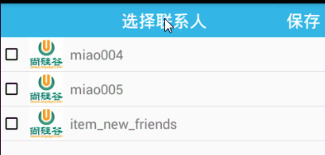
1)頁面布局
<?xml version="1.0" encoding="utf-8"?>
<LinearLayout xmlns:android="http://schemas.android.com/apk/res/android"
    xmlns:tools="http://schemas.android.com/tools"
    android:layout_width="match_parent"
    android:layout_height="match_parent"
    android:orientation="vertical"
>
    <RelativeLayout
        android:background="@android:color/holo_blue_light"
        android:layout_width="match_parent"
        android:layout_height="60dp">

        <TextView
            android:text="選擇聯系人"
            android:textSize="25sp"
            android:textColor="@android:color/white"
            android:layout_centerInParent="true"
            android:layout_width="wrap_content"
            android:layout_height="wrap_content" />

        <TextView
            android:id="@+id/tv_pick_save"
            android:text="保存"
            android:textSize="25sp"
            android:textColor="@android:color/white"
            android:layout_alignParentRight="true"
            android:gravity="center"
            android:layout_marginRight="5dp"
            android:layout_width="wrap_content"
            android:layout_height="match_parent" />
    </RelativeLayout>

    <ListView
        android:id="@+id/lv_pick"
        android:layout_width="match_parent"
        android:layout_height="match_parent">

    </ListView>

</LinearLayout>
2)獲取好友列表
// 獲取所有聯系人的數據
List<UserInfo> contacts = Model.getInstace().getDbManager().getContactTableDao().getContacts();
mPicks = new ArrayList<>();
// 校驗
if(contacts != null && contacts.size() >= 0) {
	// 將聯系人信息轉換為選擇聯系人bean信息
	PickContactInfo pickContactInfo = null;
	for (UserInfo contact: contacts){
		pickContactInfo = new PickContactInfo(contact, false);
		mPicks.add(pickContactInfo);
	}
}
3)初始化listview
// 創建適配器
mPickContactsAdapter = new PickContactsAdapter(PickContactsActivity.this, mPicks, mExistingMembers);
// 添加適配器
lv_pick_contacts.setAdapter(mPickContactsAdapter);
4)Listview適配器
public class PickContactsAdapter extends BaseAdapter {
    private Context mContext;
    private List<PickContactInfo> mPicks = new ArrayList<>();
    private List<String> mExistingMembers  = new ArrayList<>();


    public PickContactsAdapter(Context context , List<PickContactInfo> picks,List<String> existingMembers) {
        mContext = context;

        if(picks != null && picks.size() >= 0) {
            mPicks.clear();
            mPicks.addAll(picks);
        }

        // 接受群中已經存在的群成員的環信id
        if(existingMembers != null && existingMembers.size() >=0 ) {
            mExistingMembers.clear();
            mExistingMembers.addAll(existingMembers);
        }
    }

    // 獲取選中的聯系人
    public List<String> getAddMembers(){
        // 准備一個要返回的數據集合
        List<String> names = new ArrayList<>();

        // 遍歷集合 選擇出選中狀態的聯系人
        for (PickContactInfo pick: mPicks){

            if(pick.isChecked()) {
                names.add(pick.getUser().getName());
            }
        }

        return names;
    }

    @Override
    public int getCount() {
        return mPicks == null? 0:mPicks.size();
    }

    @Override
    public Object getItem(int position) {
        return mPicks.get(position);
    }

    @Override
    public long getItemId(int position) {
        return position;
    }

    @Override
    public View getView(int position, View convertView, ViewGroup parent) {
        // 創建或獲取viewholder
        ViewHolder holder  = null;
        if(convertView == null) {
            holder = new ViewHolder();
            convertView = View.inflate(mContext, R.layout.item_pick_contacts, null);
            holder.tv_name = (TextView) convertView.findViewById(R.id.tv_item_pick_contacts_name);
            holder.cb_checked = (CheckBox) convertView.findViewById(R.id.cb_item_pick_contacts);
            convertView.setTag(holder);
        }else {
            holder = (ViewHolder) convertView.getTag();
        }
        // 獲取當前item數據
        PickContactInfo pickContactInfo = mPicks.get(position);

        // 顯示數據
        holder.tv_name.setText(pickContactInfo.getUser().getName());
        holder.cb_checked.setChecked(pickContactInfo.isChecked());

        if(mExistingMembers.contains(pickContactInfo.getUser().getHxId())) {
            holder.cb_checked.setChecked(true);
            pickContactInfo.setIsChecked(true);
        }

        // 返回view

        return convertView;
    }

    static class ViewHolder{
        TextView tv_name;
        CheckBox cb_checked;
    }
}
5)Listview條目的點擊事件
// listView團隊item點擊事件處理
lv_pick_contacts.setOnItemClickListener(new AdapterView.OnItemClickListener() {
	@Override
	public void onItemClick(AdapterView<?> parent, View view, int position, long id) {
		//  獲取當前item的checkbox對象
		CheckBox cb_item_pick_contacts = (CheckBox) view.findViewById(R.id.cb_item_pick_contacts);
		// 設置狀態
		cb_item_pick_contacts.setChecked(!cb_item_pick_contacts.isChecked());
//                cb_item_pick_contacts.toggle();
		// 更新數據
		PickContactInfo pickContactInfo = mPicks.get(position);
		pickContactInfo.setIsChecked(cb_item_pick_contacts.isChecked());
		// 刷新列表數據
		mPickContactsAdapter.notifyDataSetChanged();
	}
});
6)保存按鈕點擊事件
// 保存按鈕的點擊監聽處理
tv_pick_contacts_save.setOnClickListener(new View.OnClickListener() {
	@Override
	public void onClick(View v) {
		// 獲取被選擇的聯系人
		List<String> addMembers = mPickContactsAdapter.getAddMembers();
		// 設置數據准備返回創建群頁面
		Intent intent = new Intent();
		intent.putExtra("members", addMembers.toArray(new String[0]));
		setResult(RESULT_OK, intent);
		// 結束當前頁面
		finish();
	}
});
 【lushengduan】02、Activity的基本認識 如何彈出一條Toast提示框,lushengduantoast
【lushengduan】02、Activity的基本認識 如何彈出一條Toast提示框,lushengduantoast一、Activity的簡要理解 &n
 Android Design Support Library——TextInputLayout,designsupportlibrary
Android Design Support Library——TextInputLayout,designsupportlibrary前沿 上一篇介紹了Naviga
 Android模擬登錄評論CSDN
Android模擬登錄評論CSDN 有時候作為非官方開發的APP集成了官方的所有信息,但是現在需要實現另一個功能那就是登錄發表評論到官方的網站,而非官方的APP並不知道官
 Android群英傳-拼圖游戲puzzle-6點吐槽
Android群英傳-拼圖游戲puzzle-6點吐槽 一、緣由 經常寫文章,混了一些C幣。最近在深入學習Android應用開發,就從商城裡買了一本《Android群英
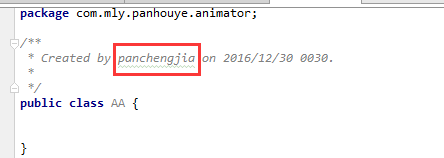 Android中開發工具Android Studio修改created用戶(windows環境),androidcreated
Android中開發工具Android Studio修改created用