編輯:關於android開發
自定義組合控件
1. 自定義一個View, 繼承ViewGroup,比如RelativeLayout,此文中是SettingItemView
2. 編寫組合控件的布局文件,在自定義的View中加載
// 將自定義好的布局文件設置給當前的SettingItemView
View.inflate(getContext(), R.layout.view_setting_item, this);
3. 自定義屬性
刪除代碼中對文本的動態設置,改為在布局文件中設置
在布局文件中增加新的命名空間
創建attrs.xml,定義相關屬性
讀取自定義的值,更新相關內容
activity_setting.xml
<?xml version="1.0" encoding="utf-8"?>
<LinearLayout xmlns:android="http://schemas.android.com/apk/res/android"
    xmlns:mobilesafe="http://schemas.android.com/apk/res/com.mxn.mobilesafe"//自定義命名空間。。。在布局文件中增加新的命名空間
    android:layout_width="match_parent"
    android:layout_height="match_parent"
    android:orientation="vertical" >

    <TextView

        style="@style/TitleStyle"
        android:text="設置中心" />

    <com.mxn.mobilesafe.view.SettingItemView
        android:id="@+id/siv_update"
        android:layout_width="match_parent"
        android:layout_height="wrap_content"

        //自定義屬性,不用android默認的屬性
        //從命名空間中找
        mobilesafe:title="自動更新設置"
        mobilesafe:desc_on="自動更新已開啟"
        mobilesafe:desc_off="自動更新已關閉" >
    </com.mxn.mobilesafe.view.SettingItemView>

    <com.mxn.mobilesafe.view.SettingItemView
        android:id="@+id/siv_address"
        android:layout_width="match_parent"
        android:layout_height="wrap_content"
        mobilesafe:title="歸屬地顯示設置"
        mobilesafe:desc_on="歸屬地顯示已開啟"
        mobilesafe:desc_off="歸屬地顯示已關閉" >
    </com.mxn.mobilesafe.view.SettingItemView>


     <com.mxn.mobilesafe.view.SettingClickView
        android:id="@+id/scv_address_style"
        android:layout_width="match_parent"
        android:layout_height="wrap_content"
         >
    </com.mxn.mobilesafe.view.SettingClickView>


      <com.mxn.mobilesafe.view.SettingItemView
        android:id="@+id/siv_watchdog"
        android:layout_width="match_parent"
        android:layout_height="wrap_content"
        mobilesafe:title="看門狗設置"
        mobilesafe:desc_on="看門狗已開啟"
        mobilesafe:desc_off="看門狗已關閉" >
    </com.mxn.mobilesafe.view.SettingItemView>


</LinearLayout>
自定義屬性 : attrs.xml。。創建attrs.xml,定義相關屬性
<?xml version="1.0" encoding="utf-8"?>
<resources>
    <declare-styleable name="SettingItemView">
        <attr name="title"  format="string"></attr>
        <attr name="desc_on"  format="string"></attr>
        <attr name="desc_off"  format="string"></attr>

    </declare-styleable>

</resources>
SettingItemView.java
/*
 * 設置中心的自定義控件,自定義View
 */
public class SettingItemView extends RelativeLayout {
    TextView tvTitle;
    TextView tvDesc;
    CheckBox cbStatus;
    private String mtitle;
    private String mdescon;
    private String mdescoff;

    String namespace = "http://schemas.android.com/apk/res/com.mxn.mobilesafe";//命名空間

    public SettingItemView(Context context, AttributeSet attrs, int defStyleAttr, int defStyleRes) {
        super(context, attrs, defStyleAttr, defStyleRes);
        // TODO Auto-generated constructor stub
        initView();
    }

    public SettingItemView(Context context, AttributeSet attrs, int defStyleAttr) {
        super(context, attrs, defStyleAttr);
        // TODO Auto-generated constructor stub

        initView();
//        int attributeCount = attrs.getAttributeCount();
//        for(int i=0;i<attributeCount;i++){
//            String attrsname = attrs.getAttributeName(i);
//            String attrvalue = attrs.getAttributeValue(i);
//            System.out.println(attrsname+"="+attrvalue);
//
//        }


    }

    public SettingItemView(Context context, AttributeSet attrs) {
        super(context, attrs);
        // TODO Auto-generated constructor stub
       // 讀取自定義的值,更新相關內容
        //根據屬性名稱獲取屬性的值
        mtitle = attrs.getAttributeValue(namespace , "title");
        mdescon = attrs.getAttributeValue(namespace , "desc_on");
        mdescoff = attrs.getAttributeValue(namespace , "desc_off");

        initView();
    }

    public SettingItemView(Context context) {
        super(context);
        // TODO Auto-generated constructor stub
        initView();
    }

    // 初始化布局
    private void initView() {
        // 把自定義好的布局設置給當前的SettingItemView
        View.inflate(getContext(), R.layout.view_setting_item, this);// this表示把view_setting_item布局塞給RelativeLayout
        tvTitle = (TextView) findViewById(R.id.tv_title);
        tvDesc = (TextView) findViewById(R.id.tv_desc);
        cbStatus = (CheckBox) findViewById(R.id.cb_status);

        setTitle(mtitle);

    }

    public void setTitle(String title) {
        tvTitle.setText(title);
    }

    public void setDesc(String desc) {
        tvDesc.setText(desc);
    }

    // 判斷當前的勾選狀態並返回
    public boolean isChecked() {
        return cbStatus.isChecked();
    }

    public void setChecked(boolean check){
        cbStatus.setChecked(check);
        //根據選擇的狀態更新文本描述
        if(check){
            setDesc(mdescon);
        }else{
            setDesc(mdescoff);
        }
    }
}
view_setting_item.xml
<?xml version="1.0" encoding="utf-8"?>
  <RelativeLayout
        xmlns:android="http://schemas.android.com/apk/res/android"
        android:layout_width="match_parent"
        android:layout_height="80dp"
        android:padding="10dp">

        <TextView
            android:id="@+id/tv_title"
            android:layout_width="match_parent"
            android:layout_height="wrap_content"

            android:textColor="@color/black"
            android:textSize="20sp"/>
        <TextView
            android:id="@+id/tv_desc"
            android:layout_width="match_parent"
            android:layout_height="wrap_content"
            android:layout_marginTop="5dp"

            android:textColor="#a000"
            android:layout_below="@id/tv_title"
            android:textSize="15sp"/>
        <CheckBox
            android:id="@+id/cb_status"
            android:layout_width="wrap_content"
            android:layout_height="wrap_content"
            android:layout_alignParentRight="true"
            android:layout_centerVertical="true"

            //要禁用某些事件,這三個搭配使用。
            android:clickable="false"//表示不能點擊
            android:focusable="false"//不能獲取焦點
            android:focusableInTouchMode="false"
            />
        <View
            android:layout_width="match_parent"
            android:layout_height="0.2dp"
            android:background="#a000"
            android:layout_alignParentBottom="true"
            />
    </RelativeLayout>
SettingClickView.java
/*
 * 設置中心的自定義控件,自定義View
 */
public class SettingClickView extends RelativeLayout {
    private TextView tvTitle;
    private TextView tvDesc;

    public SettingClickView(Context context, AttributeSet attrs, int defStyle) {
        super(context, attrs, defStyle);
        initView();
    }

    public SettingClickView(Context context, AttributeSet attrs) {
        super(context, attrs);
        initView();
    }

    public SettingClickView(Context context) {
        super(context);
        initView();
    }

    /**
     * 初始化布局
     */
    private void initView() {
        // 將自定義好的布局文件設置給當前的SettingClickView
        View.inflate(getContext(), R.layout.view_setting_click, this);
        tvTitle = (TextView) findViewById(R.id.tv_title);
        tvDesc = (TextView) findViewById(R.id.tv_desc);
    }

    public void setTitle(String title) {
        tvTitle.setText(title);
    }

    public void setDesc(String desc) {
        tvDesc.setText(desc);
    }


}
view_setting_click.xml
<?xml version="1.0" encoding="utf-8"?>
  <RelativeLayout
        xmlns:android="http://schemas.android.com/apk/res/android"
        android:layout_width="match_parent"
        android:layout_height="80dp"
        android:padding="10dp">

        <TextView
            android:id="@+id/tv_title"
            android:layout_width="match_parent"
            android:layout_height="wrap_content"

            android:textColor="@color/black"
            android:textSize="20sp"/>
        <TextView
            android:id="@+id/tv_desc"
            android:layout_width="match_parent"
            android:layout_height="wrap_content"
            android:layout_marginTop="5dp"

            android:textColor="#a000"
            android:layout_below="@id/tv_title"
            android:textSize="15sp"/>
        <ImageView
            android:src="@drawable/jiantou1_pressed"
            android:layout_width="wrap_content"
            android:layout_height="wrap_content"
            android:layout_alignParentRight="true"
            android:layout_centerVertical="true"
            android:id="@+id/iv_jt"
            />
        <View
            android:layout_width="match_parent"
            android:layout_height="0.2dp"
            android:background="#a000"
            android:layout_alignParentBottom="true"
            />
    </RelativeLayout>
運行界面:
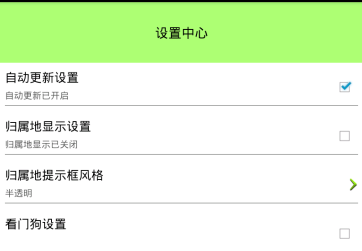
SettingActivity.java
/**
 * 設置中心
 *
 * @author mxn
 *
 */
public class SettingActivity extends Activity {

    private SettingItemView sivUpdate;// 設置自動更新
    private SettingItemView sivAddress;// 設置歸屬地
    private SettingClickView scvAddressStyle;// 修改風格
    private SettingClickView scvAddressLocation;// 修改歸屬地位置
    private SharedPreferences mPref;

    @Override
    protected void onCreate(Bundle savedInstanceState) {
        super.onCreate(savedInstanceState);
        setContentView(R.layout.activity_setting);

        mPref = getSharedPreferences("config", MODE_PRIVATE);
        //MODE_PRIVATE訪問權限
        initUpdateView();
        initAddressView();
        initAddressStyle();
    }

    /**
     * 初始化自動更新開關
     */
    private void initUpdateView() {
        sivUpdate = (SettingItemView) findViewById(R.id.siv_update);
        // sivUpdate.setTitle("自動更新設置");
        //默認設置的開啟,用戶進入之後
        boolean autoUpdate = mPref.getBoolean("auto_update", true);

        if (autoUpdate) {
            // sivUpdate.setDesc("自動更新已開啟");
            sivUpdate.setChecked(true);
        } else {
            // sivUpdate.setDesc("自動更新已關閉");
            sivUpdate.setChecked(false);
        }

        sivUpdate.setOnClickListener(new OnClickListener() {

            @Override
            public void onClick(View v) {
                // 判斷當前的勾選狀態
                if (sivUpdate.isChecked()) {
                    // 設置不勾選
                    sivUpdate.setChecked(false);
                    // sivUpdate.setDesc("自動更新已關閉");
                    // 更新sp
                    mPref.edit().putBoolean("auto_update", false).commit();
                } else {
                    sivUpdate.setChecked(true);
                    // sivUpdate.setDesc("自動更新已開啟");
                    // 更新sp
                    mPref.edit().putBoolean("auto_update", true).commit();
                }
            }
        });
    }

    /**
     * 初始化歸屬地開關顯示
     */
    private void initAddressView() {
        sivAddress = (SettingItemView) findViewById(R.id.siv_address);

        // 根據歸屬地服務是否運行來更新checkbox
        boolean serviceRunning = ServiceStatusUtils.isServiceRunning(this,
                "com.itheima52.mobilesafe.service.AddressService");

        if (serviceRunning) {
            sivAddress.setChecked(true);
        } else {
            sivAddress.setChecked(false);
        }

        sivAddress.setOnClickListener(new OnClickListener() {

            @Override
            public void onClick(View v) {
                if (sivAddress.isChecked()) {
                    sivAddress.setChecked(false);
                    stopService(new Intent(SettingActivity.this,
                            AddressService.class));// 停止歸屬地服務
                } else {
                    sivAddress.setChecked(true);
                    startService(new Intent(SettingActivity.this,
                            AddressService.class));// 開啟歸屬地服務
                }
            }
        });
    }

    final String[] items = new String[] { "半透明", "活力橙", "衛士藍", "金屬灰", "蘋果綠" };

    /**
     * 修改歸屬地提示框顯示風格
     */
    private void initAddressStyle() {
        scvAddressStyle = (SettingClickView) findViewById(R.id.scv_address_style);

        scvAddressStyle.setTitle("歸屬地提示框風格");

        int style = mPref.getInt("address_style", 0);// 讀取保存的style
        scvAddressStyle.setDesc(items[style]);

        scvAddressStyle.setOnClickListener(new OnClickListener() {

            @Override
            public void onClick(View v) {
                showSingleChooseDailog();
            }
        });
    }

    /**
     * 彈出選擇風格的單選框
     */
    protected void showSingleChooseDailog() {
        AlertDialog.Builder builder = new AlertDialog.Builder(this);
        // builder.setIcon(R.drawable.ic_launcher);
        builder.setTitle("歸屬地提示框風格");

        int style = mPref.getInt("address_style", 0);// 讀取保存的style

        builder.setSingleChoiceItems(items, style,
                new DialogInterface.OnClickListener() {

                    @Override
                    public void onClick(DialogInterface dialog, int which) {
                        mPref.edit().putInt("address_style", which).commit();// 保存選擇的風格
                        dialog.dismiss();// 讓dialog消失

                        scvAddressStyle.setDesc(items[which]);// 更新組合控件的描述信息
                    }
                });

        builder.setNegativeButton("取消", null);
        builder.show();
    }

}
 微信支付僅能成功調用一次的問題,微信支付調用
微信支付僅能成功調用一次的問題,微信支付調用本人使用Android開發有一段時間了,但是本身沒有系統學,而且多年專注服務端開發,總覺得因為項目需要接觸Android移動端
 Android 手機衛士--簽名文件說明&包名說明,android衛士
Android 手機衛士--簽名文件說明&包名說明,android衛士在《Android 手機衛士--打包生成apk維護到服務器》一文中,實現了新版本的apk到服
 ListView之點擊展開菜單,listview展開菜單
ListView之點擊展開菜單,listview展開菜單一、概述 ListView點擊item顯示菜單是要實現這樣的效果: 需要實現的邏輯如下: 1)點擊一個普通ite
 Android 手機衛士10--應用管理器,android10--
Android 手機衛士10--應用管理器,android10-- 1.添加不同類型條目 1 class MyAdapter extends BaseAdapter{