編輯:關於android開發
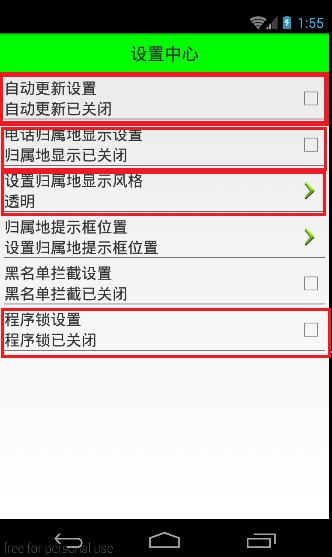
由於設置中心條目中的布局都很類似,所以可以考慮使用自定義組合控件來簡化實現
本文地址:http://www.cnblogs.com/wuyudong/p/5909043.html,轉載請注明源地址。
自定義組合控件
1.將已經編寫好的布局文件,抽取到一個類中去做管理,下次還需要使用此布局結構的時候,直接使用組合控件對應的對象.
2.將組合控件的布局,抽取到單獨的一個xml中
新建布局文件:setting_item_view.xml,將上篇文章中布局文件中的代碼放進去
<?xml version="1.0" encoding="utf-8"?>
<RelativeLayout xmlns:android="http://schemas.android.com/apk/res/android"
    android:layout_width="match_parent"
    android:layout_height="wrap_content" >

    <RelativeLayout
        android:layout_width="match_parent"
        android:layout_height="wrap_content"
        android:padding="5dp" >

        <TextView
            android:id="@+id/tv_title"
            android:layout_width="wrap_content"
            android:layout_height="wrap_content"
            android:text="自動更新設置"
            android:textColor="#000"
            android:textSize="18sp" />

        <TextView
            android:id="@+id/tv_des"
            android:layout_width="wrap_content"
            android:layout_height="wrap_content"
            android:layout_below="@id/tv_title"
            android:text="自動更新已關閉"
            android:textColor="#000"
            android:textSize="18sp" />

        <CheckBox
            android:id="@+id/cb_box"
            android:layout_width="wrap_content"
            android:layout_height="wrap_content"
            android:layout_alignParentRight="true"
            android:layout_centerVertical="true" />

        <View
            android:layout_width="match_parent"
            android:layout_height="1dp"
            android:layout_below="@id/tv_des"
            android:background="#000" />
    </RelativeLayout>

</RelativeLayout>
3.通過一個單獨的類SettingItemView.java,去加載此段布局文件.
package com.wuyudong.mobilesafe.view;

import com.wuyudong.mobilesafe.R;

import android.content.Context;
import android.util.AttributeSet;
import android.view.View;
import android.widget.CheckBox;
import android.widget.RelativeLayout;
import android.widget.TextView;

public class SettingItemView extends RelativeLayout {

    private TextView tv_des;
    private CheckBox cb_box;

    public SettingItemView(Context context) {
        this(context, null);
    }

    public SettingItemView(Context context, AttributeSet attrs) {
        this(context, null, 0);
    }

    public SettingItemView(Context context, AttributeSet attrs, int defStyle) {
        super(context, attrs, defStyle);
        // xml-->view 將設置界面的條目轉換成view對象
        View.inflate(context, R.layout.setting_item_view, this);
        // 等同於以下兩行代碼
        /*
         * View view = View.inflate(context, R.layout.setting_item_view, null);
         * this.addView(view);
         */

        //自定義組合控件中的標題描述
        TextView tv_title = (TextView) findViewById(R.id.tv_title);
        tv_des = (TextView) findViewById(R.id.tv_des);
        cb_box = (CheckBox) findViewById(R.id.cb_box);
    }

}
這樣只需要簡單的幾行代碼就可以完成布局文件的調用
<?xml version="1.0" encoding="utf-8"?>
<LinearLayout xmlns:android="http://schemas.android.com/apk/res/android"
    android:layout_width="match_parent"
    android:layout_height="match_parent"
    android:orientation="vertical" >

    <TextView
        style="@style/TitleStyle"
        android:text="設置中心" />

    <!--
    <RelativeLayout
        android:layout_width="match_parent"
        android:layout_height="wrap_content"
        android:padding="5dp" >

        <TextView
            android:id="@+id/tv_title"
            android:layout_width="wrap_content"
            android:layout_height="wrap_content"
            android:text="自動更新設置"
            android:textColor="#000"
            android:textSize="18sp" />

        <TextView
            android:id="@+id/tv_des"
            android:layout_width="wrap_content"
            android:layout_height="wrap_content"
            android:layout_below="@id/tv_title"
            android:text="自動更新已關閉"
            android:textColor="#000"
            android:textSize="18sp" />

        <CheckBox
            android:id="@+id/cb_box"
            android:layout_alignParentRight="true"
            android:layout_centerVertical="true"
            android:layout_width="wrap_content"
            android:layout_height="wrap_content" />
        <View
            android:layout_below="@id/tv_des"
            android:background="#000"
            android:layout_width="match_parent"
            android:layout_height="1dp"

            />
    </RelativeLayout>
    -->

    <com.wuyudong.mobilesafe.view.SettingItemView
        android:layout_width="match_parent"
        android:layout_height="wrap_content" >
    </com.wuyudong.mobilesafe.view.SettingItemView>

</LinearLayout>
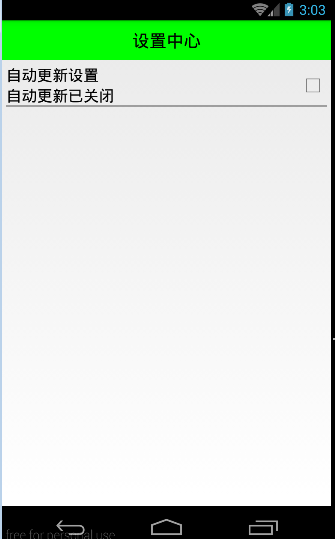
運行項目後,有如下效果:
 Android表單UI及相應控件的事件處理,android表單ui控件
Android表單UI及相應控件的事件處理,android表單ui控件一、Toast Toast是一種輕量級的提示工具,可顯示一行文本對用戶的操作進行提示響應 用法:T
 手機安全衛士——緩存清理,安全衛士緩存清理
手機安全衛士——緩存清理,安全衛士緩存清理CleanCacheActivity.java /** * 緩存清理*/ public class CleanCacheAc
 Android 綜合揭秘 —— 全面剖釋 Service 服務,androidservice
Android 綜合揭秘 —— 全面剖釋 Service 服務,androidservice引言 Service 服務是 Android 系統最常用的四大部件之一,And
 Android 側滑菜單的實現
Android 側滑菜單的實現 Android 側滑菜單的實現,參考網上的代碼,實現側滑菜單。最重要的是這個動畫類UgcAnimations,如何使用動畫類來側滑的封裝F