編輯:關於android開發
本文地址:http://www.cnblogs.com/wuyudong/p/5908986.html,轉載請注明源地址。
本文以及後續文章,將一步步完善功能列表:
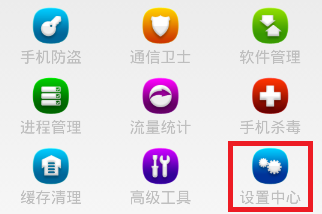
要點擊九宮格中的條目,需要注冊點擊事件
        // 注冊九宮格單個條目的點擊事件
        gv_home.setOnItemClickListener(new OnItemClickListener() {
            // 點中列表條目索引 position
            @Override
            public void onItemClick(AdapterView<?> parent, View view,
                    int position, long id) {
                switch (position) {
                case 0:

                    break;
                case 8:
                    Intent intent = new Intent(getApplicationContext(), SettingActivity.class);
                    startActivity(intent);
                    break;

                default:
                    break;
                }

            }
        });
毫無疑問需要新建SettingActivity.java
package com.wuyudong.mobilesafe.activity;

import com.wuyudong.mobilesafe.R;

import android.app.Activity;
import android.os.Bundle;

public class SettingActivity extends Activity {
    @Override
    protected void onCreate(Bundle savedInstanceState) {
        // TODO Auto-generated method stub
        super.onCreate(savedInstanceState);
        setContentView(R.layout.activity_setting);
    }

}
在點擊相應的條目後,跳轉到“設置中心”,於是新建activity_setting.xml布局文件
<?xml version="1.0" encoding="utf-8"?>
<LinearLayout xmlns:android="http://schemas.android.com/apk/res/android"
    android:layout_width="match_parent"
    android:layout_height="match_parent"
    android:orientation="vertical" >

    <RelativeLayout
        android:layout_width="match_parent"
        android:layout_height="wrap_content"
        android:padding="5dp" >

        <TextView
            android:id="@+id/tv_title"
            android:layout_width="wrap_content"
            android:layout_height="wrap_content"
            android:text="自動更新設置"
            android:textColor="#000"
            android:textSize="18sp" />

        <TextView
            android:id="@+id/tv_des"
            android:layout_width="wrap_content"
            android:layout_height="wrap_content"
            android:layout_below="@id/tv_title"
            android:text="自動更新已關閉"
            android:textColor="#000"
            android:textSize="18sp" />

        <CheckBox
            android:id="@+id/cb_box"
            android:layout_alignParentRight="true"
            android:layout_centerVertical="true"
            android:layout_width="wrap_content"
            android:layout_height="wrap_content" />
        <View
            android:layout_below="@id/tv_des"
            android:background="#000"
            android:layout_width="match_parent"
            android:layout_height="1dp"
            />

    </RelativeLayout>

</LinearLayout>
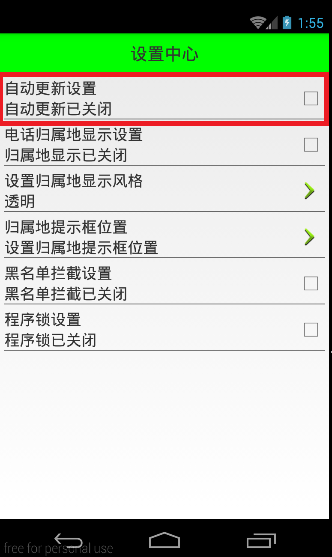
本文先實現設置中心選項的一個條目布局結構,如下紅色方框所示:
 android不太常用的控件,
android不太常用的控件,AutoCompleteTextView:是一種與EditText類似的視圖(實際上他是EditText的子類),只不過它還在用戶輸入時自動
 Android:應用寶省流量更新
Android:應用寶省流量更新 應用寶省流量更新介紹 應用寶省流量更新(SDK),是應用寶提供給開發者輕松實現應用省流量更新的功能,可以幫助開發者縮短更新過程,提高應用
 Android junit單元測試,androidjunit
Android junit單元測試,androidjunit軟件測試的分類* 黑盒測試 * 測試邏輯業務* 白盒測試 * 測試邏輯方法 根據測試粒度 * 方法測試:fun
 Android java傳遞int類型數據給C,androidint
Android java傳遞int類型數據給C,androidint本文根據《Android jni簡便開發流程》中的開發流程來實現一個java傳遞int類型數據給C 新
 Building Apps with Over 65K Methods(解決APP引用方法總數超過65536),appsapp
Building Apps with Over 65K Methods(