編輯:關於android開發
今天發的是TabHost結合ViewPager實現首頁底部導航的效果,雖然說網上有很多這樣的Demo,不過呢,我還是要把自己練習寫的發出來,沒錯!就是這麼任性;
先上效果圖,如下:
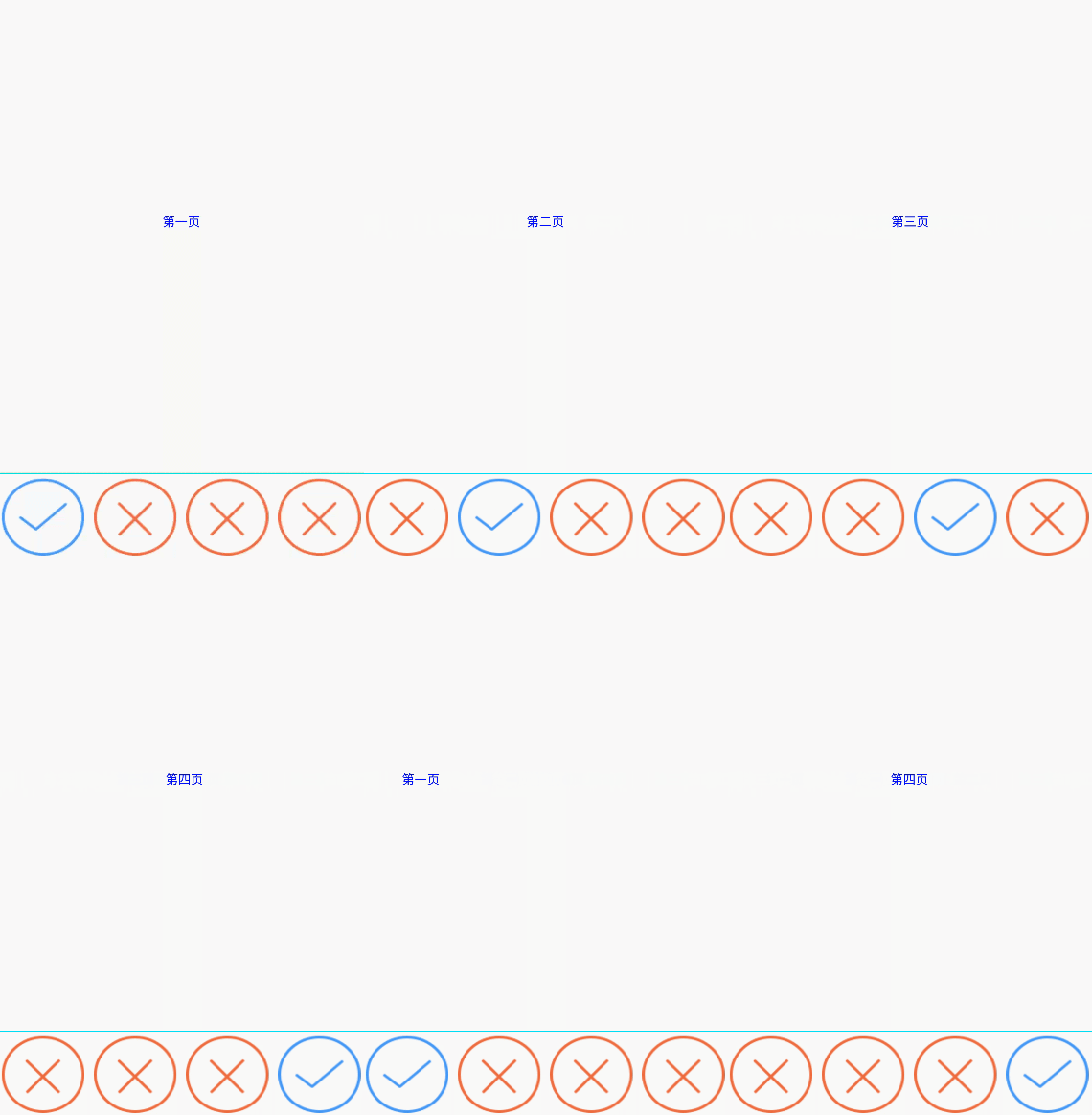
代碼裡面有注釋,就不過多解釋了,說幾點需要注意的問題
1:TabHost 、TabWidget、FrameLayout一定添加id這個屬性,否則會報錯
android:id=”@android:id/tabhost”
android:id=”@android:id/tabcontent”
android:id=”@android:id/tabs”
這個屬性是固定的。
2:ViewPager的適配器要繼承PagerAdapter,別整錯咯;
布局文件xml:
 1 <?xml version="1.0" encoding="utf-8"?>
 2 <TabHost xmlns:android="http://schemas.android.com/apk/res/android"
 3     xmlns:tools="http://schemas.android.com/tools"
 4     android:id="@android:id/tabhost"
 5     android:layout_width="match_parent"
 6     android:layout_height="match_parent"
 7     tools:context="com.example.wgh.tabhostwithviewpager.MainActivity">
 8
 9     <LinearLayout
10         android:layout_width="match_parent"
11         android:layout_height="match_parent"
12         android:orientation="vertical">
13
14         <FrameLayout
15             android:id="@android:id/tabcontent"
16             android:layout_width="match_parent"
17             android:layout_height="match_parent"
18             android:layout_weight="1.0">
19
20             <android.support.v4.view.ViewPager
21                 android:id="@+id/viewPager"
22                 android:layout_width="match_parent"
23                 android:layout_height="match_parent"></android.support.v4.view.ViewPager>
24
25         </FrameLayout>
26
27         <TabWidget
28             android:id="@android:id/tabs"
29             android:layout_width="match_parent"
30             android:layout_height="match_parent"
31             android:layout_weight="0.0"
32             android:visibility="gone" />
33
34         <View
35             android:layout_width="match_parent"
36             android:layout_height="1dp"
37             android:background="#0ff0f0" />
38
39         <RadioGroup
40             android:id="@+id/radioGroup"
41             android:layout_width="match_parent"
42             android:layout_height="wrap_content"
43
44             android:orientation="horizontal">
45
46             <RadioButton
47                 android:id="@+id/radioButton1"
48                 android:layout_width="0dp"
49                 android:layout_height="wrap_content"
50                 android:layout_margin="5dp"
51                 android:layout_weight="1"
52                 android:background="@drawable/img_draw_money_fail"
53                 android:button="@null"
54                 android:paddingLeft="10dp" />
55
56             <RadioButton
57                 android:id="@+id/radioButton2"
58                 android:layout_width="0dp"
59                 android:layout_height="wrap_content"
60                 android:layout_margin="5dp"
61                 android:layout_weight="1"
62                 android:background="@drawable/img_draw_money_fail"
63                 android:button="@null" />
64
65             <RadioButton
66                 android:id="@+id/radioButton3"
67                 android:layout_width="0dp"
68                 android:layout_height="wrap_content"
69                 android:layout_margin="5dp"
70                 android:layout_weight="1"
71                 android:background="@drawable/img_draw_money_fail"
72                 android:button="@null" />
73
74             <RadioButton
75                 android:id="@+id/radioButton4"
76                 android:layout_width="0dp"
77                 android:layout_height="wrap_content"
78                 android:layout_margin="5dp"
79                 android:layout_weight="1"
80                 android:background="@drawable/img_draw_money_fail"
81                 android:button="@null" />
82         </RadioGroup>
83     </LinearLayout>
84 </TabHost>
Activity:
  1 package com.example.wgh.tabhostwithviewpager;
  2
  3 import android.app.TabActivity;
  4 import android.os.Bundle;
  5 import android.support.v4.view.ViewPager;
  6 import android.view.LayoutInflater;
  7 import android.view.View;
  8 import android.widget.RadioButton;
  9 import android.widget.RadioGroup;
 10 import android.widget.TabHost;
 11
 12 import java.util.ArrayList;
 13
 14 public class MainActivity extends TabActivity {
 15
 16     private TabHost tabHost = null;
 17     private ViewPager viewPager = null;
 18     private RadioGroup radioGroup = null;
 19     private ArrayList<View> list = null;
 20     private View view1 = null;
 21     private View view2 = null;
 22     private View view3 = null;
 23     private View view4 = null;
 24     private RadioButton radioButton1 = null;
 25     private RadioButton radioButton2 = null;
 26     private RadioButton radioButton3 = null;
 27     private RadioButton radioButton4 = null;
 28
 29     @Override
 30     protected void onCreate(Bundle savedInstanceState) {
 31         super.onCreate(savedInstanceState);
 32         setContentView(R.layout.activity_main);
 33         initView();
 34         initData();
 35
 36         //設置初始化默認選項
 37         radioGroup.check(R.id.radioButton1);
 38         radioButton1.setBackgroundResource(R.drawable.img_draw_money_success);
 39         viewPager.setCurrentItem(0);
 40         tabHost.setCurrentTab(0);
 41
 42         //getViewPager添加適配器
 43         MyAdapter adapter = new MyAdapter(list);
 44         viewPager.setAdapter(adapter);
 45
 46     /**
 47      * viewPager設置滑動監聽,根據viewPager選中頁的position,設置tabHost頁卡選項的樣式
 48      */
 49
 50         viewPager.setOnPageChangeListener(new ViewPager.OnPageChangeListener() {
 51             @Override
 52             public void onPageScrolled(int position, float positionOffset, int positionOffsetPixels) {
 53             }
 54
 55             @Override
 56             public void onPageSelected(int position) {
 57                 if (position == 0){
 58                     radioButton1.setBackgroundResource(R.drawable.img_draw_money_success);
 59                     radioButton2.setBackgroundResource(R.drawable.img_draw_money_fail);
 60                     radioButton3.setBackgroundResource(R.drawable.img_draw_money_fail);
 61                     radioButton4.setBackgroundResource(R.drawable.img_draw_money_fail);
 62                 }else if(position == 1){
 63                     radioButton1.setBackgroundResource(R.drawable.img_draw_money_fail);
 64                     radioButton2.setBackgroundResource(R.drawable.img_draw_money_success);
 65                     radioButton3.setBackgroundResource(R.drawable.img_draw_money_fail);
 66                     radioButton4.setBackgroundResource(R.drawable.img_draw_money_fail);
 67                 }else if(position == 2){
 68                     radioButton1.setBackgroundResource(R.drawable.img_draw_money_fail);
 69                     radioButton2.setBackgroundResource(R.drawable.img_draw_money_fail);
 70                     radioButton3.setBackgroundResource(R.drawable.img_draw_money_success);
 71                     radioButton4.setBackgroundResource(R.drawable.img_draw_money_fail);
 72                 }else if(position == 3){
 73                     radioButton1.setBackgroundResource(R.drawable.img_draw_money_fail);
 74                     radioButton2.setBackgroundResource(R.drawable.img_draw_money_fail);
 75                     radioButton3.setBackgroundResource(R.drawable.img_draw_money_fail);
 76                     radioButton4.setBackgroundResource(R.drawable.img_draw_money_success);
 77                 }
 78             }
 79
 80             @Override
 81             public void onPageScrollStateChanged(int state) {
 82             }
 83         });
 84
 85     /**
 86      * 給radioGroup設置監聽,以此來改變ViewPager的頁面
 87      */
 88         radioGroup.setOnCheckedChangeListener(new RadioGroup.OnCheckedChangeListener() {
 89             @Override
 90             public void onCheckedChanged(RadioGroup radioGroup, int checkedId) {
 91                 switch (checkedId){
 92                     case R.id.radioButton1:
 93                         viewPager.setCurrentItem(0);
 94                         radioButton1.setBackgroundResource(R.drawable.img_draw_money_success);
 95                         radioButton2.setBackgroundResource(R.drawable.img_draw_money_fail);
 96                         radioButton3.setBackgroundResource(R.drawable.img_draw_money_fail);
 97                         radioButton4.setBackgroundResource(R.drawable.img_draw_money_fail);
 98                         break;
 99                     case R.id.radioButton2:
100                         viewPager.setCurrentItem(1);
101                         radioButton1.setBackgroundResource(R.drawable.img_draw_money_fail);
102                         radioButton2.setBackgroundResource(R.drawable.img_draw_money_success);
103                         radioButton3.setBackgroundResource(R.drawable.img_draw_money_fail);
104                         radioButton4.setBackgroundResource(R.drawable.img_draw_money_fail);
105                         break;
106                     case R.id.radioButton3:
107                         viewPager.setCurrentItem(2);
108                         radioButton1.setBackgroundResource(R.drawable.img_draw_money_fail);
109                         radioButton2.setBackgroundResource(R.drawable.img_draw_money_fail);
110                         radioButton3.setBackgroundResource(R.drawable.img_draw_money_success);
111                         radioButton4.setBackgroundResource(R.drawable.img_draw_money_fail);
112                         break;
113                     case R.id.radioButton4:
114                         viewPager.setCurrentItem(3);
115                         radioButton1.setBackgroundResource(R.drawable.img_draw_money_fail);
116                         radioButton2.setBackgroundResource(R.drawable.img_draw_money_fail);
117                         radioButton3.setBackgroundResource(R.drawable.img_draw_money_fail);
118                         radioButton4.setBackgroundResource(R.drawable.img_draw_money_success);
119                         break;
120                 }
121             }
122         });
123     }
124
125     /**
126      * 初始化數據源
127      */
128     private void initData() {
129         list = new ArrayList<View>();
130         list.add(view1);
131         list.add(view2);
132         list.add(view3);
133         list.add(view4);
134     }
135
136      /**
137      * 初始化控件
138      */
139     private void initView() {
140         tabHost = getTabHost();
141
142         viewPager = (ViewPager) findViewById(R.id.viewPager);
143         radioGroup = (RadioGroup) findViewById(R.id.radioGroup);
144         radioButton1 = (RadioButton) findViewById(R.id.radioButton1);
145         radioButton2 = (RadioButton) findViewById(R.id.radioButton2);
146         radioButton3 = (RadioButton) findViewById(R.id.radioButton3);
147         radioButton4 = (RadioButton) findViewById(R.id.radioButton4);
148      /**
149      * 將每頁要展示的layout實例出來,添加到list裡面,最後通過適配器return回來要展示的相應的layout
150      */
151         LayoutInflater inflater = LayoutInflater.from(this);
152         view1 = inflater.inflate(R.layout.layout_one,null);
153         view2 = inflater.inflate(R.layout.layout_two,null);
154         view3 = inflater.inflate(R.layout.layout_three,null);
155         view4 = inflater.inflate(R.layout.layout_four,null);
156     }
157
158 }
ViewPager適配器MyAdapter:
 1 public class MyAdapter extends PagerAdapter {
 2     private ArrayList<View> list = null;
 3
 4     public MyAdapter(ArrayList<View> list) {
 5         this.list = list;
 6     }
 7
 8     @Override
 9     public int getCount() {
10         return list.size();
11     }
12
13     @Override
14     public boolean isViewFromObject(View arg0, Object arg1) {
15         return arg0 == arg1;
16     }
17
18     @Override
19     public Object instantiateItem(ViewGroup container, int position) {
20         container.addView(list.get(position));
21         return list.get(position);
22     }
23     @Override
24     public void destroyItem(ViewGroup container, int position, Object object) {
25
26         container.removeView(list.get(position));
27
28     }
29 }
如果有什麼問題,歡迎留言!
 Andriod DiskLruCache的使用案例
Andriod DiskLruCache的使用案例 DiskLruCache是谷歌推薦的用來實現硬盤緩存的類,本案例將對DiskLruCache的基本用法做一個總結,
 android 常用的listview管理示例
android 常用的listview管理示例 listview作為一個常用控件,對listview的操作都應該滾瓜爛熟了。對listview 的數據管理也很熟悉。包括l
 System.exit(0)和System.exit(1)區別,system.exit區別
System.exit(0)和System.exit(1)區別,system.exit區別1.參考文獻 http://hi.baidu.com/accpzhangbo
 Android WebView和JavaScript交互,androidwebview
Android WebView和JavaScript交互,androidwebview JavaScript在現在的網頁設計中用得很多,Android 的WebView