編輯:關於android開發
暴露您view中所有影響可見外觀的屬性或者行為。
詳細步驟見:Android 自定義View步驟
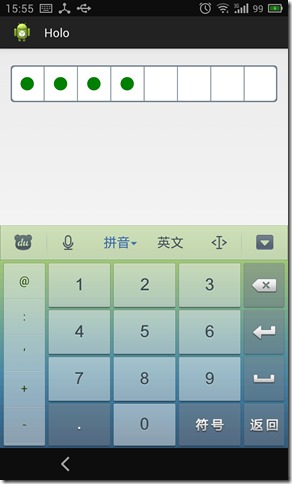
可以通過XML定義影響外邊和行為的屬性如下
邊框圓角值,邊框顏色,分割線顏色,邊框寬度,密碼長度,密碼大小,密碼顏色
<declare-styleable name="PasswordInputView">
    <attr name="borderWidth" format="dimension"/>
    <attr name="borderColor" format="color"/>
    <attr name="borderRadius" format="dimension"/>
    <attr name="passwordLength" format="integer"/>
    <attr name="passwordWidth" format="dimension"/>
    <attr name="passwordColor" format="color"/>
    <attr name="passwordRadius" format="dimension"/>
</declare-styleable>
同時支持原來EditText功能,可以獲得數據值,數字鍵盤設置等
protected void onDraw(Canvas canvas) {
    int width = getWidth();
    int height = getHeight();

    // 外邊框
    RectF rect = new RectF(0, 0, width, height);
    borderPaint.setColor(borderColor);
    canvas.drawRoundRect(rect, borderRadius, borderRadius, borderPaint);

    // 內容區
    RectF rectIn = new RectF(rect.left + defaultContMargin, rect.top + defaultContMargin,
            rect.right - defaultContMargin, rect.bottom - defaultContMargin);
    borderPaint.setColor(Color.WHITE);
    canvas.drawRoundRect(rectIn, borderRadius, borderRadius, borderPaint);

    // 分割線
    borderPaint.setColor(borderColor);
    borderPaint.setStrokeWidth(defaultSplitLineWidth);
    for (int i = 1; i < passwordLength; i++) {
        float x = width * i / passwordLength;
        canvas.drawLine(x, 0, x, height, borderPaint);
    }

    // 密碼
    float cx, cy = height/ 2;
    float half = width / passwordLength / 2;
    for(int i = 0; i < textLength; i++) {
        cx = width * i / passwordLength + half;
        canvas.drawCircle(cx, cy, passwordWidth, passwordPaint);
    }
}
https://github.com/tianshaojie/Android-PasswordInputView
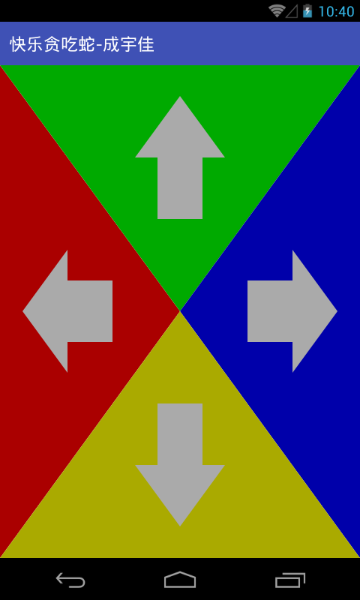 Android快樂貪吃蛇游戲實戰項目開發教程-06虛擬方向鍵(五)繪制方向鍵箭頭,android-06
Android快樂貪吃蛇游戲實戰項目開發教程-06虛擬方向鍵(五)繪制方向鍵箭頭,android-06本系列教程概述與目錄:http://www.cnblogs.com/
 我的android學習經歷8,android學習經歷8
我的android學習經歷8,android學習經歷8android簽名打包apk文件 1.在要打包的項目上右擊打開Android Tools,然後打開Export An
 初探ListView,初探網
初探ListView,初探網ListView可能是Android開發中最常用的一個控件,但要用的純熟還需要不斷的鍛煉。 建立簡單的ListView 1.在布局文件(.
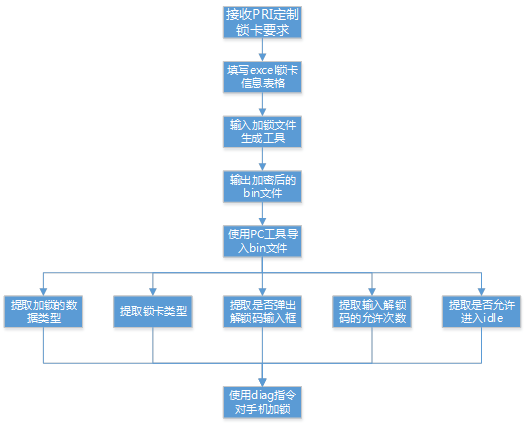 SIMLock鎖卡功能解析,simlock鎖解析
SIMLock鎖卡功能解析,simlock鎖解析一、鎖卡背景介紹 鎖卡即SIMLock,當手機開機啟動或者插入SIM卡時,手機modem側預置在NV項中的配置信息會與