編輯:關於android開發
在使用AIDL通信的時候,在Stub類中都會生成一個asInterface函數,以《Android開發藝術探索》中的例子來分析,其生成的asInterface函數源碼為:
 1         /**
 2          * Cast an IBinder object into an com.willhua.demoaidl.aidl.IBookManager
 3          * interface, generating a proxy if needed.
 4          */
 5         public static com.willhua.demoaidl.aidl.IBookManager asInterface(
 6                 android.os.IBinder obj) {
 7             if ((obj == null)) {
 8                 return null;
 9             }
10             android.os.IInterface iin = obj.queryLocalInterface(DESCRIPTOR);
11             if (((iin != null) && (iin instanceof com.willhua.demoaidl.aidl.IBookManager))) {
12                 return ((com.willhua.demoaidl.aidl.IBookManager) iin);
13             }
14             return new com.willhua.demoaidl.aidl.IBookManager.Stub.Proxy(obj);
15         }
我們知道asInterface的作用是根據調用是否屬於同進程而返回不同的實例對象,但是對於該過程是怎麼進行的,返回的到底是什麼東西,可能很多童鞋不是很清楚,就這個問題分享一點我的理解。顯然,通過代碼可知,決定返回何種對象的關鍵在obj.queryLocalInterface(DESCRIPTOR)的返回結果。
下面我們通過實際DEMO來了解其過程。代碼基於《Android開發藝術探索》中的例子。
DEMO中有主要有兩個東西,一個就是MainActivity,一個就是BookService,MainActivity會去bind BookService,而BookService通過在Manifest中設置android:process而使之分別與MainActivity運行在同進程和異進程。
主要代碼:
public class BookService extends Service {

    private Binder mBinder = new IBookManager.Stub() {
    ...
    };


    @Override
    public IBinder onBind(Intent intent) {
        // TODO Auto-generated method stub
        LOG("BookService onBind mBinder:" +mBinder.getClass().getName() + " Process:" + Process.myPid());
        return mBinder;
    }

}
public class MainActivity extends Activity{

    private IBookManager mService;
    private Button mQuery;
    private TextView mOutInfo;

    ...

    @Override
    protected void onCreate(Bundle savedInstanceState) {
        super.onCreate(savedInstanceState);
        setContentView(R.layout.activity_main);
        connectService();
    }

    private void connectService(){
        Intent intent = new Intent(getApplicationContext(), BookService.class);
        bindService(intent, new ServiceConnection() {

            @Override
            public void onServiceDisconnected(ComponentName name) {
                // TODO Auto-generated method stub

            }

            @Override
            public void onServiceConnected(ComponentName name, IBinder service) {
                // TODO Auto-generated method stub
                LOG("onServiceConnected " + service);
                mService = IBookManager.Stub.asInterface(service);
            }
        }, BIND_AUTO_CREATE);

    }
    ...

}
    public static abstract class Stub extends android.os.Binder implements
            com.willhua.demoaidl.aidl.IBookManager {
        private static final java.lang.String DESCRIPTOR = "com.willhua.demoaidl.aidl.IBookManager";

        /** Construct the stub at attach it to the interface. */
        public Stub() {
            this.attachInterface(this, DESCRIPTOR);
        }

        /**
         * Cast an IBinder object into an com.willhua.demoaidl.aidl.IBookManager
         * interface, generating a proxy if needed.
         */
        public static com.willhua.demoaidl.aidl.IBookManager asInterface(
                android.os.IBinder obj) {
            if ((obj == null)) {
                return null;
            }
            android.os.IInterface iin = obj.queryLocalInterface(DESCRIPTOR);
            if (((iin != null) && (iin instanceof com.willhua.demoaidl.aidl.IBookManager))) {
                return ((com.willhua.demoaidl.aidl.IBookManager) iin);
            }
            return new com.willhua.demoaidl.aidl.IBookManager.Stub.Proxy(obj);
        }
...
}
androd.os.Binder部分源碼:
public class Binder implements IBinder {

    //...

    /**
     * Convenience method for associating a specific interface with the Binder.
     * After calling, queryLocalInterface() will be implemented for you
     * to return the given owner IInterface when the corresponding
     * descriptor is requested.
     */
    public void attachInterface(IInterface owner, String descriptor) {
        mOwner = owner;
        mDescriptor = descriptor;
    }

    /**
     * Use information supplied to attachInterface() to return the
     * associated IInterface if it matches the requested
     * descriptor.
     */
    public IInterface queryLocalInterface(String descriptor) {
        if (mDescriptor.equals(descriptor)) {
            return mOwner;
        }
        return null;
    }

    //...

    final class BinderProxy implements IBinder {
        //...

        public IInterface queryLocalInterface(String descriptor) {
        return null;
        }

        //...
    }
}
通過LOG,我們發現,在onServiceConnected函數中,如果MainActivity與BookService同進程,則打印的log為:

如果MainActivity與BookService異進程,及MainActivity跨進程綁定BookService服務,則打印的log為:

先分析同進程,
在同進程中,onServiceConnected接收得到的service對象的類型為BookServices$1,我們知道$表示的是BookServices中的內部類,而在BookServices的定義中,我們只在mBinder的初始化中定義了一個IBookManager.Stub()的子類,即同進程時,在onServiceConnected接收到的是IBookManager.Stub()類型。而IBookManager.Stub() extenders android.os.Binder implements IBookManager,其queryLocalInterface方法來源於超類android.os.Binder。對於方法中傳入的descriptor,通過asInterface的代碼可知就是Stub中定義的DESCRIPTOR,而Binder中定義的mDescriptor,其賦值過程是在attachInterface函數中,而attachInterface函數是在Stub的構造函數中被調用,其調用為
this.attachInterface(this, DESCRIPTOR);
而在onServiceConnected中的調用為:
mService = IBookManager.Stub.asInterface(service);
注意sercice為IBookManager.Stub,從而我們可以知道,
if (mDescriptor.equals(descriptor))
判斷語句中的mDescriptor和descriptor都為IBookManager.Stub中定義的DESCRIPTOR,則queryLocalInterface返回的是mOwer。那麼mOwer又是什麼呢?細心的童鞋估計已經知道答案,在Stub的構造函數調用中attachInterface的時候,已經給mOwer賦值,且賦值為this,即該Stub對象本身!再回去對照asInterface的邏輯,我們即可以得出結論:同進程時,調用asInterface返回的是Stub對象,其實就是在onBind中返回的mBinder。
再來分析跨進程調用的情形
由上面的log可知,跨進程調用時,onSericeConnected中接收到的service為android.os.BinderProxy類型,而上面的源碼已經給出,BinderProxy為final類,且其queryLocalInterface方法直接返回的null,結合asInterface的代碼邏輯,就知道它返回的為IBookManager.Stub.Proxy對象,得出結論:同進程時,調用asInterface返回的是Stub.Proxy對象。
至此,開篇提到的問題應該已經明了。但其實又引出了一個新的問題:為什麼跨進程調時,在onServiceConnected中接收到的是os.BinderProxy,而同進程調用時接收到的是IBookManager.Stub?
且聽下回。。。
 redmine 整合ldap 用戶
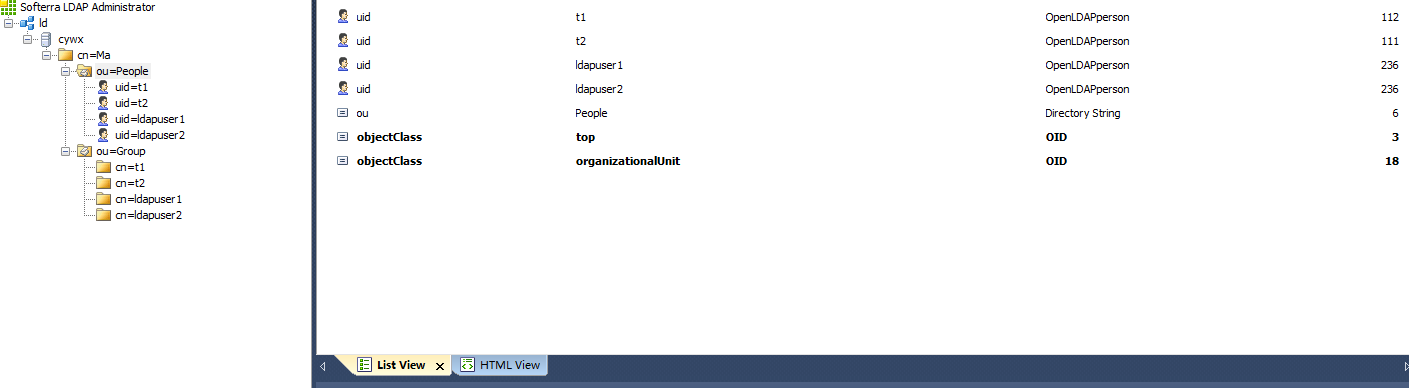
redmine 整合ldap 用戶首先要配置好LDAP 不然會把你累死LDAP的安裝過程在博客目錄中找一下()要對應slapd.conf配置文件來寫 我們需要三份數據文件
 android的布局-----TableLayout(表格布局),tablelayout布局
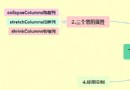
android的布局-----TableLayout(表格布局),tablelayout布局學習導圖 (1)TableLayout的相關簡介 java
 Linux內核系列—11.操作系統開發之ELF格式,linuxelf
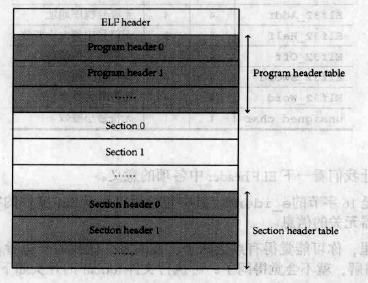
Linux內核系列—11.操作系統開發之ELF格式,linuxelfELF文件的結構如下圖所示: ELF文件由4部分組成,分別是ELF頭(ELF header)、程序頭
 我的Android進階之旅------)Android自定義View實現帶數字的進度條(NumberProgressBar)
我的Android進階之旅------)Android自定義View實現帶數字的進度條(NumberProgressBar) 第一步、效果展示 圖1、藍色的進度條