編輯:關於android開發
1、前言:
前幾天用了GitHub上se.emilsjolander.stickylistheaders這個組件,然後發現這個組件的listview不能添加footerView,加了footer後,滑倒footer的時候head會消失,與我項目中的需求不符。
於是就自己寫了一個StickHeaderListView,實現比較簡單,做法和stickylistheaders基本相同只是沒有封裝那麼多功能,可以添加footer但不能添加header,有需要的同學可以拿去改良後用。
另外由於是臨時寫的一個組件,代碼沒做什麼優化,如果有想法可以提點意見,謝謝!
2、示例效果:
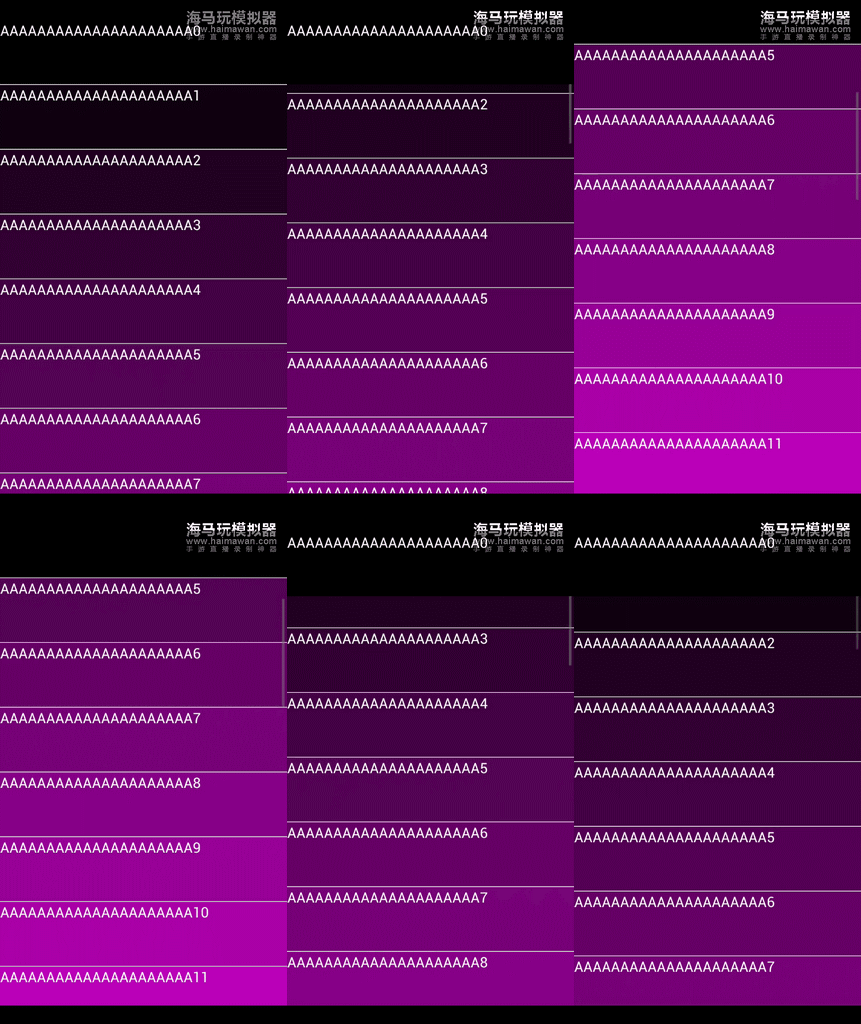
3、組件源碼:
  1 /**
  2  * 帶頭部固定的列表
  3  * Created by shengdong.huang on 2016/6/24.
  4  */
  5 public class StickHeaderListView extends FrameLayout {
  6
  7     /** 頁面引用 */
  8     protected Context context;
  9     /** 列表視圖 */
 10     protected ListView listView;
 11     /** 適配器 */
 12     protected StickHeaderAdapter adapter;
 13     /** 頭部布局 */
 14     protected FrameLayout headLayout;
 15     /** 滾動監聽器 */
 16     protected OnScrollListener listener;
 17     /** 提供Adapter響應的觀察者 */
 18     protected DataSetObserver mDataSetObserver = new DataSetObserver() {
 19         @Override
 20         public void onChanged() {
 21             if (listView != null && headLayout != null && adapter != null) {
 22                 refreshHead(listView.getFirstVisiblePosition(), true);
 23             }
 24         }
 25
 26         @Override
 27         public void onInvalidated() {
 28         }
 29     };
 30
 31     /**
 32      * 滾動監聽器
 33      */
 34     protected AbsListView.OnScrollListener scrollListener = new AbsListView.OnScrollListener() {
 35
 36         @Override
 37         public void onScrollStateChanged(AbsListView view, int scrollState) {
 38             if (listener != null) {
 39                 listener.onScrollStateChanged(view, scrollState);
 40             }
 41         }
 42
 43         @Override
 44         public void onScroll(AbsListView view, int firstVisibleItem, int visibleItemCount, int totalItemCount) {
 45             if (listener != null) {
 46                 listener.onScroll(view, firstVisibleItem, visibleItemCount, totalItemCount);
 47             }
 48             // 刷新
 49             refreshHead(firstVisibleItem, false);
 50         }
 51     };
 52
 53     protected void refreshHead(int firstVisibleItem, boolean forceRefresh) {
 54         // 防空
 55         if (headLayout == null || adapter == null || adapter.getHeadPos() == null
 56                 || listView.getChildAt(0) == null) {
 57             return;
 58         }
 59
 60         // 獲取頭部位置記錄
 61         ArrayList<Integer> headPos = adapter.getHeadPos();
 62         // 是否有找到head
 63         boolean find = false;
 64
 65         // 獲取head中的位置
 66         int prevHeadPos = -1;
 67         if (headLayout.getChildCount() > 0 && headLayout.getChildAt(0) != null &&
 68                 headLayout.getChildAt(0).getTag() != null) {
 69             prevHeadPos = (int) headLayout.getChildAt(0).getTag();
 70         }
 71
 72         // 反向遍歷頭部位置記錄
 73         for (int i = (headPos.size() - 1); i>=0; i--) {
 74             // 如果當前位置大於等於某個頭部記錄,表示應該使用該頭部
 75             if (firstVisibleItem >= headPos.get(i)) {
 76                 // 獲取headLayout中視圖的pos標簽
 77
 78                 // 構造或者從headLayout中獲取視圖
 79                 View v;
 80                 if (prevHeadPos == -1 || prevHeadPos != headPos.get(i) || forceRefresh) {
 81                     // 無Pos標簽或POS標簽不配對
 82                     headLayout.removeAllViews();
 83                     v = listView.getAdapter().getView(headPos.get(i), null, null);
 84                     v.setTag(headPos.get(i));
 85                     LayoutParams params = new FrameLayout.LayoutParams(-1, -2);
 86                     v.setLayoutParams(params);
 87                     headLayout.addView(v);
 88                 } else if (i+1 < headPos.size() && firstVisibleItem == headPos.get(i+1) - 1) {
 89                     // 當前第一個item的top值
 90                     int top = listView.getChildAt(0).getTop();
 91                     // Pos標簽配對但,有下一個head,且下一個head的pos為下一個item時
 92                     v = headLayout.getChildAt(0);
 93                     // 設置head的Top
 94                     LayoutParams params = (LayoutParams) v.getLayoutParams();
 95                     params.setMargins(0, top, 0, -top);
 96                     v.setLayoutParams(params);
 97                 } else {
 98                     // 修正head top沒有回到0的問題
 99                     v = headLayout.getChildAt(0);
100                     LayoutParams params = (LayoutParams) v.getLayoutParams();
101                     if (params.topMargin != 0) {
102                         params.setMargins(0, 0, 0, 0);
103                         v.setLayoutParams(params);
104                     }
105                 }
106                 find = true;
107                 break;
108             }
109         }
110         // 未找到head的情況,清空Head
111         if (!find && headLayout != null) {
112             headLayout.removeAllViews();
113         }
114     }
115
116     public StickHeaderListView(Context context) {
117         super(context);
118         this.context = context;
119     }
120
121     public StickHeaderListView(Context context, AttributeSet attrs) {
122         super(context, attrs);
123         this.context = context;
124     }
125
126     public void setBackgroundColor(int color) {
127         if (listView != null) {
128             listView.setBackgroundColor(color);
129         }
130     }
131
132     public void addFooterView(View v) {
133         if (listView != null) {
134             listView.addFooterView(v);
135         }
136     }
137
138     public boolean removeFooterView(View v) {
139         if (listView != null) {
140             return listView.removeFooterView(v);
141         }
142         return false;
143     }
144
145     public int getFooterViewsCount() {
146         if (listView != null) {
147             return listView.getFooterViewsCount();
148         }
149         return 0;
150     }
151
152     public void setDividerHeight(int height) {
153         if (listView != null) {
154             listView.setDividerHeight(height);
155         }
156     }
157
158     public void setCacheColorHint(int color) {
159         if (listView != null) {
160             listView.setCacheColorHint(color);
161         }
162     }
163
164     public void setSelector(int resID) {
165         if (listView != null) {
166             listView.setSelector(resID);
167         }
168     }
169
170     public void setAdapter(StickHeaderAdapter adapter) {
171         if (adapter instanceof BaseAdapter && listView != null) {
172             this.adapter = adapter;
173             if (adapter != null && mDataSetObserver != null) {
174                 try {
175                     ((BaseAdapter) adapter).unregisterDataSetObserver(mDataSetObserver);
176                 } catch (Exception e) {}
177             }
178             listView.setAdapter((ListAdapter) this.adapter);
179             ((BaseAdapter) adapter).registerDataSetObserver(mDataSetObserver);
180         }
181     }
182
183     public void setOnScrollListener(OnScrollListener listener) {
184         this.listener = listener;
185     }
186
187     @Override
188     protected void onFinishInflate() {
189         super.onFinishInflate();
190         // 添加列表,屬性直接使用父視圖
191         listView = new ListView(context);
192         listView.setLayoutParams(new FrameLayout.LayoutParams(ViewGroup.LayoutParams.MATCH_PARENT,
193                 ViewGroup.LayoutParams.MATCH_PARENT));
194         addView(listView);
195         // 添加head
196         headLayout = new FrameLayout(context);
197         headLayout.setLayoutParams(new FrameLayout.LayoutParams(ViewGroup.LayoutParams.MATCH_PARENT,
198                 ViewGroup.LayoutParams.WRAP_CONTENT));
199         addView(headLayout);
200         // 添加滾動監聽
201         listView.setOnScrollListener(scrollListener);
202     }
203
204     public interface OnScrollListener extends AbsListView.OnScrollListener {}
205
206     public interface StickHeaderAdapter {
207         public ArrayList<Integer> getHeadPos();
208     }
209 }
4、示例代碼:
 1 /**
 2  * 主頁面
 3  * Created by shengdong.huang on 2016/6/20.
 4  */
 5 public class MainActivity extends FragmentActivity {
 6
 7     private StickHeaderListView listView;
 8     private TestAdapter adapter;
 9
10     @Override
11     protected void onCreate(@Nullable Bundle savedInstanceState) {
12         super.onCreate(savedInstanceState);
13         setContentView(R.layout.activity_main);
14         listView = (StickHeaderListView) findViewById(R.id.list);
15
16         View footer = LayoutInflater.from(this).inflate(R.layout.item_head_foot, null);
17         footer.setBackgroundColor(Color.GREEN);
18         listView.addFooterView(footer);
19
20         View footer2 = LayoutInflater.from(this).inflate(R.layout.item_head_foot, null);
21         footer2.setBackgroundColor(Color.BLUE);
22         listView.addFooterView(footer2);
23
24         View footer3 = LayoutInflater.from(this).inflate(R.layout.item_head_foot, null);
25         footer3.setBackgroundColor(Color.RED);
26         listView.addFooterView(footer3);
27
28         listView = (StickHeaderListView) findViewById(R.id.list);
29
30         adapter = new TestAdapter();
31         listView.setAdapter(adapter);
32     }
33
34     public class TestAdapter extends BaseAdapter implements StickHeaderListView.StickHeaderAdapter {
35
36         private ArrayList<Integer> headpos = new ArrayList<>();
37
38         public TestAdapter() {
39             headpos.add(0);
40             headpos.add(5);
41             headpos.add(15);
42         }
43         @Override
44         public int getCount() {
45             return 30;
46         }
47         @Override
48         public Object getItem(int position) {
49             return position;
50         }
51         @Override
52         public long getItemId(int position) {
53             return position;
54         }
55         @Override
56         public View getView(final int position, View convertView, ViewGroup parent) {
57             ViewHolder holder;
58             if (convertView == null) {
59                 convertView = LayoutInflater.from(MainActivity.this).inflate(R.layout.item_list, null);
60                 holder = new ViewHolder();
61                 holder.text = (TextView) convertView.findViewById(R.id.text);
62                 convertView.setTag(holder);
63             } else {
64                 holder = (ViewHolder) convertView.getTag();
65             }
66             holder.text.setText("AAAAAAAAAAAAAAAAAAAAA"+position);
67             holder.text.setOnClickListener(new View.OnClickListener() {
68                 @Override
69                 public void onClick(View v) {
70                     Toast.makeText(MainActivity.this, "pos:"+position, Toast.LENGTH_SHORT).show();
71                 }
72             });
73             convertView.setBackgroundColor(0x110011 * position % 0xffffff + 0xff000000);
74             return convertView;
75         }
76
77         @Override
78         public ArrayList<Integer> getHeadPos() {
79             return headpos;
80         }
81     }
82
83     private class ViewHolder {
84         TextView text;
85     }
86 }
5、使用方法:
1、布局中加入StickHeaderListView
2、Adapter實現StickHeaderAdapter接口
3、getHeadPos()中返回headitem的位置,標示listview item中各個head的起點(這點與stickylistheaders不同)
4、如果有需要用到一些listview的方法,請自行在StickHeaderListView中添加,但注意,不能addHeaderView,會導致滑動異常
-END-
 Android性能優化之常見的內存洩漏
Android性能優化之常見的內存洩漏 前言 對於內存洩漏,我想大家在開發中肯定都遇到過,只不過內存洩漏對我們來說並不是可見的,因為它是在堆中活動,而要想檢測程序中是
 XAMARIN.ANDROID SIGNALR 實時消息接收發送示例,xamarinsignalr
XAMARIN.ANDROID SIGNALR 實時消息接收發送示例,xamarinsignalrSignalR 是一個開發實時 Web 應用的 .NET 類庫,使用 S
 JSON解析和XML解析對比,JSON解析XML解析
JSON解析和XML解析對比,JSON解析XML解析 JSON解析和XML解析是較為普遍的兩種解析方式,其中JSON解析的市場分額更大
 淺談android:clipChildren屬性,
淺談android:clipChildren屬性,實現功能: 1、APP主界面底部模塊欄 2、ViewPager一屏多個界面顯示 3、........ 首先