編輯:關於android開發
看了很多別人寫的安卓SQlite數據的操作代碼,都是浮雲,瞎弄!一點也不通俗易懂,我覺得我寫的不錯,而且安卓項目也用上了,所以在博客園裡保存分享一下!
一SQLiteHelper類是自動重載增刪改查函數的,另外一個是自己定義的類,用Context傳值。我用的是Fragment,用Activity的話吧getActivity()去掉!
實現了用戶登錄注冊的功能!
http://www.cnblogs.com/xiaobo-Linux/ (小波)趙存檔QQ463431476
public class MySqliteHelper extends SQLiteOpenHelper {

    //自定義訪問sqlite
    public MySqliteHelper(Context context) {
        super(context, "userdb.db", null, 3);
        // TODO Auto-generated constructor stub
    }

    @Override
    public void onCreate(SQLiteDatabase db) {
        // TODO Auto-generated method stub
     //http://www.cnblogs.com/xiaobo-Linux/ (小波)趙存檔QQ463431476
        db.execSQL("create table users(id int primary key ,name text,pwd text)");

    }

    @Override
    public void onUpgrade(SQLiteDatabase db, int oldVersion, int newVersion) {
        // TODO Auto-generated method stub

    }

}
public class Userlogin extends Activity implements  OnClickListener{


       private MySqliteHelper helper;

       Button sign;
       Button reg;

       String  name;
       String  mypwd;
       private EditText user;
       private EditText pwd;


   //http://www.cnblogs.com/xiaobo-Linux/ (小波)趙存檔QQ463431476

   public void onCreate(Bundle savedInstanceState) {
       super.onCreate(savedInstanceState);
       //設置狀態欄顏色
       getWindow().addFlags(WindowManager.LayoutParams.FLAG_DRAWS_SYSTEM_BAR_BACKGROUNDS);
       getWindow().setStatusBarColor(getResources().getColor(R.color.StatusBar));
       //設置actionbar顏色
       ActionBar actionBar = getActionBar();
       actionBar.setBackgroundDrawable(new ColorDrawable(Color.parseColor("#0099CC")));
       setContentView(R.layout.login);

       findViewById(R.id.button1).setOnClickListener(this);
       findViewById(R.id.button2).setOnClickListener(this);
       user = (EditText)findViewById(R.id.editText1);
       pwd=(EditText)findViewById(R.id.editText2);

   }


 public void  insert()
 {


      helper = new MySqliteHelper(getApplicationContext());
      SQLiteDatabase db=helper.getWritableDatabase();

      //查詢一下,是否用戶名重復
       String sql1 = "select * from users";
       Cursor cursor = db.rawQuery(sql1, null);
       while (cursor.moveToNext()) {
          //第一列為id
          name =  cursor.getString(1); //獲取第2列的值,第一列的索引從0開始
          mypwd = cursor.getString(2);//獲取第3列的值

      }

     if((user.getText().toString().equals(name)))
         {
                Toast.makeText(this, "已存在此用戶,請重新注冊", Toast.LENGTH_SHORT).show();
         }
         else
          {
             String sql2 = "insert into users(name,pwd) values ('"+user.getText().toString()+"','"+pwd.getText().toString()+"')";
                db.execSQL(sql2);
               Toast.makeText(this, "注冊成功!", Toast.LENGTH_SHORT).show();
          }

 }

  public void select()
 {

      helper = new MySqliteHelper(getApplicationContext());
      SQLiteDatabase db=helper.getWritableDatabase();

      String sql = "select * from users";

      Cursor cursor = db.rawQuery(sql, null);
      while (cursor.moveToNext()) {
          //第一列為id
          name =  cursor.getString(1); //獲取第2列的值,第一列的索引從0開始
          mypwd = cursor.getString(2);//獲取第3列的值

      }

      if((user.getText().toString().equals(name))&&(pwd.getText().toString().equals(mypwd)))
         {
                Toast.makeText(this, "用戶驗證成功", Toast.LENGTH_SHORT).show();
                Intent MainActivity = new Intent();
                MainActivity .setClass(this,MainActivity.class);
                  this.startActivity(MainActivity);
                  finish();//退出
         }
         else
          {
                Toast.makeText(this, "賬號或者密碼錯誤,請重新輸入", Toast.LENGTH_SHORT).show();
          }

                cursor.close();
                db.close();
                //Toast.makeText(this, "已經關閉數據庫", Toast.LENGTH_SHORT).show();
 }


@Override
public void onClick(View v) {
    // TODO Auto-generated method stub
       switch(v.getId()){
        case R.id.button1:
            select();

            break;
        case R.id.button2:
            insert();
            break;
         }

}
http://www.cnblogs.com/xiaobo-Linux/ (小波)趙存檔QQ463431476
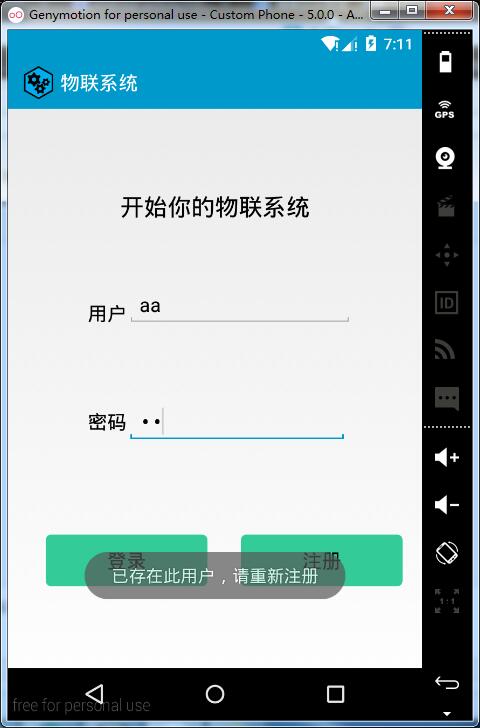
效果如下:
 關於數據抓取之xpath提取text為空問題的原因和解決方案
關於數據抓取之xpath提取text為空問題的原因和解決方案今天在抓取淘寶網網頁的時候,使用了:#店名 shopname = driver.find_element_by
 (轉)Android SlidingTabLayout定制分割線和指示條顏色,android分割線
(轉)Android SlidingTabLayout定制分割線和指示條顏色,android分割線本文轉載與:http://blog.csdn.net/zhangphil
 Android中利用AIDL機制調用遠程服務,androidaidl
Android中利用AIDL機制調用遠程服務,androidaidl服務端: //CalculateInterface.aidl package com.itheima
 Menu創建菜單,menu創建
Menu創建菜單,menu創建 菜單是用戶界面中最常見的元素之一,使用非常頻繁,在And