編輯:關於android開發
本文轉載與:http://blog.csdn.net/zhangphil/article/details/48863347
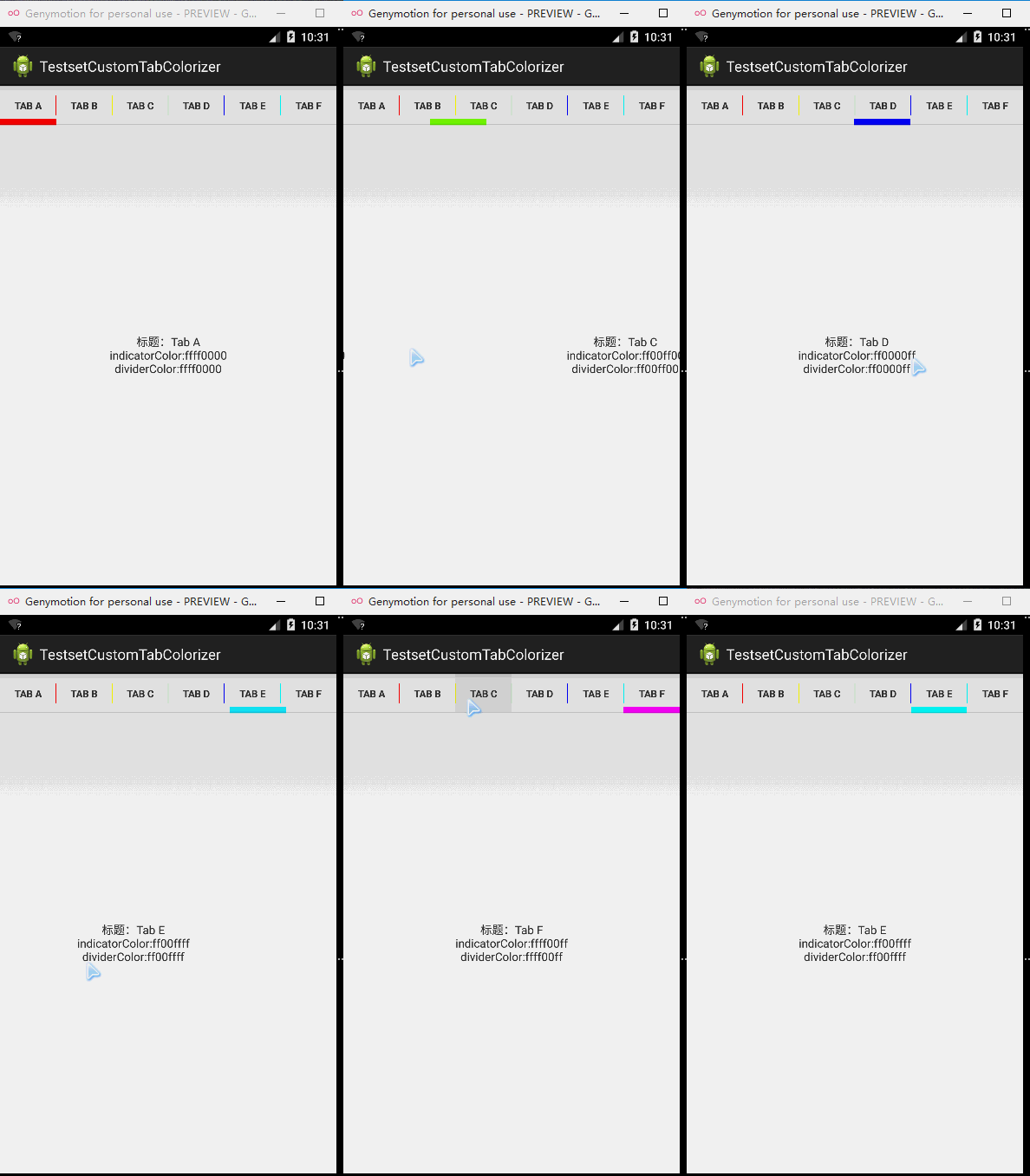
Android SlidingTabLayout默認的滑動指示條是系統默認的某個藍色系色值,分割線是灰色。如果要自定義實現滑動指示條和分割線定制顏色,則主要通過SlidingTabLayout的setCustomTabColorizer()方法實現。
現在給出一個例子加以說明。
(1)首先做一個MainActivity,此MainActivity沒有實質意義,只是作為第二步加載要實現SlidingTabLayout Fragment的“容器”。
(2)在一個Fragment實現SlidingTabLayout,然後將此Fragment加載。
不要忘記引用Android官方實現的SlidingTabLayout和SlidingTabStrip。
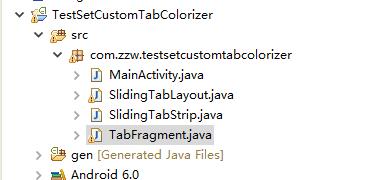
代碼層次結構如圖所示:
測試用的主Activity MainActivity.java :
 1 package com.zzw.testsetcustomtabcolorizer;
 2
 3 import android.os.Bundle;
 4 import android.support.v4.app.FragmentActivity;
 5 import android.support.v4.app.FragmentTransaction;
 6
 7 public class MainActivity extends FragmentActivity {
 8
 9     @Override
10     protected void onCreate(Bundle savedInstanceState) {
11         super.onCreate(savedInstanceState);
12         setContentView(R.layout.activity_main);
13
14         if (savedInstanceState == null) {
15             FragmentTransaction transaction = getSupportFragmentManager()
16                     .beginTransaction();
17             TabFragment fragment = new TabFragment();
18             transaction.replace(R.id.content_fragment, fragment);
19             transaction.commit();
20         }
21     }
22 }
MainActivity.java需要的布局文件:activity_main.xml:
 1 <RelativeLayout xmlns:android="http://schemas.android.com/apk/res/android"
 2     xmlns:tools="http://schemas.android.com/tools"
 3     android:layout_width="match_parent"
 4     android:layout_height="match_parent"
 5     tools:context="com.zzw.testsetcustomtabcolorizer.MainActivity" >
 6
 7     <FrameLayout
 8         android:id="@+id/content_fragment"
 9         android:layout_width="match_parent"
10         android:layout_height="match_parent" />
11
12 </RelativeLayout>
TabFragment.java代碼文件:
  1 package com.zzw.testsetcustomtabcolorizer;
  2
  3 import java.util.ArrayList;
  4
  5 import com.zzw.testsetcustomtabcolorizer.SlidingTabLayout.TabColorizer;
  6
  7 import android.graphics.Color;
  8 import android.os.Bundle;
  9 import android.support.annotation.Nullable;
 10 import android.support.v4.app.Fragment;
 11 import android.support.v4.app.FragmentManager;
 12 import android.support.v4.app.FragmentPagerAdapter;
 13 import android.support.v4.view.ViewPager;
 14 import android.view.Gravity;
 15 import android.view.LayoutInflater;
 16 import android.view.View;
 17 import android.view.ViewGroup;
 18 import android.webkit.WebView.FindListener;
 19 import android.widget.TextView;
 20
 21 public class TabFragment extends Fragment {
 22
 23     private static class PagerItem {
 24         private final CharSequence mTitle;
 25         private final int mIndicatorColor;
 26         private final int mDividerColor;
 27
 28         public PagerItem(CharSequence mTitle, int mIndicatorColor,
 29                 int mDividerColor) {
 30             super();
 31             this.mTitle = mTitle;
 32             this.mIndicatorColor = mIndicatorColor;
 33             this.mDividerColor = mDividerColor;
 34         }
 35
 36         public Fragment createFragment() {
 37             return ContentFragment.newInstance(mTitle, mIndicatorColor,
 38                     mDividerColor);
 39
 40         }
 41
 42         public CharSequence getTitle() {
 43             return mTitle;
 44         }
 45
 46         public int getIndicatorColor() {
 47             return mIndicatorColor;
 48         }
 49
 50         public int getDividerColor() {
 51             return mDividerColor;
 52         }
 53     }
 54
 55     private ArrayList<PagerItem> mTabCards = new ArrayList<PagerItem>();
 56
 57     public static class ContentFragment extends Fragment {
 58         private static final String KEY_TITLE = "title";
 59         private static final String KEY_INDICATOR_COLOR = "indicator_color";
 60         private static final String KEY_DIVIDER_COLOR = "divider_color";
 61
 62         public static ContentFragment newInstance(CharSequence title,
 63                 int indicatorColor, int dividerColor) {
 64             Bundle bundle = new Bundle();
 65             bundle.putCharSequence(KEY_TITLE, title);
 66             bundle.putInt(KEY_INDICATOR_COLOR, indicatorColor);
 67             bundle.putInt(KEY_DIVIDER_COLOR, dividerColor);
 68
 69             ContentFragment fragment = new ContentFragment();
 70             fragment.setArguments(bundle);
 71
 72             return fragment;
 73         }
 74
 75         @Override
 76         @Nullable
 77         public View onCreateView(LayoutInflater inflater,
 78                 @Nullable ViewGroup container,
 79                 @Nullable Bundle savedInstanceState) {
 80
 81             TextView tv = new TextView(getActivity());
 82             tv.setGravity(Gravity.CENTER);
 83
 84             return tv;
 85         }
 86
 87         @Override
 88         public void onViewCreated(View view, @Nullable Bundle savedInstanceState) {
 89             TextView tv = (TextView) view;
 90
 91             Bundle args = getArguments();
 92
 93             String content = "";
 94             if (args != null) {
 95                 String title = args.getCharSequence(KEY_TITLE) + "";
 96
 97                 int indicatorColor = args.getInt(KEY_INDICATOR_COLOR);
 98                 String indicatorColors = Integer.toHexString(indicatorColor)
 99                         + "";
100
101                 int dividerColor = args.getInt(KEY_DIVIDER_COLOR);
102                 String dividerColors = Integer.toHexString(dividerColor) + "";
103
104                 content = content + "標題:" + title + "\n";
105                 content = content + "indicatorColor:" + indicatorColors + "\n";
106                 content = content + "dividerColor:" + dividerColors;
107             }
108             tv.setText(content);
109         }
110
111     }
112
113     @Override
114     public void onCreate(@Nullable Bundle savedInstanceState) {
115         super.onCreate(savedInstanceState);
116
117         mTabCards.add(new PagerItem("Tab A", Color.RED, Color.RED));
118         mTabCards.add(new PagerItem("Tab B", Color.YELLOW, Color.YELLOW));
119         mTabCards.add(new PagerItem("Tab C", Color.GREEN, Color.GREEN));
120         mTabCards.add(new PagerItem("Tab D", Color.BLUE, Color.BLUE));
121         mTabCards.add(new PagerItem("Tab E", Color.CYAN, Color.CYAN));
122         mTabCards.add(new PagerItem("Tab F", Color.MAGENTA, Color.MAGENTA));
123     }
124
125     @Override
126     @Nullable
127     public View onCreateView(LayoutInflater inflater,
128             @Nullable ViewGroup container, @Nullable Bundle savedInstanceState) {
129         return inflater.inflate(R.layout.fragment, null);
130     }
131
132     @Override
133     public void onViewCreated(View view, @Nullable Bundle savedInstanceState) {
134         ViewPager mViewPager = (ViewPager) view.findViewById(R.id.viewpager);
135         mViewPager.setAdapter(new MyFragmentPagerAdapter(
136                 getChildFragmentManager()));
137
138         SlidingTabLayout mSlidingTabLayout = (SlidingTabLayout) view
139                 .findViewById(R.id.sliding_tabs);
140         mSlidingTabLayout.setViewPager(mViewPager);
141       //設置顏色的代碼
142         mSlidingTabLayout.setCustomTabColorizer(new TabColorizer() {
143
144             @Override
145             public int getIndicatorColor(int position) {
146                 return mTabCards.get(position).getIndicatorColor();
147             }
148
149             @Override
150             public int getDividerColor(int position) {
151
152                 return mTabCards.get(position).getDividerColor();
153             }
154         });
155
156     }
157
158     public class MyFragmentPagerAdapter extends FragmentPagerAdapter {
159
160         public MyFragmentPagerAdapter(FragmentManager fm) {
161             super(fm);
162         }
163
164         @Override
165         public int getCount() {
166             return mTabCards.size();
167         }
168
169         @Override
170         public CharSequence getPageTitle(int position) {
171             return mTabCards.get(position).getTitle();
172         }
173
174         @Override
175         public Fragment getItem(int position) {
176             return mTabCards.get(position).createFragment();
177         }
178
179     }
180 }
TabFragment.java需要的布局文件fragment.xml文件代碼
 1 <?xml version="1.0" encoding="utf-8"?>
 2 <LinearLayout xmlns:android="http://schemas.android.com/apk/res/android"
 3     android:layout_width="match_parent"
 4     android:layout_height="match_parent"
 5     android:orientation="vertical" >
 6
 7     <com.zzw.testsetcustomtabcolorizer.SlidingTabLayout
 8         android:id="@+id/sliding_tabs"
 9         android:layout_width="match_parent"
10         android:layout_height="wrap_content" />
11
12     <android.support.v4.view.ViewPager
13         android:id="@+id/viewpager"
14         android:layout_width="match_parent"
15         android:layout_height="wrap_content" />
16 </LinearLayout>
 Android應用開發教程之三:最全的系統控件界面用法匯總
今天我用自己寫的一個Demo 和大家詳細介紹一個Android開發中遇到的一些常用系統控件的使用技
 Android 自定義控件之第三講:obtainStyledAttributes 系列函數詳解
Android 自定義控件之第三講:obtainStyledAttributes 系列函數詳解 在項目中開發自定義控件時,或多或少都會用到 obtainStyledAtt
 Android junit單元測試,androidjunit
Android junit單元測試,androidjunit軟件測試的分類* 黑盒測試 * 測試邏輯業務* 白盒測試 * 測試邏輯方法 根據測試粒度 * 方法測試:fun
 Android 博客園客戶端 (五) 查看評論、搜索博主,android查看評論
Android 博客園客戶端 (五) 查看評論、搜索博主,android查看評論項目地址:https://github.com/ZhangTingkuo/AndroidC
 Android移動APP開發筆記——Cordova(PhoneGap)通過CordovaPlugin插件調用 Activity 實例,phonegapcordova
Android移動APP開發筆記——Cordova(PhoneGap)通