編輯:關於android開發
多線程下載文件的過程是:
(1)首先獲得下載文件的長度,然後設置本地文件的長度。
HttpURLConnection.getContentLength();//獲取下載文件的長度
RandomAccessFile file = new RandomAccessFile("QQSetup.exe","rwd");
file.setLength(filesize);//設置本地文件的長度
(2)根據文件長度和線程數計算每條線程下載的數據長度和下載位置。
如:文件的長度為6M,線程數為3,那麼,每條線程下載的數據長度為2M,每條線程開始下載的位置如下圖所示。
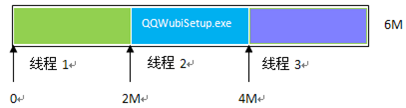
例如10M大小,使用3個線程來下載,
線程下載的數據長度 (10%3 == 0 ? 10/3:10/3+1) ,第1,2個線程下載長度是4M,第三個線程下載長度為2M
下載開始位置:線程id*每條線程下載的數據長度 = ?
下載結束位置:(線程id+1)*每條線程下載的數據長度-1=?
(3)使用Http的Range頭字段指定每條線程從文件的什麼位置開始下載,下載到什麼位置為止,
如:指定從文件的2M位置開始下載,下載到位置(4M-1byte)為止
代碼如下:HttpURLConnection.setRequestProperty("Range", "bytes=2097152-4194303");
(4)保存文件,使用RandomAccessFile類指定每條線程從本地文件的什麼位置開始寫入數據。
RandomAccessFilethreadfile= newRandomAccessFile("QQWubiSetup.exe ","rwd");
threadfile.seek(2097152);//從文件的什麼位置開始寫入數據
/**
 *多線程下載,UI更新類
 *@author young
 * */
public class MultiThreadDownload extends Thread{
    private static final String TAG = "MultiThreadDownload";
    /**每一個線程需要下載的大小 */
    private int blockSize;
    /*** 線程數量
 默認為5個線程下載*/
    private int threadNum = 5;
    /*** 文件大小 */
    private int fileSize;
    /** * 已經下載多少 */
    private int downloadSize;
    /**文件的url,線程編號,文件名稱*/
    private String UrlStr,ThreadNo,fileName;
    /***保存的路徑*/
    private String savePath;
    /**下載的百分比*/
    private int downloadPercent = 0;
    /**下載的 平均速度*/
    private int downloadSpeed = 0;
    /**下載用的時間*/
    private int usedTime = 0;
    /**當前時間*/
    private long curTime;
    /**是否已經下載完成*/
    private boolean completed = false;
    private Handler handler ;
    /**
     * 下載的構造函數
     * @param url  請求下載的URL
     * @param handler   UI更新使用
     * @param savePath  保存文件的路徑
     */
    public MultiThreadDownload(Handler handler,String url,String savePath)
    {
        this.handler = handler;
        this.UrlStr = url;
        this.savePath = savePath;
        Log.e(TAG, toString());
    }

    @Override
    public void run() {

        FileDownloadThread[] fds = new FileDownloadThread[threadNum];//設置線程數量
        try {
            URL url = new URL(UrlStr);
            URLConnection conn = url.openConnection();
            fileSize = conn.getContentLength();

            this.fileName = FileUtil.getFileName(UrlStr);
            //只創建一個文件,saveFile下載內容
            File saveFile = new File(savePath+"/"+fileName);
            Log.e(TAG, "文件一共:"+fileSize+" savePath "+savePath+"  fileName  "+fileName);

            RandomAccessFile accessFile = new RandomAccessFile(saveFile,"rwd");
            //設置本地文件的長度和下載文件相同
            accessFile.setLength(fileSize);
            accessFile.close();
            //Handler更新UI,發送消息
            sendMsg(FileUtil.startDownloadMeg);
            //每塊線程下載數據
            blockSize = ((fileSize%threadNum)==0)?(fileSize/threadNum):(fileSize/threadNum+1);
            Log.e(TAG, "每個線程分別下載 :"+blockSize);

            for (int i = 0; i < threadNum; i++) {
                int curThreadEndPosition = (i+1)!=threadNum ? ((i+1)*blockSize-1) : fileSize;
                FileDownloadThread fdt = new FileDownloadThread(url, saveFile, i*blockSize, curThreadEndPosition);
                fdt.setName("thread"+i);
                fdt.start();
                fds[i]=fdt;
            }
            /**
             * 獲取數據,更新UI,直到所有下載線程都下載完成。
             */
            boolean finished = false;
            //開始時間,放在循環外,求解的usedTime就是總時間
            long startTime = System.currentTimeMillis();
            while(!finished)
            {
                downloadSize = 0;
                finished = true;
                for (int i = 0; i < fds.length; i++) {
                    downloadSize+= fds[i].getDownloadSize();
                    if(!fds[i].isFinished())
                    {
                        finished = false;
                    }
                }
                downloadPercent = (downloadSize*100)/fileSize;
                curTime = System.currentTimeMillis();
                System.out.println("curTime = "+curTime+" downloadSize = "+downloadSize+" usedTime "+(int) ((curTime-startTime)/1000));
                usedTime = (int) ((curTime-startTime)/1000);

                if(usedTime==0)usedTime = 1;
                downloadSpeed = (downloadSize/usedTime)/1024;
                sleep(1000);/*1秒鐘刷新一次界面*/
                sendMsg(FileUtil.updateDownloadMeg);
            }
            Log.e(TAG, "下載完成");
            completed = true;
            sendMsg(FileUtil.endDownloadMeg);
        } catch (Exception e) {
            Log.e(TAG, "multi file error  Exception  "+e.getMessage());
            e.printStackTrace();
        }
        super.run();
    }
    /**
     * 得到文件的大小
     * @return
     */
    public int getFileSize()
    {
        return this.fileSize;
    }
    /**
     * 得到已經下載的數量
     * @return
     */
    public int getDownloadSize()
    {
        return this.downloadSize;
    }
    /**
     * 獲取下載百分比
     * @return
     */
    public int getDownloadPercent(){
        return this.downloadPercent;
    }
   /**
    * 獲取下載速度
    * @return
    */
    public int getDownloadSpeed(){
        return this.downloadSpeed;
    }
    /**
     * 修改默認線程數
     * @param threadNum
     */
    public void setThreadNum(int threadNum){
        this.threadNum = threadNum;
    }
    /**
     * 分塊下載完成的標志
     * @return
     */
    public boolean isCompleted(){
        return this.completed;
    }
    @Override
    public String toString() {
        return "MultiThreadDownload [threadNum=" + threadNum + ", fileSize="
                + fileSize + ", UrlStr=" + UrlStr + ", ThreadNo=" + ThreadNo
                + ", savePath=" + savePath + "]";
    }

    /**
     * 發送消息,用戶提示
     * */
    private void sendMsg(int what)
    {
        Message msg = new Message();
        msg.what = what;
        handler.sendMessage(msg);
    }
public class FileDownloadThread extends Thread{
    private static final String TAG = "FileDownloadThread";
    /**緩沖區 */
    private static final int BUFF_SIZE = 1024;
    /**需要下載的URL*/
    private URL url;
    /**緩存的FIle*/
    private File file;
    /**開始位置*/
    private int startPosition;
    /**結束位置*/
    private int endPosition;
    /**當前位置*/
    private int curPosition;
    /**完成*/
    private boolean finished = false;
    /**已經下載多少*/
    private int downloadSize = 0;

    /***
     * 分塊文件下載,可以創建多線程模式
     * @param url   下載的URL
     * @param file  下載的文件
     * @param startPosition 開始位置
     * @param endPosition   結束位置
     */
    public FileDownloadThread(URL url, File file, int startPosition,
            int endPosition) {
        this.url = url;
        this.file = file;
        this.startPosition = startPosition;
        this.curPosition = startPosition;
        this.endPosition = endPosition;
        Log.e(TAG, toString());
    }

    @Override
    public void run() {
        BufferedInputStream bis = null;
        RandomAccessFile rAccessFile = null;
        byte[] buf = new byte[BUFF_SIZE];
        URLConnection conn = null;
        try {
            conn = url.openConnection();
            conn.setConnectTimeout(10000);//設置超時
            conn.setReadTimeout(10000);
            conn.setAllowUserInteraction(true);
                    System.out.println(this.getName()+" startPosition "+startPosition+" endPosition "+endPosition);
                    conn.setRequestProperty("Range", "bytes="+(startPosition)+"-"+endPosition);  //取剩余未下載的
                    rAccessFile = new RandomAccessFile(file,"rwd");//讀寫
                     //設置從什麼位置開始寫入數據
                    rAccessFile.seek(startPosition);
                    bis = new BufferedInputStream(conn.getInputStream(), BUFF_SIZE);
                    while(curPosition endPosition)
                        {   //如果下載多了,則減去多余部分
                            System.out.println("  curPosition > endPosition  !!!!");
                            int extraLen = curPosition-endPosition;
                            downloadSize += (len-extraLen+1);
                        }else{
                            downloadSize+=len;
                        }
                    }
                    this.finished = true;  //當前階段下載完成
            Log.e(TAG, "當前"+this.getName()+"下載完成");
        } catch (Exception e) {
            Log.e(TAG, "download error Exception "+e.getMessage());
            e.printStackTrace();
        }finally{
            //關閉流
            FileUtil.closeInputStream(bis);
            try {
                rAccessFile.close();
            } catch (IOException e) {
                // TODO Auto-generated catch block
                Log.e("AccessFile", "AccessFile IOException "+e.getMessage());
            }
        }
        super.run();
    }

    /**
     * 是否完成當前段下載完成
     * @return
     */
    public boolean isFinished() {
        return finished;
    }
    /**
     * 已經下載多少
     * @return
     */
    public int getDownloadSize() {
        return downloadSize;
    }

    @Override
    public String toString() {
        return "FileDownloadThread [url=" + url + ", file=" + file
                + ", startPosition=" + startPosition + ", endPosition="
                + endPosition + ", curPosition=" + curPosition + ", finished="
                + finished + ", downloadSize=" + downloadSize + "]";
    }
示例源碼:demo下載
 PostgreSQL空值null參與運算的處理方法
PostgreSQL空值null參與運算的處理方法 在數字加減乘除運算中遇到某個字段值為空值(null)的時候,輸出的結果往往會讓我們失望,得不到我們所期待的數值,可以通
 Android 友盟分享詳細集成過程及所遇問題解決,android
Android 友盟分享詳細集成過程及所遇問題解決,android最近項目需要針對微信、朋友圈、QQ、QQ空間集成友盟分享的功能,說實話,我也是第一次做,期間碰到過很多問
 《Android源碼設計模式解析與實戰》讀書筆記(二十一)
《Android源碼設計模式解析與實戰》讀書筆記(二十一) 第二十一章、裝飾模式 裝飾模式也稱為包裝模式,是結構型設計模式之一。裝飾模式是一種用於替代繼承技術的一種方
 「視頻直播技術詳解」系列之六:現代播放器原理,
「視頻直播技術詳解」系列之六:現代播放器原理, 關於直播的技術文章不少,成體系的不多。我們將用七篇文章,更系統化地介紹當下大熱的視頻直播各環節的關鍵技術,幫助視頻直播創