編輯:關於android開發
樣式:
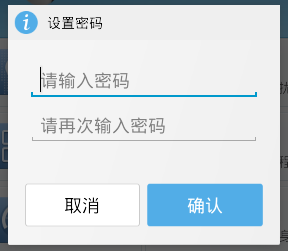
布局:
layout
dialog_set_pwd.xml
 1 <?xml version="1.0" encoding="utf-8"?>
 2 <LinearLayout xmlns:android="http://schemas.android.com/apk/res/android"
 3     android:layout_width="match_parent"
 4     android:layout_height="match_parent"
 5     android:orientation="vertical" >
 6
 7     <LinearLayout
 8         android:layout_width="match_parent"
 9         android:layout_height="wrap_content"
10         android:background="#EFEFEF"
11         android:orientation="horizontal"
12         android:padding="10dp" >
13
14         <ImageView
15             android:layout_width="wrap_content"
16             android:layout_height="wrap_content"
17             android:src="@drawable/dialog_title_default_icon" />
18
19         <TextView
20             android:id="@+id/textView1"
21             android:layout_width="wrap_content"
22             android:layout_height="wrap_content"
23             android:layout_marginLeft="5dp"
24             android:text="設置密碼"
25             android:textColor="@color/black"
26             android:textSize="18sp" />
27     </LinearLayout>
28
29     <EditText
30         android:id="@+id/et_pwd"
31         android:layout_width="match_parent"
32         android:layout_height="wrap_content"
33         android:layout_margin="5dp"
34         android:hint="請輸入密碼"
35         android:inputType="textPassword" >
36     </EditText>
37
38     <EditText
39         android:id="@+id/et_pwd_confirm"
40         android:layout_width="match_parent"
41         android:layout_height="wrap_content"
42         android:layout_margin="5dp"
43         android:hint="請再次輸入密碼"
44         android:inputType="textPassword" />
45
46     <LinearLayout
47         android:layout_width="match_parent"
48         android:layout_height="wrap_content"
49         android:orientation="horizontal"
50         android:padding="10dp" >
51
52         <Button
53             android:id="@+id/btn_ok"
54             android:layout_width="0dp"
55             android:layout_height="wrap_content"
56             android:layout_weight="1"
57             android:background="@drawable/btn_blue_selector"
58             android:text="確定"
59             android:layout_marginRight="5dp"
60             android:textColor="@color/white" />
61
62         <Button
63             android:id="@+id/btn_cancel"
64             android:layout_width="0dp"
65             android:layout_height="wrap_content"
66             android:layout_weight="1"
67             android:background="@drawable/btn_white_selector"
68             android:text="取消"
69             android:textColor="@color/black" />
70     </LinearLayout>
71
72 </LinearLayout>
狀態選擇器:
drawable
btn_blue_selector.xml
1 <?xml version="1.0" encoding="utf-8"?>
2 <selector xmlns:android="http://schemas.android.com/apk/res/android">
3
4     <item android:drawable="@drawable/dg_btn_confirm_select" android:state_pressed="true"></item>
5     <item android:drawable="@drawable/dg_btn_confirm_normal"></item>
6
7 </selector>
btn_white_selector.xml
1 <?xml version="1.0" encoding="utf-8"?>
2 <selector xmlns:android="http://schemas.android.com/apk/res/android">
3
4     <item android:drawable="@drawable/dg_button_cancel_select" android:state_pressed="true"></item>
5     <item android:drawable="@drawable/dg_button_cancel_normal"></item>
6
7 </selector>
引用值
values
colors.xml
 1 <?xml version="1.0" encoding="utf-8"?>
 2 <resources>
 3
 4     <color name="black">#000</color>
 5     <color name="gray">#a000</color>
 6     <color name="white">#fff</color>
 7     <color name="red">#f00</color>
 8     <color name="shape_setting_normal">#B1D7EE</color>
 9     <color name="shape_setting_pressed">#3C9AD4</color>
10     <color name="blue">#459FD7</color>
11     <color name="light_green">#80f0</color>
12
13 </resources>
代碼:
 1     private void showSetPwdDialog() {
 2         AlertDialog.Builder builder = new AlertDialog.Builder(this);
 3         View view = View.inflate(this, R.layout.dialog_set_pwd, null);
 4
 5         Button btnOk = (Button) view.findViewById(R.id.btn_ok);
 6         Button btnCancel = (Button) view.findViewById(R.id.btn_cancel);
 7
 8         final EditText etPwd = (EditText) view.findViewById(R.id.et_pwd);
 9         final EditText etPwdConfirm = (EditText) view
10                 .findViewById(R.id.et_pwd_confirm);
11
12         builder.setView(view);//將當前布局對象設置給dialog
13         final AlertDialog dialog = builder.create();
14
15         btnOk.setOnClickListener(new OnClickListener() {
16
17             @Override
18             public void onClick(View v) {
19                 String pwd = etPwd.getText().toString().trim();
20                 String pwdConfirm = etPwdConfirm.getText().toString().trim();
21
22                 if (TextUtils.isEmpty(pwd) || TextUtils.isEmpty(pwdConfirm)) {
23                     ToastUtils.showToast(getApplicationContext(), "輸入內容不能為空!");
24                 } else {
25                     if (pwd.equals(pwdConfirm)) {
26                         System.out.println("登錄成功!");
27
28                         //將密碼保存在本地sp
29                         PrefUtils.putString(getApplicationContext(),
30                                 GlobalConstants.PREF_PASSWORD,
31                                 MD5Utils.getMd5(pwd));
32
33                         dialog.dismiss();
34
35                         enterLostAndFindPage();
36                     } else {
37                         ToastUtils.showToast(getApplicationContext(),
38                                 "兩次密碼不一致!");
39                     }
40
41                 }
42             }
43         });
44
45         btnCancel.setOnClickListener(new OnClickListener() {
46
47             @Override
48             public void onClick(View v) {
49                 dialog.dismiss();
50             }
51         });
52
53         dialog.show();
54     }
 【Android測試】【隨筆】Android Studio環境搭建,androidstudio
【Android測試】【隨筆】Android Studio環境搭建,androidstudio◆版權聲明:本文出自胖喵~的博客,轉載必須注明出處。 &nbs
 詳解Android Handler的使用
我們進行Android開發時,Handler可以說是使用非常頻繁的一個概念,它
 銷毀一個活動,銷毀活動
銷毀一個活動,銷毀活動 要銷毀一個活動很容易,只需要點一下返回鍵(在手機中點)。但是如果想在程序中自己指定,其實也很簡單,用finis
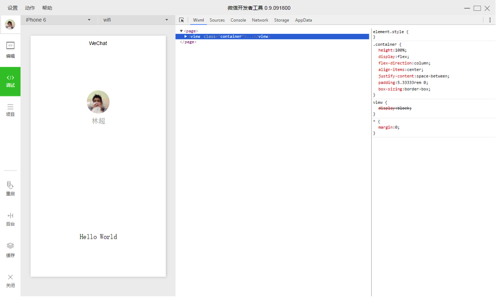 微信小程序:原生熱布局終將改變世界,微信小程序布局
微信小程序:原生熱布局終將改變世界,微信小程序布局 最近朋友圈已經被微信小程序刷屏了,這也難怪,騰訊的產品擁有廣泛的影