編輯:關於android開發
shape
先看下,系統自帶的EditText和Button的外形
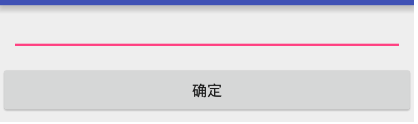
下面看加了shape後的效果
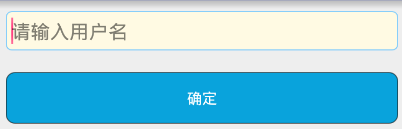
簡單點講,shape可以為組件加上背景邊框,圓角之類的可以配合selector使用
shapeXXX.xml定義在drawable目錄下
EditText使用的
<?xml version="1.0" encoding="utf-8"?>
<!--
rectangle 矩形
oval 橢圓
line 一條線
ring  環形
-->
<shape
    android:shape="rectangle"
    xmlns:android="http://schemas.android.com/apk/res/android">

    <!--4個角的圓角-->
    <corners android:radius="5dp"/>

    <!--內邊距-->
    <padding android:bottom="6dp"
        android:left="5dp"
        android:right="5dp"
        android:top="6dp"/>

    <!--填充顏色
    按需求要不要加
    -->
    <solid android:color="#FFFAE3"/>

    <!--邊框顏色
    需要 就加邊框,
    -->

    <stroke android:color="#87CEFA"
        android:width="1dp"/>

    </shape>
Button使用的定義的都 一樣
<?xml version="1.0" encoding="utf-8"?>
<!--
rectangle 矩形
oval 橢圓
line 一條線
ring  環形
-->
<shape
    android:shape="rectangle"
    xmlns:android="http://schemas.android.com/apk/res/android">

    <!--4個角的圓角-->
    <corners android:radius="8dp"/>

    <!--內邊距-->
    <padding android:bottom="5dp"
        android:left="3dp"
        android:right="3dp"
        android:top="5dp"/>

    <!--填充顏色-->
    <solid android:color="#09A3DC"/>

    <!--邊框顏色-->

    <stroke android:color="#88000000"
        android:width="1dp"/>

    </shape>
布局中組使用在background屬性中使用
<?xml version="1.0" encoding="utf-8"?>
<LinearLayout xmlns:android="http://schemas.android.com/apk/res/android"
    android:orientation="vertical"
    android:layout_width="match_parent"
    android:layout_height="match_parent">

    <EditText
        android:layout_margin="10dp"
        android:layout_width="match_parent"
        android:layout_height="wrap_content"
        android:background="@drawable/shap_et"
        android:hint="請輸入用戶名" />


    <Button
        android:layout_margin="10dp"
        android:layout_width="match_parent"
        android:layout_height="wrap_content"
        android:textColor="#ffffff"
        android:background="@drawable/shap_btn"
        android:text="確定"/>
</LinearLayout>
 [android]Android中圖形圖片及處理相關Api的小總結
[android]Android中圖形圖片及處理相關Api的小總結 開發應用中圖片的使用是必不可少的,Android系統提供了豐富的圖片支持功能。我們除了可以使Drawa
 年底了,給MySQL做個例行巡檢吧
年底了,給MySQL做個例行巡檢吧前言:例行巡檢是節假日來臨之前的必做項目,對服務器做一輪全面的健康檢查,一方面可以確保節假日期間服務器的穩定,另外還可以檢查一下平時監控
 Android下拉刷新上拉加載更多的擴展ListView
Android下拉刷新上拉加載更多的擴展ListView 下拉刷新上拉加載更多的擴展ListView 在很多APP我們都能看到,在一個列表上面,將手指往屏幕下面滑動,
 使用Eclipse開發,Java Compiler中Annotation Processin不出現的解決方案,eclipseannotation
使用Eclipse開發,Java Compiler中Annotation Processin不出現的解決方案,eclipseannotation第一步:在Eclipse菜