編輯:關於android開發
<?xml version="1.0" encoding="utf-8"?>
<LinearLayout xmlns:android="http://schemas.android.com/apk/res/android"
    android:layout_width="match_parent"
    android:layout_height="match_parent"
    android:orientation="vertical" >

    <LinearLayout
        android:layout_width="match_parent"
        android:layout_height="wrap_content"
        android:orientation="horizontal" >

        <TextView
            android:layout_width="wrap_content"
            android:layout_height="wrap_content"
            android:text="用戶名    :" />

        <EditText
            android:id="@+id/editText1"
            android:layout_width="match_parent"
            android:layout_height="wrap_content"
            android:hint="請輸入用戶名" />
    </LinearLayout>

    <LinearLayout
        android:layout_width="match_parent"
        android:layout_height="wrap_content"
        android:orientation="horizontal" >

        <TextView
            android:layout_width="wrap_content"
            android:layout_height="wrap_content"
            android:text="密        碼:" />

        <EditText
            android:id="@+id/editText2"
            android:layout_width="match_parent"
            android:layout_height="wrap_content"
            android:hint="請輸入密碼"
            android:inputType="textPassword" />
    </LinearLayout>

    <LinearLayout
        android:layout_width="match_parent"
        android:layout_height="wrap_content"
        android:orientation="horizontal" >

        <TextView
            android:layout_width="wrap_content"
            android:layout_height="wrap_content"
            android:text="確認密碼:" />

        <EditText
            android:id="@+id/editText3"
            android:layout_width="match_parent"
            android:layout_height="wrap_content"
            android:hint="請再輸入密碼"
            android:inputType="textPassword" />
    </LinearLayout>

    <LinearLayout
        android:layout_width="match_parent"
        android:layout_height="wrap_content" >

        <Button
            android:id="@+id/btn_confirm"
            android:layout_width="wrap_content"
            android:layout_height="wrap_content"
            android:layout_weight="1"
            android:background="@drawable/login_btn_click"
            android:text="確認" />

        <Button
            android:id="@+id/btn_back"
            android:layout_width="wrap_content"
            android:layout_height="wrap_content"
            android:layout_weight="1"
            android:background="@drawable/login_btn_click"
            android:text="返回" />
    </LinearLayout>

</LinearLayout>
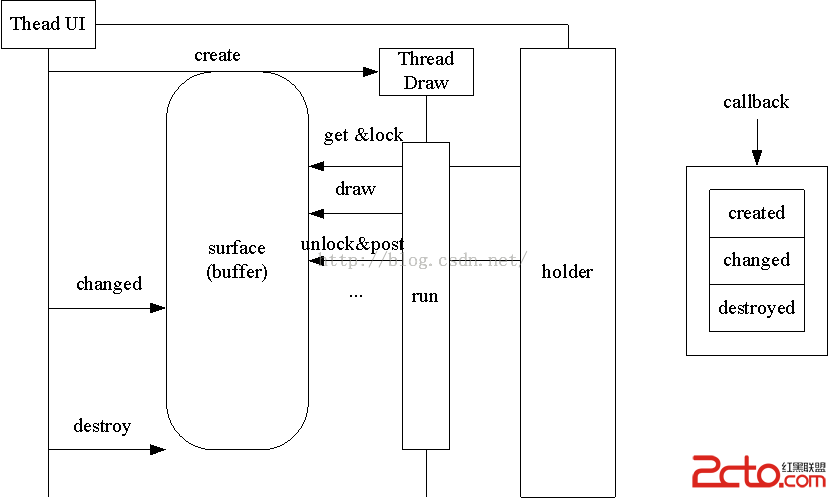 Android surfaceview詳解(一)
Android surfaceview詳解(一) surface,這個單詞的意思是浮在表面的,那麼surfaceview就是浮在表面的view了。如果真的這樣解釋,估計有
 Android筆記——Android中數據的存儲方式(二),android筆記
Android筆記——Android中數據的存儲方式(二),android筆記 我們在實際開發中,有的時候需要儲存或者備份比較復雜的數據。這些數據的特點是,內容多、結構
 TouchScreenTest,touchscreensly.com
TouchScreenTest,touchscreensly.comMainActivity: package com.example.touchscreentest;
 【騰訊Bugly干貨分享】深入源碼探索 ReactNative 通信機制,buglyreactnative
【騰訊Bugly干貨分享】深入源碼探索 ReactNative 通信機制,buglyreactnativeBugly 技術干貨系列內容主要涉及移動開發方向,是由 Bugl