編輯:關於android開發
<?xml version="1.0" encoding="UTF-8"?>

    <LinearLayout android:orientation="vertical" android:layout_height="fill_parent" android:layout_width="fill_parent" xmlns:android="http://schemas.android.com/apk/res/android">

    <TextView android:layout_height="wrap_content" android:layout_width="fill_parent" android:text="多選控件:" android:id="@+id/label"/>
    <RadioGroup android:orientation="horizontal" android:layout_height="fill_parent" android:layout_width="fill_parent" android:id="@+id/radionGroup">
    <RadioButton android:layout_height="wrap_content" android:layout_width="wrap_content" android:text="女" android:id="@+id/radioFemale"/>
    <RadioButton android:layout_height="wrap_content" android:layout_width="wrap_content" android:text="男" android:id="@+id/radioMale" android:checked="true"/>
    <Button android:layout_height="wrap_content" android:layout_width="wrap_content" android:text="確定" android:id="@+id/ok"/>
</RadioGroup>

</LinearLayout>
package com.example.yanlei.mytk;

import android.os.Bundle;
import android.support.v7.app.AppCompatActivity;
import android.view.View;
import android.widget.Button;
import android.widget.RadioButton;


public class MainActivity extends AppCompatActivity  {


    private RadioButton radioFemale;
    private RadioButton radioMale;
    private Button ok;

    @Override
    protected void onCreate(Bundle savedInstanceState) {
        // TODO Auto-generated method stub
        super.onCreate(savedInstanceState);

        setContentView(R.layout.activity_main);

        radioFemale=(RadioButton)findViewById(R.id.radioFemale);
        radioMale=(RadioButton)findViewById(R.id.radioMale);
        ok=(Button)findViewById(R.id.ok);

        ok.setOnClickListener(new View.OnClickListener() {
            @Override
            public void onClick(View v) {
                String result = "你選擇的是:";
                if (radioFemale.isChecked()) {
                    setTitle(result + "女");
                } else {
                    setTitle(result + "男");
                }
            }
        });
    }
}
 選項切換條--第三方開源--SHSegmentControl,開源微信第三方平台
選項切換條--第三方開源--SHSegmentControl,開源微信第三方平台 SHSegmentControl在github上的項目主頁地址:https://gith
 Android中的JSONObject和JSONArray的使用
Android中的JSONObject和JSONArray的使用 在Android的jdk開發包中已經包含了JSON的幾個API: 也可以下載JSON包:http://
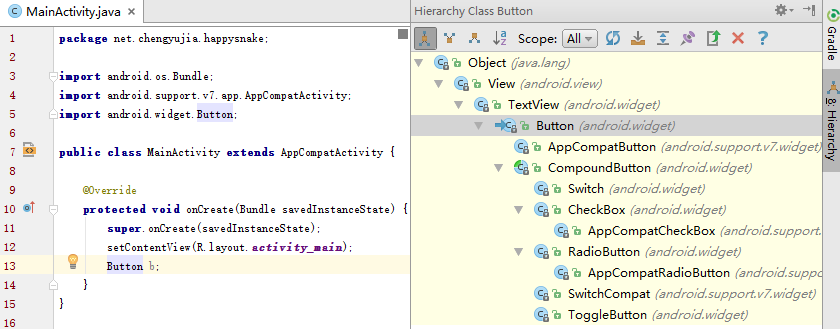 Android快樂貪吃蛇游戲實戰項目開發教程-02虛擬方向鍵(一)自定義控件概述,android-02
Android快樂貪吃蛇游戲實戰項目開發教程-02虛擬方向鍵(一)自定義控件概述,android-02該系列教程概述與目錄:http://www.cnblogs.com/
 Android使用xml自定義軟鍵盤效果
Android使用xml自定義軟鍵盤效果 Android使用xml自定義軟鍵盤效果原理: 1,軟鍵盤其實是個控件,使用android.inputmethodserve