編輯:關於android開發
最近在搗鼓android 自定義控件屬性,學到了TypedArray以及attrs。在這其中看了一篇大神博客Android 深入理解Android中的自定義屬性。我就更加深入學習力一番。我就沿著這個學習,講一下流程吧,後續一篇還有應用。
<!--{cke_protected}{C}%3C!%2D%2D%3Fxml%20version%3D%221.0%22%20encoding%3D%22utf-8%22%3F%2D%2D%3E-->
<resources>

    <attr name="titleText" format="string">
    <attr name="titleTextColor" format="color">
    <attr name="titleTextSize" format="dimension">

    <declare-styleable name="AuthCodeView">
        <attr name="titleText">
        <attr name="titleTextColor">
        <attr name="titleTextSize">
    </attr></attr></attr></declare-styleable>

</attr></attr></attr></resources>
看到這上面的代碼有三個屬性,首先attr標簽是定義名字以及屬性。後面是一個declare-styleable組,這個組名字AuthCodeView,後面class中會用到。先看兩張圖,就了解大半了,也理解大半了。
a、自定義屬性的名字的引用
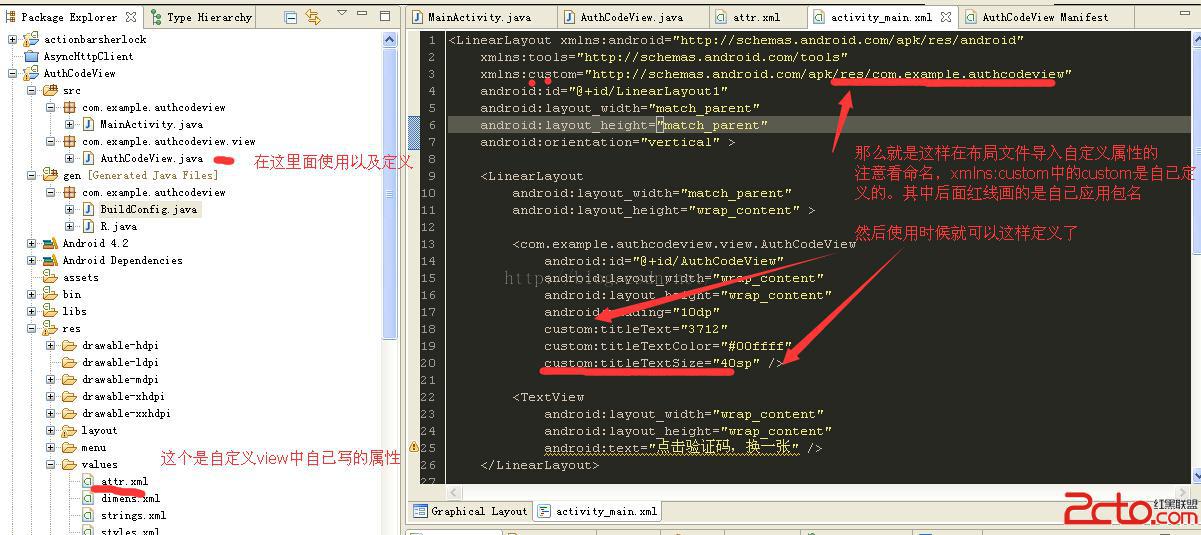
b、仔細看圖上說明以及a跟b圖的比較。你就知道屬性名改變,以及怎麼引用。
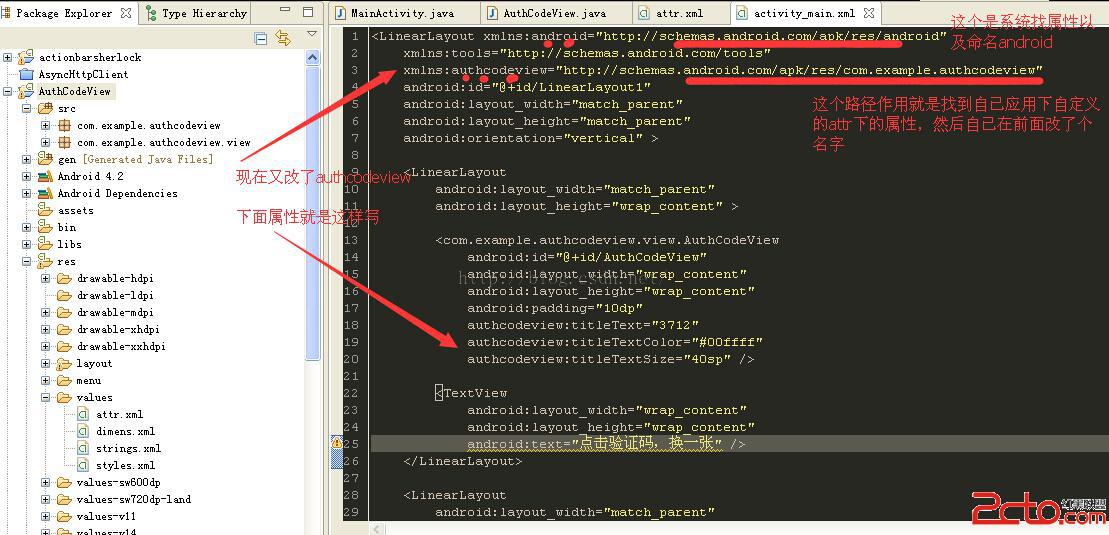
怕上面圖片看不清,附上部分xml代碼
<linearlayout xmlns:android="http://schemas.android.com/apk/res/android" xmlns:tools="http://schemas.android.com/tools" xmlns:authcodeview="http://schemas.android.com/apk/res/com.example.authcodeview" android:id="@+id/LinearLayout1" android:layout_width="match_parent" android:layout_height="match_parent" android:orientation="vertical">

    <linearlayout android:layout_width="match_parent" android:layout_height="wrap_content">

        <com.example.authcodeview.view.authcodeview android:id="@+id/AuthCodeView" android:layout_width="wrap_content" android:layout_height="wrap_content" android:padding="10dp" authcodeview:titletext="3712" authcodeview:titletextcolor="#00ffff" authcodeview:titletextsize="40sp">

        <textview android:layout_width="wrap_content" android:layout_height="wrap_content" android:text="點擊驗證碼,換一張">
    </textview></com.example.authcodeview.view.authcodeview></linearlayout>

    <linearlayout android:layout_width="match_parent" android:layout_height="wrap_content">

        <textview android:layout_width="wrap_content" android:layout_height="wrap_content" android:text="輸入驗證碼">

        <edittext android:id="@+id/editText1" android:layout_width="match_parent" android:layout_height="wrap_content" android:ems="10" android:inputtype="number">

            <requestfocus>
        </requestfocus></edittext>
    </textview></linearlayout><button android:id="@+id/button1" android:layout_width="match_parent" android:layout_height="wrap_content" android:text="驗證"></button></linearlayout>
重點看頭部layout中xmlns:android="http://schemas.android.com/apk/res/android"這是引用系統屬性的作用。
然而xmlns:authcodeview="http://schemas.android.com/apk/res/com.example.authcodeview"是引用自定義屬性。
xmlns:+名稱 ="http://schemas.android.com/apk/res/ + 應用的包名"
後面使用時候自定義屬性就是這樣啦
authcodeview:titleText="3712"
authcodeview:titleTextColor="#00ffff"
authcodeview:titleTextSize="40sp"
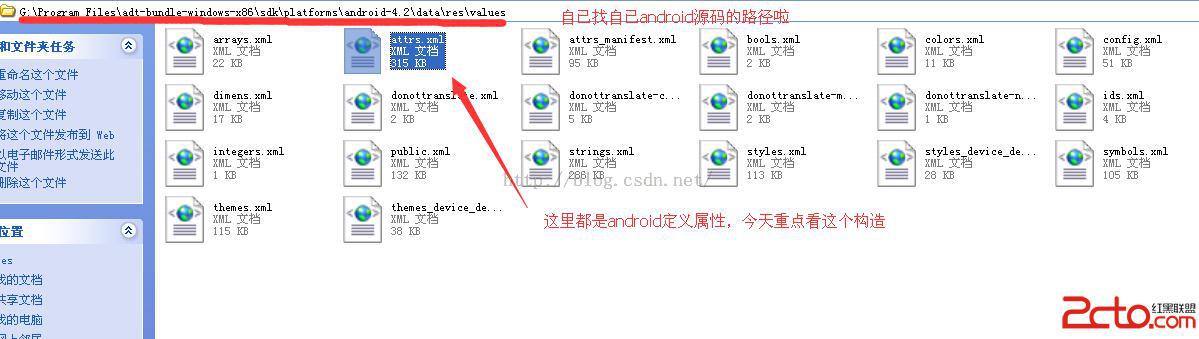
順便附上系統arrs自定義的路徑
看一段代碼先
	/**
	 * 獲得我自定義的樣式屬性
	 *
	 * @param context
	 * @param attrs
	 * @param defStyle
	 */
	public AuthCodeView(Context context, AttributeSet attrs, int defStyle)
	{
		super(context, attrs, defStyle);
		/**
		 * 獲得我們所定義的自定義樣式屬性
		 */
		TypedArray a = context.getTheme().obtainStyledAttributes(attrs, R.styleable.AuthCodeView, defStyle, 0);

		//獲取在attr文件下,名字為AuthCodeView的declare-styleable屬性有幾個
		int n = a.getIndexCount();
		for (int i = 0; i < n; i++)
		{
			int attr = a.getIndex(i);
			switch (attr)
			{
			//這個屬性可以不要,因為都是隨機產生
			case R.styleable.AuthCodeView_titleText:
				mTitleText = a.getString(attr);
				break;
			case R.styleable.AuthCodeView_titleTextColor:
				// 默認顏色設置為黑色
				mTitleTextColor = a.getColor(attr, Color.BLACK);
				break;
			case R.styleable.AuthCodeView_titleTextSize:
				// 默認設置為16sp,TypeValue也可以把sp轉化為px
				mTitleTextSize = a.getDimensionPixelSize(attr, (int) TypedValue.applyDimension(
						TypedValue.COMPLEX_UNIT_SP, 16, getResources().getDisplayMetrics()));
				break;

			}

		}
		a.recycle();
		}
這個TypedArray的作用就是資源的映射作用,寫法是這樣的。R.styleable.AuthCodeView這個是不是很熟悉。
還有R.styleable.AuthCodeView_titleText,後面就是名稱加上下橫線加上屬性。
這樣做就把自定義屬性在xml設置值映射到class,怎麼獲取都很簡單。
有空格看以去看看生成id的R文件。
這篇先到這裡結束,還有這篇的續集,自定義屬性控件,也是自定義view。隨機驗證碼demo學習。
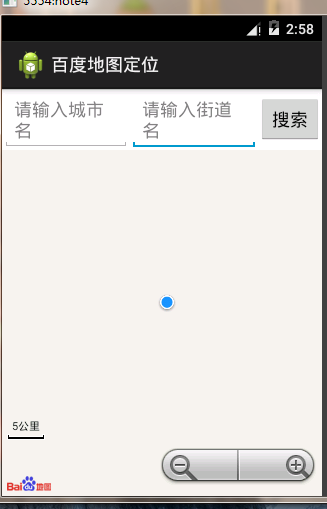 百度地圖可視化定位效果,可以輸入目的地定位。,可視化目的地
百度地圖可視化定位效果,可以輸入目的地定位。,可視化目的地登錄百度開發者帳號後下載sdk導入自己的工程中。 代碼如下: 1 package com.lixu.bai
 仿天天動聽5應用項目源碼,項目源碼
仿天天動聽5應用項目源碼,項目源碼這是一個高仿天天動聽5的android版音樂播放器,界面華麗功能完整,除了本地播放器應有的那些功能另外還添加了程序內直接在線匹配下載歌詞
 Android SwipeRefreshLayout下拉刷新與上拉加載+滑動刪除
Android SwipeRefreshLayout下拉刷新與上拉加載+滑動刪除 SwipeRefreshLayout–Google官方提出的下拉刷新控件
 Android學習指南之二十:Content Provider的使用
Content Provider屬於Android應用程序的組件之一,作為應用