編輯:關於android開發
Android系統四大組件Activity, Content Provider, Broadcast和Service均可以進行跨進程數據傳輸。
Activity可以隱式調用其他進程的Activity; Content Provier可以跨進程訪問其他應用中的數據;Broadcast通過廣播的方式與其他應用進行通訊;Service則是通過Binder實現RPC
Binder的實現機制很復雜,在這裡不展開敘述,只需要知道它是C/S模式實現RPC(Remote Procedure Call Protocol)——遠程過程調用協議。例如應用程序A提供實現了加減乘除的操作,並對外提供的操作接口,其他應用程序就可以遠程調用應 用程序A提供的接口實現運算,而不需要自己實現;
那麼AIDL是什麼呢,AIDL是AndroidInterface definition language的縮寫,是android接口定義語言。把Binder比作一個管道,AIDL則定義了該管道中傳輸數據的格式。
下面我們以實例講解如何使用AIDL實現遠程服務的調用
1、在Eclipse中新建Android工程,工程命名為Service。在Service工程的src目錄上右鍵新建包,起名為com.example.aild;在新建的包中增加普通文件,命名為IRemoteService.aidl,標明該服務對外提供getPid()和basicTypes()兩個接口;
package com.example.aidl;

interface IRemoteService {
    /** Request the process ID of this service, to do evil things with it. */
    int getPid();

    /** Demonstrates some basic types that you can use as parameters
     * and return values in AIDL.
     */
    int basicTypes(int anInt, long aLong, boolean aBoolean, float aFloat,
            double aDouble, String aString);
}
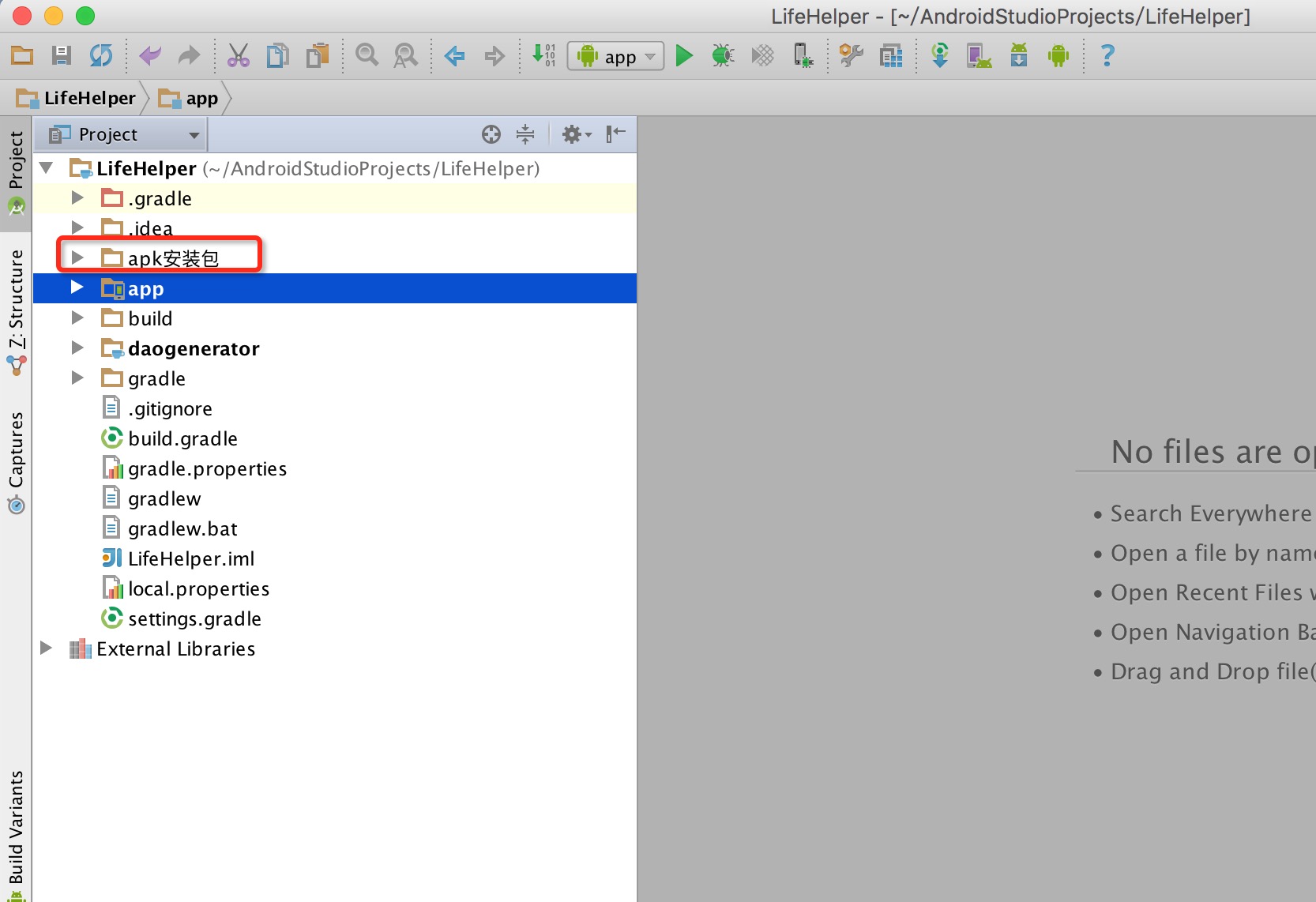
aidl文件完成後,在gen目錄下會自動生成com.example.aild包和IRemoteService.java文件,我們不需要進行任何修改,完成後,Service目錄結構如下
package com.example.service;
import android.app.Service;
import android.content.Intent;
import android.os.IBinder;
import android.os.Process;
import android.util.Log;
import com.example.aidl.IRemoteService;
public class AIDLService extends Service {
private String TAG = "REMOTESERVICE";
@Override
public IBinder onBind(Intent intent) {
// TODO Auto-generated method stub
Log.d(TAG, "DDService onBind");
return mBinder;
}
@Override
public void onCreate() {
// TODO Auto-generated method stub
super.onCreate();
Log.d(TAG, "DDService onCreate........" + "Thread: " + Thread.currentThread().getName());
}
/*與本地服務不同,此處新建Stub類型的Binder*/
private final IRemoteService.Stub mBinder = new IRemoteService.Stub() {
public int getPid(){
Log.d(TAG, "Thread: " + Thread.currentThread().getName());
/*返回給調用者當前的線程編號*/
return (int) Thread.currentThread().getId();
}
public int basicTypes(int anInt, long aLong, boolean aBoolean,
float aFloat, double aDouble, String aString) {
Log.d(TAG, "Thread: " + Thread.currentThread().getName());
Log.d(TAG, "basicTypes aDouble: " + aDouble +" anInt: " + anInt+" aBoolean " + aBoolean+" aString " + aString);
/*返回給調用者當前的線程編號*/
return (int) Thread.currentThread().getId();
}
};
}
可以看到,與本地服務不同的是,我們在onBind()中返回的是IRemoteService.Stub類型的變量,Stub類實際上是繼承自Binder,並且定義了我們在AIDL中定義的接口;需要我們實現這些接口,即getPid()和basicTypes();
3、在AndroidMainfest.xml中聲明該服務
<service android:name=".AIDLService"
                 android:process=":xlzh" >
            <intent-filter>
                <action android:name="com.example.aidl" />
                <category android:name="android.intent.category.DEFAULT" />
            </intent-filter>
</service>
在Serivce的屬性中增加了android:process,其中冒號後可自己隨意填寫。其含義請自行google。
OK,到此為止,服務端的工作已經全部結束了。接下來我們說下客戶端如何使用服務端提供的接口
1、在Eclipse中新建工程,名稱為Client;然後把Server工程中的com.example.aidl包整個拷貝到Client工程的src目錄下;工程結構如下所示
<LinearLayout xmlns:android="http://schemas.android.com/apk/res/android"
android:layout_width="match_parent"
android:layout_height="match_parent"
android:orientation="vertical" >
<Button
android:id="@+id/binderButton"
android:layout_width="match_parent"
android:layout_height="wrap_content"
android:text="bind" />
<Button
android:id="@+id/unbinderButton"
android:layout_width="match_parent"
android:layout_height="wrap_content"
android:text="unbind" />
</LinearLayout>
3、在Acitivity中使用遠程服務,MainActivity.java內容如下
package com.example.client;

import android.app.Activity;
import android.content.ComponentName;
import android.content.Context;
import android.content.Intent;
import android.content.ServiceConnection;
import android.os.Bundle;
import android.os.IBinder;
import android.os.RemoteException;
import android.util.Log;
import android.view.View;
import android.widget.Button;

import com.example.aidl.IRemoteService;

public class MainActivity extends Activity {

    private String TAG = "com.example.aidl";
    private IRemoteService remoteService;
    private Button mBindButton;
    private Button mUnbindButton;

    @Override
    public void onCreate(Bundle savedInstanceState) {
        super.onCreate(savedInstanceState);
        setContentView(R.layout.activity_main);
        mBindButton = (Button)findViewById(R.id.binderButton);
        mBindButton.setOnClickListener(new View.OnClickListener() {

            @Override
            public void onClick(View v) {
                // TODO Auto-generated method stub
                Log.d(TAG, "Bind Service");
                //Intent intent = new Intent(IRemoteService.class.getName());
                /*新建Intent,指定Service的AndroidMainfest.xml中聲明的Action名稱*/
                Intent intent = new Intent("com.example.aidl");
                /*在Android5.0以後,不允許隱式調用服務,故再次指定服務所在包名*/
                intent.setPackage("com.example.service");
                /*綁定服務*/
                bindService(intent, conn, Context.BIND_AUTO_CREATE);
            }
        });

        mUnbindButton = (Button)findViewById(R.id.unbinderButton);
        mUnbindButton.setOnClickListener(new View.OnClickListener() {

            @Override
            public void onClick(View v) {
                // TODO Auto-generated method stub
                Log.d(TAG, "UnBind Service");
                /*解綁服務*/
                unbindService(conn);
            }
        });
    }

    ServiceConnection conn = new ServiceConnection() {

        @Override
        public void onServiceDisconnected(ComponentName name) {
            Log.d(TAG, "UnBind Service success!");
        }

        @Override
        public void onServiceConnected(ComponentName name, IBinder service) {
            Log.d(TAG, "Bind Service success!");
            /*獲取服務端handle*/
            remoteService = IRemoteService.Stub.asInterface(service);
            try {
                int pid1 = remoteService.getPid();
                int pid2 = remoteService.basicTypes(12, 1223, true, 12.2f, 12.3, "我們的愛,我明白");
                /*打印帶有getPid接口和basicTypes接口時服務端的線程號*/
                Log.d(TAG, "remoteService.getPid(): " + pid1 + " remoteService.basicTypes(): " + pid2);
            } catch (RemoteException e) {
                e.printStackTrace();
            }
        }
    };

    @Override
    protected void onDestroy() {
        super.onDestroy();
        /*正規做法是設置標記位,標志服務是否已經unbind,來決定是否調用unbindService
         * 此處,簡便行事,默認此時服務已經unbind
*/
        //unbindService(conn);
    }
}
1、Android5.0以後,不允許隱式調用服務,所以必須制定要調用的服務所在的包名(調了一下午才調通)
2、通過客戶端的打印結果,可以知道當調用getpid和basicTypes的接口時,服務器端處理客戶端調用的線程是不一樣的。具體原因需要深入學習下Binder的機制
3、與本地服務的不同在於,服務器端返回的是繼承自Binder的Stub類型的Binder,客戶端獲取服務器端的handle時使用了Stub的asInterface接口。另外服務器端需要在AndroidMainfest.xml中聲明服務時指定android:process屬性。
4、AIDL中支持以下的數據類型
Java 的原生類型
String 和CharSequence
List 和 Map ,List和Map 對象的元素必須是AIDL支持的數據類型; 以上三種類型都不需要導入(import)
AIDL 自動生成的接口 需要導入(import)
實現android.os.Parcelable 接口的類. 需要導入(import)。
使用遠程服務流程總結如下;
1、定義AIDL文件,聲明該服務需要向外提供的接口
2、在服務器中實現AIDL中定義的接口
3、在AndroidMainfest.xml中聲明遠程服務
4、客戶端中拷貝服務端的AIDL文件
5、客戶端中指定服務器的服務名稱和所在包,進行綁定
6、客戶端使用Stub.asInterface接口獲取服務器的hander,調用服務提供的接口
 Android Material Design新UI控件使用大全 一
Android Material Design新UI控件使用大全 一 序言 自從谷歌在2014年的IO大會上推出了Material Design新的設計規
 DragLayout: QQ5.0側拉菜單的新特效,draglayoutqq5.0
DragLayout: QQ5.0側拉菜單的新特效,draglayoutqq5.0一、項目概要 1.1 項目效果如圖: 1.2 需要使用到的技術
 狀態欄一體化及其帶來的軟鍵盤自適應問題
狀態欄一體化及其帶來的軟鍵盤自適應問題 狀態欄一體化及其帶來的軟鍵盤自適應問題 應項目需求才開始了解狀態欄一體化的問題,作為一個android新手,之前從未接觸過。第
 Android App監聽軟鍵盤按鍵的三種方式與改變軟鍵盤右下角確定鍵樣式,androidapp
Android App監聽軟鍵盤按鍵的三種方式與改變軟鍵盤右下角確定鍵樣式,androidappactionNone : 回車鍵,按下後光標到下一行actionGo :