編輯:Android編程入門
代碼沒有優化,暫時先實現結果
package download;

import java.io.File;
import java.io.InputStream;
import java.io.RandomAccessFile;
import java.net.HttpURLConnection;
import java.net.URL;

/**
 * @author Liu Yutao
 * @className Down
 * @email koal@vip.qq.com
 * @date 2016/4/7 21:11
 */

public class Down {

    //下載地址
    public static final String DOWNFILE = "http://219.150.176.188/files/WindowsXP_SP2.exe";
    //線程數
    public static final int THREADCOUNT = 5;


    //格式化文件,得到文件名稱
    public static String formatFileName(String value) {
        //得到最後一個/位置
        int indexOf = value.lastIndexOf("/");
        //截取/WindowsXP_SP2.exe文件名
        String fileName = value.substring(indexOf + 1, value.length());
        return fileName;
    }

    //下載文件
    public static void httpDownload(String downfile) {
        try {
            URL url = new URL(DOWNFILE);
            HttpURLConnection connection = (HttpURLConnection) url.openConnection();
            //超時5秒
            connection.setReadTimeout(5000);
            connection.setRequestMethod("GET");
            int code = connection.getResponseCode();
            if (code == 200) {
                //得到文件長度
                long length = connection.getContentLength();
                InputStream stream = connection.getInputStream();
                File file = new File(formatFileName(DOWNFILE));
                //用於創建一個和目標文件大小一樣的空文件,為了就是占坑(rw是可讀可寫模式read,write)
                RandomAccessFile accessFile = new RandomAccessFile(file, "rw");
                accessFile.setLength(length);
                //分10個線程,每個線程的區塊長度(總長度 ÷ 個數)
                long blockSize = length / THREADCOUNT;
                for (int threadId = 0; threadId < THREADCOUNT; threadId++) {
                    //開始區塊
                    // 當前循環線程編號 x 當前線程區塊長度(0x1024,1x1024,2x1024)
                    long beginIndex = threadId * blockSize;
                    //結束區塊
                    // 當前線程+1 x 每個區塊大小 = 下次循環的開始區塊,再 -1 就等於本次區塊的最後位置
                    long endIndex = (threadId + 1) * blockSize - 1;
                    //是否最後一個線程
                    if (threadId == (THREADCOUNT - 1)) {
                        endIndex = length - 1;
                    }
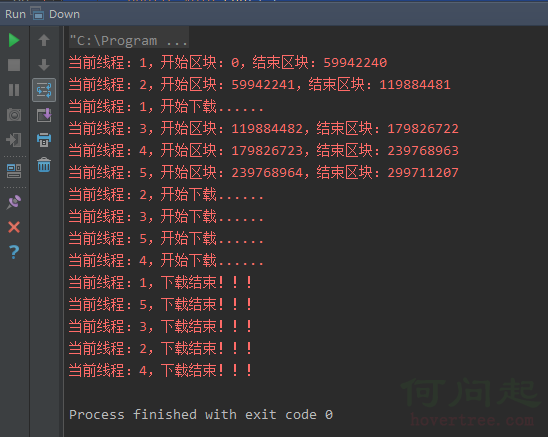
                    System.err.println("當前線程:" + (threadId+1) + ",開始區塊:" + beginIndex + ",結束區塊:" + endIndex);
                    new ThreadDownloadRun(threadId, beginIndex, endIndex).start();
                }
            }
        } catch (Exception e) {
            e.printStackTrace();
        }
    }

    public static class ThreadDownloadRun extends Thread {

        private long threadId;
        private long beginIndex;
        private long endIndex;

        //構造
        public ThreadDownloadRun(long threadId, long beginIndex, long endIndex) {
            this.threadId = threadId;
            this.beginIndex = beginIndex;
            this.endIndex = endIndex;
        }

        @Override
        public void run() {
            try {
                System.err.println("當前線程:" + (threadId+1) + ",開始下載......");
                URL url = new URL(DOWNFILE);
                HttpURLConnection urlConnection = (HttpURLConnection) url.openConnection();
                urlConnection.setRequestMethod("GET");
                //設置http文件頭的range(區間)
                urlConnection.setRequestProperty("Range", "bytes=" + beginIndex + "-" + endIndex);
                int code = urlConnection.getResponseCode();
                //區間返回是206
                if (code == 206) {
                    //得到數據
                    InputStream stream = urlConnection.getInputStream();
                    File file = new File(formatFileName(DOWNFILE));
                    RandomAccessFile accessFile = new RandomAccessFile(file, "rw");
                    //設置RandomAccessFile寫入文件的區塊開始長度
                    accessFile.seek(beginIndex);
                    //下載開始
                    byte[] bytes = new byte[1024 * 1024];
                    int len = 0;
                    while ((len = stream.read(bytes)) > 0) {
                        accessFile.write(bytes, 0, len);
                    }
                    accessFile.close();
                    stream.close();
                    System.err.println("當前線程:" + (threadId+1) + ",下載結束!!!");
                }
            } catch (Exception e) {
                e.printStackTrace();
            }
        }
    }

    public static void main(String[] args) {
        httpDownload(DOWNFILE);
    }
}
 Android消息機制
每一個Android應用在啟動的時候都會創建一個線程,這個線程被稱為主線程或者UI線程,Android應用的所有操作默認都會運行在這個線程中。但是當我們想要進行數據請求,
 Android中的一些基礎知識(二)
這幾天在回顧Android的基礎知識,就把一些常見的知識點整理一下,以後忘了也可以翻出來看一看。簡單介紹一下Activity的生命周期在API文檔中對生命周期回調的函數描
 android開發-界面設計基本知識Ⅳ
上一章講述了Android界面開發中的Widget,Service,BroadcastReceiver基本知識點,本章以一個實際案例-後台音樂播放器解析各個知識點之間的關
 Android 概述
Android 概述什麼是 Android?Android 是一個開源的,基於 Linux 的移動設備操作系統,如智能手機和平板電腦。Android 是由