編輯:Android資訊
控件的測量可以說是固定寫法,原生的View只支持EXACTLY的測量模式,我們自定義的控件可以重寫onMeasure方法
@Override
protected void onMeasure(int widthMeasureSpec, int heightMeasureSpec) {
    setMeasuredDimension(getMeasuredSize(widthMeasureSpec), getMeasuredSize(heightMeasureSpec));
}
onMeasure方法給我們返回的widthMeasureSpec和heightMeasureSpec,我們並不能直接拿過來使用,需要使用MeasureSpec類進行解析,來獲取測量後的具體值。
首先需要獲取測量模式
MeasureSpec.getMode(measureSpec)
```
getMode方法返回是測量的模式,有以下3種類型:
- MeasureSpec.EXACTLY : 精確值模式(指定值/match_parent)
- MeasureSpec.AT_MOST : 最大值模式(wrap_content)
- MeasureSpec.UNSPECIFIED : 不指定大小的測量模式(一般用不上)
獲取到了測量模式以後,獲取測量後的大小
``` java
MeasureSpec.getSize(measureSpec)
根據上面的意思,可以封裝我們的getMeasuredSize方法
// 默認大小
private static final int DEFAULT_SIZE = 200;
/**
 * 獲取測量後的大小
 *
 * @param measureSpec measureSpec
 * @return measuredSize
 */
private int getMeasuredSize(int measureSpec) {
    switch (MeasureSpec.getMode(measureSpec)) {
        case MeasureSpec.EXACTLY: // 精確值模式(指定值/match_parent)
            Log.i(TAG, "getMeasuredSize: 精確值模式");
            return MeasureSpec.getSize(measureSpec);
        case MeasureSpec.AT_MOST: // 最大值模式(wrap_content)
            Log.i(TAG, "getMeasuredSize: 最大值模式");
            return Math.min(DEFAULT_SIZE, MeasureSpec.getSize(measureSpec));
        case MeasureSpec.UNSPECIFIED: // 不指定大小的測量模式
            return DEFAULT_SIZE;
        default:
            return DEFAULT_SIZE;
    }
}
現在我們自定義的View就支持自定義的大小了,包括match_parent、wrap_content、具體值。
創建畫筆
Paint paint = new Paint();
BitmapShader, ComposeShader, LinearGradient, RadialGradient, SweepGradient
/**
 * Helper for drawPoints() for drawing a single point.
 */
public void drawPoint(float x, float y, @NonNull Paint paint)
canvas.drawPoint(10, 10, paint);
繪制一條直線
/**
 * Draw a line segment with the specified start and stop x,y coordinates,
 * using the specified paint.
 *
 * <p>Note that since a line is always "framed", the Style is ignored in the paint.</p>
 *
 * <p>Degenerate lines (length is 0) will not be drawn.</p>
 *
 * @param startX The x-coordinate of the start point of the line
 * @param startY The y-coordinate of the start point of the line
 * @param paint  The paint used to draw the line
 */
public void drawLine(float startX, float startY, float stopX, float stopY, @NonNull Paint paint)
繪制多條直線
public void drawLines(@Size(multiple=4) @NonNull float[] pts, @NonNull Paint paint)
/**
 * Draw the specified Rect using the specified paint. The rectangle will
 * be filled or framed based on the Style in the paint.
 *
 * @param left   The left side of the rectangle to be drawn
 * @param top    The top side of the rectangle to be drawn
 * @param right  The right side of the rectangle to be drawn
 * @param bottom The bottom side of the rectangle to be drawn
 * @param paint  The paint used to draw the rect
 */
public void drawRect(float left, float top, float right, float bottom, @NonNull Paint paint)
canvas.drawRect(100, 100, 200, 200, paint);

/**
 * Draw the specified round-rect using the specified paint. The roundrect
 * will be filled or framed based on the Style in the paint.
 *
 * @param rx    The x-radius of the oval used to round the corners
 * @param ry    The y-radius of the oval used to round the corners
 * @param paint The paint used to draw the roundRect
 */
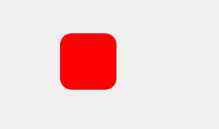
public void drawRoundRect(float left, float top, float right, float bottom, float rx, float ry, @NonNull Paint paint)
canvas.drawRoundRect(100, 100, 200, 200, 20, 20, paint);
/**
 * Draw the specified circle using the specified paint. If radius is <= 0,
 * then nothing will be drawn. The circle will be filled or framed based
 * on the Style in the paint.
 *
 * @param cx     The x-coordinate of the center of the cirle to be drawn
 * @param cy     The y-coordinate of the center of the cirle to be drawn
 * @param radius The radius of the cirle to be drawn
 * @param paint  The paint used to draw the circle
 */
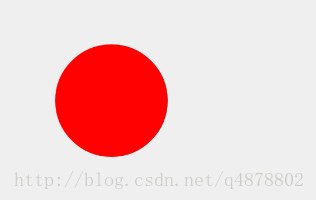
public void drawCircle(float cx, float cy, float radius, @NonNull Paint paint)
// 畫圓
canvas.drawCircle(200, 200, 100, paint);
/**
 * <p>Draw the specified arc, which will be scaled to fit inside the
 * specified oval.</p>
 *
 * <p>If the start angle is negative or >= 360, the start angle is treated
 * as start angle modulo 360.</p>
 *
 * <p>If the sweep angle is >= 360, then the oval is drawn
 * completely. Note that this differs slightly from SkPath::arcTo, which
 * treats the sweep angle modulo 360. If the sweep angle is negative,
 * the sweep angle is treated as sweep angle modulo 360</p>
 *
 * <p>The arc is drawn clockwise. An angle of 0 degrees correspond to the
 * geometric angle of 0 degrees (3 o'clock on a watch.)</p>
 *
 * @param startAngle Starting angle (in degrees) where the arc begins
 * @param sweepAngle Sweep angle (in degrees) measured clockwise
 * @param useCenter If true, include the center of the oval in the arc, and
                    close it if it is being stroked. This will draw a wedge
 * @param paint      The paint used to draw the arc
 */
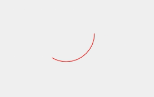
public void drawArc(float left, float top, float right, float bottom, float startAngle, float sweepAngle, boolean useCenter, @NonNull Paint paint)
// 扇形 起始角度0度 旋轉角度120度
canvas.drawArc(100, 100, 200, 200, 0, 120, true, paint);

扇形通過調整屬性,可以實現弧形的效果,首先畫筆設置成空心
// 空心
paint.setStyle(Paint.Style.STROKE);
設置畫扇形的useCenter參數為false
// 弧形 起始角度0度 旋轉角度120度
canvas.drawArc(100, 100, 200, 200, 0, 120, false, paint);
/**
 * Draw the specified oval using the specified paint. The oval will be
 * filled or framed based on the Style in the paint.
 */
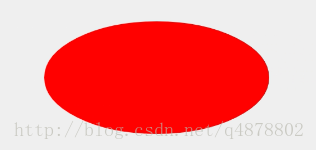
public void drawOval(float left, float top, float right, float bottom, @NonNull Paint paint)
// 橢圓
canvas.drawOval(100, 100, 500, 300, paint);
/**
 * Draw the text, with origin at (x,y), using the specified paint. The
 * origin is interpreted based on the Align setting in the paint.
 *
 * @param text  The text to be drawn
 * @param x     The x-coordinate of the origin of the text being drawn
 * @param y     The y-coordinate of the baseline of the text being drawn
 * @param paint The paint used for the text (e.g. color, size, style)
 */
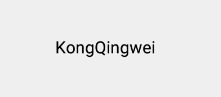
public void drawText(@NonNull String text, float x, float y, @NonNull Paint paint)
// 文字
paint.setTextSize(30);
paint.setColor(Color.BLACK);
canvas.drawText("KongQingwei", 100, 100, paint);
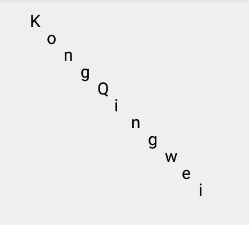
在指定位置顯示每個字符
/**
 * Draw the text in the array, with each character's origin specified by
 * the pos array.
 *
 * @param text  The text to be drawn
 * @param pos   Array of [x,y] positions, used to position each character
 * @param paint The paint used for the text (e.g. color, size, style)
 *
 * @deprecated This method does not support glyph composition and decomposition and
 * should therefore not be used to render complex scripts. It also doesn't
 * handle supplementary characters (eg emoji).
 */
@Deprecated
public void drawPosText(@NonNull String text, @NonNull @Size(multiple=2) float[] pos, @NonNull Paint paint)
canvas.drawPosText("KongQingwei", new float[]{
        30,30,
        60,60,
        90,90,
        120,120,
        150,150,
        180,180,
        210,210,
        240,240,
        270,270,
        300,300,
        330,330
}, paint);
可以自定義畫出想要的任意圖形
五角星
/**
 * Draw the specified path using the specified paint. The path will be
 * filled or framed based on the Style in the paint.
 *
 * @param path  The path to be drawn
 * @param paint The paint used to draw the path
 */
public void drawPath(@NonNull Path path, @NonNull Paint paint)
Path path = new Path();
path.moveTo(0,100);
path.lineTo(250,300);
path.lineTo(150,0);
path.lineTo(50,300);
path.lineTo(300,100);
path.lineTo(0,100);
canvas.drawPath(path,paint);

空心
paint.setStyle(Paint.Style.STROKE);
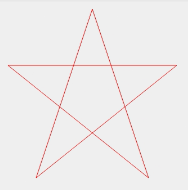
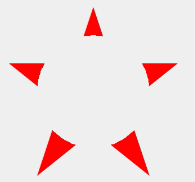
以上面的實心五角星為例,以五角星的中心為圓心,裁剪出一個半徑為100的圓形
/**
    * Modify the current clip with the specified path.
 *
 * @param path The path to operate on the current clip
 * @param op   How the clip is modified
 * @return     true if the resulting is non-empty
 */
public boolean clipPath(@NonNull Path path, @NonNull Region.Op op)
// 裁剪一個圓形
Path path = new Path();
path.reset();
path.addCircle(150, 150, 100, Path.Direction.CCW);
canvas.clipPath(path, Region.Op.INTERSECT);
// canvas.save();
// 畫五角星
path.reset();
path.moveTo(0,100);
path.lineTo(250,300);
path.lineTo(150,0);
path.lineTo(50,300);
path.lineTo(300,100);
path.lineTo(0,100);
canvas.drawPath(path,paint);

DIFFERENCE
外部
 為什麼Android App質量不高並且卡頓崩潰
和前幾年iOS能夠憑籍App數量將安卓壓倒在地、安卓嬌喘吁吁起身不能的情況不同,現在安卓的App數量對比iOS平台可謂是有過之而無不及。2009年安卓系統起航伊始
 Android 開發者需要知道的8個項目管理技巧
本文由碼農網 – 小峰原創翻譯,轉載請看清文末的轉載要求,歡迎參與我們的付費投稿計劃! 專業的Android app開發人員會關注一些成熟的項目管理技術,
 Android鏡子應用 一面可編程的鏡子
本文由碼農網 – 小峰原創翻譯,轉載請看清文末的轉載要求,歡迎參與我們的付費投稿計劃! 先來看看我家裡的一面搭載了Android應用的鏡子,上圖: 擁有
 Android自定義圓形進度條實現代碼
今天無意中發現一個圓形進度,想想自己實現一個,如下圖: 基本思路是這樣的: 1.首先繪制一個實心圓 2.繪制一個白色實心的正方形,遮住實心圓 3.在圓的中心動態