編輯:Android資訊
在之前呢,我們經常會有這種需求,比如在某個activity,或者某個fragment裡面,我們需要查找某個數據源,並且顯示出來,當數據源自己更新的時候,界面也要及時響應。
當然咯,查找數據這個過程可能很短,但是也可能很漫長,為了避免anr,我們都是開啟一個子線程去查找,然後通過handler來更新我們的ui界面。但是,考慮到activity和
fragment 復雜的生命周期,上述的方法 使用起來會很不方便,畢竟你要考慮到保存現場 還原現場 等等復雜的工作來保證你的app無懈可擊。所以後來呢谷歌就幫我們推出了一個新的東西—Loader。他可以幫我們完成上述所有功能!實在是很強大。
如果你有閱讀英文技術文檔的習慣 那麼谷歌官方的文檔 也許比我所說的更加完美。具體可以參考如下:
http://developer.android.com/intl/zh-cn/reference/android/app/LoaderManager.html
http://developer.android.com/intl/zh-cn/reference/android/content/AsyncTaskLoader.html
http://developer.android.com/intl/zh-cn/guide/components/loaders.html
我所述的內容也是主要基於上述三篇文檔。
首先呢,我們來看第一個例子,這個例子也是官方的推薦了,我給簡化了一下,主要是監聽手機裡 聯系人這個數據源。當數據源改變的時候 自動update 我們的ui。
package com.example.administrator.modifytestview;

import android.app.Activity;
import android.app.FragmentManager;
import android.app.ListFragment;
import android.app.LoaderManager;
import android.content.CursorLoader;
import android.content.Loader;
import android.database.Cursor;
import android.net.Uri;
import android.os.Bundle;
import android.provider.ContactsContract.Contacts;
import android.util.Log;
import android.view.View;
import android.widget.ListView;
import android.widget.SimpleCursorAdapter;

public class MainActivity extends Activity {

    @Override
    protected void onCreate(Bundle savedInstanceState) {
        super.onCreate(savedInstanceState);
        setContentView(R.layout.activity_main);
        FragmentManager fm = getFragmentManager();
        CursorLoaderListFragment list = new CursorLoaderListFragment();
        fm.beginTransaction().replace(R.id.root, list).commit();

    }

    public static class CursorLoaderListFragment extends ListFragment
            implements LoaderManager.LoaderCallbacks<Cursor> {

        // This is the Adapter being used to display the list's data.
        SimpleCursorAdapter mAdapter;

        // If non-null, this is the current filter the user has provided.
        String mCurFilter;

        @Override
        public void onActivityCreated(Bundle savedInstanceState) {

            mAdapter = new SimpleCursorAdapter(getActivity(),
                    android.R.layout.simple_list_item_2, null,
                    new String[]{Contacts.DISPLAY_NAME, Contacts.CONTACT_STATUS},
                    new int[]{android.R.id.text1, android.R.id.text2}, 0);
            setListAdapter(mAdapter);

            //這個地方初始化了我們的loader
            getLoaderManager().initLoader(0, null, this);

            super.onActivityCreated(savedInstanceState);
        }

        @Override
        public void onListItemClick(ListView l, View v, int position, long id) {
            // Insert desired behavior here.
            Log.i("FragmentComplexList", "Item clicked: " + id);
        }

        // These are the Contacts rows that we will retrieve.
        static final String[] CONTACTS_SUMMARY_PROJECTION = new String[]{
                Contacts._ID,
                Contacts.DISPLAY_NAME,
                Contacts.CONTACT_STATUS,
                Contacts.CONTACT_PRESENCE,
                Contacts.PHOTO_ID,
                Contacts.LOOKUP_KEY,
        };

        //只會調用一次
        public Loader<Cursor> onCreateLoader(int id, Bundle args) {
            // This is called when a new Loader needs to be created.  This
            // sample only has one Loader, so we don't care about the ID.
            // First, pick the base URI to use depending on whether we are
            // currently filtering.
            Uri baseUri;
            if (mCurFilter != null) {
                baseUri = Uri.withAppendedPath(Contacts.CONTENT_FILTER_URI,
                        Uri.encode(mCurFilter));
            } else {
                baseUri = Contacts.CONTENT_URI;
            }

            // Now create and return a CursorLoader that will take care of
            // creating a Cursor for the data being displayed.
            String select = "((" + Contacts.DISPLAY_NAME + " NOTNULL) AND ("
                    + Contacts.HAS_PHONE_NUMBER + "=1) AND ("
                    + Contacts.DISPLAY_NAME + " != '' ))";
            //返回的是對這個數據源的監控
            return new CursorLoader(getActivity(), baseUri,
                    CONTACTS_SUMMARY_PROJECTION, select, null,
                    Contacts.DISPLAY_NAME + " COLLATE LOCALIZED ASC");
        }

        //每次數據源都有更新的時候,就會回調這個方法,然後update 我們的ui了。
        public void onLoadFinished(Loader<Cursor> loader, Cursor data) {

            // Swap the new cursor in.  (The framework will take care of closing the
            // old cursor once we return.)
            mAdapter.swapCursor(data);

            // The list should now be shown.
            if (isResumed()) {
                setListShown(true);
            } else {
                setListShownNoAnimation(true);
            }
        }

        public void onLoaderReset(Loader<Cursor> loader) {
            // This is called when the last Cursor provided to onLoadFinished()
            // above is about to be closed.  We need to make sure we are no
            // longer using it.
            mAdapter.swapCursor(null);
        }
    }

}
可以仔細的觀察一下這個代碼,我們能發現 使用loader所需要的一些步驟:
1.需要一個activity或者是fragment,當然在上述的例子裡 我們使用的是fragment。
2.一個LoaderManger的實例,注意看53行,我們get了一個loadermanager。這個地方就是獲取實例了。
3.需要一個CursorLoader,並且從contentProvider獲取數據源,90-97行 就是這麼做的。
4.需要實現一個LoaderCallBack的這個接口,然後在幾個回調方法裡 寫上我們自己業務的邏輯 即可。你看34行就是繼承的接口。
還有3個回調方法在那,我們都在裡面實現了自己的邏輯。
到這,其實一看,思路還是很清晰的。那到這裡 有人肯定要說了。你這個沒用啊,要實現contentprovider,我們的app不需要做數據共享的,能否直接操作數據庫呢?答案是可以的。在這裡我們也可以構造出一個場景。假設有一張學生表。我們點擊add按鈕,就自動往這個表裡面增加一個數據,然後下面有個listview 會自動捕捉到 這個數據源的變化,然後自動更新列表。
我們可以知道 上面那個demo裡面 CursorLoader的定義是這樣的
public class CursorLoader extends AsyncTaskLoader<Cursor> {
我們現在要實現一個不用contentProvider的Loader 也是基於AsyncTaskLoader來的。
先給出一個抽象類:
package com.example.administrator.activeandroidtest3;

import android.content.AsyncTaskLoader;
import android.content.Context;
import android.database.Cursor;

public abstract class SimpleCursorLoader extends AsyncTaskLoader<Cursor> {
    private Cursor mCursor;

    public SimpleCursorLoader(Context context) {
        super(context);
    }

    /* 在子線程裡運作 */
    @Override
    public abstract Cursor loadInBackground();

    /* 在ui 線程裡運作 */
    @Override
    public void deliverResult(Cursor cursor) {
        if (isReset()) {
            // An async query came in while the loader is stopped
            if (cursor != null) {
                cursor.close();
            }
            return;
        }
        Cursor oldCursor = mCursor;
        mCursor = cursor;

        if (isStarted()) {
            super.deliverResult(cursor);
        }

        if (oldCursor != null && oldCursor != cursor && !oldCursor.isClosed()) {
            oldCursor.close();
        }
    }

    @Override
    protected void onStartLoading() {
        if (mCursor != null) {
            deliverResult(mCursor);
        }
        if (takeContentChanged() || mCursor == null) {
            forceLoad();
        }
    }

    @Override
    protected void onStopLoading() {
        cancelLoad();
    }

    @Override
    public void onCanceled(Cursor cursor) {
        if (cursor != null && !cursor.isClosed()) {
            cursor.close();
        }
    }

    @Override
    protected void onReset() {
        super.onReset();

        onStopLoading();

        if (mCursor != null && !mCursor.isClosed()) {
            mCursor.close();
        }
        mCursor = null;
    }
}
然後我們再接著定義我們最終的 不需要provider的loader實現類(注意你如果想寫的比較完美的話 cursor記得用抽象類的,抽象類的那個就不要寫成private的了,我這裡為了圖簡單 直接用自己構造的)。
package com.example.administrator.activeandroidtest3;

import android.content.Context;
import android.database.Cursor;
import android.database.sqlite.SQLiteDatabase;

/**
 * Created by Administrator on 2015/10/7.
 */
public class SpecialLoader extends SimpleCursorLoader {

    ForceLoadContentObserver mObserver = new ForceLoadContentObserver();
    private Context context;

    public SpecialLoader(Context context) {
        super(context);
        this.context = context;

    }

    @Override
    public Cursor loadInBackground() {
        DatabaseHelper dh = new DatabaseHelper(context, "Test.db");
        SQLiteDatabase database = dh.getReadableDatabase();
        String table = "Student";
        String[] columns = new String[]{"Name", "No"};
        //這個地方因為我用的是activeandroid 的orm 框架,所以默認的自增長主鍵是Id,但是SimpleCursorAdapter
        //需要的是_id 否則會報錯,所以這裡要重命名一下
        Cursor cursor = database.rawQuery("SELECT Id AS _id,Name,No FROM Student", null);
        if (database != null) {
            if (cursor != null) {
                //注冊一下這個觀察者
                cursor.registerContentObserver(mObserver);
                //這邊也要注意 一定要監聽這個uri的變化。但是如果你這個uri沒有對應的provider的話
                //記得在你操作數據庫的時候 通知一下這個uri
                cursor.setNotificationUri(context.getContentResolver(), MainActivity.uri);
            }

        }
        return cursor;
    }
}
然後我們在簡單看下activity 主類裡的代碼:
package com.example.administrator.activeandroidtest3;

import android.app.Activity;
import android.app.LoaderManager;
import android.content.Loader;
import android.database.Cursor;
import android.net.Uri;
import android.os.Bundle;
import android.util.Log;
import android.view.Menu;
import android.view.MenuItem;
import android.view.View;
import android.widget.ListView;
import android.widget.SimpleCursorAdapter;
import android.widget.TextView;

import com.activeandroid.query.Select;

import java.util.List;
import java.util.Random;

public class MainActivity extends Activity implements LoaderManager.LoaderCallbacks {

    public static final Uri uri = Uri.parse("content://com.example.student");
    private TextView addTv;
    private ListView lv;
    private SimpleCursorAdapter adapter;

    @Override
    protected void onCreate(Bundle savedInstanceState) {
        super.onCreate(savedInstanceState);
        setContentView(R.layout.activity_main);
        addTv = (TextView) this.findViewById(R.id.add);
        addTv.setOnClickListener(new View.OnClickListener() {
            @Override
            public void onClick(View v) {
                Student student = new Student();
                student.name = getRandomString(5);
                student.no = (int) (Math.random() * 1000) + "";
                student.sex = (int) (Math.random() * 1);
                student.save();
                //操作完數據庫要notify 不然loader那邊收不到哦
                getContentResolver().notifyChange(uri, null);

            }
        });
        lv = (ListView) this.findViewById(R.id.lv);
        adapter = new SimpleCursorAdapter(MainActivity.this,
                android.R.layout.simple_list_item_2, null,
                new String[]{"Name", "No"},
                new int[]{android.R.id.text1, android.R.id.text2}, 0);
        lv.setAdapter(adapter);
        getLoaderManager().initLoader(0, null, this);
    }

    @Override
    public boolean onCreateOptionsMenu(Menu menu) {
        // Inflate the menu; this adds items to the action bar if it is present.
        getMenuInflater().inflate(R.menu.menu_main, menu);
        return true;
    }

    @Override
    public boolean onOptionsItemSelected(MenuItem item) {
        // Handle action bar item clicks here. The action bar will
        // automatically handle clicks on the Home/Up button, so long
        // as you specify a parent activity in AndroidManifest.xml.
        int id = item.getItemId();

        //noinspection SimplifiableIfStatement
        if (id == R.id.action_settings) {
            return true;
        }

        return super.onOptionsItemSelected(item);
    }

    public static String getRandomString(int length) { //length表示生成字符串的長度
        String base = "abcdefghijklmnopqrstuvwxyz0123456789";
        Random random = new Random();
        StringBuffer sb = new StringBuffer();
        for (int i = 0; i < length; i++) {
            int number = random.nextInt(base.length());
            sb.append(base.charAt(number));
        }
        return sb.toString();
    }

    @Override
    public Loader onCreateLoader(int id, Bundle args) {
        SpecialLoader loader = new SpecialLoader(MainActivity.this);
        return loader;
    }

    @Override
    public void onLoadFinished(Loader loader, Object data) {
        adapter.swapCursor((Cursor) data);
    }

    @Override
    public void onLoaderReset(Loader loader) {

    }
}
最後我們看下運行的效果:
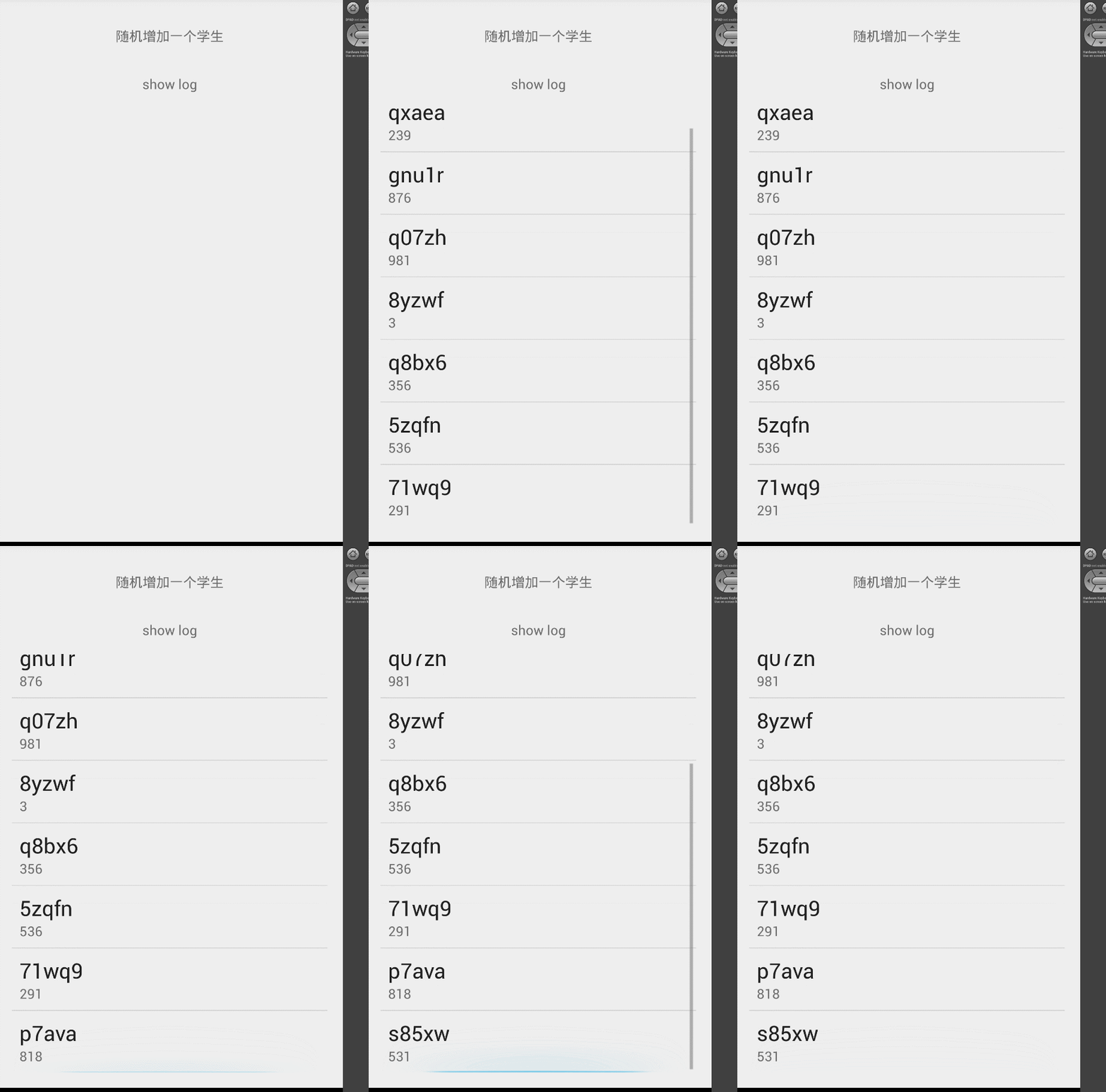
好,那到這裡 又有人要說了,你這個說來說去 還不是只能支持provider或者db類型的數據源嗎?好 接著往下,我們給出另外一個例子,不過這個例子是谷歌官方的例子,我就取其中重要的部分給予注釋講解。
http://developer.android.com/intl/zh-cn/reference/android/content/AsyncTaskLoader.html
首先說一下 這個例子是干嘛的,他主要是監聽手機裡app list的變化,比如你刪除了一個應用安裝了一個應用,馬上就能捕捉到你的手機裡app list的變化 並顯示在界面,大家都知道 監聽app list是通過監聽系統廣播來完成的。 我就主要講一下 這個官方demo裡 是如何在監聽到系統廣播以後和loader結合起來然後自動回調方法的。
/**
 * Helper class to look for interesting changes to the installed apps
 * so that the loader can be updated.
 */
public static class PackageIntentReceiver extends BroadcastReceiver {
    final AppListLoader mLoader;

    //這個構造函數是很重要的 他接收的 就是自定義的loader
    public PackageIntentReceiver(AppListLoader loader) {
        mLoader = loader;
        IntentFilter filter = new IntentFilter(Intent.ACTION_PACKAGE_ADDED);
        filter.addAction(Intent.ACTION_PACKAGE_REMOVED);
        filter.addAction(Intent.ACTION_PACKAGE_CHANGED);
        filter.addDataScheme("package");
        mLoader.getContext().registerReceiver(this, filter);
        // Register for events related to sdcard installation.
        IntentFilter sdFilter = new IntentFilter();
        sdFilter.addAction(Intent.ACTION_EXTERNAL_APPLICATIONS_AVAILABLE);
        sdFilter.addAction(Intent.ACTION_EXTERNAL_APPLICATIONS_UNAVAILABLE);
        //在這個地方 直接用loader來注冊這個廣播接收器
        mLoader.getContext().registerReceiver(this, sdFilter);
    }

    //在收到廣播以後 什麼事情都沒有做,而是調用了loader的onContentChanged方法
    @Override public void onReceive(Context context, Intent intent) {
        // Tell the loader about the change.
        mLoader.onContentChanged();
    }
}
你看這裡的25-26行 調用了 loader的onContentChanged方法。繼續看下面的loader
/**
 * A custom Loader that loads all of the installed applications.
 */
public static class AppListLoader extends AsyncTaskLoader<List<AppEntry>> {
    final InterestingConfigChanges mLastConfig = new InterestingConfigChanges();
    final PackageManager mPm;

    List<AppEntry> mApps;
    PackageIntentReceiver mPackageObserver;

    public AppListLoader(Context context) {
        super(context);

        // Retrieve the package manager for later use; note we don't
        // use 'context' directly but instead the save global application
        // context returned by getContext().
        mPm = getContext().getPackageManager();
    }

    //實際上最重要的就是這個方法了,每當這個回調方法被調用的時候 就去取applist 然後將結果返回到
    //onLoadFinished 這個回調方法裡面!
    @Override public List<AppEntry> loadInBackground() {
        // Retrieve all known applications.
        List<ApplicationInfo> apps = mPm.getInstalledApplications(
                PackageManager.GET_UNINSTALLED_PACKAGES |
                PackageManager.GET_DISABLED_COMPONENTS);
        if (apps == null) {
            apps = new ArrayList<ApplicationInfo>();
        }

        final Context context = getContext();

        // Create corresponding array of entries and load their labels.
        List<AppEntry> entries = new ArrayList<AppEntry>(apps.size());
        for (int i=0; i<apps.size(); i++) {
            AppEntry entry = new AppEntry(this, apps.get(i));
            entry.loadLabel(context);
            entries.add(entry);
        }

        // Sort the list.
        Collections.sort(entries, ALPHA_COMPARATOR);

        // Done!
        return entries;
    }

    /**
     * Called when there is new data to deliver to the client.  The
     * super class will take care of delivering it; the implementation
     * here just adds a little more logic.
     */
    @Override public void deliverResult(List<AppEntry> apps) {
        if (isReset()) {
            // An async query came in while the loader is stopped.  We
            // don't need the result.
            if (apps != null) {
                onReleaseResources(apps);
            }
        }
        List<AppEntry> oldApps = mApps;
        mApps = apps;

        if (isStarted()) {
            // If the Loader is currently started, we can immediately
            // deliver its results.
            super.deliverResult(apps);
        }

        // At this point we can release the resources associated with
        // 'oldApps' if needed; now that the new result is delivered we
        // know that it is no longer in use.
        if (oldApps != null) {
            onReleaseResources(oldApps);
        }
    }

    /**
     * Handles a request to start the Loader.
     */
    @Override protected void onStartLoading() {
        if (mApps != null) {
            // If we currently have a result available, deliver it
            // immediately.
            deliverResult(mApps);
        }

        // Start watching for changes in the app data.
        if (mPackageObserver == null) {
            mPackageObserver = new PackageIntentReceiver(this);
        }

        // Has something interesting in the configuration changed since we
        // last built the app list?
        boolean configChange = mLastConfig.applyNewConfig(getContext().getResources());

        if (takeContentChanged() || mApps == null || configChange) {
            // If the data has changed since the last time it was loaded
            // or is not currently available, start a load.
            forceLoad();
        }
    }

    /**
     * Handles a request to stop the Loader.
     */
    @Override protected void onStopLoading() {
        // Attempt to cancel the current load task if possible.
        cancelLoad();
    }

    /**
     * Handles a request to cancel a load.
     */
    @Override public void onCanceled(List<AppEntry> apps) {
        super.onCanceled(apps);

        // At this point we can release the resources associated with 'apps'
        // if needed.
        onReleaseResources(apps);
    }

    /**
     * Handles a request to completely reset the Loader.
     */
    @Override protected void onReset() {
        super.onReset();

        // Ensure the loader is stopped
        onStopLoading();

        // At this point we can release the resources associated with 'apps'
        // if needed.
        if (mApps != null) {
            onReleaseResources(mApps);
            mApps = null;
        }

        // Stop monitoring for changes.
        if (mPackageObserver != null) {
            getContext().unregisterReceiver(mPackageObserver);
            mPackageObserver = null;
        }
    }

    /**
     * Helper function to take care of releasing resources associated
     * with an actively loaded data set.
     */
    protected void onReleaseResources(List<AppEntry> apps) {
        // For a simple List<> there is nothing to do.  For something
        // like a Cursor, we would close it here.
    }
}
好,到這裡流程就很明顯了,在loader裡 注冊廣播接收器,當廣播接收器 收到廣播以後 就調用loader的onContentChanged方法,這個方法一調用 AppListLoader裡的loadInBackGround就會被調用,然後當loadInBackGround執行完畢以後 就會把結果傳遞給onLoadFinished方法了。 搞清楚這個流程 你就真正學會了使用loader這個大殺器了。當然了,我們並不滿足於此,loader還有一個特性就是可以自動管理他自己的生命周期 等等。我們現在就去看看他的源碼,是如何完成這一點的。 並且上述幾個方法之間是如何相互調用的,順序如何。
首先 我們要搞清楚幾個類之間的關系:
public class CursorLoader extends AsyncTaskLoader<Cursor> {

public abstract class AsyncTaskLoader<D> extends Loader<D> {

public class Loader<D> {
這樣就很清晰。首先由一個實體類作為最基礎的基類,Loader 注意他可以接受一個泛型為參數,然後有一個抽象類:AsyncTaskLoader 也是泛型作為參數。
最後實際調用運作的類就是CursorLoader類了,這裡就可以看出來 傳進去的泛型是一個Cursor。你在自定義Loader的時候,這個泛型參數 當然是可以自己決定的,
比如官方demo裡 傳的就是一個List。
搞清楚 他們三者之間的關系,剩下的就簡單多了。可以逐步分析了。
在前面的3個demo裡,我們分別演示了在fragment和activity裡 調用loader的方法。 那我們就看看 這兩者之間有什麼異同點。先來看fragment。
fragment裡 我們是這樣調用的:
 //這個地方初始化了我們的loader
 getLoaderManager().initLoader(0, null, this);
直接get了一個manager 然後init他。我們進去看fragment的源碼:
//這邊就能看出來一個fragment只能有一個loadermanager了。
public LoaderManager getLoaderManager() {

        if (mLoaderManager != null) {
            return mLoaderManager;
        }
        //mHost很好理解 就是fragment的宿主,也就是跟fragment 相關聯的activity。
        if (mHost == null) {
            throw new IllegalStateException("Fragment " + this + " not attached to Activity");
        }
        mCheckedForLoaderManager = true;
        mLoaderManager = mHost.getLoaderManager(mWho, mLoadersStarted, true);
        return mLoaderManager;
    }
既然 我們知道 fragment的getLoaderManager也是通過activity的getLoader去調用的,那我們就去activity裡的源碼看看 :
//在activty中最終實際上調用的就是他了 是這個方法
  LoaderManagerImpl getLoaderManagerImpl() {
        if (mLoaderManager != null) {
            return mLoaderManager;
        }
        mCheckedForLoaderManager = true;
        mLoaderManager = getLoaderManager("(root)", mLoadersStarted, true /*create*/);
        return mLoaderManager;
    }

//這個地方就能看到 主要的第一個參數 who,你到這就能發現 如果是activity自己調用的話,傳進去的who的值就是root
//也就是說一個actvity 只能有一個loadermanger 但是我們可以發現在fragment裡 傳進去的值是下面這個:
// Internal unique name for this fragment;
//String mWho;
//也就是說每一個fragment的mWho的值都是唯一的,而在activty中,是維護了一個map,一個key 對應一個loadermanager
//key就是fragment的那個唯一的標示,或者是activity自己,activity自己的標示就是(root)了
    LoaderManagerImpl getLoaderManager(String who, boolean started, boolean create) {
        if (mAllLoaderManagers == null) {
            mAllLoaderManagers = new ArrayMap<String, LoaderManager>();
        }
        LoaderManagerImpl lm = (LoaderManagerImpl) mAllLoaderManagers.get(who);
        if (lm == null) {
            if (create) {
                lm = new LoaderManagerImpl(who, this, started);
                mAllLoaderManagers.put(who, lm);
            }
        } else {
            lm.updateHostController(this);
        }
        return lm;
    }
好 一直到這裡 ,我們就可以下一個結論了,真正的loadermanager都是存儲在activity中的,包括fragment的loadermanager也是,通過一個map來保證 get的時候取的manager是自己對應的,並且全局唯一。繼續往下看:
public abstract class LoaderManager {
    /**
     * Callback interface for a client to interact with the manager.
     */
    public interface LoaderCallbacks<D> {
        /**
         * Instantiate and return a new Loader for the given ID.
         *
         * @param id The ID whose loader is to be created.
         * @param args Any arguments supplied by the caller.
         * @return Return a new Loader instance that is ready to start loading.
         */
        public Loader<D> onCreateLoader(int id, Bundle args);

        /**
         * Called when a previously created loader has finished its load.  Note
         * that normally an application is <em>not</em> allowed to commit fragment
         * transactions while in this call, since it can happen after an
         * activity's state is saved.  See {@link FragmentManager#beginTransaction()
         * FragmentManager.openTransaction()} for further discussion on this.
         *
         * <p>This function is guaranteed to be called prior to the release of
         * the last data that was supplied for this Loader.  At this point
         * you should remove all use of the old data (since it will be released
         * soon), but should not do your own release of the data since its Loader
         * owns it and will take care of that.  The Loader will take care of
         * management of its data so you don't have to.  In particular:
         *
         * <ul>
         * <li> <p>The Loader will monitor for changes to the data, and report
         * them to you through new calls here.  You should not monitor the
         * data yourself.  For example, if the data is a {@link android.database.Cursor}
         * and you place it in a {@link android.widget.CursorAdapter}, use
         * the {@link android.widget.CursorAdapter#CursorAdapter(android.content.Context,
         * android.database.Cursor, int)} constructor <em>without</em> passing
         * in either {@link android.widget.CursorAdapter#FLAG_AUTO_REQUERY}
         * or {@link android.widget.CursorAdapter#FLAG_REGISTER_CONTENT_OBSERVER}
         * (that is, use 0 for the flags argument).  This prevents the CursorAdapter
         * from doing its own observing of the Cursor, which is not needed since
         * when a change happens you will get a new Cursor throw another call
         * here.
         * <li> The Loader will release the data once it knows the application
         * is no longer using it.  For example, if the data is
         * a {@link android.database.Cursor} from a {@link android.content.CursorLoader},
         * you should not call close() on it yourself.  If the Cursor is being placed in a
         * {@link android.widget.CursorAdapter}, you should use the
         * {@link android.widget.CursorAdapter#swapCursor(android.database.Cursor)}
         * method so that the old Cursor is not closed.
         * </ul>
         *
         * @param loader The Loader that has finished.
         * @param data The data generated by the Loader.
         */
        public void onLoadFinished(Loader<D> loader, D data);

        /**
         * Called when a previously created loader is being reset, and thus
         * making its data unavailable.  The application should at this point
         * remove any references it has to the Loader's data.
         *
         * @param loader The Loader that is being reset.
         */
        public void onLoaderReset(Loader<D> loader);
    }
一看就知道 loadermanger 其實是一個抽象類。就是定義了一些 我們需要的接口而已,這些接口方法的含義和用法 在那3個demo裡 相信大家都有了解,不多說。
我們去看看這個抽象類的實現類,為什麼要看他,因為你在get到這個maganger以後 馬上就去調用了他的init方法 我們就看看這部分的邏輯是怎麼樣的:
public <D> Loader<D> initLoader(int id, Bundle args, LoaderManager.LoaderCallbacks<D> callback) {
        if (mCreatingLoader) {
            throw new IllegalStateException("Called while creating a loader");
        }

        //這個就是先看看是否有活動的loader 有的話就取出來 沒有的話 就創建一個
        LoaderInfo info = mLoaders.get(id);

        if (DEBUG) Log.v(TAG, "initLoader in " + this + ": args=" + args);

        if (info == null) {
            // Loader doesn't already exist; create.
            info = createAndInstallLoader(id, args,  (LoaderManager.LoaderCallbacks<Object>)callback);
            if (DEBUG) Log.v(TAG, "  Created new loader " + info);
        } else {
            if (DEBUG) Log.v(TAG, "  Re-using existing loader " + info);
            info.mCallbacks = (LoaderManager.LoaderCallbacks<Object>)callback;
        }

        if (info.mHaveData && mStarted) {
            // If the loader has already generated its data, report it now.
            info.callOnLoadFinished(info.mLoader, info.mData);
        }

        return (Loader<D>)info.mLoader;
    }

    //這個就是現在存活的loader
    final SparseArray<LoaderInfo> mLoaders = new SparseArray<LoaderInfo>(0);

    //這個是已經運行結束的loader
    final SparseArray<LoaderInfo> mInactiveLoaders = new SparseArray<LoaderInfo>(0);

    //其實這個創建loader的過程特別簡單,我們主要看第三個參數,callback 這個參數
    //一想就明白,在前面3個demo裡我們是直接在fragemet和activity裡實現的callback
    //所以傳進去的就是this,也就是說 回調就是在這個函數裡 真正的和loader 發生了關聯了
    private LoaderInfo createAndInstallLoader(int id, Bundle args,
            LoaderManager.LoaderCallbacks<Object> callback) {
        try {
            mCreatingLoader = true;
            LoaderInfo info = createLoader(id, args, callback);
            installLoader(info);
            return info;
        } finally {
            mCreatingLoader = false;
        }
    }
你看 一直到這裡,我們就明白了 callback是怎麼和loadermageer本身發生關聯的。 我們繼續往下看。這次我們要搞明白當數據源發生變化的時候 是怎麼一步步回調我們子類loader的方法的。
我們先看Loader這個基類的主要方法:
//這個是一個觀察者 當發生變化的時候 他調用了onContentChanged方法
 public final class ForceLoadContentObserver extends ContentObserver {
        public ForceLoadContentObserver() {
            super(new Handler());
        }

        @Override
        public boolean deliverSelfNotifications() {
            return true;
        }

        @Override
        public void onChange(boolean selfChange) {
            onContentChanged();
        }
    }

//下面這2個方法一看就明白 最終當數據源發生變化的時候 會通知這個觀察者,然後這個觀察者會最終調用
//onForceLoad這個方法 而onForceLoad是交給子類去實現的 也就是AsyncTaskLoader的onForceLoad方法了
public void onContentChanged() {
        if (mStarted) {
            forceLoad();
        } else {
            // This loader has been stopped, so we don't want to load
            // new data right now...  but keep track of it changing to
            // refresh later if we start again.
            mContentChanged = true;
        }
    }

 public void forceLoad() {
        onForceLoad();
    }

    /**
     * Subclasses must implement this to take care of requests to {@link #forceLoad()}.
     * This will always be called from the process's main thread.
     */
    protected void onForceLoad() {
    }
然後看看AsyncTaskLoader的幾個主要方法:
//這邊一目了然 asynacTaskLoader 裡面 正好是有一個AsyncTask對象的!實現了runnabele接口
//注意著參數d 這個d是干嘛的,這個d就是用來傳遞參數的一個泛型,可以是系統實現的loader裡的cursor
//也可以是我們自己實現的loader裡的list類型
final class LoadTask extends AsyncTask<Void, Void, D> implements Runnable {
        private final CountDownLatch mDone = new CountDownLatch(1);

        // Set to true to indicate that the task has been posted to a handler for
        // execution at a later time.  Used to throttle updates.
        boolean waiting;

        /* Runs on a worker thread */
        @Override
        protected D doInBackground(Void... params) {
            if (DEBUG) Log.v(TAG, this + " >>> doInBackground");
            try {
                //這個地方就很明顯了,他調用了自己的onLoadInBackGround方法
                D data = AsyncTaskLoader.this.onLoadInBackground();
                if (DEBUG) Log.v(TAG, this + "  <<< doInBackground");
                return data;
            } catch (OperationCanceledException ex) {
                if (!isCancelled()) {
                    // onLoadInBackground threw a canceled exception spuriously.
                    // This is problematic because it means that the LoaderManager did not
                    // cancel the Loader itself and still expects to receive a result.
                    // Additionally, the Loader's own state will not have been updated to
                    // reflect the fact that the task was being canceled.
                    // So we treat this case as an unhandled exception.
                    throw ex;
                }
                if (DEBUG) Log.v(TAG, this + "  <<< doInBackground (was canceled)", ex);
                return null;
            }
        }
        //後面還有很多代碼 略過
}

//你看這裡下面的2個函數 一看就明白了 最終task裡調用的是這個抽象方法,那這個抽象方法
//就是留給我們子類自己去實現的,我們在自定義loader的時候最重要的就是重寫這個方法。
 protected D onLoadInBackground() {
        return loadInBackground();
    }

 public abstract D loadInBackground();

//你看這個地方 就是當數據源發生變化的時候 就會調用這個方法了,啟動了我們的laodtask
//也是最終調用子類 也就是CursorLoader這樣的子類的loadInBackground方法了
@Override
    protected void onForceLoad() {
        super.onForceLoad();
        cancelLoad();
        mTask = new LoadTask();
        if (DEBUG) Log.v(TAG, "Preparing load: mTask=" + mTask);
        executePendingTask();
    }
相信到這裡 大家一定能搞明白數據源變化的時候 是怎麼一步步調用我們的loader裡的回調方法的,那有人肯定要繼續問當你這個方法調用完畢的時候 是怎麼通知最後updateUI呢,也就是當你background方法結束以後是怎麼調用的onLoadFinished方法的呢?
我們繼續看AsyncTaskLoader這個類
//在那個asynctask裡面 走完是肯定要走這個方法的 相信大家都能理解。
        @Override
        protected void onPostExecute(D data) {
            if (DEBUG) Log.v(TAG, this + " onPostExecute");
            try {
                AsyncTaskLoader.this.dispatchOnLoadComplete(this, data);
            } finally {
                mDone.countDown();
            }
        }
//實際上走的就是這個方法。看26行-
        void dispatchOnLoadComplete(LoadTask task, D data) {
        if (mTask != task) {
            if (DEBUG) Log.v(TAG, "Load complete of old task, trying to cancel");
            dispatchOnCancelled(task, data);
        } else {
            if (isAbandoned()) {
                // This cursor has been abandoned; just cancel the new data.
                onCanceled(data);
            } else {
                commitContentChanged();
                mLastLoadCompleteTime = SystemClock.uptimeMillis();
                mTask = null;
                if (DEBUG) Log.v(TAG, "Delivering result");
                deliverResult(data);
            }
        }
    }

//這邊一下就看出來是調用的mListtenr的回調方法
     public void deliverResult(D data) {
        if (mListener != null) {
            mListener.onLoadComplete(this, data);
        }
    }
實際上這個Listener就是在Loader這個基類裡:
OnLoadCompleteListener<D> mListener;

public interface OnLoadCompleteListener<D> {
        /**
         * Called on the thread that created the Loader when the load is complete.
         *
         * @param loader the loader that completed the load
         * @param data the result of the load
         */
        public void onLoadComplete(Loader<D> loader, D data);
    }

//並且通過這個注冊
 public void registerListener(int id, OnLoadCompleteListener<D> listener) {
        if (mListener != null) {
            throw new IllegalStateException("There is already a listener registered");
        }
        mListener = listener;
        mId = id;
    }
那就好了 我們就是要看一下 是在哪個地方調用的registerlistener這個方法 注冊他的
//回到initLoader的這個方法 注意這個方法是在LoaderManger裡面
  public <D> Loader<D> initLoader(int id, Bundle args, LoaderManager.LoaderCallbacks<D> callback) {
        if (mCreatingLoader) {
            throw new IllegalStateException("Called while creating a loader");
        }

        LoaderInfo info = mLoaders.get(id);

        if (DEBUG) Log.v(TAG, "initLoader in " + this + ": args=" + args);

        if (info == null) {
//下面的代碼跳轉到30行
            info = createAndInstallLoader(id, args,  (LoaderManager.LoaderCallbacks<Object>)callback);
            if (DEBUG) Log.v(TAG, "  Created new loader " + info);
        } else {
            if (DEBUG) Log.v(TAG, "  Re-using existing loader " + info);
            info.mCallbacks = (LoaderManager.LoaderCallbacks<Object>)callback;
        }

        if (info.mHaveData && mStarted) {
            // If the loader has already generated its data, report it now.
            info.callOnLoadFinished(info.mLoader, info.mData);
        }

        return (Loader<D>)info.mLoader;
    }

    private LoaderInfo createAndInstallLoader(int id, Bundle args,
            LoaderManager.LoaderCallbacks<Object> callback) {
        try {
            mCreatingLoader = true;
            LoaderInfo info = createLoader(id, args, callback);
            //這裡跳轉到43行
            installLoader(info);
            return info;
        } finally {
            mCreatingLoader = false;
        }
    }

    void installLoader(LoaderInfo info) {
        mLoaders.put(info.mId, info);
        if (mStarted) {
            //跳轉到51行
            info.start();
        }
    }

   void start() {
            if (mRetaining && mRetainingStarted) {
                // Our owner is started, but we were being retained from a
                // previous instance in the started state...  so there is really
                // nothing to do here, since the loaders are still started.
                mStarted = true;
                return;
            }

            if (mStarted) {
                // If loader already started, don't restart.
                return;
            }

            mStarted = true;

            if (DEBUG) Log.v(TAG, "  Starting: " + this);
            if (mLoader == null && mCallbacks != null) {
               mLoader = mCallbacks.onCreateLoader(mId, mArgs);
            }
            if (mLoader != null) {
                if (mLoader.getClass().isMemberClass()
                        && !Modifier.isStatic(mLoader.getClass().getModifiers())) {
                    throw new IllegalArgumentException(
                            "Object returned from onCreateLoader must not be a non-static inner member class: "
                            + mLoader);
                }
                if (!mListenerRegistered) {
                    //就是在這裡注冊的mloader裡的回調了,注意這裡的參數是this 也就是loaderInfo這個類 注意這個類就是loadermanger裡的內部類了 再繼續往下看
                    //我們前面說到 在asynctask裡面最終調用的是mLoader裡的onLoadComplete方法 所以我們就看看loaderInfo這個類裡的這個方法做了什麼看91行
                    mLoader.registerListener(mId, this);
                    mLoader.registerOnLoadCanceledListener(this);
                    mListenerRegistered = true;
                }
                mLoader.startLoading();
            }
        }

         @Override
        public void onLoadComplete(Loader<Object> loader, Object data) {
            if (DEBUG) Log.v(TAG, "onLoadComplete: " + this);

            if (mDestroyed) {
                if (DEBUG) Log.v(TAG, "  Ignoring load complete -- destroyed");
                return;
            }

            if (mLoaders.get(mId) != this) {
                // This data is not coming from the current active loader.
                // We don't care about it.
                if (DEBUG) Log.v(TAG, "  Ignoring load complete -- not active");
                return;
            }

            LoaderInfo pending = mPendingLoader;
            if (pending != null) {
                // There is a new request pending and we were just
                // waiting for the old one to complete before starting
                // it.  So now it is time, switch over to the new loader.
                if (DEBUG) Log.v(TAG, "  Switching to pending loader: " + pending);
                mPendingLoader = null;
                mLoaders.put(mId, null);
                destroy();
                installLoader(pending);
                return;
            }

            // Notify of the new data so the app can switch out the old data before
            // we try to destroy it.
            if (mData != data || !mHaveData) {
                mData = data;
                mHaveData = true;
                if (mStarted) {
                    //繼續往下 看第149行
                    callOnLoadFinished(loader, data);
                }
            }

            //if (DEBUG) Log.v(TAG, "  onLoadFinished returned: " + this);

            // We have now given the application the new loader with its
            // loaded data, so it should have stopped using the previous
            // loader.  If there is a previous loader on the inactive list,
            // clean it up.
            LoaderInfo info = mInactiveLoaders.get(mId);
            if (info != null && info != this) {
                info.mDeliveredData = false;
                info.destroy();
                mInactiveLoaders.remove(mId);
            }

            if (mHost != null && !hasRunningLoaders()) {
                mHost.mFragmentManager.startPendingDeferredFragments();
            }
        }

         void callOnLoadFinished(Loader<Object> loader, Object data) {
            if (mCallbacks != null) {
                String lastBecause = null;
                if (mHost != null) {
                    lastBecause = mHost.mFragmentManager.mNoTransactionsBecause;
                    mHost.mFragmentManager.mNoTransactionsBecause = "onLoadFinished";
                }
                try {
                    if (DEBUG) Log.v(TAG, "  onLoadFinished in " + loader + ": "
                            + loader.dataToString(data));
                    //到這裡就真相大白了,最終callback是在這裡調用的onLoadFinished方法也就是我們經常重寫的方法
                    mCallbacks.onLoadFinished(loader, data);
                } finally {
                    if (mHost != null) {
                        mHost.mFragmentManager.mNoTransactionsBecause = lastBecause;
                    }
                }
                mDeliveredData = true;
            }
        }
好,到這裡 我們就把Loader框架中的 數據傳遞 整個流程給摸清楚了。最後我們再來看看 他的生命周期是如何管理的吧。
我們可以先看看activity的:
//看activity的onStart方法
protected void onStart() {
        if (DEBUG_LIFECYCLE) Slog.v(TAG, "onStart " + this);
        mCalled = true;
        //繼續看12行 這個地方mFragements 你就理解成activity本身即可,不多做解釋 這個地方要搞清楚 又是另外一塊了 有興趣的可以自行谷歌activity和fragment如何建立關系
        mFragments.doLoaderStart();

        getApplication().dispatchActivityStarted(this);
    }

    //這個函數就很明顯了 調用了manager的dostart函數
     void doLoaderStart() {
        if (mLoadersStarted) {
            return;
        }
        mLoadersStarted = true;

        if (mLoaderManager != null) {
            //跳轉到30行
            mLoaderManager.doStart();
        } else if (!mCheckedForLoaderManager) {
            mLoaderManager = getLoaderManager("(root)", mLoadersStarted, false);
        }
        mCheckedForLoaderManager = true;
    }

//------------------注意上面的代碼都在activity裡,下面的開始 都在LoaderManger類裡了

     void doStart() {
        if (DEBUG) Log.v(TAG, "Starting in " + this);
        if (mStarted) {
            RuntimeException e = new RuntimeException("here");
            e.fillInStackTrace();
            Log.w(TAG, "Called doStart when already started: " + this, e);
            return;
        }

        mStarted = true;

        // Call out to sub classes so they can start their loaders
        // Let the existing loaders know that we want to be notified when a load is complete
        for (int i = mLoaders.size()-1; i >= 0; i--) {
            //跳轉到50行
            mLoaders.valueAt(i).start();
        }
    }

     void start() {
            if (mRetaining && mRetainingStarted) {
                // Our owner is started, but we were being retained from a
                // previous instance in the started state...  so there is really
                // nothing to do here, since the loaders are still started.
                mStarted = true;
                return;
            }

            if (mStarted) {
                // If loader already started, don't restart.
                return;
            }

            mStarted = true;

            if (DEBUG) Log.v(TAG, "  Starting: " + this);
            if (mLoader == null && mCallbacks != null) {
                //原來onCreateLoader這個回調方法 是在這裡調用的 怪不得谷歌說這個方法是必定會被執行並且只會被執行一次的方法!
               mLoader = mCallbacks.onCreateLoader(mId, mArgs);
            }
            if (mLoader != null) {
                if (mLoader.getClass().isMemberClass()
                        && !Modifier.isStatic(mLoader.getClass().getModifiers())) {
                    throw new IllegalArgumentException(
                            "Object returned from onCreateLoader must not be a non-static inner member class: "
                            + mLoader);
                }
                if (!mListenerRegistered) {
                    mLoader.registerListener(mId, this);
                    mLoader.registerOnLoadCanceledListener(this);
                    mListenerRegistered = true;
                }
                //你看這裡調用了startLoading方法 這個方法是屬於mLoader的 跳轉到88行
                mLoader.startLoading();
            }
        }

//88- 98行是loader這個類裡的
    public final void startLoading() {
        mStarted = true;
        mReset = false;
        mAbandoned = false;
        onStartLoading();
    }

    //你看最終是調用的這個方法,注意他是空方法 是交給子類去實現的,我們去看看cursorloader這個子類是怎麼實現的吧。
    protected void onStartLoading() {
    }
//99-  112行 是cursorLoader這個類的代碼

//你看這個地方 直接調用了forceload方法 這個方法大家前面肯定有印象  他最終會啟動那個asynctask 去執行background方法
//這也就解釋了 第一次我們的數據是怎麼來的,比如說 假設我們的數據源還沒有被更新的時候,為什麼會自動去查找數據源 並返回數據
//到這裡就明白了,原來是activity的onStart函數為開端 一步步走到Loader的子類的onStartLoading方法裡的,當然你如果覺得
//Loader不需要初始加載 只要在有變化的時候再加載 那這個方法你就可以保持為空了。
     protected void onStartLoading() {
        if (mCursor != null) {
            deliverResult(mCursor);
        }
        if (takeContentChanged() || mCursor == null) {
            forceLoad();
        }
    }

//114-139行 為 http://developer.android.com/intl/zh-cn/reference/android/content/AsyncTaskLoader.html 這個裡面 AppListLoader  的一段源碼
//你看138行 也是直接調用的forceLoad 這樣當我們的applist沒有變化的時候 第一次也能顯示出列表
 /**
     * Handles a request to start the Loader.
     */
    @Override protected void onStartLoading() {
        if (mApps != null) {
            // If we currently have a result available, deliver it
            // immediately.
            deliverResult(mApps);
        }

        // Start watching for changes in the app data.
        if (mPackageObserver == null) {
            mPackageObserver = new PackageIntentReceiver(this);
        }

        // Has something interesting in the configuration changed since we
        // last built the app list?
        boolean configChange = mLastConfig.applyNewConfig(getContext().getResources());

        if (takeContentChanged() || mApps == null || configChange) {
            // If the data has changed since the last time it was loaded
            // or is not currently available, start a load.
            forceLoad();
        }
    }
start流程 我們分析完畢了 最後我們再看看stop流程吧 看完這個 其他生命周期 我們就不分析了留給讀者自己感興趣的話自己分析試試看。
//我們來看看fragment的onDestroy方法 都做了什麼
public void onDestroy() {
        mCalled = true;
        //Log.v("foo", "onDestroy: mCheckedForLoaderManager=" + mCheckedForLoaderManager
        //        + " mLoaderManager=" + mLoaderManager);
        if (!mCheckedForLoaderManager) {
            mCheckedForLoaderManager = true;
            mLoaderManager = mHost.getLoaderManager(mWho, mLoadersStarted, false);
        }
        if (mLoaderManager != null) {
            //跳轉到16行
            mLoaderManager.doDestroy();
        }
    }
//上面的代碼 是在fragment裡 下面的代碼在loadermanger裡
     void doDestroy() {
        if (!mRetaining) {
            if (DEBUG) Log.v(TAG, "Destroying Active in " + this);
            for (int i = mLoaders.size()-1; i >= 0; i--) {
                mLoaders.valueAt(i).destroy();
            }
            mLoaders.clear();
        }

        if (DEBUG) Log.v(TAG, "Destroying Inactive in " + this);
        for (int i = mInactiveLoaders.size()-1; i >= 0; i--) {
            mInactiveLoaders.valueAt(i).destroy();
        }
        mInactiveLoaders.clear();
    }
//下面這個destroy流程 可以清晰的看到很多東西 包括clear所有回調等
 void destroy() {
            if (DEBUG) Log.v(TAG, "  Destroying: " + this);
            mDestroyed = true;
            boolean needReset = mDeliveredData;
            mDeliveredData = false;
            if (mCallbacks != null && mLoader != null && mHaveData && needReset) {
                if (DEBUG) Log.v(TAG, "  Reseting: " + this);
                String lastBecause = null;
                if (mHost != null) {
                    lastBecause = mHost.mFragmentManager.mNoTransactionsBecause;
                    mHost.mFragmentManager.mNoTransactionsBecause = "onLoaderReset";
                }
                try {
                    mCallbacks.onLoaderReset(mLoader);
                } finally {
                    if (mHost != null) {
                        mHost.mFragmentManager.mNoTransactionsBecause = lastBecause;
                    }
                }
            }
            mCallbacks = null;
            mData = null;
            mHaveData = false;
            if (mLoader != null) {
                if (mListenerRegistered) {
                    mListenerRegistered = false;
                    mLoader.unregisterListener(this);
                    mLoader.unregisterOnLoadCanceledListener(this);
                }
                //在這調用了rest
                mLoader.reset();
            }
            if (mPendingLoader != null) {
                mPendingLoader.destroy();
            }
        }
//最後我們來看看loader裡的代碼 就能明白了 當fragement destroy的時候最終的調用來到了子類的onReset方法
         public void reset() {
        onReset();
        mReset = true;
        mStarted = false;
        mAbandoned = false;
        mContentChanged = false;
        mProcessingChange = false;
    }

    /**
     * Subclasses must implement this to take care of resetting their loader,
     * as per {@link #reset()}.  This is not called by clients directly,
     * but as a result of a call to {@link #reset()}.
     * This will always be called from the process's main thread.
     */
    protected void onReset() {
    }

//這裡是cURSORLOADER的代碼了 你看這裡關閉了cursor
    @Override
    protected void onReset() {
        super.onReset();

        // Ensure the loader is stopped
        onStopLoading();

        if (mCursor != null && !mCursor.isClosed()) {
            mCursor.close();
        }
        mCursor = null;
    }

//同樣的 我們也能看到applistloader源碼裡面 也是在這個函數裡清除了廣播接收器。
//所以讀到這裡 我們就知道 loader的強大了。你只需要搞清楚這些生命周期的函數的意義
//就可以重寫他們,至於什麼時候調用 loader都幫你做好了 你只需要在裡面實現你自己的邏輯即可!非常強大 非常好用
    @Override protected void onReset() {
        super.onReset();

        // Ensure the loader is stopped
        onStopLoading();

        // At this point we can release the resources associated with 'apps'
        // if needed.
        if (mApps != null) {
            onReleaseResources(mApps);
            mApps = null;
        }

        // Stop monitoring for changes.
        if (mPackageObserver != null) {
            getContext().unregisterReceiver(mPackageObserver);
            mPackageObserver = null;
        }
    }
 Android 中 DownLoadManager 實現文件下載
一、問題概述 在android開發中,經常會使用到文件下載的功能,比如app版本更新等。在api level 9之後,android系統為我們提供了DownLoa
 Android Transition框架介紹及使用教程
Android Transition框架允許我們對應用程序用戶界面當中的各類外觀變化加以配置。大家可以在應用程序屏幕內實現動畫式過渡、將每個階段定義為一種場景並控
 非常全面的 Android Bitmap 知識點梳理
在日常開發中,可以說和Bitmap低頭不見抬頭見,基本上每個應用都會直接或間接的用到,而這裡面又涉及到大量的相關知識。 所以這裡把Bitmap的常用知識做個梳理,
 理解 Android 進程啟動之全過程
一. 概述 Android系統將進程做得很友好的封裝,對於上層app開發者來說進程幾乎是透明的. 了解Android的朋友,一定知道Android四大組件,但對於