編輯:Android資訊
AValidations 是 一個免費的、開源的、簡易的、遵循Apache Licence 2.0開源協議發布,超級容易擴展的android表單驗證的小框架
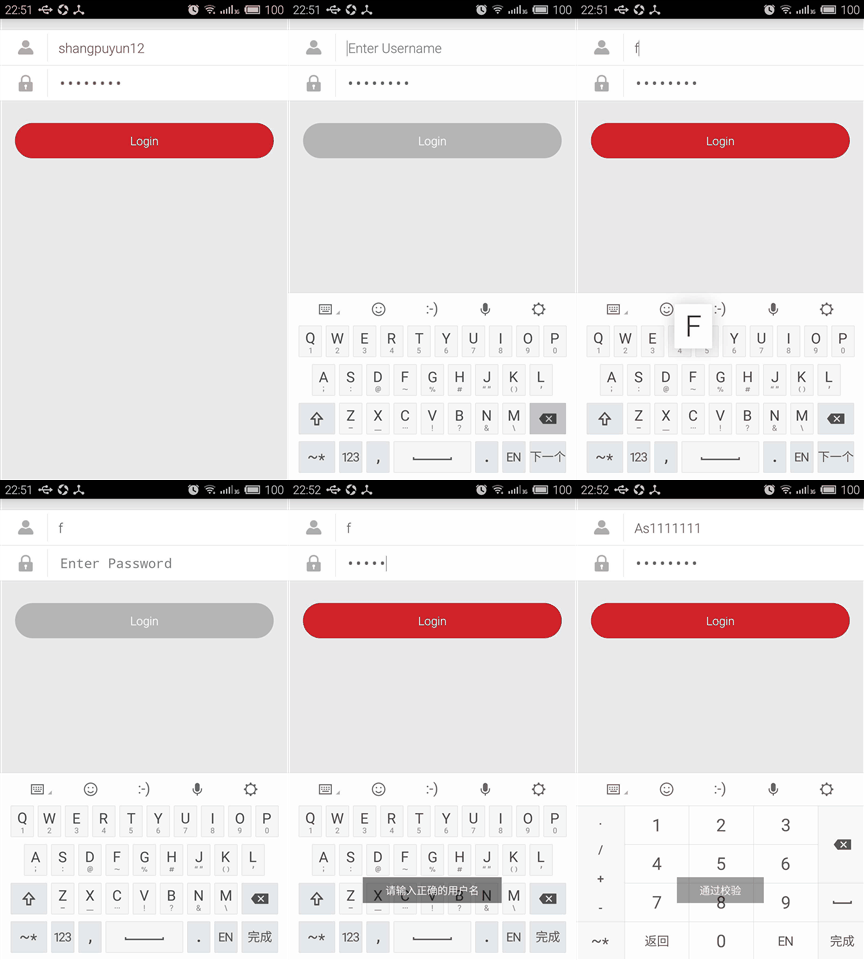
使用方法:
1.下載zip或者克隆AValidations項目
2.導入Eclipse,右鍵工程->preference->Android->library->Add,選擇AValidations工程加入後 apply應用
3.繼承ValidationExecutor寫出自己的校驗器:
public class UserNameValidation extends ValidationExecutor {
    public boolean doValidate(Context context, String text) {

        String regex = "^[a-zA-Z](?=.*?[a-zA-Z])(?=.*?[0-9])[a-zA-Z0-9_]{7,11}$";
        boolean result = Pattern.compile(regex).matcher(text).find();
        if (!result) {
            Toast.makeText(context, context.getString(R.string.e_username_hint), Toast.LENGTH_SHORT).show();
            return false;
        }
        return true;
    }
}
4.使用EditTextValidator進行校驗:
public class LoginActivity extends Activity implements OnClickListener{
    private EditText usernameEditText;
    private EditText passwordEditText;
    private Button loginButton;
    private EditTextValidator editTextValidator;
    @Override
    protected void onCreate(Bundle savedInstanceState) {
        super.onCreate(savedInstanceState);
        setContentView(R.layout.activity_login);

        usernameEditText = (EditText) findViewById(R.id.login_username_edittext);
        passwordEditText = (EditText) findViewById(R.id.login_password_edittext);
        loginButton = (Button) findViewById(R.id.login_button);

        loginButton.setOnClickListener(this);

        editTextValidator = new EditTextValidator(this)
            .setButton(loginButton)
            .add(new ValidationModel(usernameEditText,new UserNameValidation()))
            .add(new ValidationModel(passwordEditText,new PasswordValidation()))
            .execute();

    }

    @Override
        public void onClick(View v) {
            switch (v.getId()) {
            case R.id.login_button:

                if (editTextValidator.validate()) {
                    Toast.makeText(this, "通過校驗", Toast.LENGTH_SHORT).show();
                }
                break;
            }
        }
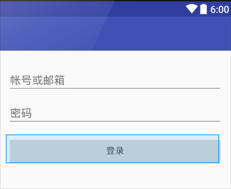
5.如果需要實現沒有填寫表單時表單提交按鈕不可點擊效果 需要設置setButton(view)和寫Button背景的selector,如:
<?xml version="1.0" encoding="utf-8"?>
<selector xmlns:android="http://schemas.android.com/apk/res/android">

<item android:drawable="@drawable/red_btn_normal" android:state_focused="true" android:state_pressed="false"/>
<item android:drawable="@drawable/red_btn_selected" android:state_focused="true" android:state_pressed="true"/>
<item android:drawable="@drawable/red_btn_selected" android:state_focused="false" android:state_pressed="true"/>
<item android:drawable="@drawable/red_btn_disable" android:state_enabled="false"/>

<item android:drawable="@drawable/red_btn_normal"/>

</selector>
 Android UI 自動化測試實現過程
介紹 Android測試支持庫包含 UI自動化模塊 ,它可以對Android應用進行自動黑盒測試。在API Level 18中引入了自動化模塊,它允許開發者在組成
 AChartEngine:Android圖表繪制引擎
本文由碼農網 – 小峰原創,轉載請看清文末的轉載要求,歡迎參與我們的付費投稿計劃! AChartEngine是一款基於Android的圖表繪制引擎,它為A
 Android應用架構之MVP實現
回顧上一篇文章 《Android應用架構概述》 ,我們知道,Android App 本質上抽象成兩個層次:視圖和數據。為了App在發展過程中快速的適應變化,方便維
 Android的官司打贏了 屬於Android社區的勝利
BI 中文站 5 月 27 日報道 美國陪審團裁決剛剛揭曉,根據此次最新的裁決,甲骨文在控訴谷歌侵權之爭中敗訴。陪審團認為,谷歌使用有爭議的代碼程序是“公平使用(